
Draws a graph of your data to analyze the structure of its references.

Project description
Installation
Install memory_graph using pip:
pip install memory-graph
Additionally Graphviz needs to be installed.
Graph your Memory
Does your Python code have a bug, is it behaving differently from what you expect? The problem could be a misunderstanding of the Python Data Model, and the first step to the solution could be drawing your data as a graph using memory_graph.show( your_data ), an example:
import memory_graph

data = [ (1, 2), [3, 4], {5, 6}, {7:'seven', 8:'eight'} ]
memory_graph.show( data, block=True )
This shows a graph with the starting point of our 'data' drawn with thick lines, the program blocks until the ENTER key is pressed.

Alternatively render the graph to an output file of our choosing using for example:
memory_graph.render( data, "my_graph.png" )
Python Data Model
The Python Data Model makes a distiction between immutable and mutable types:
- immutable: bool, int, float, complex, str, tuple, bytes, frozenset
- mutable: list, dict, set, class, ... (all other types)
immutable type
In the code below variable a and b both reference the same int value 10. An int is an immutable type and therefore when we change variable a its value can not be mutated in place, and thus a copy is made and a and b reference a different value afterwards.
import memory_graph
memory_graph.rewrite_to_node.reduce_reference_children.remove("int") # shows references to 'int'

a = 10
b = a
memory_graph.render(locals(), 'immutable1.png')
a += 1
memory_graph.render(locals(), 'immutable2.png')
mutable type
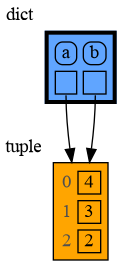
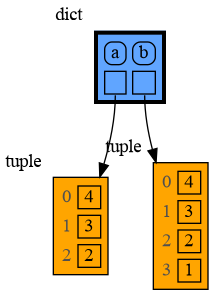
With mutable types the result is different. In the code below variable a and b both reference the same list value [4, 3, 2]. A list is a mutable type and therefore when we change variable a its value can be mutated in place and thus a and b both reference the same new value afterwards. The result is that changing a also changes b and vice versa. Sometimes we want this but other times we don't and then we will have to make a copy so that b is independent from a.
import memory_graph

a = [4, 3, 2]
b = a
memory_graph.render(locals(), 'mutable1.png')
a.append(1)
memory_graph.render(locals(), 'mutable2.png')
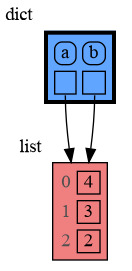
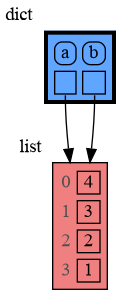
Python makes this distiction between mutable and immutable types because a value of a mutable type generally could be large and therefore it would be slow to make a copy each time we change it. On the other hand, a value of a changable immutable type generally is small and therefore fast to copy.
copying
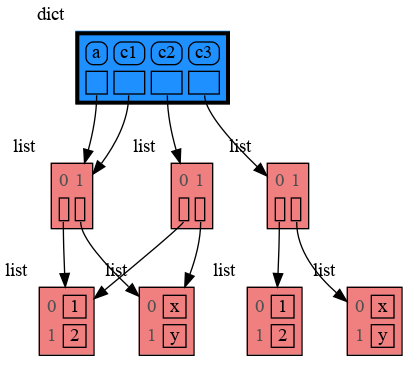
Python offers three different "copy" options that we will demonstrate using a nested list:
import memory_graph
import copy

a = [ [1, 2], ['a', 'b'] ] # a nested list (a list containing other lists)

# three different ways to make a "copy" of 'a':
c1 = a
c2 = copy.copy(a) # equivalent to:   a.copy() a[:] list(a)
c3 = copy.deepcopy(a)

memory_graph.render(locals(), 'copies.png')
c1is an assignment, all the data is shared.c2is a shallow copy, only the data referenced by the first reference is copied and the underlying data is sharedc3is a deep copy, all the data is copied
custom copy method
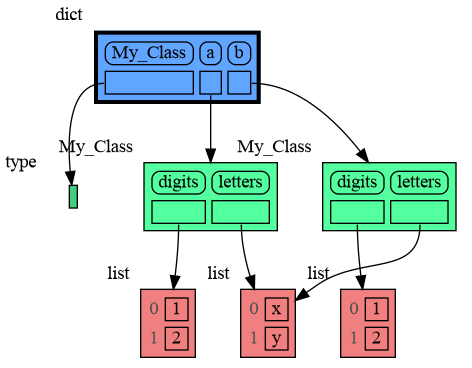
We can write our own custom copy function or method in case the three "copy" options don't do what we want. For example the copy() method of My_Class in the code below copies the numbers but shares the letters between the two objects.
import memory_graph
import copy

class My_Class:

    def __init__(self):
        self.numbers = [1, 2]
        self.letters = ['a', 'b']

    def copy(self): # custom copy method copies the numbers but shares the letters
        c = copy.copy(self)
        c.numbers = copy.copy(self.numbers)
        return c

a = My_Class()
b = a.copy()

memory_graph.render(locals(), 'copy_method.png')
Graph all Local Variables
Often it is useful to graph all the local variables using:
memory_graph.show( locals(), block=True )
So much so that function d() is available as alias for this for easier debugging. Additionally it logs all locals by printing them which helps comparing them over time. For example:
from memory_graph import d

my_squares = []
my_squares_ref = my_squares
for i in range(5):
    my_squares.append(i**2)
    d()                                    # 'd' for debug, logs and graphs all local variables and blocks
my_squares_copy = my_squares.copy()
d(block=False)                             # debug without blocking
d(log=False,block=False)                   # debug without logging and blocking

import memory_graph
memory_graph.log_file=open("log.txt","w")  # now log to file instead of screen (sys.stdout)
d(graph=False)                             # debug without showing the graph
Which in the end results in:

my_squares: [0, 1, 4, 9, 16]
my_squares_ref: [0, 1, 4, 9, 16]
i: 4
my_squares_copy: [0, 1, 4, 9, 16]
Notice that in the graph it is clear that my_squares and my_squares_ref share their data while my_squares_copy has its own copy. This can not be observed in the log and shows the benefit of the graph.
Alternatively debug by setting this expression as a 'watch' in a debugger tool and open the output file:
memory_graph.render( locals(), "my_debug_graph.pdf" )
Larger Example
This larger example shows a (static) class variable and recursive references.
my_list = [10, 20, 10]

class My_Class:
    my_class_var = 20 # class variable

    def __init__(self):
        self.var1 = "foo"
        self.var2 = "bar"
        self.var3 = 20

obj1 = My_Class()
obj2 = My_Class()

data=[my_list, my_list, obj1, obj2]

my_list.append(data) # recursive reference

import memory_graph
memory_graph.show( locals() )

Call Stack
Function memory_graph.get_call_stack() returns the full call stack that holds for each called function all the local variables. This enables us to visualize the local variables of different called functions simultaneously. This helps to visualize if different called functions share the same data or not. Here we call function add_one() with arguments a, b, c and add one to them.
import memory_graph

def add_one(a, b, c):
    a += 1
    b.append(1)
    c.append(1)
    memory_graph.show(memory_graph.get_call_stack())

a = 1
b = [4, 3, 2]
c = [4, 3, 2]

add_one(a, b, c.copy())
print(f"a:{a} b:{b} c:{c}")
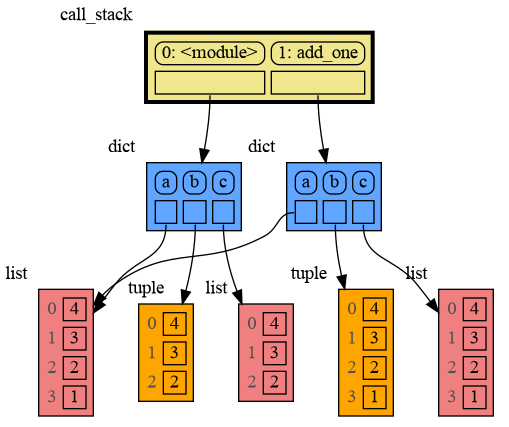
The visualization shows only b is shared so only b is changed in the calling stack frame as reflected in the printed output:
a:1 b:[4, 3, 2, 1] c:[4, 3, 2]
recursion
The call stack also helps to visualize how recursion works. Here we show each step of how recursively factorial(3) is computed:
import memory_graph

def factorial(n):
    if n==0:
        return 1
    memory_graph.show( memory_graph.get_call_stack(), block=True )
    result = n*factorial(n-1)
    memory_graph.show( memory_graph.get_call_stack(), block=True )
    return result

factorial(3)


Config
Different aspects of memory_graph can be configured.
Config Visualization, graphviz_nodes
Configure how the nodes of the graph are visualized with:
- memory_graph.graphviz_nodes.linear_layout_vertical : bool
- if False, linear node layout is horizontal
- memory_graph.graphviz_nodes.linear_any_ref_layout_vertical : bool
- if False, linear node layout is horizontal if any of its elements is a refence
- memory_graph.graphviz_nodes.linear_all_ref_layout_vertical : bool
- if False, linear node layout is horizontal if all elements are reference
- memory_graph.graphviz_nodes.key_value_layout_vertical : bool
- if False, key_value node layout is horizontal
- memory_graph.graphviz_nodes.key_value_any_ref_layout_vertical : bool
- if False, key_value node layout is horizontal if any of its elements is a refence
- memory_graph.graphviz_nodes.key_value_all_ref_layout_vertical : bool
- if False, key_value node layout is horizontal if all elements are reference
- memory_graph.graphviz_nodes.padding : int
- the padding in nodes
- memory_graph.graphviz_nodes.padding : int
- the spacing in nodes
- memory_graph.graphviz_nodes.join_references_count : int
- minimum number of reference we join together
- memory_graph.graphviz_nodes.join_circle_size : string
- size of the join circle
- memory_graph.graphviz_nodes.join_circle_minlen : string
- extra space for references above a join circle
- memory_graph.graphviz_nodes.max_string_length : int
- maximum string length where the string is cut off
- memory_graph.graphviz_nodes.category_to_color_map : dict
- mapping van type/caterogries to node colors
- memory_graph.graphviz_nodes.uncategorized_color : dict
- color for unkown types/categories
- memory_graph.graphviz_nodes.graph_attr : dict
- allows to set various graphviz graph attributes
- memory_graph.graphviz_nodes.node_attr : dict
- allows to set various graphviz node attributes
- memory_graph.graphviz_nodes.edge_attr : dict
- allows to set various graphviz edges attributes
See for color names: graphviz colors
To configure more about the visualization use:
digraph = memory_graph.create_graph( locals() )
and see the graphviz api to render it in many different ways.
Config Graph Structure, rewrite_to_node
Configure the structure of the nodes in the graph with:
- memory_graph.rewrite_to_node.reduce_reference_parents : set
- the node types/categories for which we remove the reference to children
- memory_graph.rewrite_to_node.reduce_reference_children : bool
- the node types/categories for which we remove the reference from parents
Config Node Creation, rewrite
Configure what nodes are created based on reading the given data structure:
- memory_graph.rewrite.ignore_types : dict
- all types that we ignore, these will not be in the graph
- memory_graph.rewrite.singular_types : set
- all types rewritten to node as singular values (bool, int, float, ...)
- memory_graph.rewrite.linear_types : set
- all types rewritten to node as linear values (tuple, list, set, ...)
- memory_graph.rewrite.dict_types : set
- all types rewritten to node as dictionary values (dict, mappingproxy)
- memory_graph.rewrite.dict_ignore_dunder_keys : bool
- determines if we ignore dunder keys ('
__example') in dict_types
- determines if we ignore dunder keys ('
- memory_graph.rewrite.custom_accessor_functions : dict
- custom accessor functions to define how to read various data types
Config Examples
With configuration:
memory_graph.graphviz_nodes.linear_layout_vertical = False           # draw lists,tuples,sets,... horizontally
memory_graph.graphviz_nodes.category_to_color_map['list'] = 'yellow' # change color of 'list' type
memory_graph.graphviz_nodes.spacing=15                               # more spacing in each node
memory_graph.graphviz_nodes.graph_attr['ranksep']='1.2'              # more vertical separation
memory_graph.graphviz_nodes.graph_attr['nodesep']='1.2'              # more horizontal separation
memory_graph.rewrite_to_node.reduce_reference_children.remove("int") # draw references to 'int' type
the last example looks like:

Custom Accessor Functions
For any type a custom accessor function can be introduced. For example Pandas DataFrames and Series are not visualized correctly by default. This can be fixed by adding custom accessor functions:
import pandas as pd

data = {'Name':['Tom', 'Anna', 'Steve', 'Lisa'],
        'Age':[28,34,29,42],
        'Length':[1.70,1.66,1.82,1.73] }
df = pd.DataFrame(data)

import memory_graph
memory_graph.rewrite.custom_accessor_functions[pd.DataFrame] = lambda d: list(d.items())
memory_graph.rewrite.custom_accessor_functions[pd.Series] = lambda d: list(d.items())
memory_graph.rewrite_to_node.reduce_reference_parents.add("DataFrame")
memory_graph.rewrite_to_node.reduce_reference_parents.add("Series")
memory_graph.graphviz_nodes.category_to_color_map['Series'] = 'lightskyblue'
memory_graph.show( locals() )
which results in:

Troubleshooting
- When graph edges overlap it can be hard to distinguish them. Using an interactive graphviz viewer, such as xdot, on a '*.gv' output file will help.
Author
Bas Terwijn
Inspiration
Inspired by PythonTutor.
Release history Release notifications | RSS feed


Download files
Download the file for your platform. If you're not sure which to choose, learn more about installing packages.
Source Distribution
Built Distribution
Filter files by name, interpreter, ABI, and platform.
If you're not sure about the file name format, learn more about wheel file names.
Copy a direct link to the current filters
File details
Details for the file memory_graph-0.1.25.tar.gz.
File metadata
- Download URL: memory_graph-0.1.25.tar.gz
- Upload date:
- Size: 16.2 kB
- Tags: Source
- Uploaded using Trusted Publishing? No
- Uploaded via: twine/5.0.0 CPython/3.11.0rc1
File hashes
| Algorithm | Hash digest | |
|---|---|---|
| SHA256 |
3e9dff32084828cb75d86133cff63cbc10c4b59332f2004a75e41cae51e21ea7
|
|
| MD5 |
3ab4008f257a501bdc96782b3265acda
|
|
| BLAKE2b-256 |
33f18d749815fd966f5fa6504e32ed1623f4170636acb3959a447344539f285d
|
File details
Details for the file memory_graph-0.1.25-py2.py3-none-any.whl.
File metadata
- Download URL: memory_graph-0.1.25-py2.py3-none-any.whl
- Upload date:
- Size: 13.1 kB
- Tags: Python 2, Python 3
- Uploaded using Trusted Publishing? No
- Uploaded via: twine/5.0.0 CPython/3.11.0rc1
File hashes
| Algorithm | Hash digest | |
|---|---|---|
| SHA256 |
ec5ca466816a0278accea580d4234648d1bdf0bd8b388abab491c55ff67a5d9f
|
|
| MD5 |
412df743f46d8ecd403fa45240116033
|
|
| BLAKE2b-256 |
e816e066e3e8a51a49b67bcdce98e055fdf6f91f3462d7482485364d64d8255b
|






