
English · 简体中文
MemoryHub
Manage every AI coding session as git-backed memory — save it purified, load it back, curate it on a map.
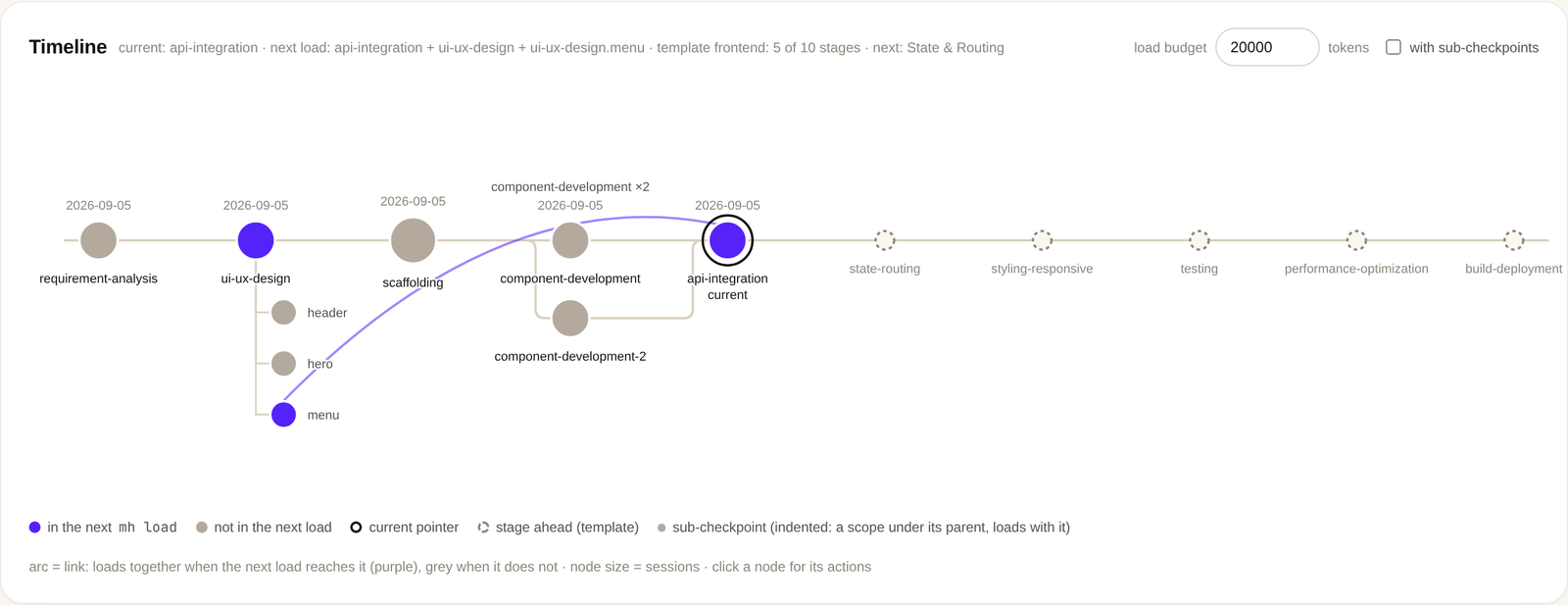
MemoryHub (mh) is a small Python CLI and a local web map for Claude Code, pi and Codex. A session ends and mh save keeps it; the next session runs mh load and the project's memory is back; mh ui is where you manage all of it.
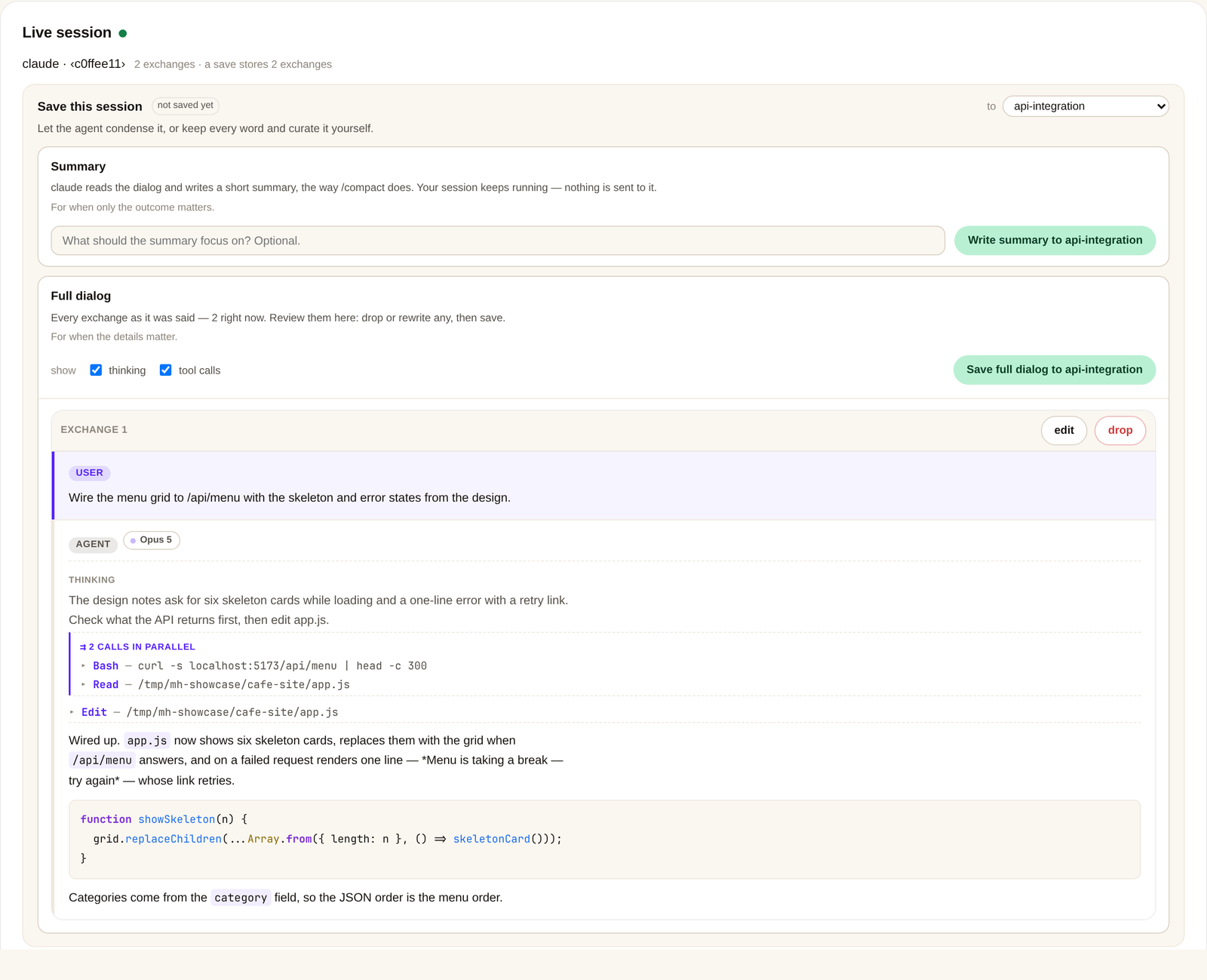
- Every session kept, none of the noise — purified to the User/Agent dialog by rule, no model call, stored as a file in a checkpoint, committed to a git repo you own
- Loaded when it matters — the next session starts from the checkpoint you are at, its parents and its links, newest first within a token budget
- Curated, not hoarded — skip a session, drop or rewrite an exchange, move a session, write a summary instead, from the map or the terminal
- Shaped like the project — stages from a template, parallel takes at a stage, sub-checkpoints for a smaller scope, links between the ones that belong together




uv tool install memoryhub-mh && mh skill install
Linux or macOS · git ≥ 2.32 · Python ≥ 3.12 · pipx install memoryhub-mh and pip install memoryhub-mh work too. See the changelog for what is new.
See it in action
Real captures of the map on a small café-site project, not mockups.
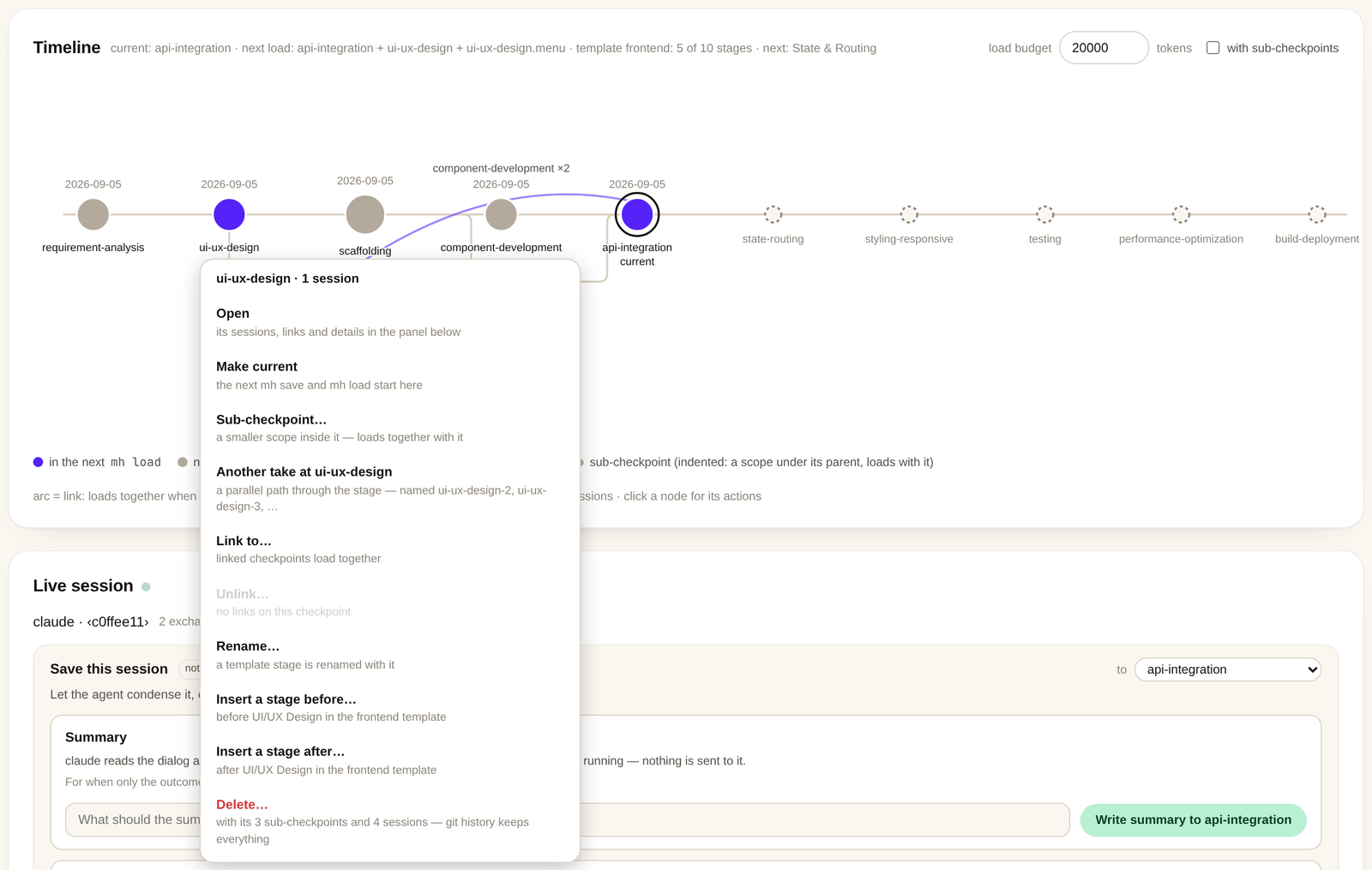
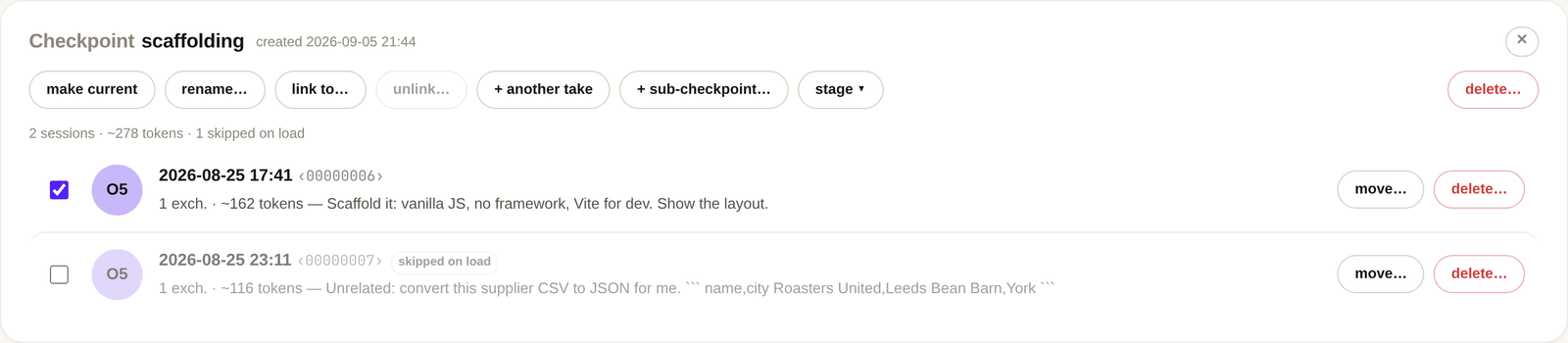
| Click a node | Open a checkpoint | Save the running session |
|---|---|---|
 |
 |
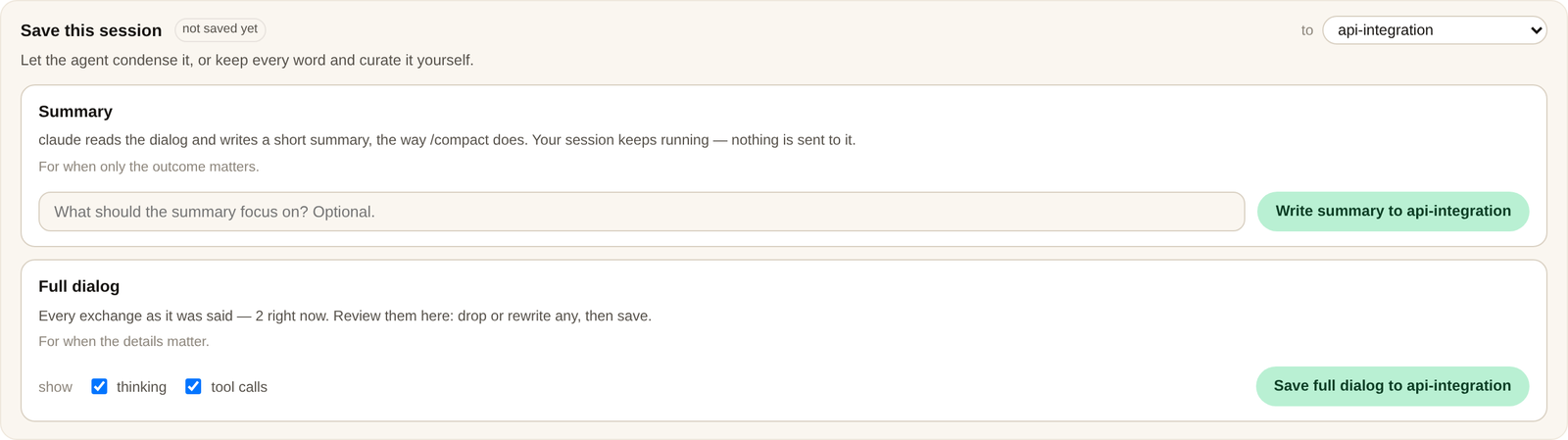 |
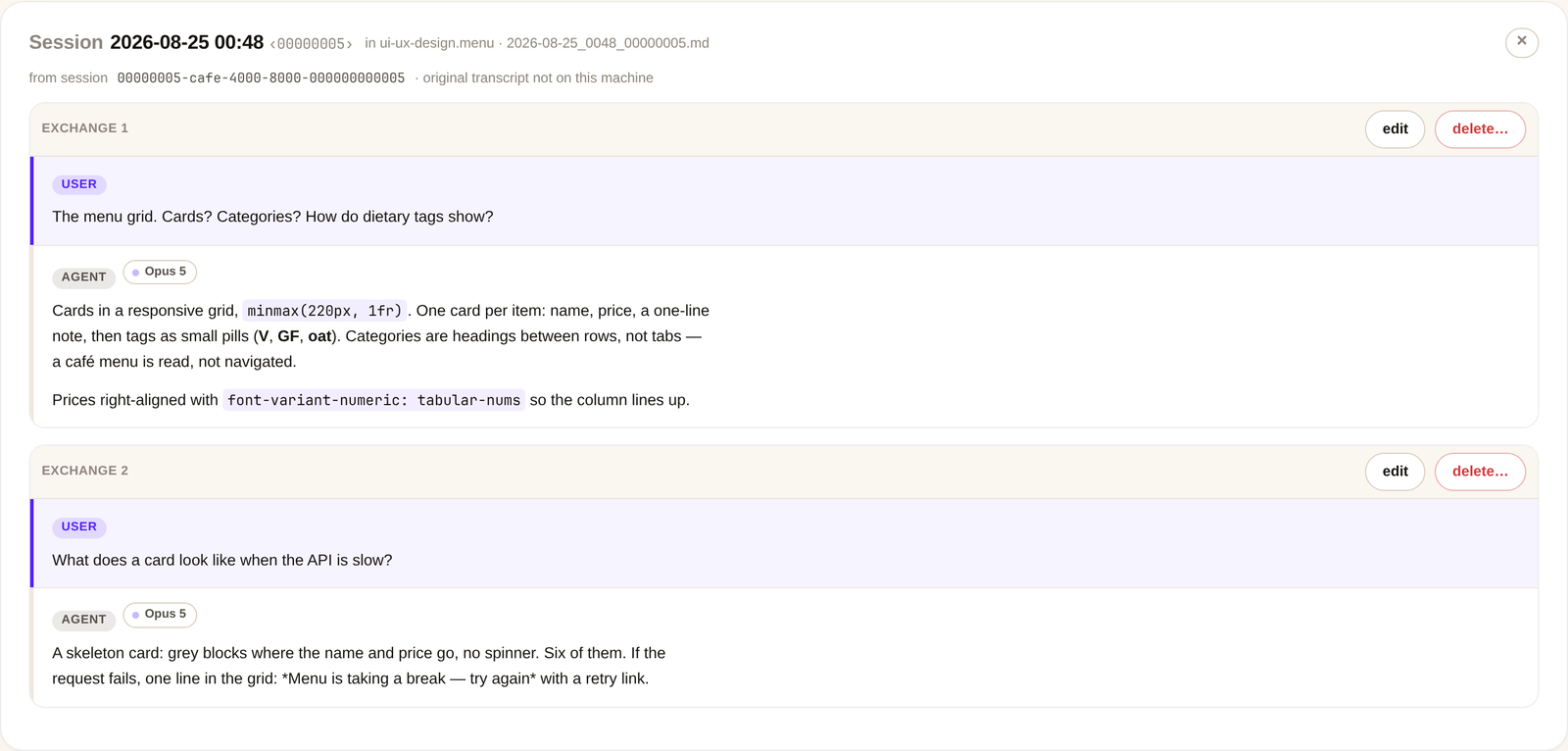
| Everything you can do to it, with a word on each. | Untick a session and every load leaves it out. | Dialog as it is, or a summary the agent writes. |
A saved session is the dialog and nothing else. Edit or delete an exchange; the hub keeps the history.
The session running right now, thinking and tool calls included, with the save box on top.
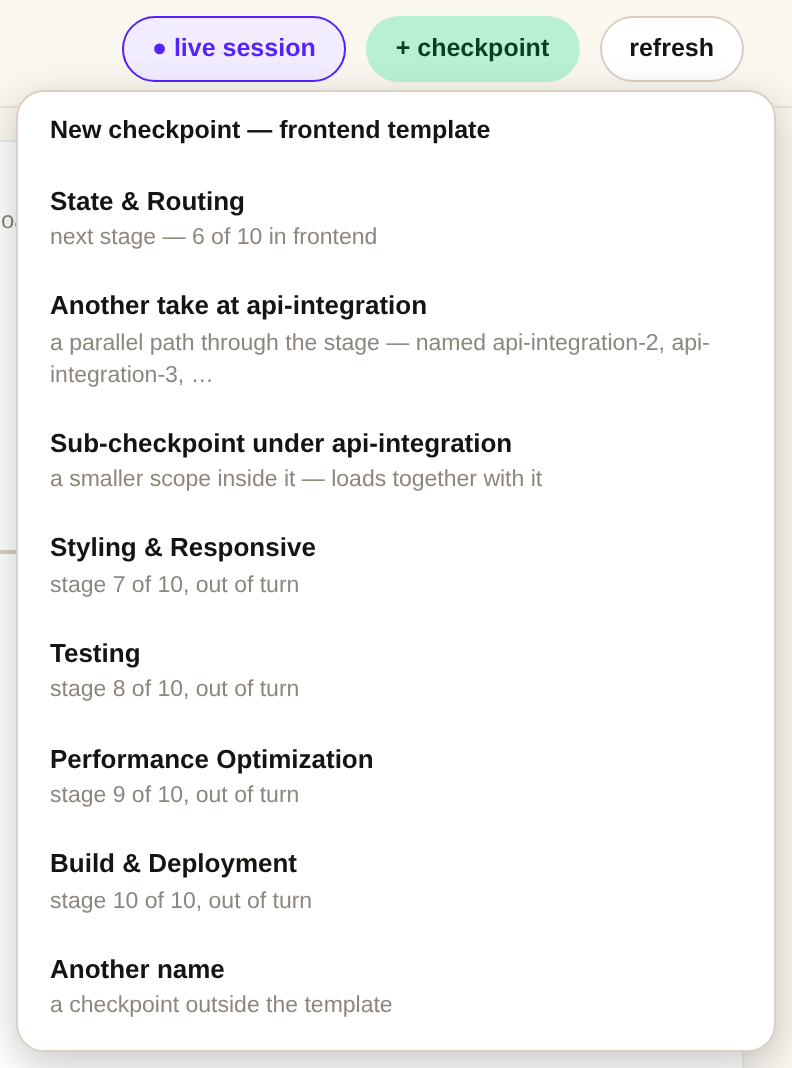
New checkpoint: the template's next stage, another take at this one, a sub-checkpoint, or any name.
Quick start
1. Install
uv tool install memoryhub-mh   # or: pipx install memoryhub-mh · pip install memoryhub-mh
mh skill install               # teaches Claude Code the /mh workflow
The package is memoryhub-mh, the command is mh. uv fetches Python 3.12 when the machine has none; pipx and pip need it installed.
2. Give the project a hub
cd my-site
mh init --template frontend   # .memoryhub/ with the stages of a frontend project
mh checkpoint                 # the first stage: requirement-analysis
3. Work, save, load
# … work with Claude Code; at the end the agent runs:
mh save                       # this session, purified, into the checkpoint
# next time:
mh load                       # the memory, back in context
mh ui                         # the map
mh hook install makes Claude Code run the load at session start and the save at the end.
Manage sessions
| You want to | On the map | In the terminal |
|---|---|---|
| Keep this session | save box → Dialog | mh save |
| Keep a summary instead | save box → Summary | mh save --compact --with agent |
| Leave a session out of loads | untick it | mh skip CKPT/SESSION |
| Fix or drop one exchange | edit / delete on the exchange | mh edit, mh rm -x N |
| Move a session elsewhere | move… on its row | mh mv CKPT/SESSION CKPT |
| Load two checkpoints together | node → Link to… | mh link A B |
| Work in a smaller scope | node → Sub-checkpoint… | mh checkpoint NAME --under CKPT |
| Try the stage again, in parallel | node → Another take | mh checkpoint --at STAGE |
| Load a node whole | tick "with sub-checkpoints" | mh load --tree |
| Find where a session came from | open original ↗ | mh trace CKPT/SESSION |
| Bring in past sessions | — | mh import |
| Undo anything | — | git -C .memoryhub revert HEAD |
Why MemoryHub
- Purified, mechanically — tool calls, thinking, harness wrappers and the unanswered last question are stripped by rule. What is stored reads like the conversation, and costs nothing to produce.
- A git repo, not a database —
.memoryhub/is plain markdown in a normal repository: diff it, push it, revert it, read it without mh. - Independent by default — checkpoints load alone unless you link them; a sub-checkpoint loads inside its parents; a take is a parallel path, not a copy.
- The map tells the truth — purple is exactly what the next
mh loadpacks; a link the load does not reach is grey; a terminal change shows up within a poll. - Local only — loopback, a per-run token, no cloud. Nothing leaves the machine unless you push the hub. The one model call there is, the summary, uses the CLI you already run.
How it works
| Step | What happens |
|---|---|
| Save | The session's transcript is found, each user turn paired with the reply that followed, everything else stripped. |
| Store | The dialog lands as <end-time>_<session>.md in the current checkpoint, one commit in the hub. A session lives in exactly one checkpoint. |
| Load | The current checkpoint, its parents and its links; sessions merged by time, newest first, within the budget (20 000 tokens by default). |
| Map | mh ui draws the hub: stages, takes, sub-checkpoints, links, what the next load packs, and the session being written right now. |
| Curate | Skips, edits, moves and summaries are commits like any other; the map and the CLI share one rule for each. |
Commands
| Command | What it does |
|---|---|
mh init [--global] [--claude] [--template T] |
Create the hub. |
mh checkpoint [name] [--at STAGE] [--under CKPT] |
New checkpoint; becomes current. No name: the template's next stage; --at alone: one more take at a stage (design-2); --under: a sub-checkpoint (design.head-page). |
mh template [name] [--list [-v]] [--clear] |
Stage template — default names for the checkpoints ahead. |
mh save [CKPT] [--to CKPT] [--file MD] [--session-id ID] [--transcript P] |
Purify the current session into a checkpoint. |
mh save [CKPT] --compact --file MD |
Store an agent-written summary instead of the full dialog. |
mh save [CKPT] --compact --with agent [--focus TEXT] |
Have the session's own CLI (claude -p or pi -p; --with claude/pi picks one) write the summary and store it. |
mh import [--to CKPT] [--agent A]... [--dry-run] |
Backfill this project's past sessions (Claude Code, pi, Codex). |
mh load [CKPT...] [--no-links] [--tree] [--budget N] [--all] [--json] |
Warm-start pack: selection + linked closure, time-merged; --tree adds the sub-checkpoints under the selection. |
mh link A B / mh unlink A B |
Make checkpoints load together / stop that. |
mh list / mh show CKPT[/SESSION] / mh search Q |
Inspect the hub. |
mh trace CKPT/SESSION |
Find the original transcript a saved session was purified from. |
mh rm CKPT[/SESSION] [-x N] [--force] |
Delete a checkpoint, a session, or one exchange. |
mh mv CKPT/SESSION CKPT / mh rename CKPT NAME |
Move a session / rename a checkpoint. |
mh edit CKPT/SESSION -x N [--user T] [--agent T] |
Rewrite one side of an exchange. |
mh skip CKPT/SESSION / mh unskip CKPT/SESSION |
Leave a session out of mh load (it stays in its checkpoint) / load it again. |
mh back [N] / mh forward [N] / mh goto CKPT |
Move the current pointer. |
mh status / mh log |
Position and counts / the hub's git journal. |
mh sync |
pull --rebase + push to origin; conflicts auto-abort. |
mh hubs [--prune] |
All registered hubs. |
mh ui [--port N] [--budget N|none] [--read-only] [--detach] [--stop] [--session ID] |
Open the checkpoint map in a browser and curate the hub. |
mh hook install [--user] [--remove] [--budget N] [--tree] |
Automate load/save through Claude Code hooks. |
mh skill install |
Install the Claude Code skill. |
Hands-free
mh hook install            # this project: load at session start, save at the end
mh hook install --user     # every project
mh hook install --remove   # undo
SessionStart injects mh load; SessionEnd and PreCompact run mh save.
Reference and scope
- CONTRIBUTING.md — the invariants a change must keep · CHANGELOG.md — what changed when
scripts/showcase.pyrebuilds the screenshots above from a throwaway project- Out of scope on purpose: a hosted service, typing into the running session, choosing the template from the map
License
MIT — free to use, modify and distribute.
Contributing
Issues and pull requests are welcome. Start with the contribution guide; every change keeps the suite hermetic and both READMEs in step.
1 maintainer

Download files
Download the file for your platform. If you're not sure which to choose, learn more about installing packages.
Source Distribution
Built Distribution
Filter files by name, interpreter, ABI, and platform.
If you're not sure about the file name format, learn more about wheel file names.
Copy a direct link to the current filters
File details
Details for the file memoryhub_mh-0.3.0.tar.gz.
File metadata
- Download URL: memoryhub_mh-0.3.0.tar.gz
- Upload date:
- Size: 185.7 kB
- Tags: Source
- Uploaded using Trusted Publishing? Yes
- Uploaded via:
uv/0.12.9 {"installer":{"name":"uv","version":"0.12.9","subcommand":["publish"]},"python":null,"implementation":{"name":null,"version":null},"distro":{"name":"Ubuntu","version":"24.04","id":"noble","libc":null},"system":{"name":null,"release":null},"cpu":null,"openssl_version":null,"setuptools_version":null,"rustc_version":null,"ci":true}
File hashes
| Algorithm | Hash digest | |
|---|---|---|
| SHA256 |
7ceb49f6a7ed94c899d27e7c5f35573d53bfe94f39e68c03d64bcd4ac975fbe6
|
|
| MD5 |
b18b977955e066ae285c06984fd3c414
|
|
| BLAKE2b-256 |
8e5efae114f86c71ab7260b6dbe91ba9806963ce0827ceb0ed64b3184a6d9e97
|
File details
Details for the file memoryhub_mh-0.3.0-py3-none-any.whl.
File metadata
- Download URL: memoryhub_mh-0.3.0-py3-none-any.whl
- Upload date:
- Size: 119.0 kB
- Tags: Python 3
- Uploaded using Trusted Publishing? Yes
- Uploaded via:
uv/0.12.9 {"installer":{"name":"uv","version":"0.12.9","subcommand":["publish"]},"python":null,"implementation":{"name":null,"version":null},"distro":{"name":"Ubuntu","version":"24.04","id":"noble","libc":null},"system":{"name":null,"release":null},"cpu":null,"openssl_version":null,"setuptools_version":null,"rustc_version":null,"ci":true}
File hashes
| Algorithm | Hash digest | |
|---|---|---|
| SHA256 |
c7b72c67c1ec222a1cae759a43e85fa818b04352cc56618a5b63e8a79ff1a487
|
|
| MD5 |
85fe5e1e6908bec818004eeb761908d6
|
|
| BLAKE2b-256 |
501a51b9a311297d8baa26cd756cabcebccac6924cc0da86ebcc47f56f39399d
|














