
memtomem
🧪 Beta — the nine core MCP tools, the
mmCLI, and the format of your memory files and config files change only with anUpgradingnote in the CHANGELOG, and behind a deprecation window where one is possible. Features marked experimental can change or go away without either — see Stability. Feedback and issue reports are especially welcome at github.com/memtomem/memtomem/issues.
Long-term memory for AI coding agents, kept as Markdown you own. Core usage is hook-free by default: your .md files are the source of truth, the search database is a rebuildable cache, and memory changes happen only when you or your agent explicitly call memtomem. Optional client hooks are separate, visible integrations.
The session loop
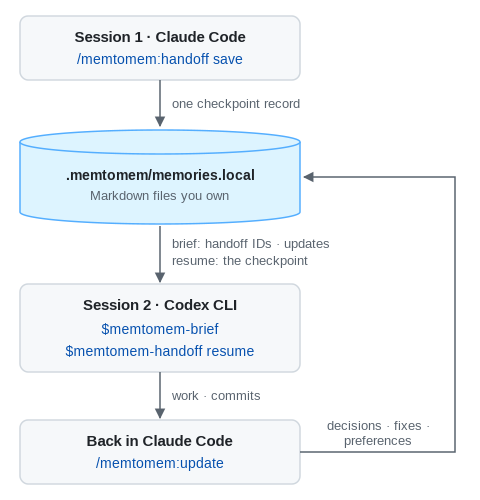
Three plugin workflows carry a project's memory from one session to the next, and from one coding agent to another.
Illustrative output — agent wording and results vary.
# End of a session, in Claude Code
> /memtomem:handoff save codex-cli
handoff_id: 3f2a9c1e-7b4d-4e8a-9c2f-1d5e6a7b8c9d · scope: project_local · namespace: shared:retry-policy

# Next session, in Codex CLI
> $memtomem-brief
Recent updates and active handoff IDs
  - 3f2a9c1e-7b4d-4e8a-9c2f-1d5e6a7b8c9d  from claude-code → codex-cli
> $memtomem-handoff resume 3f2a9c1e-7b4d-4e8a-9c2f-1d5e6a7b8c9d
git_head matches the live HEAD · worktree clean · in sync with `origin` `refs/heads/main`

# After a few commits, back in Claude Code
> /memtomem:update
mode: incremental · saved 2 items · commit-derived: 1 · session-derived: 1
handoff save writes one Markdown record into the project's own .memtomem/memories.local; brief only reads; update saves decisions, bug fixes, and preferences as separate items. All three run only when you invoke them. The Project workflows guide has each one's modes, checks, and names per host.
Quick Start
# 1. Install memtomem with all features (Python 3.12+)
uv tool install 'memtomem[all]'  # or: pipx install 'memtomem[all]'
mm --version

# 2. Configure storage, search, and optional MCP registration
mm init

# 3. Verify a complete memory round trip
mm status
mm add "Deployment checklist uses blue-green rollout" --tags ops
mm search "blue-green"
The search should return the sentence you just added. mm add writes to your configured user memory directory and indexes the entry immediately, so this path works without an existing notes directory or a connected editor. Choose Minimal in the setup picker for a no-model-download first proof and rerun mm init later to add semantic search. To index existing files next, run mm index /path/to/your/notes.
To run the session loop, install the plugin for your coding agent (Claude Code, Codex CLI, OpenCode, Kimi Code, or Antigravity), then register the project memory tier with cd <your-project> && mm mem init --scope project_local and run the brief workflow in a new session (/memtomem:brief in Claude Code; the guide above lists each host's name). The Korean Claude Code/Codex quickstart walks this path in 10–15 minutes; Getting Started covers install alternatives and MCP Client Setup covers manual registration for other editors.
[all] includes local ONNX embeddings, Korean tokenization, code chunking, the Web UI, Langfuse tracing, and LangGraph Store support. The Ollama and OpenAI embedding providers need no extra, so a bare memtomem install can use them; without a provider it searches by keyword (BM25). See the optional extras table for smaller bundles. If mm is not on PATH, run uv tool update-shell and open a new shell. If an install appears stale, re-run it with --refresh. To upgrade an existing uv tool install, run mm upgrade rather than uv tool install again: it keeps the extras it detects and, on macOS and Linux, stops running servers first (see the CLI reference).
memtomem is the long-term-memory store. memtomem-stm is a separate, optional MCP proxy for automatic surfacing, compression, and caching.
What else is inside
| Your memory, your files | Operate it | Plug it in |
|---|---|---|
| Markdown is the source of truth; the search database is a rebuildable cache | Web UI for search, sources, tags, timeline, and dedup (mm web; --dev adds the maintainer pages) |
Nine core MCP tools, with mem_do routing every other action so agents load a small tool surface |
| Hybrid search: BM25 (FTS5) + dense vectors (sqlite-vec) merged by Reciprocal Rank Fusion | Namespaces, auto-derived from folder names and labelled from the Web UI | Context Gateway: keep Skills, Commands, and Subagents in one Store and push them to your AI runtimes |
| Semantic chunking: heading-aware Markdown, AST-based Python, tree-sitter JS/TS, structure-aware JSON/YAML/TOML | Maintenance: near-duplicate detection with merge, time-based decay, TTL expiration, auto-tagging | Pinned Context: small user/project/agent Markdown blocks composed ahead of retrieved memory |
| Incremental indexing: chunk-level SHA-256 diff, so only changed chunks are re-embedded | Scheduled jobs for compaction, decay, dead-link cleanup, and dedup scans | LangGraph MemtomemBaseStore, plus the Hybrid Store with SQLite persistence and BM25/dense/RRF retrieval |
| Export and import as JSON bundles (experimental) | Scriptable CLI: --json output on status, search, recall, and the write commands; mm warmup pre-loads local models |
Multilingual by default: English, Korean, Japanese, and Chinese through the local multilingual-e5-small ONNX model (bge-m3 remains available) |
The complete MCP table lists every tool by category.
Documentation
Full documentation lives in the memtomem GitHub repo and at memtomem.com:
| Guide | Topic |
|---|---|
| Getting Started | Start here — install, configure, save and find your first memory |
| 한국어 바이브코딩 빠른 시작 | Claude Code·Codex CLI에서 10~15분 안에 기억 저장·검색 |
| Project workflows | handoff, brief, and update: modes, checks, and names per host |
| MCP Client Setup | Connect Claude Code, Cursor, Codex, and other clients |
| All guides | Reference, configuration, embeddings, operations, and more, in a suggested reading order |
| memtomem-stm | Optional STM proxy for proactive memory surfacing (separate package) |
License
Apache License 2.0 — see LICENSE for details.
1 maintainer

Metadata
1 maintainer
Release files for memtomem 0.7.3
For a detailed explanation of source distributions (sdists) and built distributions (wheels), please see the package formats documentation.
Source distribution (sdist)
| File | Size | Uploaded | Provenance | Actions |
|---|---|---|---|---|
| memtomem-0.7.3.tar.gz | 3.4 MB | With provenance | Details for memtomem-0.7.3.tar.gz |
Built distribution (wheel)
| File | Interpreter | ABI | Platform | Actions Reset |
|---|---|---|---|---|
| memtomem-0.7.3-py3-none-any.whl | Python 3 | none | any | Details for memtomem-0.7.3-py3-none-any.whl |
Total release size: 6.8 MB
Release files / memtomem-0.7.3.tar.gz
| Download URL | memtomem-0.7.3.tar.gz |
|---|---|
| Size | 3.4 MB |
| Tags | Source |
|
SHA-256 checksum How to use checksums |
29ee999788d35148a3ae1b46b979f74c82d53f68dd1bbede3452c7c0edf5c85b
|
|
BLAKE2b-256 checksum How to use checksums |
d5b2a1d967a050d416b654c5bd158b5d407667bce3b001f99577e0ecd76955f0
|
| Upload date | |
|
Uploaded using Trusted Publishing? What is trusted publishing? |
Yes |
| Uploaded via |
twine/7.0.0 CPython/3.13.16
|
Provenance
Provenance describes where a file came from. On PyPI, provenance is shared via attestations, which provide a verifiable record of the build or publishing details. View details, limitations and caveats.


PyPI Publish Attestation
PyPI verified that this artifact, at this checksum, originated from the publisher listed below.
Signed by GitHub Actions, verified by PyPI on Nov 2, 2026.
Transparency logRelease files / memtomem-0.7.3-py3-none-any.whl
| Download URL | memtomem-0.7.3-py3-none-any.whl |
|---|---|
| Size | 3.5 MB |
| Tags | Python 3 |
|
SHA-256 checksum How to use checksums |
aeb0ebb5c440195e1cb75b43fc6d7fd9a940e4d48f400fc512da829b96311584
|
|
BLAKE2b-256 checksum How to use checksums |
fdcc61db026573d27fca70bc77ef05fb0534e4b1b4302e81caa3a944e145cd4d
|
| Upload date | |
|
Uploaded using Trusted Publishing? What is trusted publishing? |
Yes |
| Uploaded via |
twine/7.0.0 CPython/3.13.16
|
Provenance
Provenance describes where a file came from. On PyPI, provenance is shared via attestations, which provide a verifiable record of the build or publishing details. View details, limitations and caveats.
PyPI Publish Attestation
PyPI verified that this artifact, at this checksum, originated from the publisher listed below.
Signed by GitHub Actions, verified by PyPI on Nov 2, 2026.
Transparency logSecurity for memtomem 0.7.3
Provenance
Provenance describes where a file came from. On PyPI, provenance is shared via attestations, which provide a verifiable record of the build or publishing details. View details, limitations and caveats.
Full provenance
Both files in this release have been uploaded with provenance metadata.
Attestation for memtomem-0.7.3.tar.gz
PyPI Publish Attestation
PyPI verified that this artifact, at this checksum, originated from the publisher listed below.
Signed by GitHub Actions, verified by PyPI on Nov 2, 2026.
Transparency logA note on package security
PyPI is a repository for distributing packages, not a service for auditing them. While third-party security researchers and our staff do their best to detect and remove malicious packages, PyPI cannot guarantee the quality, security or suitability of any given package.
To learn more about protecting yourself from malicious actors, visit our package security documentation.














