

Self-healing selectors for Playwright and Selenium.




mendwright heals many broken selectors without any API key. Each time a selector matches, it saves a fingerprint of the element: its tag, ids, names, label, text and surroundings. When a site update breaks the selector, mendwright looks for that element first, checks the new XPath against the live page, saves it, and retries the step. It asks a model only when the fingerprint match isn't confident. On the next run the saved selector is used and nothing is asked.
For the model it supports Anthropic, OpenAI and compatible APIs, Gemini, Bedrock, LiteLLM, or a local model through Ollama, including mendwright's own small selector model.
Install
pip install mendwright
mendwright demo
If the mendwright command isn't on your PATH (common on Windows), run python -m mendwright demo.
The demo runs offline, with no browser and no API key. A fake page built on lxml stands in for the browser and a canned reply stands in for the model. A redesign breaks two selectors, and a cookie banner that used to come later now opens first and covers the form. mendwright clicks the banner away because the demo registered it with heal.interrupt(), heals the checkbox, and refuses to heal the pay button because the demo marks it destructive=True.
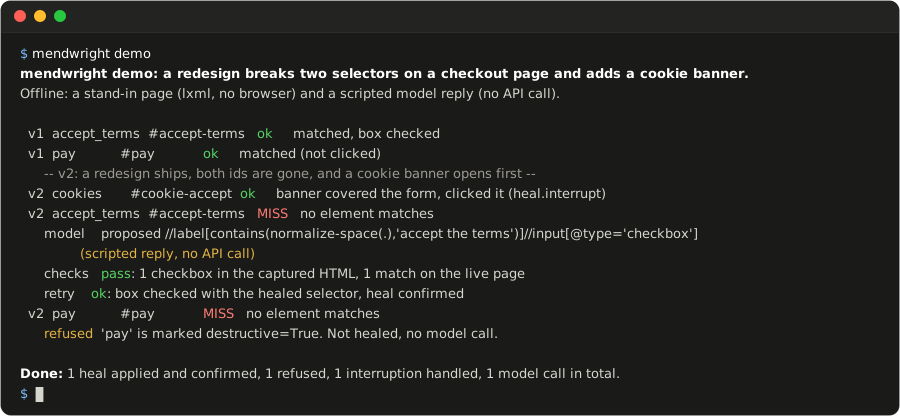
The same output as text
mendwright demo: a redesign breaks two selectors on a checkout page and adds a cookie banner.
Offline: a stand-in page (lxml, no browser) and a scripted model reply (no API call).

  v1  accept_terms  #accept-terms   ok     matched, box checked
  v1  pay           #pay            ok     matched (not clicked)
      -- v2: a redesign ships, both ids are gone, and a cookie banner opens first --
  v2  cookies       #cookie-accept  ok     banner covered the form, clicked it (heal.interrupt)
  v2  accept_terms  #accept-terms   MISS   no element matches
      model    proposed //label[contains(normalize-space(.),'accept the terms')]//input[@type='checkbox'] (scripted reply, no API call)
      checks   pass: 1 checkbox in the captured HTML, 1 match on the live page
      retry    ok: box checked with the healed selector, heal confirmed
  v2  pay           #pay            MISS   no element matches
      refused  'pay' is marked destructive=True. Not healed, no model call.

Done: 1 heal applied and confirmed, 1 refused, 1 interruption handled, 1 model call in total.
mendwright demo --browser chromium runs the same demo in a real headless browser. It needs pip install "mendwright[playwright]" and python -m playwright install chromium. mendwright demo --live asks the model from your environment (set it up as shown below) instead of the canned reply. Only the demo page is sent.
Quickstart
from playwright.sync_api import sync_playwright
import mendwright

with sync_playwright() as p:
    page = p.chromium.launch().new_page()
    page.goto("https://example.com/signup")

    heal = mendwright.open(page)
    heal.locator("email", "#email").fill("ada@example.com")
    heal.locator("accept_terms", "//input[@id='terms']", role="checkbox").check()
    heal.locator("create_account", "#create-account").click()
heal.locator() takes the selector you'd pass to page.locator(), plus a key: a name for the element that its heals are saved under.
role= is optional. mendwright needs to know what kind of element it is looking for before it can check a heal, and it learns that the first time the selector matches. Pass role= when you add mendwright to a suite whose selectors might already be broken.
intent= describes the element in words, such as intent="the terms checkbox in the signup form". The model gets it with the page, and with role= and no selector, a model finds the element on first use.
A selector that never matched has no fingerprint, and some changes are beyond one, so to let mendwright ask a model:
export ANTHROPIC_API_KEY="sk-ant-..."
export ANTHROPIC_MODEL="..."   # a current model id from Anthropic's model list

# Windows PowerShell:
$env:ANTHROPIC_API_KEY = "sk-ant-..."
$env:ANTHROPIC_MODEL = "..."
There is no default model. OPENAI_API_KEY with OPENAI_MODEL, GEMINI_API_KEY with GEMINI_MODEL, and OLLAMA_MODEL work the same way, and MENDWRIGHT_LOCAL_MODEL selects mendwright's own local model. For Bedrock, LiteLLM or another OpenAI-compatible host, pass provider= to mendwright.open().
mendwright doctor shows which provider it found. Without one, selectors still resolve and fingerprint heals still happen, and a selector the fingerprint can't place raises an error that lists the variables to set.
A selector that stops matching is waited for 10 seconds (MENDWRIGHT_TIMEOUT_MS) before mendwright tries to heal it. Each applied heal prints one line to stderr, and mendwright report shows what was saved.
No changes per step
To heal an existing script without touching its steps, change the line that makes the page or the driver:
page = mendwright.open(page).page          # Playwright
page.fill("#email", "ada@example.com")
page.check("#terms")

driver = mendwright.open(driver).driver    # Selenium (By from selenium.webdriver.common.by)
driver.find_element(By.ID, "terms").click()
Each selector is also the key its heals are saved under. Chained locators, get_by_* and the other By values go to the real page or driver unhealed, and .native is the real object. The guide lists what heals.
Selenium
from selenium import webdriver
import mendwright

driver = webdriver.Chrome()
driver.get("https://example.com/signup")

heal = mendwright.open(driver)
heal.locator("email", "#email").fill("ada@example.com")
heal.locator("accept_terms", "//input[@id='terms']", role="checkbox").check()
driver.quit()
Playwright verbs such as fill(), check() and select_option() are mapped to WebElement calls, so step code reads the same on both libraries. Selenium runs XPath and CSS, so Playwright selectors such as text=Save raise InvalidSelector at once.
Async Playwright
import asyncio
from playwright.async_api import async_playwright
import mendwright.aio

async def main():
    async with async_playwright() as p:
        browser = await p.chromium.launch()
        page = await browser.new_page()
        await page.goto("https://example.com/signup")

        heal = await mendwright.aio.open(page)
        await heal.locator("accept_terms", "//input[@id='terms']", role="checkbox").check()

asyncio.run(main())
heal.locator() returns at once. The element is resolved, and healed if needed, when you await an action on it. The model call runs in a worker thread and doesn't block the event loop.
pytest
def test_signup(page, heal):
    page.goto("https://example.com/signup")
    heal.locator("email", "#email").fill("ada@example.com")
    heal.locator("accept_terms", "//input[@id='terms']", role="checkbox").check()
The heal fixture comes from mendwright's pytest plugin, which pytest loads on its own once mendwright is installed. It wraps the page fixture from pytest-playwright (pip install pytest-playwright, then python -m playwright install chromium). For Selenium, define a driver fixture that yields your WebDriver and set mendwright_page_fixture = driver in your pytest config.
When a test passes, its heals are marked confirmed. When it fails, they stay saved (and are still used next run) but unconfirmed, and the failure report lists them so you can check whether a heal picked the wrong element.
To make CI show selector drift instead of quietly healing it, run pytest --mendwright-strict. A test that needed a heal then fails with the old and the new selector, and the heal is still saved.
How it works
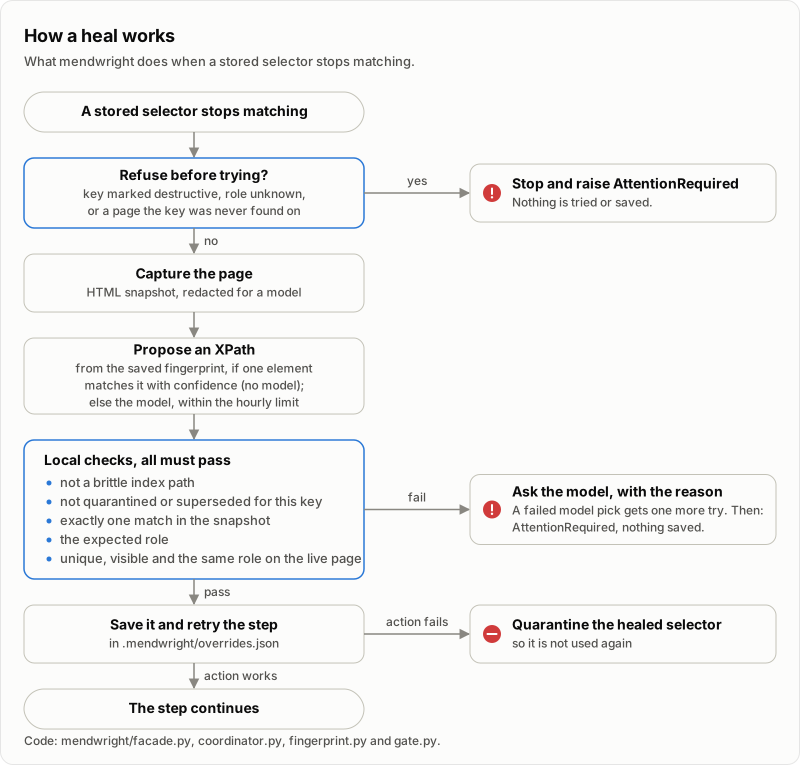
A step is refused before anything is tried when its key is marked destructive, when mendwright doesn't know what kind of element it is (see role= above), or when the page isn't one the key was found on. mendwright doesn't guess which controls are destructive. Mark a pay, submit or delete step with heal.locator(..., destructive=True), or pass its key in mendwright.open(destructive_keys=...).
Next, mendwright scores the page's elements against the key's fingerprint. It takes the best one, with no model call, only when it shares an id, test id, name, link, label or text with the recorded element and no other element comes close.
Otherwise it sends a cleaned, redacted copy of the page to the model (at most 60,000 characters of HTML and 60,000 of element inventory per request), within an hourly limit of 3 heal attempts per key and 60 in all. A rejected attempt counts, and an attempt makes up to 2 model calls. A gateway meters on its side instead.
Either way, the XPath is used only if:
- it isn't an index-only path such as
/html[1]/body[1]/div[3]/input[1] - the store doesn't hold it as quarantined or superseded for this key, and it doesn't reach an element the key has quarantined
- it matches exactly one element in the captured HTML
- that element has the step's role (checkbox, button, link, and so on)
- it matches exactly one element on the live page, and that element is visible (hidden checkboxes are allowed) and still has the role
If a fingerprint pick fails, the model is asked. If the model's first proposal fails, it gets the reason and one more try. Heals are saved in .mendwright/overrides.json, and each request, proposal, rejection and outcome goes to journal.jsonl next to it.
On the next run the selector in your code is tried first and the saved heal right after it, in the same pass. That resolves without a wait or a model call. If the action on a healed element fails in the browser, the heal is quarantined and not used again.
Local model
mendwright has its own small model, so a heal can run without the page leaving your machine.
mendwright-selector is Qwen2.5-1.5B-Instruct fine-tuned for one question: given the broken step and a numbered list of the elements of its role on the current page, which one did the step mean, if any.
It answers with a number, or says that no element fits and why. mendwright then builds the XPath for that element itself and runs it through the same checks as any heal, so the model never writes a selector.
With Ollama installed, one command downloads the model from the GitHub release, checks its SHA-256 and registers it, and one variable selects it:
mendwright model install
export MENDWRIGHT_LOCAL_MODEL=mendwright-selector
To build it yourself instead, training/README.md has the data generator and the recipe (about 6 hours of training on a laptop GPU with 6 GB).
The model file is about 1 GB. It answers in about a quarter of a second on a laptop GPU, or 1 to 2 seconds on the CPU alone.
On 3,000 held-out synthetic redesigns it picked the right element for 97.1% of the broken selectors and a wrong one for 0.14%, and said no element fits for 97.1% of the steps where none did.
A pick it is less than 80% sure of is declined rather than used (MENDWRIGHT_LOCAL_MIN_CONFIDENCE changes that).
On the 47-case benchmark, behind the fingerprint tier, it healed 31 of 35 broken selectors correctly (30 in headless Chromium) and none onto the wrong element, and declined 11 of the 12 cases where the right answer is no heal (results). Its last training round was shaped by its failures on those same cases, so expect it to do a little worse on your pages.
What it can and can't fix
mendwright repairs a selector on the page your script is on. It handles layout changes within that page:
- ids and classes renamed, or replaced by build-generated ones
- labels reworded or translated (with a model)
- elements wrapped in a new container or component
- elements moved to another part of the page, or form fields put in a different order
- lookalike elements where the surrounding text decides which one is meant
It also handles some changes in your script's flow:
- A step that can show up at any point, such as a cookie banner, a newsletter modal or an "are you still there?" dialog. Register it once with
heal.interrupt(). When it is in the way of a step (the step's element is missing, or the page shows the interruption), mendwright handles it first (a click, unless you register another action) and goes on with the step. If your script also has its own step for it, that step is skipped once the interruption was handled, so a cookie banner that now appears before signup instead of after it needs no other change. - The consent banners of common consent managers, with
cookies="reject"orcookies="accept". This is off by default. - A step that may not be there, with
heal.locator(..., optional=True).
heal = mendwright.open(page, cookies="reject")      # close common consent banners
heal.interrupt("newsletter", "#newsletter-close")   # your own modal, wherever it opens

heal.locator("email", "#email").fill("ada@example.com")
heal.locator("create_account", "#create-account").click()
A step that moved to another page, steps in a new order, or a new required step still need a change to your script.
mendwright remembers the last few pages each key was found on and doesn't heal a key on another page, so you get an error that says the flow changed, instead of a heal onto a similar element such as a Help button where a Continue button used to be. If a redesign only changed the URL, or the same steps run under language paths such as /en/ and /de/, pass heal_across_pages=True to mendwright.open().
The model is also told it may answer that no element on the page fits, but a step that moved within the same address is still the model's call, so mark irreversible steps with destructive=True. The guide has the details.
Anchor selectors on ids, names, labels or text rather than position. A positional selector such as (//form//input)[1] that still matches after two fields swap now points at the wrong field, and since nothing broke, mendwright doesn't step in.
Errors
When mendwright can't or won't heal a step, it raises mendwright.AttentionRequired with the reason and a next step. This is the error from heal.locator("pay", "#pay", destructive=True) when #pay stopped matching:
mendwright.exceptions.AttentionRequired: No matching element for: pay (tried 1 candidate(s)).
  -> 'pay' is marked as a destructive control, and mendwright never auto-heals those, because a validated but wrong selector here could act on a live account. Fix the selector in your code or seed file by hand.
mendwright doctor checks the install, the provider and the store path. mendwright report lists each key with its selectors and recent heals; --format md prints a Markdown table you can append to $GITHUB_STEP_SUMMARY, and --format html --out report.html writes one self-contained page.
mendwright fix puts confirmed heals back into your code: it prints a diff of the string literals it would change, and --apply writes them.
Compatibility
| Area | Supported |
|---|---|
| Browser libraries | Playwright sync and async (Chromium, Firefox, WebKit), patchright, camoufox, Selenium (Chrome, Firefox), or your own driver through register_driver |
| Selectors in your code | XPath, CSS, and Playwright selectors such as role=button[name='Save'] (Playwright only) |
| Selectors mendwright saves | XPath |
| Model providers | Anthropic, OpenAI, Azure OpenAI, OpenAI-compatible hosts (Groq, OpenRouter, vLLM, LM Studio), Ollama, Gemini, Bedrock, LiteLLM, your own gateway, or mendwright's own selector model in Ollama |
| Python | 3.10 and newer, with lxml as the only dependency |
The real-browser suite (python -m pytest -m browser) passed locally on Windows 11 with Python 3.12 on Playwright Chromium, Firefox and WebKit, patchright, camoufox, and Selenium with Chrome and Firefox. The async tests passed on all three Playwright browsers. CI runs the offline suite on Linux (Python 3.10 to 3.14), Windows and macOS, and the browser suite on Linux.
Comparison
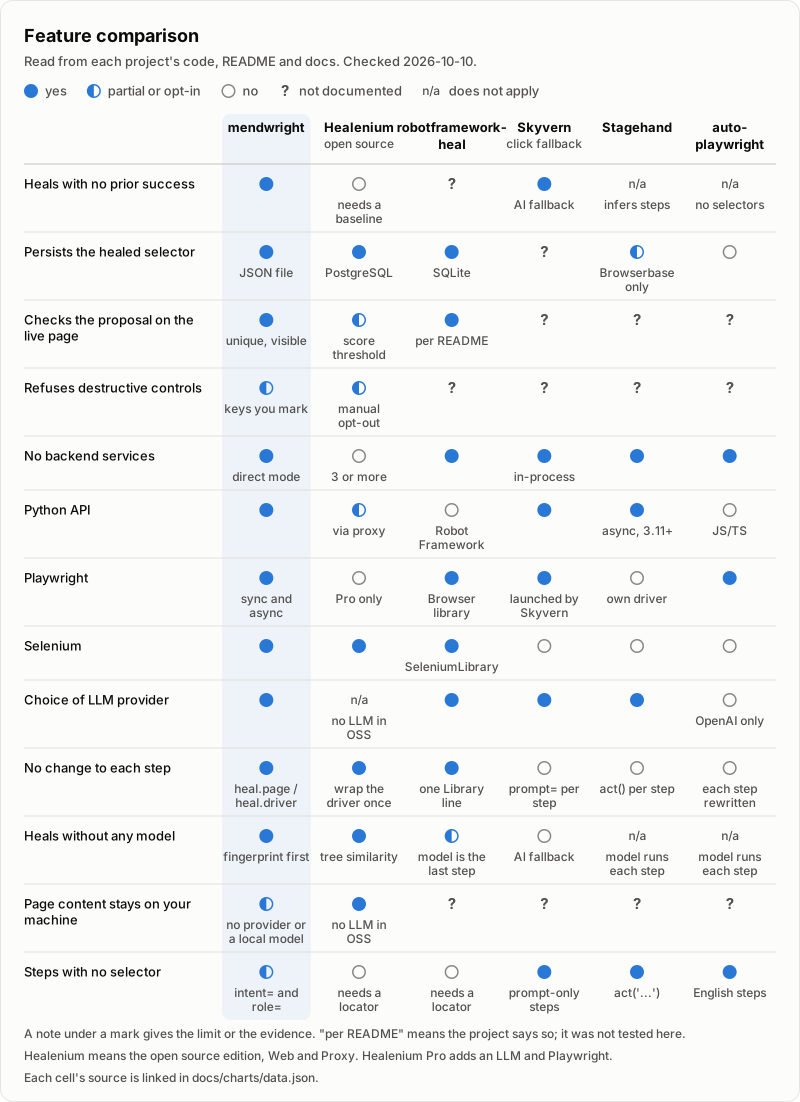
Where another tool fits better: Healenium covers Java, and any Selenium client through its proxy, and its open source edition never calls a model in any setup. Robot Framework suites have robotframework-heal. Agent tools such as Stagehand and Skyvern handle steps written in plain English. docs/comparison.md has the full comparison, with a source for every cell and the footprint charts.
Limitations
- Heals are always XPath, even when your code used CSS or a Playwright selector.
- An element inside an iframe heals only when you open mendwright on the frame: a
Framefrompage.frameson Playwright, or the driver afterswitch_to.frame()on Selenium. On Playwright, a selector that matches only inside a child iframe raisesAttentionRequiredand says so, without a model call. - With a hosted provider, page HTML is sent to it whenever a fingerprint match isn't confident. Redaction removes quoted
valueattributes, absolute http(s) URLs and runs of 12 to 19 digits, but visible text and other attributes stay. See SECURITY.md. A local model through Ollama keeps the page on your machine. - If a page's cleaned HTML is longer than 60,000 characters, the rest is cut before it reaches the model. An element near the end is then visible to it only through the element inventory.
- Accuracy has been measured without a hosted model only. On the 47-case benchmark, the fingerprint tier alone healed 20 of 35 broken selectors and none onto a wrong element, but its thresholds were tuned on those same cases, so expect it to be wrong now and then on yours. With a model-free similarity baseline behind it, 28 of 35 healed, and 3 of the 47 cases went to the wrong element. With mendwright's own local model behind it, 31 of 35 healed and 1 of the 47 went to the wrong element (results). No hosted model numbers are published yet.
--mendwright-strictonly fails the run that made the heal. Later runs pick up the saved heal and pass, which is why strict CI runs need a fresh store.
Links
- Guide: configuration, the pytest plugin, CI recipes, the CLI and troubleshooting
- Comparison
- Contributing
- Security
- Changelog
MIT license. If mendwright fixed a broken run for you, a star helps other people find it.
1 maintainer

Metadata
1 maintainer
Release files for mendwright 0.5.0
For a detailed explanation of source distributions (sdists) and built distributions (wheels), please see the package formats documentation.
Source distribution (sdist)
| File | Size | Uploaded | |
|---|---|---|---|
| mendwright-0.5.0.tar.gz | 438.1 kB | Details |
Built distribution (wheel)
| File | Interpreter | ABI | Platform | Reset |
|---|---|---|---|---|
| mendwright-0.5.0-py3-none-any.whl | Python 3 | none | any | Details |
Total release size: 670.4 kB
Release files / mendwright-0.5.0.tar.gz
| Download URL | mendwright-0.5.0.tar.gz |
|---|---|
| Size | 438.1 kB |
| Tags | Source |
|
SHA-256 checksum How to use checksums |
2c46cabb68f7da8bf3742518bff10eaf6ccc0372f5fd66bd05ed7e082f27785e
|
|
BLAKE2b-256 checksum How to use checksums |
f3962253be13b4d98b815242b367e0767928c6f212fb4d4122daec369e741052
|
| Upload date | |
|
Uploaded using Trusted Publishing? What is trusted publishing? |
Yes |
| Uploaded via |
twine/7.0.0 CPython/3.13.14
|
Provenance
Provenance describes where a file came from. On PyPI, provenance is shared via attestations, which provide a verifiable record of the build or publishing details. View details, limitations and caveats.


PyPI Publish Attestation
PyPI verified that this artifact, at this checksum, originated from the publisher listed below.
Signed by GitHub Actions, verified by PyPI on Oct 13, 2026.
Transparency logRelease files / mendwright-0.5.0-py3-none-any.whl
| Download URL | mendwright-0.5.0-py3-none-any.whl |
|---|---|
| Size | 232.2 kB |
| Tags | Python 3 |
|
SHA-256 checksum How to use checksums |
ce5940b8f869b69f2811b05ce11b9fe603c974424351e745c00154e9dc5ca9b6
|
|
BLAKE2b-256 checksum How to use checksums |
300d1f58e78af4177f132d57db3f51ede1c2f8e21cf318bc8b5557e5908de251
|
| Upload date | |
|
Uploaded using Trusted Publishing? What is trusted publishing? |
Yes |
| Uploaded via |
twine/7.0.0 CPython/3.13.14
|
Provenance
Provenance describes where a file came from. On PyPI, provenance is shared via attestations, which provide a verifiable record of the build or publishing details. View details, limitations and caveats.
PyPI Publish Attestation
PyPI verified that this artifact, at this checksum, originated from the publisher listed below.
Signed by GitHub Actions, verified by PyPI on Oct 13, 2026.
Transparency log













