




MentAI
An automated CLI tool using AI to solve Mentimeter ("Menti") quiz questions.
Table of Contents
- Getting Started
- Functionality
- Use Cases
- Other
Installation
pip3 install mentai-cli
Usage
First Steps
After installing MentAI you need to run it once to create the config file. You can just provide a random 8-digit number:
➜ mentai 12345678
OpenAI API key is missing.
Please fix the error and restart the program.
You can find your settings file in: "/Users/<YourUser>/Library/Application Support/Mentai/config.toml".
Opening it...
The config.toml will be opened in your default editor. Add an OpenAI API key and save it. All other values can be left as is. Here is a quick example of a config.toml:
[SOLVER]
OPEN_AI_API_KEY = "youropenapikeyhere"
OPEN_AI_MODEL = "gpt-5"

[QUIZ]
PLAYER_NAME = "MentiBot"
MINIMUM_DELAY_IN_MS = 500
MAXIMUM_DELAY_IN_MS = 3000
CONTEXT = "/Path/To/TextFile.txt"
- SOLVER:
- OPEN_AI_API_KEY: your OpenAI API key
- OPEN_AI_MODEL: OpenAI model to use (you can find all models here)
- QUIZ:
- PLAYER_NAME: name to use if custom names are allowed (leave empty if you always want to use a random generated username)
- MINIMUM_DELAY_IN_MS: shortest time to wait before submitting an answer
- MAXIMUM_DELAY_IN_MS: longest time to wait before submitting an answer
- CONTEXT: path to a plain text file with additional context to use when solving the quiz questions
DELAYS: This setup would generate a random delay from 500 to 3000 milliseconds for each answer submission.
Solving Quizzes
You can call mentai --help for an overview of all possible options:
➜ mentai --help

 Usage: mentai [OPTIONS] Participation Details

 An automated CLI tool using AI to solve Menti quiz questions.

╭─ Arguments ─────────────────────────────────────────────────────╮
│ *    participation_d…      Participation      Participation     │
│                            Details            code / link of    │
│                                               the Menti quiz.   │
│                                               [required]        │
╰─────────────────────────────────────────────────────────────────╯
╭─ Options ───────────────────────────────────────────────────────╮
│ --name             -n      Name               Name to use for   │
│                                               the player if     │
│                                               custom names are  │
│                                               allowed.          │
│ --additional-con…  -a      Addtional Context  Path to a text    │
│                                               file containing   │
│                                               additional        │
│                                               context to add to │
│                                               the prompt for    │
│                                               solving           │
│                                               questions.        │
│ --help                                        Show this message │
│                                               and exit.         │
╰─────────────────────────────────────────────────────────────────╯
The default usage is mentai 12345678 with 12345678 being the participation code. You can also use the participation link to join a quiz: https://www.menti.com/abcdefghijkl.
All other flags can be configured using the config.toml. However, the command-line flags will take priority. This means if you have the name MentAI set in your config.toml but run mentai 12345678 -n John, you will join the Menti quiz as John.
What this tool can do
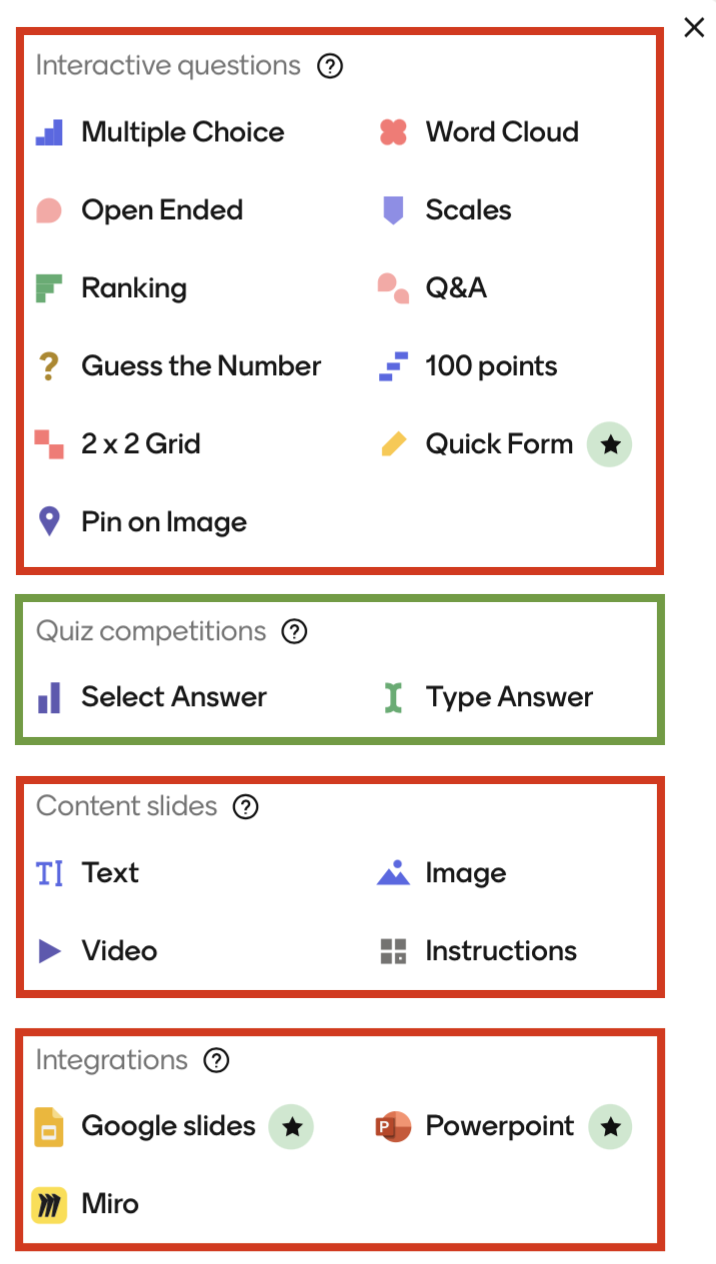
This tool can handle all slides for "Quiz competitions", which are "Select Answer" (single choice) and "Type Answer" (free text question). Please note that "Select Answer" questions can have multiple correct answers. However, the participant can only pick one.
What this tool can't do
This tool cannot handle any slides on Menti that are not of the category "Quiz competitions". This includes slides such as "Word Cloud", "Guess the Number" and "Multiple Choice", which do not give players a score either.
This tool does not guarantee you a perfect score.
When to use this tool
This tool can only be used for Menti presentations that use "Quiz competitions" slides.
As a student/participant, you can use it to automatically solve quizzes.
As a teacher/presenter, you can use it to prepare the quiz to be unsolvable for AI.
Please make sure to use this tool in a fair manner.
Disclaimer
MentAI is in no way affiliated with, authorized, maintained, or endorsed by Menti or any of its affiliates or subsidiaries. It is an independent and unofficial project. Use it at your own risk.
1 maintainer

Metadata
1 maintainer
Release files for MentAI-CLI 0.1.6
For a detailed explanation of source distributions (sdists) and built distributions (wheels), please see the package formats documentation.
Source distribution (sdist)
| File | Size | Uploaded | |
|---|---|---|---|
| mentai_cli-0.1.6.tar.gz | 22.6 kB | Details |
Built distribution (wheel)
| File | Interpreter | ABI | Platform | Reset |
|---|---|---|---|---|
| mentai_cli-0.1.6-py3-none-any.whl | Python 3 | none | any | Details |
Total release size: 48.3 kB
Release files / mentai_cli-0.1.6.tar.gz
| Download URL | mentai_cli-0.1.6.tar.gz |
|---|---|
| Size | 22.6 kB |
| Tags | Source |
|
SHA-256 checksum How to use checksums |
de5f331acac4e42c3a49afc9c1ae1cff83542a8fd10a83ba33e4467e8bf9ac97
|
|
BLAKE2b-256 checksum How to use checksums |
08ac9fcd17d29ba872ee0cb17936d217856bb851966f740794c7e1f6c7f364b1
|
| Upload date | |
|
Uploaded using Trusted Publishing? What is trusted publishing? |
No |
| Uploaded via |
uv/0.11.1 {"installer":{"name":"uv","version":"0.11.1","subcommand":["publish"]},"python":null,"implementation":{"name":null,"version":null},"distro":{"name":"Ubuntu","version":"24.04","id":"noble","libc":null},"system":{"name":null,"release":null},"cpu":null,"openssl_version":null,"setuptools_version":null,"rustc_version":null,"ci":true}
|
Release files / mentai_cli-0.1.6-py3-none-any.whl
| Download URL | mentai_cli-0.1.6-py3-none-any.whl |
|---|---|
| Size | 25.6 kB |
| Tags | Python 3 |
|
SHA-256 checksum How to use checksums |
b7e894f39b290d657fde185dda4200ac0325ce21ffb559e8d522cbf1e9e8297b
|
|
BLAKE2b-256 checksum How to use checksums |
cfba46ea59daf62266710ad5c86afd04b21f41a483c8cebb1465964be2d151ea
|
| Upload date | |
|
Uploaded using Trusted Publishing? What is trusted publishing? |
No |
| Uploaded via |
uv/0.11.1 {"installer":{"name":"uv","version":"0.11.1","subcommand":["publish"]},"python":null,"implementation":{"name":null,"version":null},"distro":{"name":"Ubuntu","version":"24.04","id":"noble","libc":null},"system":{"name":null,"release":null},"cpu":null,"openssl_version":null,"setuptools_version":null,"rustc_version":null,"ci":true}
|














