
Python package for processing Infinium DNA methylation arrays

Project description





Mepylome: Ultra-Fast Methylation Array Analysis Toolkit
Mepylome is a high-performance Python toolkit tailored for parsing, processing, and analyzing methylation array IDAT files. Serving as a versatile library, Mepylome supports a wide range of methylation analysis tasks. It also includes an interactive GUI that enables users to generate UMAP plots and CNV plots (Copy Number Variation) directly from collections of IDAT files. Mepylome is designed for large-scale cohort processing and delivers substantial speed improvements over existing methylation analysis pipelines.
✨ Key Highlights
- ⚡ Very fast processing engine
- 🧬 Supports Illumina 450k, EPIC, EPICv2, 27k, MSA48, and MM285 arrays
- 📊 CNV analysis with interactive Plotly visualizations
- 🧹 Clean API for large-scale cohort processing
- 🖥️ Optional GUI for UMAP + CNV exploration
- 🧪 Built-in QC including pOOBAH detection and quality metrics
Features
Data Processing
- Parsing of IDAT files
- Extraction of methylation signals
Copy Number Analysis
- Calculation of Copy Number Variations (CNV) with visualization using plotly.
- Interactive visualization using Plotly
- CN-summary plots
Supported Array Types
- Illumina EPIC / EPICv2
- Illumina 450k
- Illumina 27k
- Illumina MSA48
- Illumina MM285 (Mouse)
Performance
Quality Control
- pOOBAH-based probe calculation
- Quality metrics for samples and probes
- Heatmap of beta values of a gene or genomic region
GUI
- Methylation analysis tool with a graphical browser interface for UMAP
analysis, CNV plots and supervised classification
- Can be run from the command line with minimal setup or customized through a Python script
Documentation
The mepylome documentation, including installation instructions, tutorial and API, is available at https://mepylome.readthedocs.io/
Usage
Methylation extraction and copy number variation plots
from pathlib import Path

from mepylome import CNV, MethylData

# Sample
analysis_dir = Path("/path/to/idat/directory")
sample_file = analysis_dir / "200925700125_R07C01"

# CNV neutral reference files
reference_dir = Path("/path/to/reference/directory")

# Get methylation data
sample_methyl = MethylData(file=sample_file)
reference_methyl = MethylData(file=reference_dir)

# Beta value
betas = sample_methyl.betas

# Print overview of processed data
print(sample_methyl)

# CNV anylsis
cnv = CNV.set_all(sample_methyl, reference_methyl)

# Visualize CNV in the browser
cnv.plot()
Methylation analysis: Command-line interface and GUI
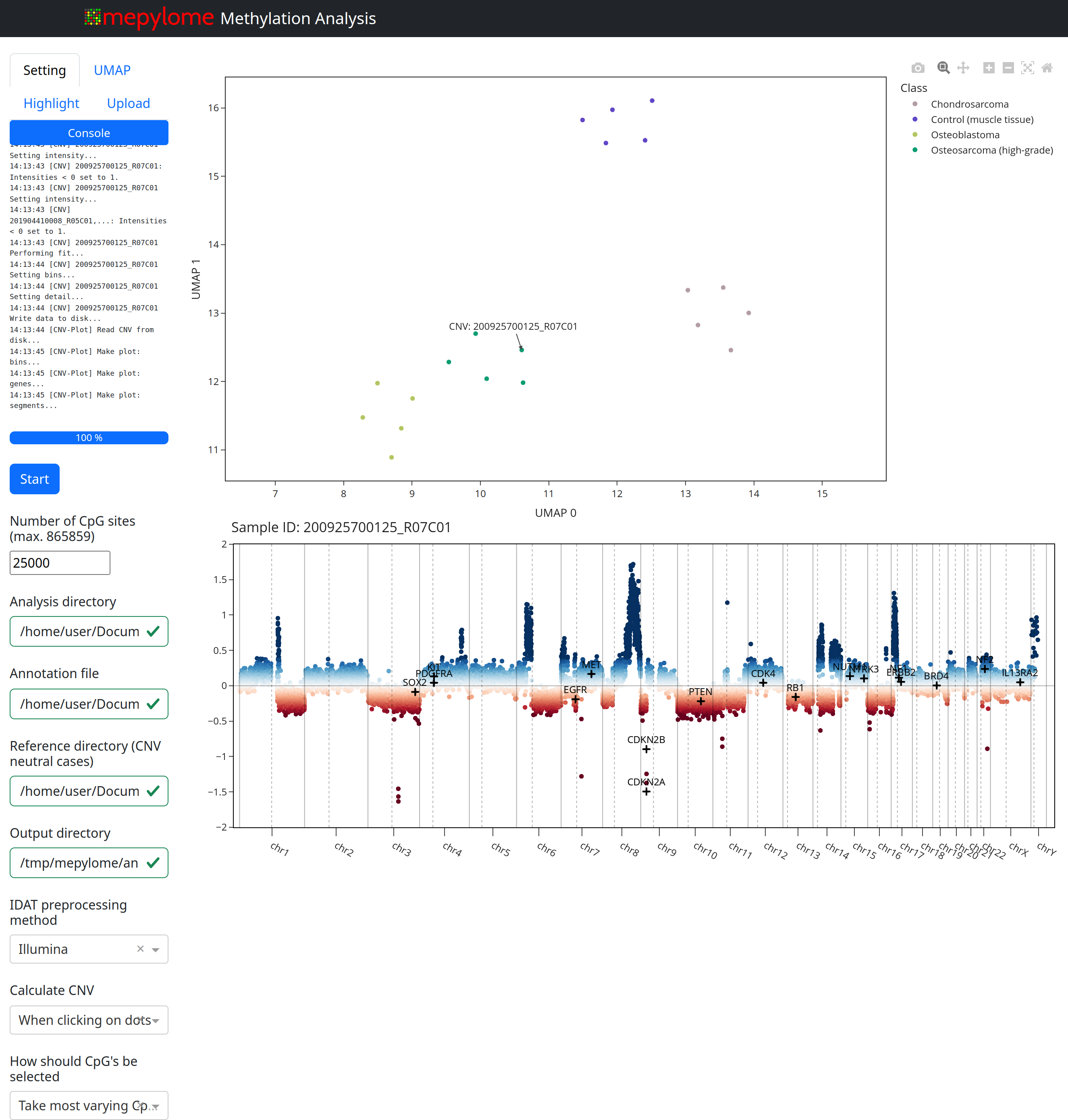
Basic usage:
Mepylome provides a command-line interface for launching a GUI and performing methylation analysis. Ensure you have an analysis directory, a CNV reference directory, and an annotation file (located within the analysis directory). Use the following command to initiate the analysis:
mepylome --analysis_dir /path/to/idats --reference_dir /path/to/ref
If you want to perform a quick test, use:
mepylome --tutorial
This command downloads sample IDAT files and provides a demonstration of the package's functionality.
You can try the tutorial directly in Google Colab-without downloading or installing anything-by clicking the link below. Please note that GUI support is limited in Colab.
See https://mepylome.readthedocs.io/ for details.
Publication
This library is described in the following peer-reviewed publication:
https://doi.org/10.1002/aisy.202500778
Contributing
Contributions are welcome! If you have any bug reports, feature requests, or suggestions, please open an issue or submit a pull request.
License
This project is licensed under the MIT license.
Acknowledgements
Mepylome is strongly influenced by minfi and conumee2. Some functionalities, such as the manifest handler and parser, are adapted from methylprep.
Release history Release notifications | RSS feed


Download files
Download the file for your platform. If you're not sure which to choose, learn more about installing packages.
Source Distribution
Built Distribution
Filter files by name, interpreter, ABI, and platform.
If you're not sure about the file name format, learn more about wheel file names.
Copy a direct link to the current filters
File details
Details for the file mepylome-0.12.0.tar.gz.
File metadata
- Download URL: mepylome-0.12.0.tar.gz
- Upload date:
- Size: 610.5 kB
- Tags: Source
- Uploaded using Trusted Publishing? No
- Uploaded via: twine/6.2.0 CPython/3.13.11
File hashes
| Algorithm | Hash digest | |
|---|---|---|
| SHA256 |
f035e3dfc3ff8c4619939d67f78a5efabf1c19a53491bb65138513adf4324551
|
|
| MD5 |
32f151f3dd4e503fff0dc4d89e381bb1
|
|
| BLAKE2b-256 |
3bfd95a06bd30541db4690614a345a2b7f7c6bb17c325a51ef69996cce6d6b7e
|
File details
Details for the file mepylome-0.12.0-py3-none-any.whl.
File metadata
- Download URL: mepylome-0.12.0-py3-none-any.whl
- Upload date:
- Size: 648.0 kB
- Tags: Python 3
- Uploaded using Trusted Publishing? No
- Uploaded via: twine/6.2.0 CPython/3.13.11
File hashes
| Algorithm | Hash digest | |
|---|---|---|
| SHA256 |
da43b17f6527109200105ff43ca78c5485309fc70cff806adb4c5ffb5a1850fc
|
|
| MD5 |
1ceb2b92854c61a21645072c03d4fa4c
|
|
| BLAKE2b-256 |
2f7bf8f2c5c3963541476c0d220410c201eff403995669325a2455ad3f663690
|






