

 merakicat
This package makes migrating Cisco Catalyst switches to Meraki Dashboard much easier. #merakicat
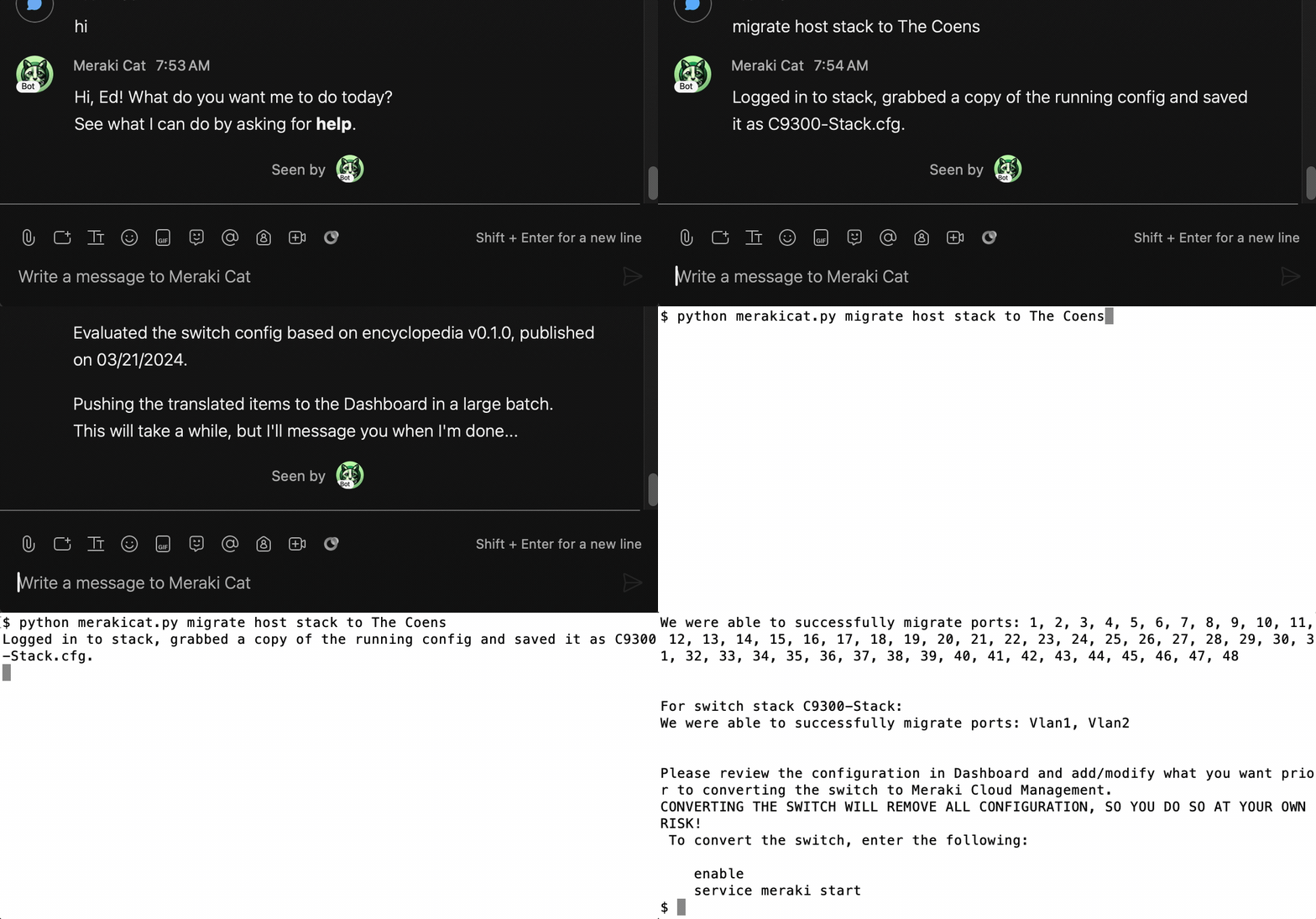
This Python app can be run in Webex Teams Bot mode or in command-line mode.
Below is the list of configurations the tool can currently translate:
switch:
- Hostname
- Spanning Tree RSTP
- Stack
- Static Routing
port:
- Port Description
- Port Status
- Port Speed
- Port Duplex
- Port Type
- PoE Enabled
- Allowed VLANs
- Data VLAN
- Voice VLAN
- Private VLAN
- Layer 3 Interface
- STP RootGuard
- STP Loop Guard
- STP BPDU Guard
- Etherchannel LACP
- NM Ports
Once installed, you can print the entire index of the feature encyclopedia, or to print the index based on either supported and translatable items or both, enter:
cd src/merakicat
python mc_pedia [support] [translatable]
Prerequisites for using in Bot mode
If you don't already have a Webex Teams account, go ahead and register for one. They are free.
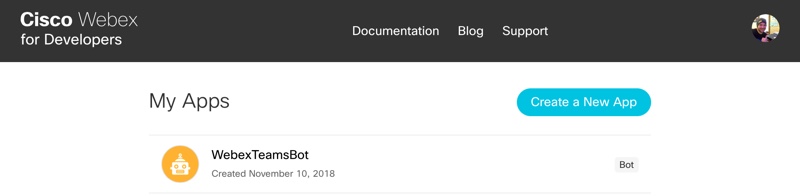
- You'll need to start by adding your Bot to the Webex Teams website. https://developer.webex.com/my-apps
- Click Create a New App
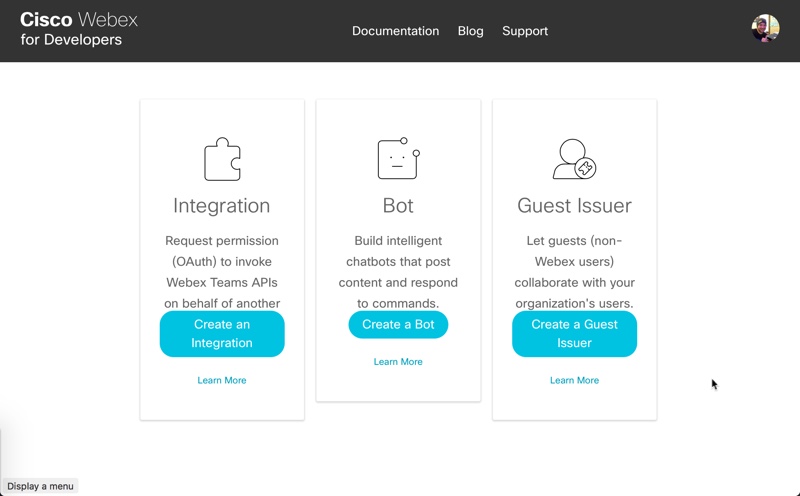
- Click Create a Bot.
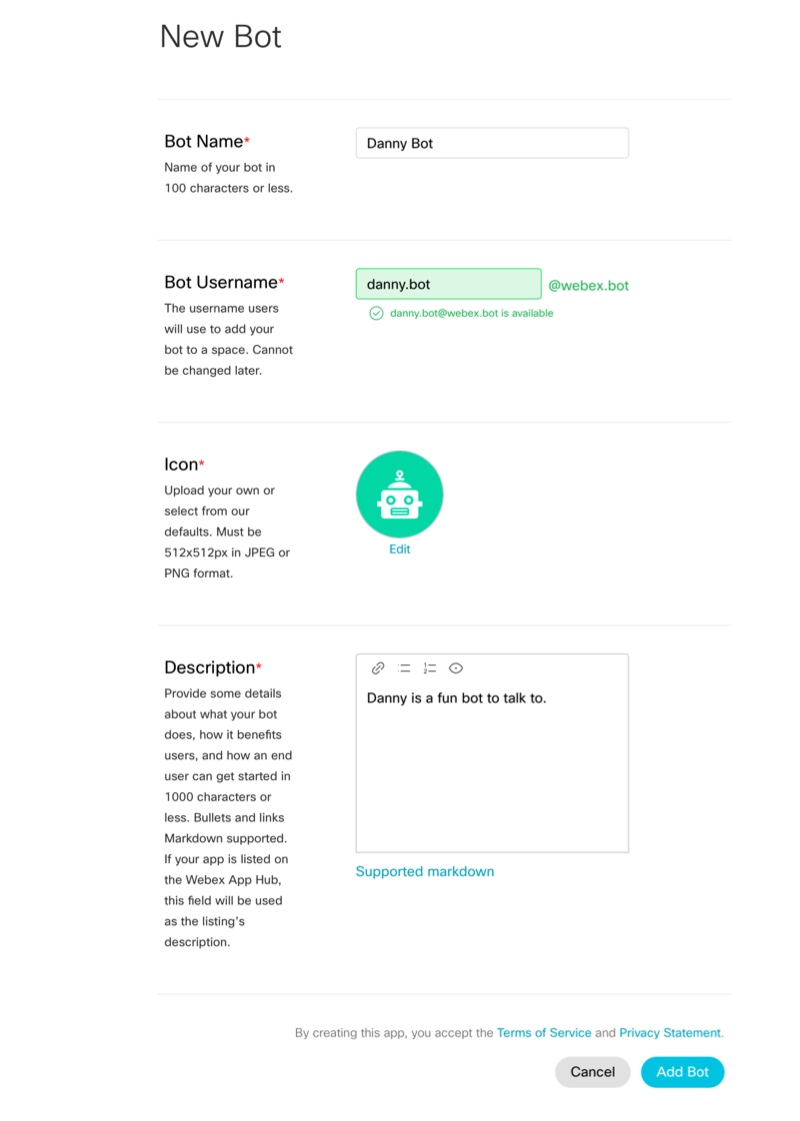
- Fill out all the details about your Bot. You'll need to set a name, username, icon (either upload one or choose a sample), and provide a description.
- Click Add Bot.
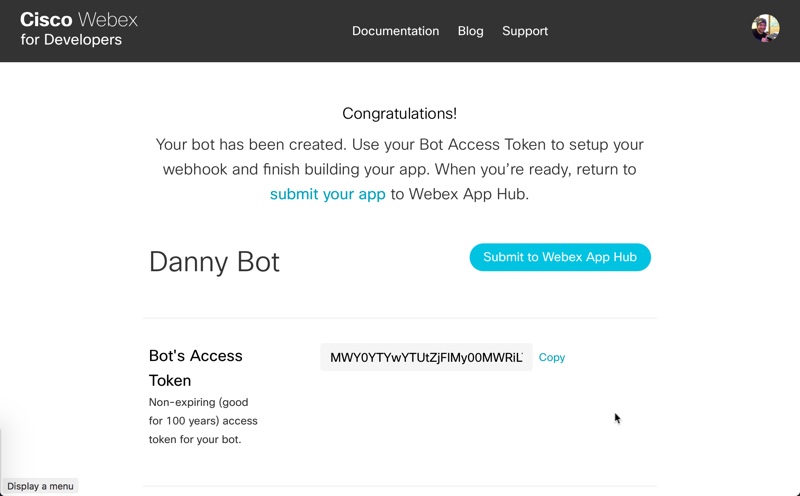
- On the Congratulations screen, make sure to copy the Bot's Access Token, you will need this in a second.
Installation
Python 3.11 is recommended.
- Clone the github repository and install the requirements
git clone https://github.com/ecoen66/merakicat
cd merakicat
pip install -r requirements_dev.txt
Usage
- The easiest way to use this module is to set a few environment variables
- You can also put the same
KEY=valueentries in a.envfile (see.env.example).Note: As an alternative, you may edit the variables in mc_user_info.py. Although more convenient, it is less secure.
In addition to these settings, various debugs and a choice of PDF vs. DOCX report format can be enabled in the mc_user_info.py file.
> Note: For PDF report generation, MS Word must be installed on the host with merakicat.
Bot
To run merakicat as a Bot, just start it without any parameters:
cd src/merakicat
python merakicat.py
Bot commands include the following:
Check a Catalyst switch config for both translatable and possible Meraki features:
check [host <FQDN or IP address> | file <filespec>] [with timing] [with details]
Check one or more Catalyst switch config files for both translatable and possible Meraki features:
check <drag-and-drop files> [with timing] [with details]
Check the configs of cloud monitored Catalyst switches for both translatable and possible Meraki features:
check network <Meraki network name> [with timing] [with details]
Register a Catalyst switch to the Meraki Dashboard:
register [host <FQDN or IP address>] [with timing]
Claim Catalyst switches to a Meraki Network:
claim [<Meraki serial numbers>] [to <Meraki network name>] [with timing]
Translate a Catalyst switch config from a file or host to claimed Meraki serial numbers:
translate [host <FQDN or IP address> | file <filespec>] [to <Meraki serial numbers>] [with timing]
Migrate a Catalyst switch to a Meraki switch - register, claim & translate:
migrate [host <FQDN or IP address>] [to <Meraki network name>] [with timing]
List all Meraki networks in the configured organization:
get networks
Create a demo report for all features currently in the feature encyclopedia:
demo report
Command-line
To run merakicat from the command-line (or from a shell script), enter any of the following:
Check a Catalyst switch config for both translatable and possible Meraki features:
cd src/merakicat
python merakicat.py check host <FQDN or IP address> | file <filespec> [with timing] [with details]
Check a list of switches specified in a CSV or Excel file (use hosts_template.xlsx as a template):
cd src/merakicat
check hosts <filespec> [with timing]
Check the configs of cloud monitored Catalyst switches for both translatable and possible Meraki features:
cd src/merakicat
python merakicat.py check network <Meraki network name> [with timing] [with details]
Get the Cloud ID for a Catalyst switch:
cd src/merakicat
python merakicat.py get cloud-id <FQDN or IP address> [with timing]
Get Cloud IDs for hosts listed in a CSV or Excel file (use hosts_template.xlsx as a template):
cd src/merakicat
python merakicat.py get cloud-ids <filespec> [with timing]
List all Meraki networks in the configured organization:
cd src/merakicat
python merakicat.py get networks
Register a Catalyst switch or stack to the Meraki Dashboard:
cd src/merakicat
python merakicat.py register host <FQDN or IP address> [with timing]
Claim Catalyst switches to a Meraki Network:
cd src/merakicat
python merakicat.py claim <Meraki serial numbers> to <Meraki network name> [with timing]
Translate a Catalyst switch or stack config from a file or host to claimed Meraki serial numbers:
cd src/merakicat
python merakicat.py translate host <FQDN or IP address> | file <filespec> to <Meraki serial numbers> [with timing]
Migrate a Catalyst switch to a Meraki switch - register, claim & translate:
cd src/merakicat
python merakicat.py migrate host <FQDN or IP address> to <Meraki network name> [with timing]
Create a demo report for all features currently in the feature encyclopedia:
cd src/merakicat
python merakicat.py demo report
Upgrade IOS software (see IOS software upgrades):
cd src/merakicat
python merakicat.py upgrade host <FQDN or IP address> [<url>] [-y] [--allow-downgrade] [--ios-software <directory>]
Upgrade IOS software on hosts listed in a CSV or Excel file (use hosts_template.xlsx as a template; see IOS software upgrades):
cd src/merakicat
python merakicat.py upgrade hosts <filespec> [<url>] [-y] [--allow-downgrade] [--ios-software <directory>]
-y skips the confirmation prompt (the software URL is then required). --allow-downgrade permits installing an older version than the switch is currently running. --ios-software <directory> selects the local directory of IOS images. When omitted, merakicat looks for an ios-software directory in the working directory and at the repository root.
Parallel bulk operations
check hosts, get cloud-ids, and upgrade hosts contact switches in parallel. The worker limit is DEFAULT_PARALLEL_MAX_WORKERS in src/merakicat/mc_constants.py (currently 20). The pool size is the smaller of that value and the number of hosts in the file. Change the constant to raise or lower how many switches are contacted at once.
IOS software upgrades
Before using upgrade host or upgrade hosts, place the Catalyst IOS XE images in the ios-software directory at the repo root, in the subdirectory that matches each platform:
| Platform | Directory |
|---|---|
| Catalyst 9300 / 9500 (and other Cat9K) | ios-software/cat9k/ |
Catalyst 9200 (cat9k_lite) |
ios-software/cat9k_lite/ |
| IE-35XX | ios-software/ie35xx/ |
Put at most one .bin image in each platform directory (cat9k/, cat9k_lite/, and ie35xx/).
To use a directory that is not in the default location, use the optional --ios-software parameter:
python merakicat.py upgrade host <FQDN or IP address> --ios-software <directory>
The switches download those images over the network. You must serve the ios-software directory from the same host that runs merakicat.py for the upgrades. From the ios-software directory (or the directory given with --ios-software), start the included HTTP server (no virtual environment needed; the script uses only Python built-in modules):
cd ios-software
python3 http-server.py
Then pass that server’s base URL to the upgrade command (for example http://<this-host>:8000/). If you omit the URL and do not use -y, merakicat will prompt for it. The URL must point at this host’s ios-software content — the default directory, or the directory passed with --ios-software — so the switches can fetch the same images merakicat selected locally.
Donations
If you found this repo to be useful, please consider donating to Life Decisions, Rockford, IL through a purchase from the Merakicat store.
Credits
This project is heavily based on the work of others:
Catalyst_to_Meraki_Migration_Tool by Fady Sharobeem.
Catalyst_2_Meraki_Config_Checker by Fady Sharobeem.
The bot functionality is using webex_bot by Finbarr Brady.
History
1.3.0 (10-13-2026)
- Added
upgrade hostandupgrade hostscommands to perform automated IOS software upgrades
1.2.3 (8-2-2026)
- Fix syntax error in mc_prechecks.py
- Fix for Meraki python library module name change
- Fix regex warnings when using Python 3.12+
1.2.2 (6-26-2026)
- Removed duplicate
mc_pedia2.pyfile from repo root - Patched
mc_prechecks.pyto account for an unconfigured, default VLAN 1
1.2.0 (6-22-2026)
- Added a "get networks" command that lists all the networks in the org
- Added support for using a .env file to store secrets
- Added switch model and IOS version compatibility checks
- Added the runtime checks performed by "register" to the reports generated by "check host(s)"
- Modified "get cloud-id(s)" to be more robust and to skip compatibility checks normally performed by "register" to ensure Cloud IDs are reported.
- Refactored mc_register.py and some other files in order to better support these changes.
1.1.0 (4-30-2026)
- Added
check hosts,get cloud-id, andget cloud-idscommands (currently CLI mode only). - Removed references to
bulk_check.shwhich has been replaced bycheck hosts. - Added checks in Register() to see if the switch has already been claimed in the Dashboard, or if the switch already has a Cloud ID before registering the switch to generate one. This speeds up the process for those two cases and protects against initiating a migration to Cloud Managed if the switch is already claimed an in a network.
- Started implementing a
--dry-runfeature. Not exposed in help because it a work in progress. - Fix issue with determining the Organization ID if the user has access to more than one org.
- Added support for IE-3500 series switches
1.0.1 (11-16-2025)
- Fixed issue with single switch "stacks".
- Fixed issue where switches on unified versions of IOS XE would automatically reboot into Meraki mode.
- Added compatibility with Early Adopters version of Meraki Dashboard API for unified IOS XE onboarding.
- Fixed issue with special versions of IOS XE.
- Reformatted the encyclopedia for easier updates and readability.
- Renamed the new encyclopedia, as it is no longer compatible with earlier versions of Merakicat.
- Updated requirements
0.2.7 (03-23-2025)
- Resolved issue with C9K Uplink after API change.
- mc_pedia version 0.1.78
0.2.6 (05-07-2024)
- Resolved Issue #6.
- Fixed issue with unclaiming switches before removing switch stack.
- Updated requirements.
0.2.5 (04-25-2024)
- Reverted back to Finbarr Brady's webex-bot after a pull merge.
0.2.4 (04-12-2024)
- Added Private VLAN -> Port Isolation to encyclopedia.
- Removed older bot code.
- Updated AUTHORS.rst.
- Updated .gitignore
0.2.3 (04-10-2024)
- Translate now checks to make sure that the target switches have the same number of ports as the sources.
0.2.2 (04-10-2024)
- Added environment variable to specify a Meraki Oragnization name.
0.2.1 (04-10-2024)
- Added support for ip default-gateway as a static route.
0.2.0 (04-10-2024)
- Changed BOT libraries to enable websockets and remove ngrok for security.
- Began adding logic for Catalyst Cloud Monitoring onboarding.
0.1.8 (04-03-2024)
- Edited README.
- Renamed mc_user_sample.py to mc_user_info.py and commented out possible environment variables.
- Added logic to merakicat.py to handle missing variables on import from mc_user_info.py.
0.1.7 (04-01-2024)
- Added the ability to Check the configs of cloud monitored Catalyst switches for both translatable and possible Meraki features.
- Included "with timing" and "with details" options on check drag-n-drop.
- Renamed some called functions in external modules.
0.1.6 (03-26-2024)
- Updated encyclopedia.
- Migrated batch helper code for cleaner installation.
0.1.5 (03-23-2024)
- Supports NM ports.
- Merged nm-specifics into the encyclopedia.
0.1.4 (03-21-2024)
- Downloads a fresh copy of the encyclopedia from my repo if the local copy is over 24 hours old.
0.1.3 (03-21-2024)
- Code beautification with flake8.
- Setting up for publishing automation.
- Changed directory structure for publishing.
- Released on PyPI.
0.0.14 (03-19-2024)
- Option added for check with drag and drop files in bot mode.
- Added missing timing in check report in bot mode.
- Still not yet released on PyPI.
0.0.13 (03-18-2024)
- Option added for detailed check report "with detail".
0.0.12 (03-15-2024)
- Option for PDF vs. DOCX reporting in checker.
- Layer 3 Interfaces (interface VLAN) supported.
- Static routes supported.
- Command added for "demo report".
0.0.11 (03-12-2024)
- New reporting in checker.
- Port-channel LACP is working and fast.
0.0.10 (03-08-2024)
- Using a single mc_pedia.
0.0.9 (03-07-2024)
- Using both config_pedia and check_pedia.
- Changed to ngrok API for bot functionality
0.0.8 (03-01-2024)
- Lots of comment blocks added.
0.0.7 (03-01-2024)
- Now using batch port updates to Meraki dashboard.
0.0.6 (03-01-2024)
- Some light refactoring of mc_translate module.
- More prep work for Uplink config.
0.0.5 (02-29-2024)
- Added Catalyst NM module recognition and prep work for Uplink config.
0.0.4 (02-28-2024)
- Removed external data fetch for list of unsupported features in prep for adding display of features that are semi-supported.
- Added command line help python merakicat.py help.
0.0.3 (02-27-2024)
- Created command line option vs BOT.
- Just try python merakicat.py convert host to .
0.0.2 (02-26-2024)
- Not yet released on PyPI.
0.0.1 (02-26-2024)
1 maintainer

Metadata
1 maintainer
Release files for merakicat 1.3.0
For a detailed explanation of source distributions (sdists) and built distributions (wheels), please see the package formats documentation.
Source distribution (sdist)
| File | Size | Uploaded | |
|---|---|---|---|
| merakicat-1.3.0.tar.gz | 2.1 MB | Details |
Built distribution (wheel)
| File | Interpreter | ABI | Platform | Reset |
|---|---|---|---|---|
| merakicat-1.3.0-py3-none-any.whl | Python 3 | none | any | Details |
Total release size: 2.3 MB
Release files / merakicat-1.3.0.tar.gz
| Download URL | merakicat-1.3.0.tar.gz |
|---|---|
| Size | 2.1 MB |
| Tags | Source |
|
SHA-256 checksum How to use checksums |
9e2d7a20e58010e2ac91d942681e459eb1aea219e7164d97793ae62f59f08f62
|
|
BLAKE2b-256 checksum How to use checksums |
184e34c4e37a406e208182e15fd352da2472ed171940329d6114ac61ed5e4986
|
| Upload date | |
|
Uploaded using Trusted Publishing? What is trusted publishing? |
No |
| Uploaded via |
twine/7.0.0 CPython/3.13.14
|
Release files / merakicat-1.3.0-py3-none-any.whl
| Download URL | merakicat-1.3.0-py3-none-any.whl |
|---|---|
| Size | 124.0 kB |
| Tags | Python 3 |
|
SHA-256 checksum How to use checksums |
97c1e76d88100a03532fb7759a34463c038dee9c868ee7273ebc71b8f57a832d
|
|
BLAKE2b-256 checksum How to use checksums |
2ed200eccfe050e892b1611a6250d69801f0642396d9fbaf155156e67eab5f7b
|
| Upload date | |
|
Uploaded using Trusted Publishing? What is trusted publishing? |
No |
| Uploaded via |
twine/7.0.0 CPython/3.13.14
|














