
A tool for tracking student progress using Gantt charts and task management
Verified details
These details have been verified by PyPIProject links
GitHub Statistics
Maintainers

Project description
Meritum


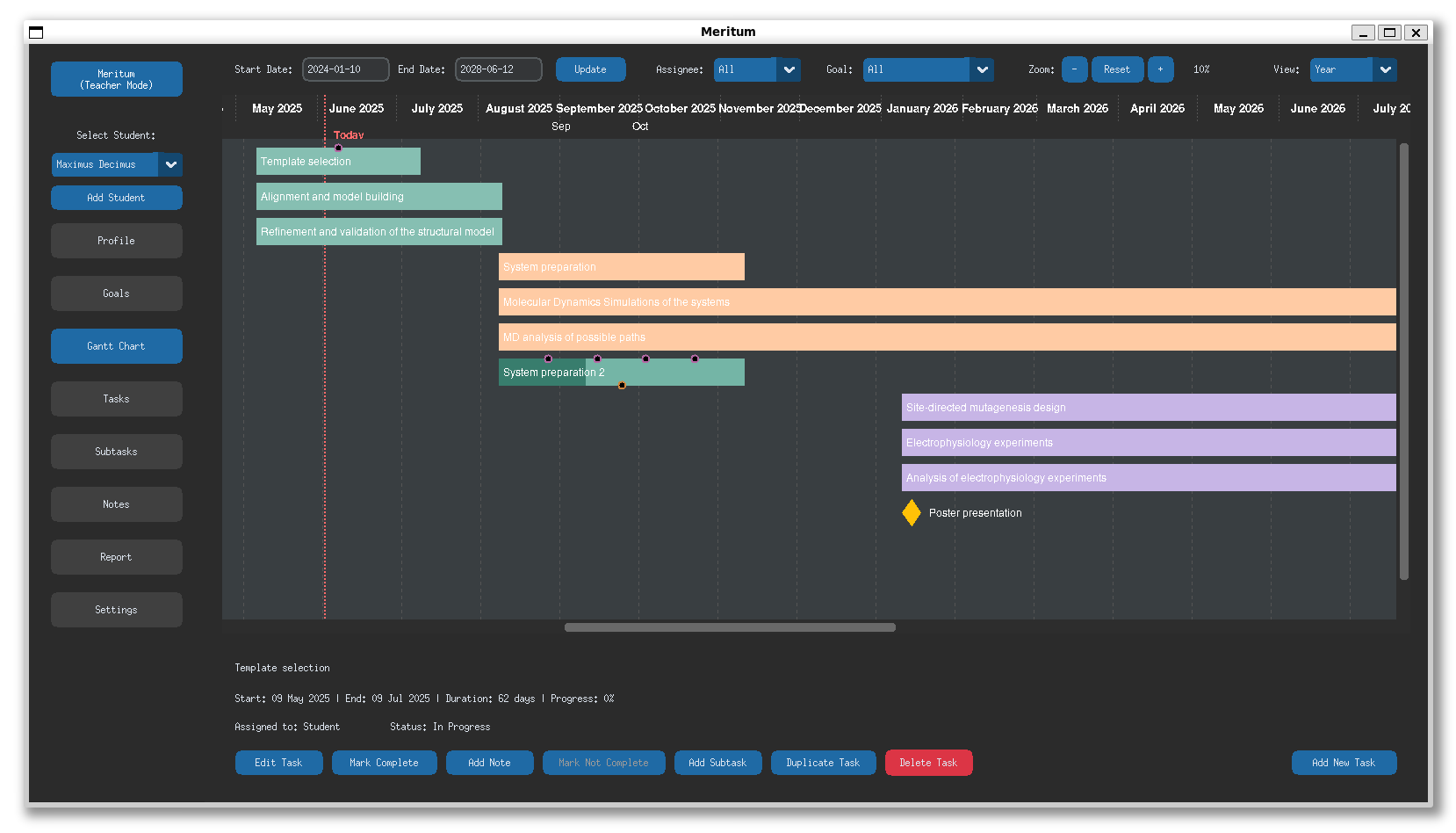
A tool for tracking student progress using Gantt charts and task management, designed especially for academic contexts like undergraduate and Ph.D. programs.
Features
- Dual Mode Interface: Separate views for teachers and students
- Visual Progress Tracking: Intuitive Gantt charts for project visualization
- Goals Management: Create and track goals with customizable colors
- Task Management: Create, assign, and track tasks with deadlines
- Goal-Task Association: Link tasks to specific goals for better organization and progress tracking
- Progress History: Detailed history of task completion and progress
- Note Taking: Add detailed notes to tasks for better context
- Profile Management: Keep detailed student profiles in one place
Installation
Install Meritum easily using pip:
pip install meritum
Or install directly from GitHub for the latest version:
pip install git+https://github.com/maurobedoya/meritum.git
To update to the latest version (since we are making a lot of changes ;) ) use:
pip install --upgrade meritum
Usage
After installation, simply run:
python -m meritum
or
meritum
On first run, you'll be prompted to choose either Teacher or Student mode.

Setup guide
For Teachers
1. Initial setup
- Launch Meritum and select "Teacher Mode"
- Go to Settings to configure application defaults if needed
2. Add students
- Click "Add Student" in the sidebar
- Enter the student´s name and create a data folder path
- This data folder should be in a location that can be shared (Dropbox, Google Drive, OneDrive, etc.)
- Fill the student´s profile information
3. Share Data Folder
- Share the data folder with your student using your preferred file-sharing service
4. Create Goals and Tasks
- Set up initial goals for the student from the Goals tab
- Create tasks and milestones from the Tasks tab or Gantt Chart
- Assign tasks to either yourself or the student
5. Monitor Progress
- Use the Gantt Chart to get a visual overview of the project timeline
- Regular check-ins through the Notes feature can provide qualitative feedback
For Students:
1. Initial Setup
- Launch Meritum and select "Student Mode"
- When prompted, enter the data folder path shared by your teacher
- If an existing profile exists, select it; otherwise, create a new profile
2. Configure Data Path
- Verify the data folder path in the Settings tab
- Make sure it points to the synchronized folder on your computer. Note that your local path may be different from your teacher's path, but both should point to the same synchronized folder (via Dropbox, Google Drive, etc.)
3. View and Update Progress
- View assigned tasks in the Tasks tab or Gantt Chart
- Update your progress on tasks by editing them and adjusting the progress percentage
- Mark tasks as complete when finished
4. Add Notes
- Use the Notes feature to provide context or ask questions about specific tasks
- All notes will be synchronized with your teacher
Synchronization:
All changes are automatically saved to the shared data folder. Both teacher and student see the same real-time data. There's no need for manual synchronization as long as both parties are using the same data folder. For cloud-based sharing services (Dropbox, Google Drive, etc.), ensure that syncing is enabled and up-to-date
Adding students

Adding goals

Adding tasks

Requirements
- Python 3.7 or higher
- customtkinter 5.2.2 or higher
License
This project is licensed under the MIT License - see the LICENSE file for details.
Contributing
Contributions are welcome! Please feel free to submit a Pull Request.
- Fork the repository
- Create your feature branch (
git checkout -b feature/amazing-feature) - Commit your changes (
git commit -m 'Add some amazing feature') - Push to the branch (
git push origin feature/amazing-feature) - Open a Pull Request
Acknowledgments
- Thanks to all contributors and testers
- Built with CustomTkinter
Project details
Verified details
These details have been verified by PyPIProject links
GitHub Statistics
Maintainers


Download files
Download the file for your platform. If you're not sure which to choose, learn more about installing packages.
Source Distribution
Built Distribution
Filter files by name, interpreter, ABI, and platform.
If you're not sure about the file name format, learn more about wheel file names.
Copy a direct link to the current filters
File details
Details for the file meritum-0.2.8.tar.gz.
File metadata
- Download URL: meritum-0.2.8.tar.gz
- Upload date:
- Size: 214.5 kB
- Tags: Source
- Uploaded using Trusted Publishing? Yes
- Uploaded via: twine/6.1.0 CPython/3.12.9
File hashes
| Algorithm | Hash digest | |
|---|---|---|
| SHA256 |
4f42241c82fc722b408183f9144eff241cb98f3373b3daa76e5a70a9873d8666
|
|
| MD5 |
b4a118ac675bda3ffc5bc8cea2e81f8f
|
|
| BLAKE2b-256 |
5b2401c212a0569aae148dc78c63312a760ca415ce7bf2a24b5d1ce5a105f8db
|
Provenance
The following attestation bundles were made for meritum-0.2.8.tar.gz:
Publisher:
publish-to-pypi.yml on maurobedoya/meritum
-
Statement:
-
Statement type:
https://in-toto.io/Statement/v1 -
Predicate type:
https://docs.pypi.org/attestations/publish/v1 -
Subject name:
meritum-0.2.8.tar.gz -
Subject digest:
4f42241c82fc722b408183f9144eff241cb98f3373b3daa76e5a70a9873d8666 - Sigstore transparency entry: 211497578
- Sigstore integration time:
-
Permalink:
maurobedoya/meritum@1762dc197d5f14156ab3ca239ed5851b5e61885f -
Branch / Tag:
refs/tags/v0.2.8 - Owner: https://github.com/maurobedoya
-
Access:
public
-
Token Issuer:
https://token.actions.githubusercontent.com -
Runner Environment:
github-hosted -
Publication workflow:
publish-to-pypi.yml@1762dc197d5f14156ab3ca239ed5851b5e61885f -
Trigger Event:
push
-
Statement type:
File details
Details for the file meritum-0.2.8-py3-none-any.whl.
File metadata
- Download URL: meritum-0.2.8-py3-none-any.whl
- Upload date:
- Size: 212.3 kB
- Tags: Python 3
- Uploaded using Trusted Publishing? Yes
- Uploaded via: twine/6.1.0 CPython/3.12.9
File hashes
| Algorithm | Hash digest | |
|---|---|---|
| SHA256 |
e78732d09a3a2f00781e213f896205463f9c4434e910aeb1bab51ffdbf0a0183
|
|
| MD5 |
02ec75a93cfc65ed357ed303a822a390
|
|
| BLAKE2b-256 |
52a18b28aa19135ef29b099b13d43df5ee2ba3a1b350ced39ace6180e2edfa30
|
Provenance
The following attestation bundles were made for meritum-0.2.8-py3-none-any.whl:
Publisher:
publish-to-pypi.yml on maurobedoya/meritum
-
Statement:
-
Statement type:
https://in-toto.io/Statement/v1 -
Predicate type:
https://docs.pypi.org/attestations/publish/v1 -
Subject name:
meritum-0.2.8-py3-none-any.whl -
Subject digest:
e78732d09a3a2f00781e213f896205463f9c4434e910aeb1bab51ffdbf0a0183 - Sigstore transparency entry: 211497581
- Sigstore integration time:
-
Permalink:
maurobedoya/meritum@1762dc197d5f14156ab3ca239ed5851b5e61885f -
Branch / Tag:
refs/tags/v0.2.8 - Owner: https://github.com/maurobedoya
-
Access:
public
-
Token Issuer:
https://token.actions.githubusercontent.com -
Runner Environment:
github-hosted -
Publication workflow:
publish-to-pypi.yml@1762dc197d5f14156ab3ca239ed5851b5e61885f -
Trigger Event:
push
-
Statement type:






