
mermaid_diagram
Python package for generating the string which represents a Mermaid diagram.
It provides methods to build your diagram. The resulting diagram is returned
as a string, either bare or enclosed within a Markdown code block.
This package cannot produce image files of the diagrams.
Use cases:
- Include Mermaid diagrams (generated from data) in a markdown file which gets created using Python script.
Installation
You can install the package using pip:
pip install mermaid_diagram
Supported diagrams
This package supports the following Mermaid diagrams:
- Packet diagram (
packet-beta).
Usage
Packet diagram
In this first example we build a diagram of the TCP packet,
using the add_segment_bytes and add_segment_bits methods.
To include the total packet size in the title, it uses the size_in_bytes and
size_in_bits getters.
Finally, the diagram string is returned as markdown code block.
from mermaid_diagram import Packet

d = Packet()
d.add_segment_bytes(2, "Source Port")
d.add_segment_bytes(2, "Destination Port")
d.add_segment_bytes(4, "Sequence Number")
d.add_segment_bytes(4, "Acknowledgment Number")
d.add_segment_bits(4, "Data Offset")
d.add_segment_bits(6, "Reserved")
d.add_segment_bits(1, "URG")
d.add_segment_bits(1, "ACK")
d.add_segment_bits(1, "PSH")
d.add_segment_bits(1, "RST")
d.add_segment_bits(1, "SYN")
d.add_segment_bits(1, "FIN")
d.add_segment_bytes(2, "Window")
d.add_segment_bytes(2, "Checksum")
d.add_segment_bytes(2, "Urgent Pointer")
d.add_segment_bytes(4, "(Options and Padding)")
d.add_segment_bytes(8, "Data (variable length)")
d.title = f"TCP Packet - {d.size_in_bytes} bytes ({d.size_in_bits} bits)"
print(d.diagram_markdown)

# ```mermaid
# ---
# title: "TCP Packet - 32 bytes (256 bits)"
# ---
# packet-beta
# 0-15 : "Source Port"
# 16-31 : "Destination Port"
# 32-63 : "Sequence Number"
# 64-95 : "Acknowledgment Number"
# 96-99 : "Data Offset"
# 100-105 : "Reserved"
# 106 : "URG"
# 107 : "ACK"
# 108 : "PSH"
# 109 : "RST"
# 110 : "SYN"
# 111 : "FIN"
# 112-127 : "Window"
# 128-143 : "Checksum"
# 144-159 : "Urgent Pointer"
# 160-191 : "(Options and Padding)"
# 192-255 : "Data (variable length)"
# ```
Which renders as:
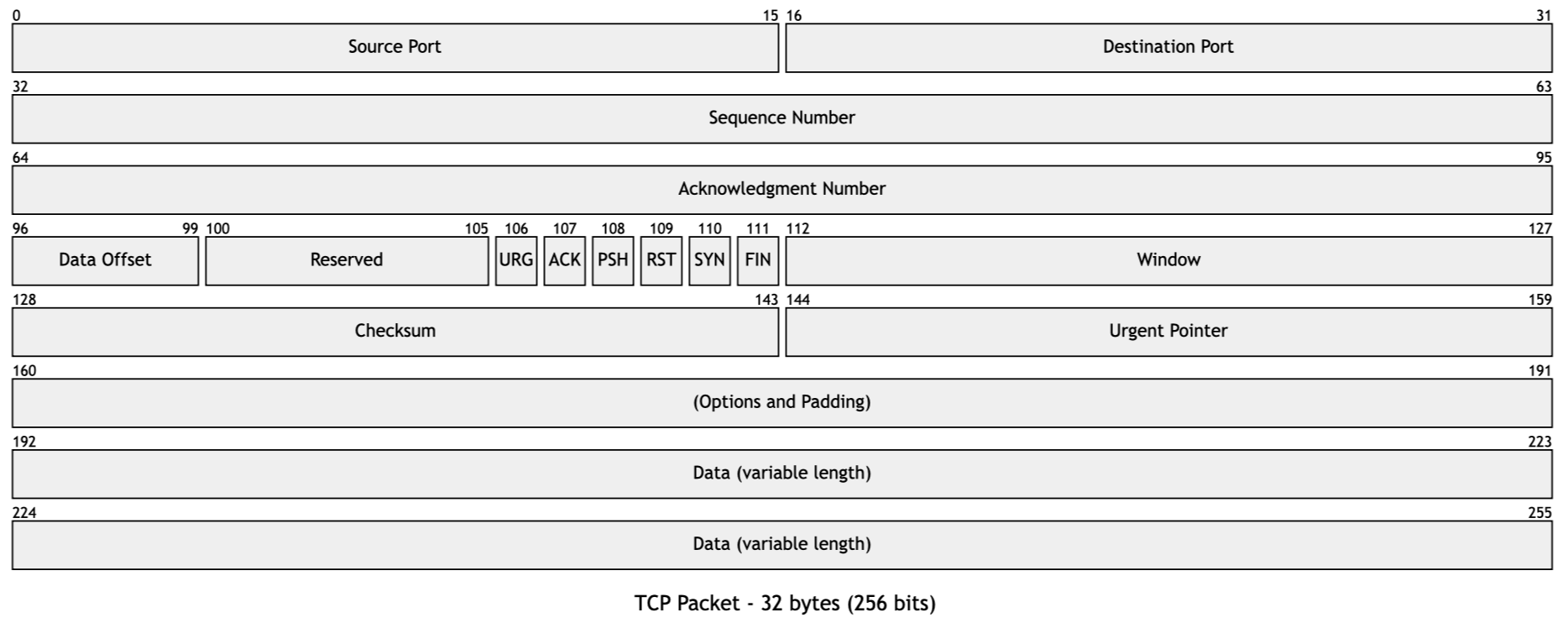
In the next example we activate the use_number_prefix option, so that every
segment gets a number prefix (e.g. 1) First segment).
This can be helpful if the diagram will be accompanied by a numbered list
where the segments are explained in detail.
from mermaid_diagram import Packet

d = Packet()
d.use_number_prefix = True
d.add_segment_bytes(2, "Source Port")
d.add_segment_bytes(2, "Destination Port")
d.add_segment_bytes(2, "Length")
d.add_segment_bytes(2, "Checksum")
d.add_segment_bytes(4, "Data (variable length)")
d.title = f"UDP Packet - {d.size_in_bytes} bytes ({d.size_in_bits} bits)"
print(d.diagram_markdown)

# ```mermaid
# ---
# title: "UDP Packet - 12 bytes (96 bits)"
# ---
# packet-beta
# 0-15 : "1) Source Port"
# 16-31 : "2) Destination Port"
# 32-47 : "3) Length"
# 48-63 : "4) Checksum"
# 64-95 : "5) Data (variable length)"
# ```
Which renders as:

Known issues
- No input validation or error handling.
1 maintainer

Metadata
1 maintainer
Release files for mermaid-diagram 0.1.2
For a detailed explanation of source distributions (sdists) and built distributions (wheels), please see the package formats documentation.
Source distribution (sdist)
| File | Size | Uploaded | |
|---|---|---|---|
| mermaid_diagram-0.1.2.tar.gz | 4.5 kB | Details |
Built distribution (wheel)
| File | Interpreter | ABI | Platform | Reset |
|---|---|---|---|---|
| mermaid_diagram-0.1.2-py3-none-any.whl | Python 3 | none | any | Details |
Total release size: 9.4 kB
Release files / mermaid_diagram-0.1.2.tar.gz
| Download URL | mermaid_diagram-0.1.2.tar.gz |
|---|---|
| Size | 4.5 kB |
| Tags | Source |
|
SHA-256 checksum How to use checksums |
f6a99444239ad68a402b215677ef067b5a70867d445fb00febe9b431ace9769c
|
|
BLAKE2b-256 checksum How to use checksums |
0883b2d84f33b8bce89203f3e1577b73f764059b6de28a1fbef8a1051e45169a
|
| Upload date | |
|
Uploaded using Trusted Publishing? What is trusted publishing? |
Yes |
| Uploaded via |
twine/6.1.0 CPython/3.12.9
|
Provenance
Provenance describes where a file came from. On PyPI, provenance is shared via attestations, which provide a verifiable record of the build or publishing details. View details, limitations and caveats.


PyPI Publish Attestation
PyPI verified that this artifact, at this checksum, originated from the publisher listed below.
Signed by GitHub Actions, verified by PyPI on Apr 21, 2025.
Transparency logRelease files / mermaid_diagram-0.1.2-py3-none-any.whl
| Download URL | mermaid_diagram-0.1.2-py3-none-any.whl |
|---|---|
| Size | 4.9 kB |
| Tags | Python 3 |
|
SHA-256 checksum How to use checksums |
6eb5f692d8d3f7f5e347e331c219a44829f4e5f6035be189af887e57a25328a8
|
|
BLAKE2b-256 checksum How to use checksums |
fd5e4db9e689bcfbc46020520d0e1ee00803bd1f19f5674c3a97c6893c395c3b
|
| Upload date | |
|
Uploaded using Trusted Publishing? What is trusted publishing? |
Yes |
| Uploaded via |
twine/6.1.0 CPython/3.12.9
|
Provenance
Provenance describes where a file came from. On PyPI, provenance is shared via attestations, which provide a verifiable record of the build or publishing details. View details, limitations and caveats.
PyPI Publish Attestation
PyPI verified that this artifact, at this checksum, originated from the publisher listed below.
Signed by GitHub Actions, verified by PyPI on Apr 21, 2025.
Transparency log













