
mesc-io


Read Femtonics .mesc two-photon recordings in Python — the frames in the units the native
reader shows, every unit's metadata, an export, a write-back, and a viewer that draws ROIs and
computes their dF/F.
Install
pip install mesc-io
pip install "mesc-io[tiff,imagej]"     # + TIFF export, ImageJ ROI export
Needs Python 3.9 or newer, numpy and h5py; nothing else for reading and viewing. Motion
correction (mesc-io register) is an extra, [register], and pulls in Suite2p 0.14.
Python
from mesc_io import MescFile

with MescFile("recording.mesc") as f:
    for u in f.units():
        print(u.path, u.shape, u.frame_rate_hz, u.pixel_size_um)

    frames = f.read("MUnit_0", channel=0)              # reader units, float64
    frames = f.read("MUnit_0", reader_units=False)     # the stored integers
    for block in f.iter_frames("MUnit_0", block=500):  # bigger than memory
        ...
read refuses over 4 GB by default (max_gb=None to override). A unit name that matches in
more than one session is refused, not resolved to the first; MSession_1/MUnit_0 always works.
Command line
mesc-io info      recording.mesc                            # units, rates, pixel sizes
mesc-io check     recording.mesc                            # what the file disagrees with itself about
mesc-io export    recording.mesc MUnit_0 u0.h5              # or u0.tif
mesc-io writeback recording.mesc out.mesc MUnit_0 u0.h5     # processed frames back in
mesc-io view      recording.mesc                            # the recording in a browser
info and check take --json.
The viewer
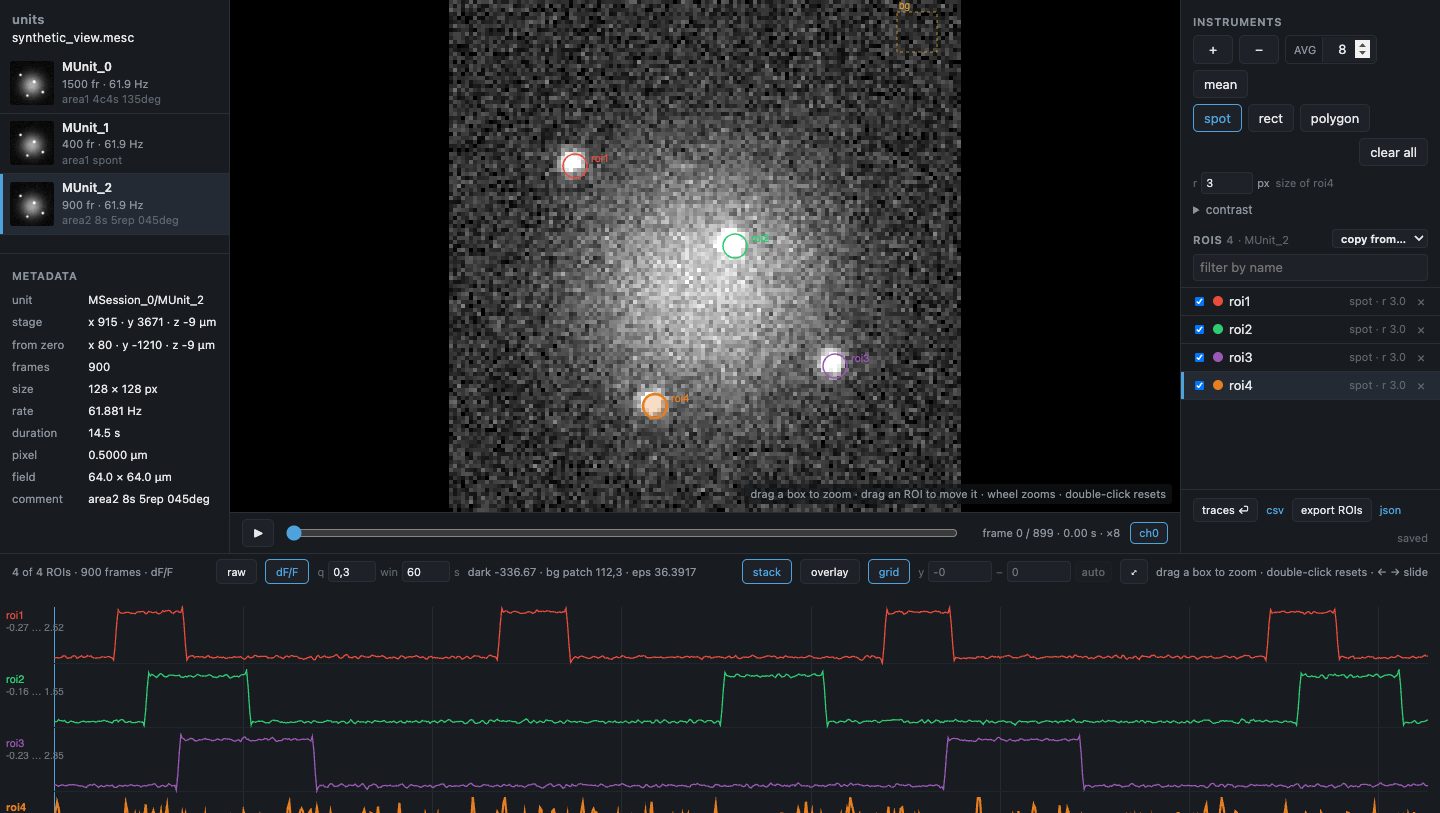
mesc-io view opens the recording in a private browser window: units on the left with a
thumbnail each and the unit's own metadata (rate, pixel size, the stage position and the
position from the zero set on the rig); the image in
the middle — scrub it, average a window of N frames, zoom into a place by dragging a box;
ROIs on the right (spot, rectangle, polygon; drag to move, type a size); every ROI's time
course along the bottom, raw or dF/F by our pipeline's method (mesc_io.dff, numpy only,
held against the pipeline's functions in the tests), stacked or overlaid, zoomed by dragging a box. ROIs belong to the
unit they were drawn on and are saved as you go, beside the working directory, never beside
the raw file; so is the view itself, so reopening the file puts you back where you were.
Layout and decisions: docs/viewer_design.md.
To try it without a recording, make one:
python tools/make_synthetic.py            # writes synthetic_view.mesc: 3 units, 4 spots, 3 of them blinking
mesc-io view synthetic_view.mesc
Development
pip install -e ".[tiff,dev]"
pytest
The package lives under src/, so tests run against the installed copy. CI runs the suite on
Python 3.9, 3.12 and 3.13 on Linux, macOS and Windows, plus one job with Suite2p for the
registration tests; the browser checks (tests/*_real_chrome.js) run in a real Chrome and are
not part of pytest.
Acknowledgements
F. Kamari, for the idea. Claude Code, for the debugging.
Licence
MIT — see LICENSE.
1 maintainer

Release files for mesc-io 0.2.1
For a detailed explanation of source distributions (sdists) and built distributions (wheels), please see the package formats documentation.
Source distribution (sdist)
| File | Size | Uploaded | |
|---|---|---|---|
| mesc_io-0.2.1.tar.gz | 84.5 kB | Details |
Built distribution (wheel)
| File | Interpreter | ABI | Platform | Reset |
|---|---|---|---|---|
| mesc_io-0.2.1-py3-none-any.whl | Python 3 | none | any | Details |
Total release size: 152.6 kB
Release files / mesc_io-0.2.1.tar.gz
| Download URL | mesc_io-0.2.1.tar.gz |
|---|---|
| Size | 84.5 kB |
| Tags | Source |
|
SHA-256 checksum How to use checksums |
9d059b720e7bb04f13f4a6701ad755554ed03812f2cbe3be6181ed2c6c8684b1
|
|
BLAKE2b-256 checksum How to use checksums |
68bcba7aa8014f77c9f7ba9b058bc6acd54ee7225e7844baa5e43d17f7882788
|
| Upload date | |
|
Uploaded using Trusted Publishing? What is trusted publishing? |
Yes |
| Uploaded via |
twine/7.0.0 CPython/3.13.14
|
Provenance
Provenance describes where a file came from. On PyPI, provenance is shared via attestations, which provide a verifiable record of the build or publishing details. View details, limitations and caveats.


PyPI Publish Attestation
PyPI verified that this artifact, at this checksum, originated from the publisher listed below.
Signed by GitHub Actions, verified by PyPI on Sep 24, 2026.
Transparency logRelease files / mesc_io-0.2.1-py3-none-any.whl
| Download URL | mesc_io-0.2.1-py3-none-any.whl |
|---|---|
| Size | 68.0 kB |
| Tags | Python 3 |
|
SHA-256 checksum How to use checksums |
97122269f1e6586acd90069a6fcbd75c76f9852f3828d9f94119122a40fab1d0
|
|
BLAKE2b-256 checksum How to use checksums |
3f913b4c7226136ab80d465c1f2b49957d1bf461c1596b8f0299a4ea4251713f
|
| Upload date | |
|
Uploaded using Trusted Publishing? What is trusted publishing? |
Yes |
| Uploaded via |
twine/7.0.0 CPython/3.13.14
|
Provenance
Provenance describes where a file came from. On PyPI, provenance is shared via attestations, which provide a verifiable record of the build or publishing details. View details, limitations and caveats.
PyPI Publish Attestation
PyPI verified that this artifact, at this checksum, originated from the publisher listed below.
Signed by GitHub Actions, verified by PyPI on Sep 24, 2026.
Transparency log













