
Extract connected skeletal graphs (centerlines) from 3D meshes

Project description
Mesh Skeleton
Extract connected skeletal graphs from 3D meshes. Unlike point-cloud skeletons, this tool preserves full connectivity as a NetworkX graph — enabling direct path traversal, branch analysis, and navigation.
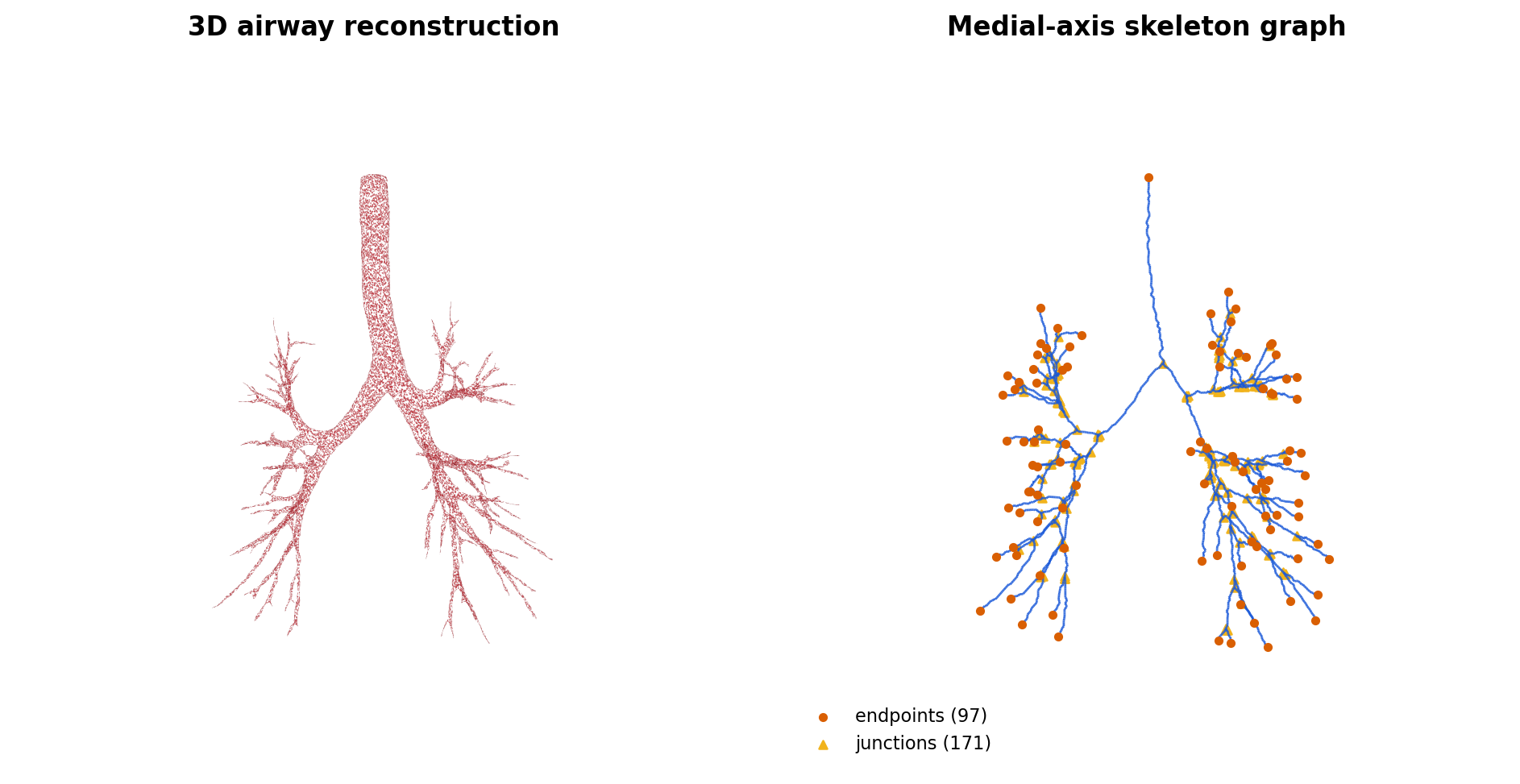
Left: 3D bronchial-tree surface (49k verts / 100k faces). Right: the medial-axis skeleton extracted by mesh-skeleton — 2,625 centerline nodes, 2,664 edges, 97 endpoints (orange), 171 junctions (yellow). Same viewpoint, same scale.
Installation
pip install mesh-skeleton
Or from source:
git clone https://github.com/iamsalvatore/mesh-skeleton.git
cd mesh-skeleton
pip install -e .
Quick Start
Command Line
python -m mesh_skeleton input_mesh.obj                          # basic extraction
python -m mesh_skeleton input_mesh.stl -o skeleton.ply -r 256   # custom resolution
python -m mesh_skeleton input_mesh.obj --no_viz                 # skip visualization
Python API
import trimesh
from mesh_skeleton import SkeletonExtractor

mesh = trimesh.load('model.obj')
extractor = SkeletonExtractor(mesh, voxel_resolution=256)
skeleton_coords = extractor.extract_skeleton()

# Access the graph
G = extractor.skeleton_graph        # NetworkX graph
endpoints = extractor.endpoints      # degree-1 nodes
junctions = extractor.junctions      # degree-3+ nodes
main_path = extractor.main_path      # longest path indices

# Custom path between two world-space points
centerline = extractor.get_ordered_centerline(start_point=[0,0,0], end_point=[1,1,1])

# Save PLY + JSON
extractor.save_skeleton(skeleton_coords, 'skeleton.ply')
How It Works
- Interior fill — watertight meshes use ray-cast containment (
mesh.contains); non-watertight meshes use surface voxelization + morphological closing + exterior flood-fill - Skeletonization — topological thinning via scikit-image
- Graph construction — 26-connected voxel neighbors linked via KDTree
- Connectivity enforcement — disconnected components bridged with interpolated edges
- Path analysis — endpoints, junctions, main centerline (double-BFS), and non-overlapping branch segments (edge-walking)
GPU Acceleration
When PyTorch with CUDA is available, voxelization and morphological operations run on GPU automatically. No code changes needed — falls back to CPU transparently.
Output Files
skeleton.ply
PLY with vertex positions and edge connectivity.
skeleton_graph.json
{
  "vertices": [[x, y, z], ...],
  "edges": [[v1, v2], ...],
  "endpoints": [0, 5, ...],
  "junctions": [12, 34, ...],
  "main_path": [0, 1, 2, ...],
  "branch_paths": [[12, 13, 14], ...]
}
CLI Arguments
| Argument | Default | Description |
|---|---|---|
input_mesh |
required | Input mesh file (OBJ, STL, PLY, etc.) |
-o, --output |
skeleton.ply |
Output file path |
-r, --resolution |
256 |
Voxel grid resolution (128=fast, 256=balanced, 512=detailed) |
--no_viz |
off | Skip matplotlib visualization |
Resolution Guide
| Resolution | Use case | Notes |
|---|---|---|
| 128 | Quick preview | Fast, coarse detail |
| 256 | Production | Balanced quality and speed |
| 512 | High detail | Slower, fine structures preserved |
Troubleshooting
Empty skeleton — verify mesh has valid geometry and consistent normals. Try increasing resolution.
Many disconnected components — components <10 voxels are pruned; larger ones are bridged automatically within mesh_scale * 0.1 distance. Check if mesh is watertight.
Slow processing — the bottleneck is skeletonize (CPU-bound). Reduce resolution for faster results.
License
MIT — see LICENSE.
Release history Release notifications | RSS feed


Download files
Download the file for your platform. If you're not sure which to choose, learn more about installing packages.
Source Distribution
Built Distribution
Filter files by name, interpreter, ABI, and platform.
If you're not sure about the file name format, learn more about wheel file names.
Copy a direct link to the current filters
File details
Details for the file mesh_skeleton-1.0.2.tar.gz.
File metadata
- Download URL: mesh_skeleton-1.0.2.tar.gz
- Upload date:
- Size: 11.3 kB
- Tags: Source
- Uploaded using Trusted Publishing? No
- Uploaded via: twine/6.2.0 CPython/3.10.19
File hashes
| Algorithm | Hash digest | |
|---|---|---|
| SHA256 |
cb2e5a528b66bef451766fe8631337baa5c83ccdb017be6ced7f3220918136b1
|
|
| MD5 |
5b29a354b9033e23258777550094e344
|
|
| BLAKE2b-256 |
7d9fb7bc6aaca356d5cd2ad8792e1aad0cadb48bf2ab546819b94c63d037dac7
|
File details
Details for the file mesh_skeleton-1.0.2-py3-none-any.whl.
File metadata
- Download URL: mesh_skeleton-1.0.2-py3-none-any.whl
- Upload date:
- Size: 11.5 kB
- Tags: Python 3
- Uploaded using Trusted Publishing? No
- Uploaded via: twine/6.2.0 CPython/3.10.19
File hashes
| Algorithm | Hash digest | |
|---|---|---|
| SHA256 |
9e9294c92568f02acabad1d6f88fd8e44af324be6cdc71d2299e4468ab790a73
|
|
| MD5 |
c7c1b3957128d5096d0f51bb4b05e472
|
|
| BLAKE2b-256 |
09b60d8d8d3ea8bd5545945df49b4a253fe4e523c9124f159cfccd5391782617
|






