
meshed
Link functions up into callable objects (DAGs)
To install: pip install meshed
Quick Start
from meshed import DAG

def this(a, b=1):
    return a + b
def that(x, b=1):
    return x * b
def combine(this, that):
    return (this, that)

dag = DAG((this, that, combine))
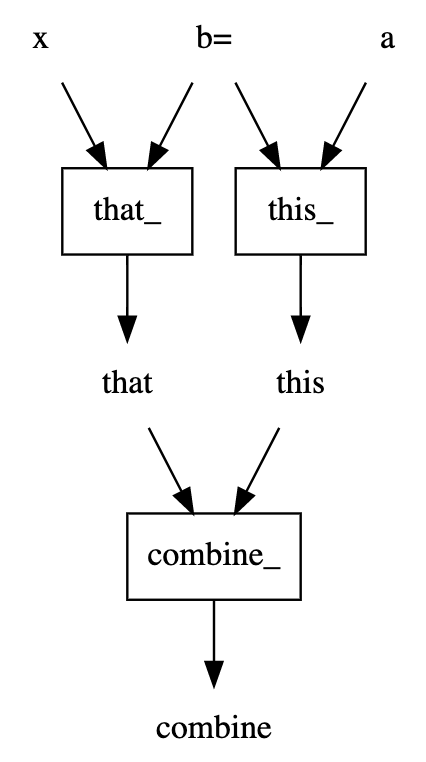
print(dag.synopsis_string())
x,b -> that_ -> that
a,b -> this_ -> this
this,that -> combine_ -> combine
But what does it do?
It's a callable, with a signature:
from inspect import signature
signature(dag)
<Signature (x, a, b=1)>
And when you call it, it executes the dag from the root values you give it and returns the leaf output values.
dag(1, 2, 3) # (a+b,x*b) == (2+3,1*3) == (5, 3)
(5, 3)
dag(1, 2) # (a+b,x*b) == (2+1,1*1) == (3, 1)
(3, 1)
You can see (and save image, or ascii art) the dag:
dag.dot_digraph()
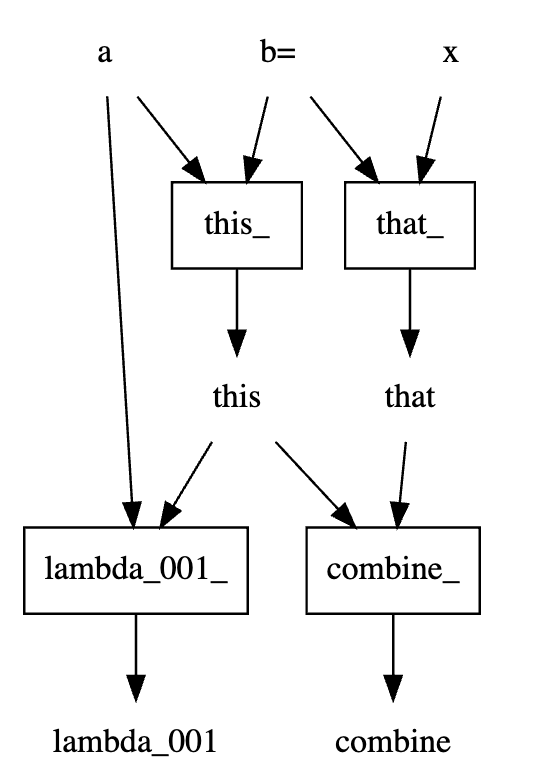
You can extend a dag
dag2 = DAG([*dag, lambda this, a: this + a])
dag2.dot_digraph()
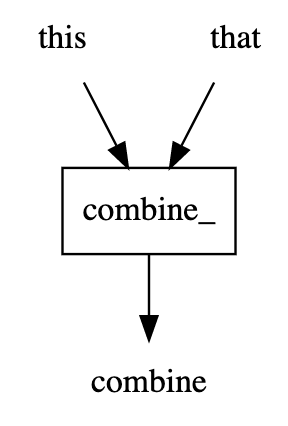
You can get a sub-dag by specifying desired input(s) and outputs.
dag2[['that', 'this'], 'combine'].dot_digraph()
Note on flexibility
The above DAG was created straight from the functions, using only the names of the functions and their arguments to define how to hook the network up.
But if you didn't write those functions specifically for that purpose, or you want to use someone else's functions, we got you covered.
You can define the name of the node (the name argument), the name of the output
(the out argument) and a mapping from the function's arguments names to
"network names" (through the bind argument).
The edges of the DAG are defined by matching out TO bind.
Examples
A train/test ML pipeline
Consider a simple train/test ML pipeline that looks like this.
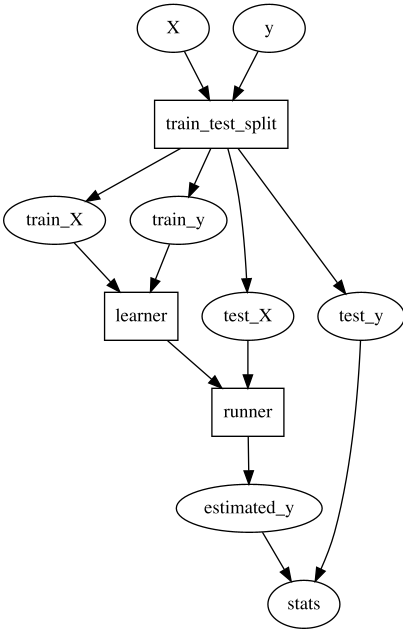
With this, we might decide we want to give the user control over how to do
train_test_split and learner, so we offer this interface to the user:
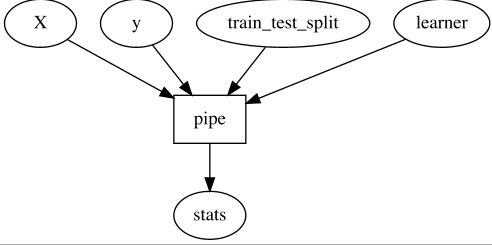
With that, the user can just bring its own train_test_split and learner
functions, and as long as it satisfied the
expected (and even better; declared and validatable) protocol, things will work.
In some situations we'd like to fix some of how train_test_split and
learner work, allowing the user to control only some aspects of them.
This function would look like this:
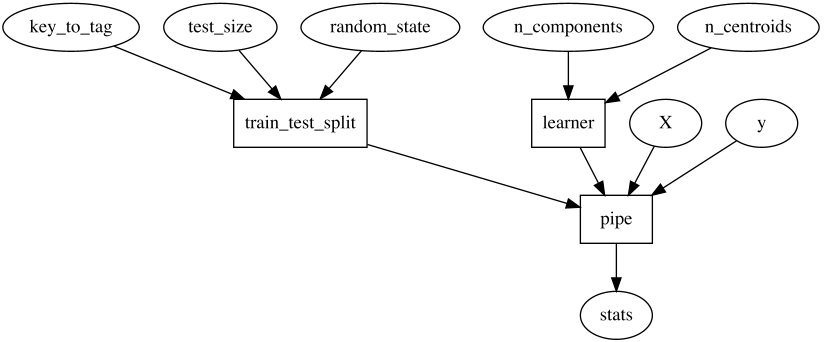
And inside, it does:
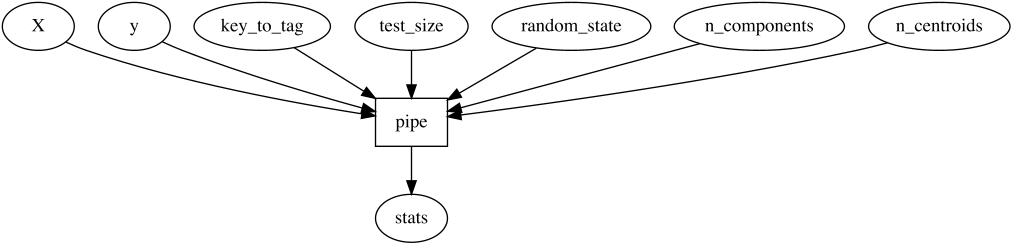
meshed allows us to easily manipulate such functional structures to
adapt them to our needs.
itools module
Tools that enable operations on graphs where graphs are represented by an adjacency Mapping.
Again.
Graphs: You know them. Networks. Nodes and edges, and the ecosystem descriptive or transformative functions surrounding these. Few languages have builtin support for the graph data structure, but all have their libraries to compensate.
The one you're looking at focuses on the representation of a graph as Mapping encoding
its adjacency list.
That is, a dictionary-like interface that specifies the graph by specifying for each node
what nodes it's adjacent to:
assert graph[source_node] == iterator_of_nodes_that_source_node_has_edges_to
We emphasize that there is no specific graph instance that you need to squeeze your graph into to
be able to use the functions of meshed. Suffices that your graph's structure is expressed by
that dict-like interface
-- which grown-ups call Mapping (see the collections.abc or typing standard libs for more information).
You'll find a lot of Mappings around pythons.
And if the object you want to work with doesn't have that interface,
you can easily create one using one of the many tools of py2store meant exactly for that purpose.
Examples
>>> from meshed.itools import edges, nodes, isolated_nodes
>>> graph = dict(a='c', b='ce', c='abde', d='c', e=['c', 'b'], f={})
>>> sorted(edges(graph))
[('a', 'c'), ('b', 'c'), ('b', 'e'), ('c', 'a'), ('c', 'b'), ('c', 'd'), ('c', 'e'), ('d', 'c'), ('e', 'b'), ('e', 'c')]
>>> sorted(nodes(graph))
['a', 'b', 'c', 'd', 'e', 'f']
>>> set(isolated_nodes(graph))
{'f'}
>>>
>>> from meshed.makers import edge_reversed_graph
>>> g = dict(a='c', b='cd', c='abd', e='')
>>> assert edge_reversed_graph(g) == {'c': ['a', 'b'], 'd': ['b', 'c'], 'a': ['c'], 'b': ['c'], 'e': []}
>>> reverse_g_with_sets = edge_reversed_graph(g, set, set.add)
>>> assert reverse_g_with_sets == {'c': {'a', 'b'}, 'd': {'b', 'c'}, 'a': {'c'}, 'b': {'c'}, 'e': set([])}
1 maintainer

Metadata
1 maintainer
Release files for meshed 0.1.20
For a detailed explanation of source distributions (sdists) and built distributions (wheels), please see the package formats documentation.
Source distribution (sdist)
| File | Size | Uploaded | |
|---|---|---|---|
| meshed-0.1.20.tar.gz | 50.4 kB | Details |
Release files / meshed-0.1.20.tar.gz
| Download URL | meshed-0.1.20.tar.gz |
|---|---|
| Size | 50.4 kB |
| Tags | Source |
|
SHA-256 checksum How to use checksums |
3af36d06862fdcf9a9a442cd377522f3080b138f2fce1eacbd92564db0b1d08e
|
|
BLAKE2b-256 checksum How to use checksums |
aeed5041ee7787149908927f814b5a635f02d9aca7203160caecdc491b29b7b7
|
| Upload date | |
|
Uploaded using Trusted Publishing? What is trusted publishing? |
No |
| Uploaded via |
twine/3.7.1 importlib_metadata/4.8.2 pkginfo/1.8.2 requests/2.26.0 requests-toolbelt/0.9.1 tqdm/4.62.3 CPython/3.8.12
|














