
Graph neural network surrogates for FEA on arbitrary geometries

Project description
Introduction
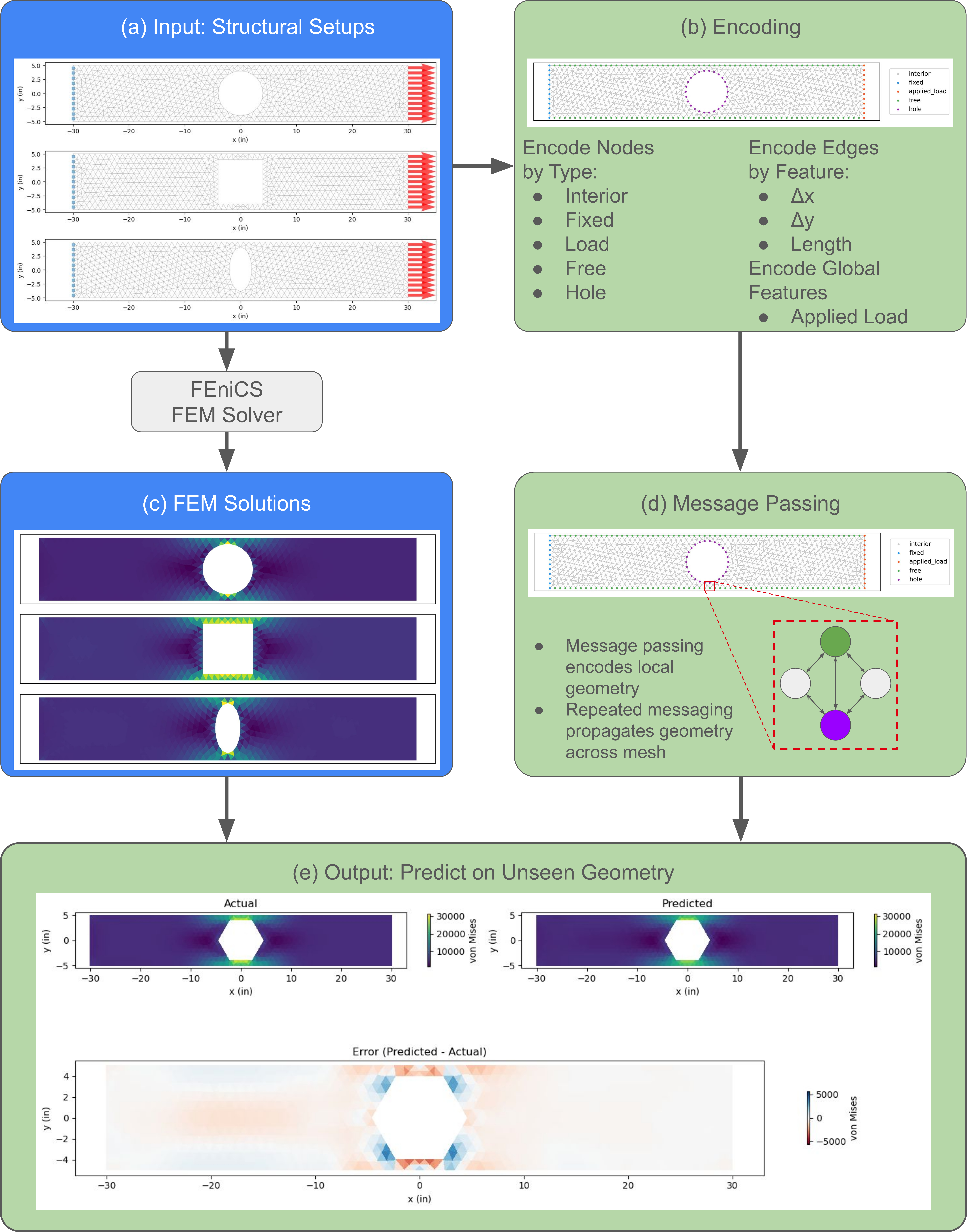
Presented here is a PyTorch implementation of mesh graph networks (MGNs) for predicting von Mises stress fields in 2D structural components with arbitrary hole geometries.
This repository accompanies the paper:
Kunz, J. & Choudhary, K. (2026). "Mesh Graph Neural Network Framework for Accelerating Finite Element Simulation for Arbitrary Geometries." [Journal TBD].
Key Features
- Geometry-agnostic: Generalizes to unseen hole shapes without retraining
- Translation/rotation invariant: Uses relative edge features and node-type embeddings rather than absolute coordinates
- Clean, high-level API: Go from geometry to trained surrogate model with simplicity
- Fast inference: Sub-second predictions compared to minutes for FEM
Installation
Google Colab (recommended)
# Install FEniCS for Colab
!wget "https://fem-on-colab.github.io/releases/fenics-install-release-real.sh" -O "/tmp/fenics-install.sh" && bash "/tmp/fenics-install.sh"
!apt-get install -y libglu1-mesa -q

# Install meshgraphnet
!pip install meshgraphnet -q
Local (conda)
# FEniCS must be installed via conda
conda install -c conda-forge fenics

# Then install meshgraphnet
pip install meshgraphnet
Package Structure
meshgraphnet/
├── mesh_object/            # Geometry loading & meshing (STEP -> Dolfin)
├── fem_object/             # FEM problem setup, solving, and visualization
│   ├── material.py         # Linear-elastic material properties
│   ├── load_types.py       # VolumeLoad, SurfaceLoad, EdgeLoad, PointLoad
│   ├── load_collection.py  # Housing for various load types
│   ├── fixed_boundary.py   # FEM boundary condition (only fixed is currently supported)
│   └── fem_object.py       # Main FEMObject class
├── ml_object/              # ML training & evaluation on FEM results
│   ├── ml_object.py        # MLObject wrapper (sklearn + GNN)
│   ├── gnn.py              # Graph Neural Network (GNN)
│   ├── mgn.py              # Mesh Graph Network (MGN); main result
│   ├── basic_gcn.py        # Basic graph convolution network (GCN)
│   └── relative_gcn.py     # GCN that uses differences
├── units/                  # Unit system management (Pint-based)
│   └── unit_system.py      # UnitSystem, Units presets
└── common_utils/           # Shared formatting helpers
Key Classes
MeshObject
Represents a mesh. Loads a geometry file (e.g. STEP), runs Gmsh auto-meshing, and produces a Dolfin mesh ready for FEniCS. Usage snippet (see examples folder for more):
mesh = MeshObject("bracket.step", mesh_size=5, units=Units.SI_MM)
mesh.summary()      # prints statistics: vertices, cells, extents
mesh.visualize()    # matplotlib plot of the mesh
FEMObject
Represents a finite element method (FEM) simulation object. Combines a mesh, loads, boundary conditions, and material into a complete linear-elastic FEM problem. Solves with FEniCS and exposes results as NumPy arrays. Usage snippet (see examples folder for more):
fem = FEMObject(
    mesh=mesh,
    loads=loads,
    boundaries=[FixedBoundary("left")],
    material=Material.steel(),
    name="Cantilever bracket"
)

fem.visualize_setup()       # preview loads & BCs
fem.solve()                 # run FEniCS solver
fem.plot_displacement()     # displacement field
fem.plot_stress()           # von Mises stress
fem.save_results("out.csv") # export nodal results
MLObject
Represents a machine learning (ML) model object. Trains sklearn or GNN surrogate models on FEM result CSV data, with built-in cross-validation, feature analysis, and visualization. Usage snippet (see examples folder for more):
ml = MLObject(
    data="fem_results.csv",
    features=["x (m)", "y (m)"],
    objectives=["von_mises (GPa)"],
)

ml.summary()
ml.analyze_features(plot=True)
ml.train(model=GradientBoostingRegressor())
ml.evaluate_on_unseen_data()
ml.plot_predictions()
GNN/MGN
Represents either a graph neural network (GNN) model or a mesh graph network (MGN) model that uses node-level regression on FEMObjects.
GNN: standard GCN operating on (X, y) feature matrices with an explicit edge CSVMGN: geometry-agnostic model inspired by Pfaff et al. 2021. Uses relative edge features and learned node-type embeddings (such asholeorfixed) so it can generalize across different geometries. Usage snippet (see examples folder for more):
mgn = MGN(hidden_channels=64, num_layers=20, global_features=["load"], epochs=5000)

ml = MLObject(
    train_fem=train_fems,   # list of solved FEMObjects
    test_fem=test_fem,
    objectives=["von_mises"],
)
ml.train(model=mgn, model_name="MGN")
mgn.save("model.pt")

# Load and reuse later:
mgn = MGN.load("model.pt")
Dependencies
| Library | Purpose |
|---|---|
fenics / dolfin |
FEM solver |
gmsh |
Auto-meshing from STEP/geometry files |
meshio |
Mesh format conversion |
pint |
Unit arithmetic and conversion |
torch / torch_geometric |
Graph neural networks |
scikit-learn |
Classical ML models |
numpy, pandas |
Numerics and data handling |
matplotlib |
Visualization |
See also requirements.txt.
Correspondence
License
Release history Release notifications | RSS feed


Download files
Download the file for your platform. If you're not sure which to choose, learn more about installing packages.
Source Distributions
Built Distribution
Filter files by name, interpreter, ABI, and platform.
If you're not sure about the file name format, learn more about wheel file names.
Copy a direct link to the current filters
File details
Details for the file meshgraphnet-0.1.1-py3-none-any.whl.
File metadata
- Download URL: meshgraphnet-0.1.1-py3-none-any.whl
- Upload date:
- Size: 63.1 kB
- Tags: Python 3
- Uploaded using Trusted Publishing? No
- Uploaded via: twine/6.2.0 CPython/3.10.12
File hashes
| Algorithm | Hash digest | |
|---|---|---|
| SHA256 |
5e0f541623228242ecfdfd14ae182e210d0a000a7e9689c4d229fe1a6142c50e
|
|
| MD5 |
315ab5e0f5d3ab48fc5c05a36aed583c
|
|
| BLAKE2b-256 |
0bee48349dfccaec4e61f55baf4b8a5662e108365fddb163feefc762f03c688f
|






