

I/O for mesh files.












There are various mesh formats available for representing unstructured meshes. meshio can read and write all of the following and smoothly converts between them:
Abaqus (
.inp), ANSYS msh (.msh), AVS-UCD (.avs), CGNS (.cgns), DOLFIN XML (.xml), Exodus (.e,.exo), FLAC3D (.f3grid), H5M (.h5m), Kratos/MDPA (.mdpa), Medit (.mesh,.meshb), MED/Salome (.med), Nastran (bulk data,.bdf,.fem,.nas), Netgen (.vol,.vol.gz), Neuroglancer precomputed format, Gmsh (format versions 2.2, 4.0, and 4.1,.msh), OBJ (.obj), OFF (.off), PERMAS (.post,.post.gz,.dato,.dato.gz), PLY (.ply), STL (.stl), Tecplot .dat, TetGen .node/.ele, SVG (2D output only) (.svg), SU2 (.su2), UGRID (.ugrid), VTK (.vtk), VTU (.vtu), WKT (TIN) (.wkt), XDMF (.xdmf,.xmf).
(Here's a little survey on which formats are actually used.)
Install with one of
pip install meshio[all]
conda install -c conda-forge meshio
([all] pulls in all optional dependencies. By default, meshio only uses numpy.)
You can then use the command-line tool
meshio convert    input.msh output.vtk   # convert between two formats

meshio info       input.xdmf             # show some info about the mesh

meshio compress   input.vtu              # compress the mesh file
meshio decompress input.vtu              # decompress the mesh file

meshio binary     input.msh              # convert to binary format
meshio ascii      input.msh              # convert to ASCII format
with any of the supported formats.
In Python, simply do
import meshio

mesh = meshio.read(
    filename,  # string, os.PathLike, or a buffer/open file
    # file_format="stl",  # optional if filename is a path; inferred from extension
    # see meshio-convert -h for all possible formats
)
# mesh.points, mesh.cells, mesh.cells_dict, ...

# mesh.vtk.read() is also possible
to read a mesh. To write, do
import meshio

# two triangles and one quad
points = [
    [0.0, 0.0],
    [1.0, 0.0],
    [0.0, 1.0],
    [1.0, 1.0],
    [2.0, 0.0],
    [2.0, 1.0],
]
cells = [
    ("triangle", [[0, 1, 2], [1, 3, 2]]),
    ("quad", [[1, 4, 5, 3]]),
]

mesh = meshio.Mesh(
    points,
    cells,
    # Optionally provide extra data on points, cells, etc.
    point_data={"T": [0.3, -1.2, 0.5, 0.7, 0.0, -3.0]},
    # Each item in cell data must match the cells array
    cell_data={"a": [[0.1, 0.2], [0.4]]},
)
mesh.write(
    "foo.vtk",  # str, os.PathLike, or buffer/open file
    # file_format="vtk",  # optional if first argument is a path; inferred from extension
)

# Alternative with the same options
meshio.write_points_cells("foo.vtk", points, cells)
For both input and output, you can optionally specify the exact file_format
(in case you would like to enforce ASCII over binary VTK, for example).
Time series
The XDMF format supports time series with a shared mesh. You can write times series data using meshio with
with meshio.xdmf.TimeSeriesWriter(filename) as writer:
    writer.write_points_cells(points, cells)
    for t in [0.0, 0.1, 0.21]:
        writer.write_data(t, point_data={"phi": data})
and read it with
with meshio.xdmf.TimeSeriesReader(filename) as reader:
    points, cells = reader.read_points_cells()
    for k in range(reader.num_steps):
        t, point_data, cell_data = reader.read_data(k)
ParaView plugin
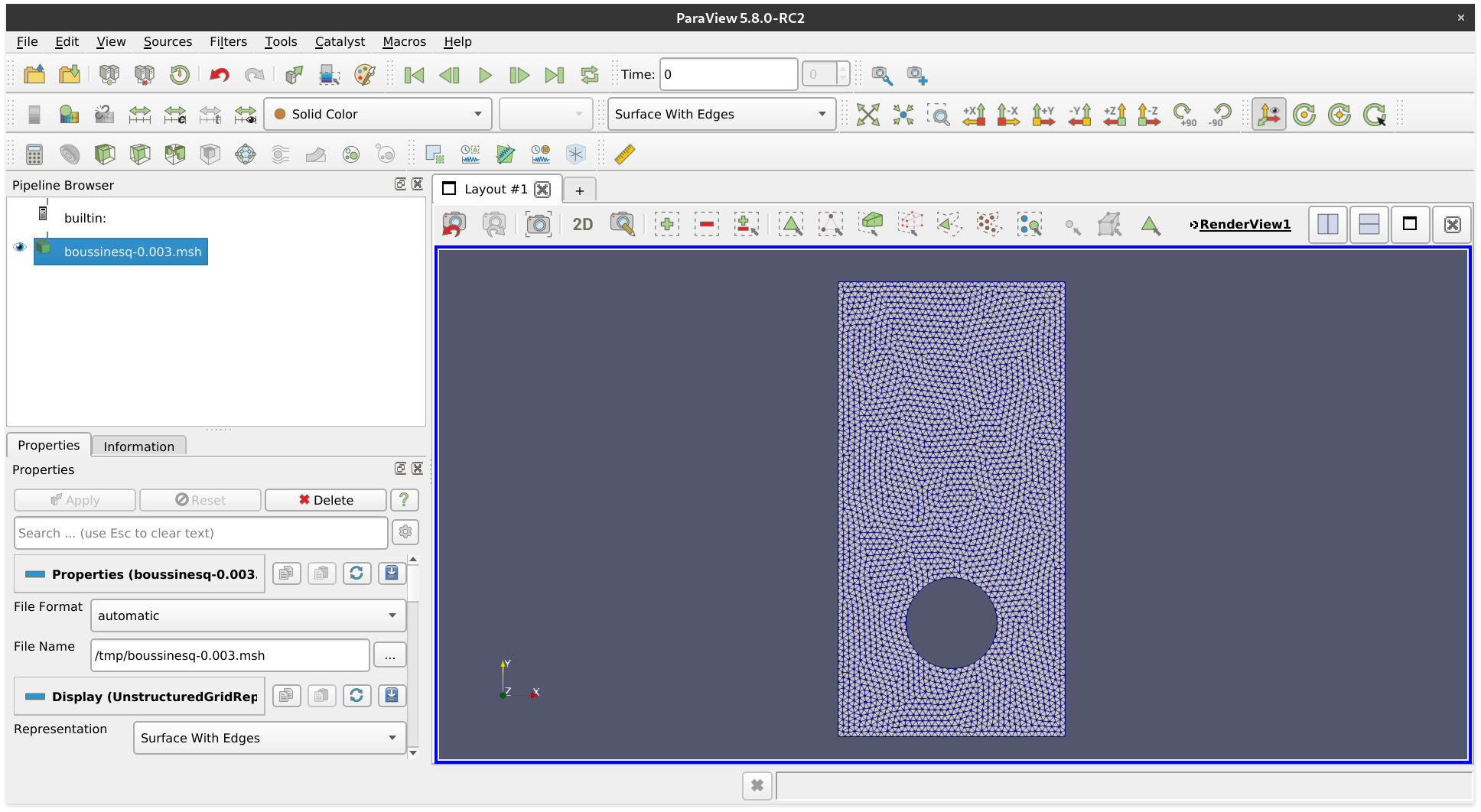 *A Gmsh file opened with ParaView.*
If you have downloaded a binary version of ParaView, you may proceed as follows.
- Install meshio for the Python major version that ParaView uses (check
pvpython --version) - Open ParaView
- Find the file
paraview-meshio-plugin.pyof your meshio installation (on Linux:~/.local/share/paraview-5.9/plugins/) and load it under Tools / Manage Plugins / Load New - Optional: Activate Auto Load
You can now open all meshio-supported files in ParaView.
Performance comparison
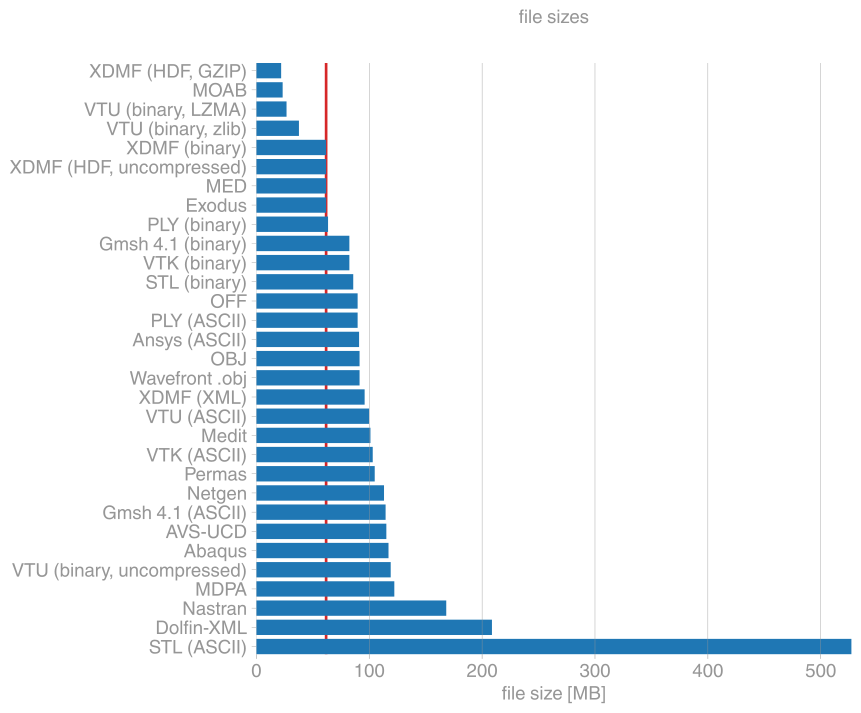
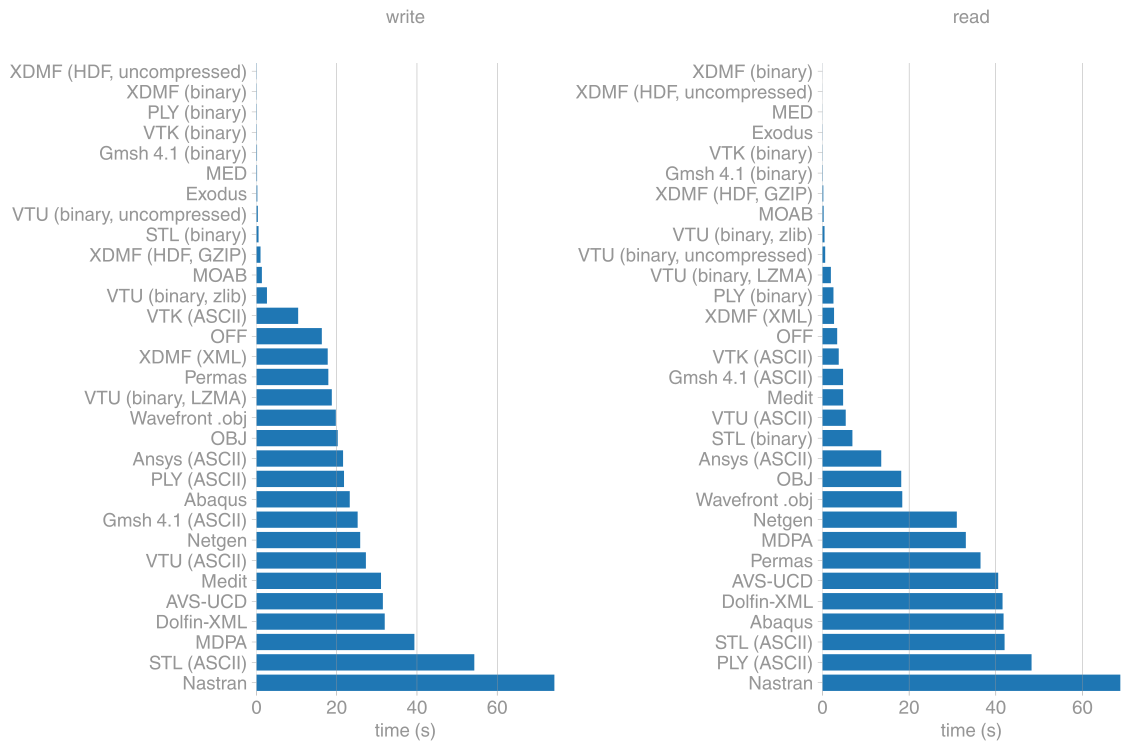
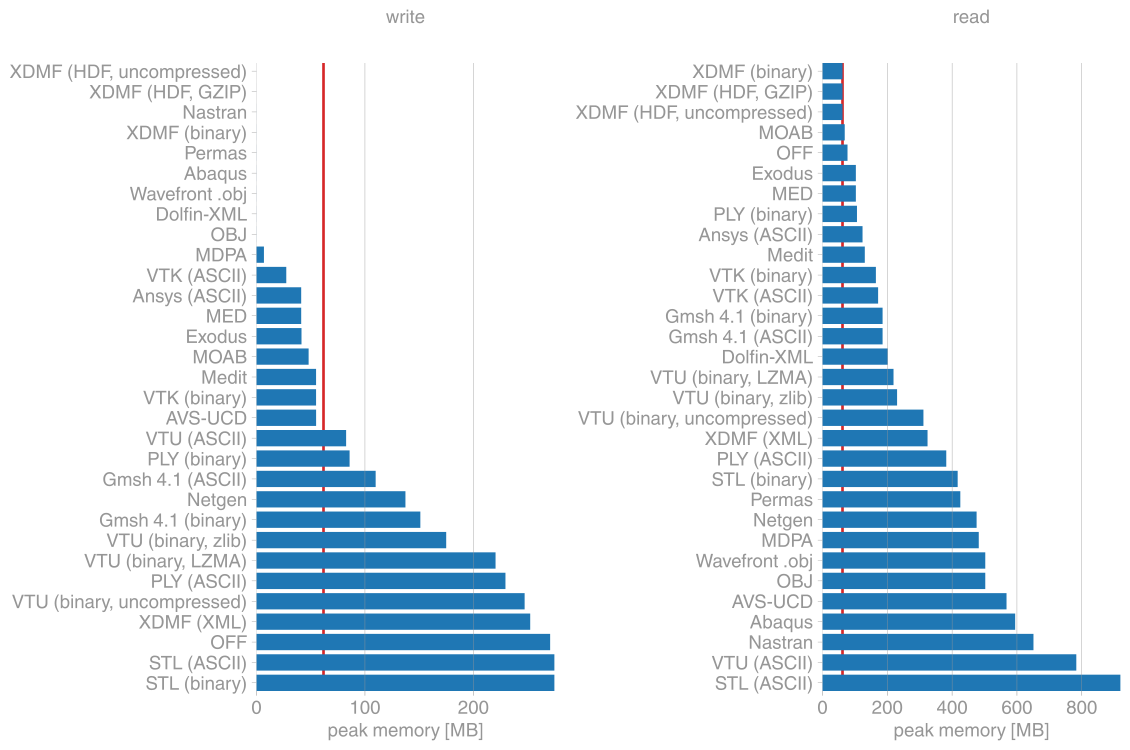
The comparisons here are for a triangular mesh with about 900k points and 1.8M triangles. The red lines mark the size of the mesh in memory.
File sizes
I/O speed
Maximum memory usage
Installation
meshio is available from the Python Package Index, so simply run
pip install meshio
to install.
Additional dependencies (netcdf4, h5py) are required for some of the output formats
and can be pulled in by
pip install meshio[all]
You can also install meshio from Anaconda:
conda install -c conda-forge meshio
Testing
To run the meshio unit tests, check out this repository and type
tox
License
meshio is published under the MIT license.
1 maintainer

Metadata
1 maintainer
Release files for meshio2 5.3.6
For a detailed explanation of source distributions (sdists) and built distributions (wheels), please see the package formats documentation.
Source distribution (sdist)
| File | Size | Uploaded | |
|---|---|---|---|
| meshio2-5.3.6.tar.gz | 604.4 kB | Details |
Built distribution (wheel)
| File | Interpreter | ABI | Platform | Reset |
|---|---|---|---|---|
| meshio2-5.3.6-py3-none-any.whl | Python 3 | none | any | Details |
Total release size: 779.2 kB
Release files / meshio2-5.3.6.tar.gz
| Download URL | meshio2-5.3.6.tar.gz |
|---|---|
| Size | 604.4 kB |
| Tags | Source |
|
SHA-256 checksum How to use checksums |
b12f231c9ddeba31a44030190179024e2e1537187f02103b0a3dd5a1b5ad28e6
|
|
BLAKE2b-256 checksum How to use checksums |
cbe584013ef12c0f124186b95cf2943e039f01df64acfd7d5e567d55b841f3f9
|
| Upload date | |
|
Uploaded using Trusted Publishing? What is trusted publishing? |
No |
| Uploaded via |
twine/4.0.2 CPython/3.11.4
|
Release files / meshio2-5.3.6-py3-none-any.whl
| Download URL | meshio2-5.3.6-py3-none-any.whl |
|---|---|
| Size | 174.9 kB |
| Tags | Python 3 |
|
SHA-256 checksum How to use checksums |
77d6ad0abc12d4bc9ca2f9d2cab55cf127b3d04425e3fba6a3eed55a26980f8e
|
|
BLAKE2b-256 checksum How to use checksums |
65b1616a7200ac9a9094074de27200841c9a0a7163c6c9947367b0493c2a2e41
|
| Upload date | |
|
Uploaded using Trusted Publishing? What is trusted publishing? |
No |
| Uploaded via |
twine/4.0.2 CPython/3.11.4
|













