
MeshKernelPy




MeshKernelPy is a library for creating and editing meshes.
It supports 1D and 2D unstructured meshes.
The underlying C++ library MeshKernel can be found here.
Installation
The library can be installed from PyPI by executing
pip install meshkernel
Under Windows, If you encounter any issues importing the pip wheels, you may need to install the Visual C++ Redistributable for Visual Studio 2019.
Examples
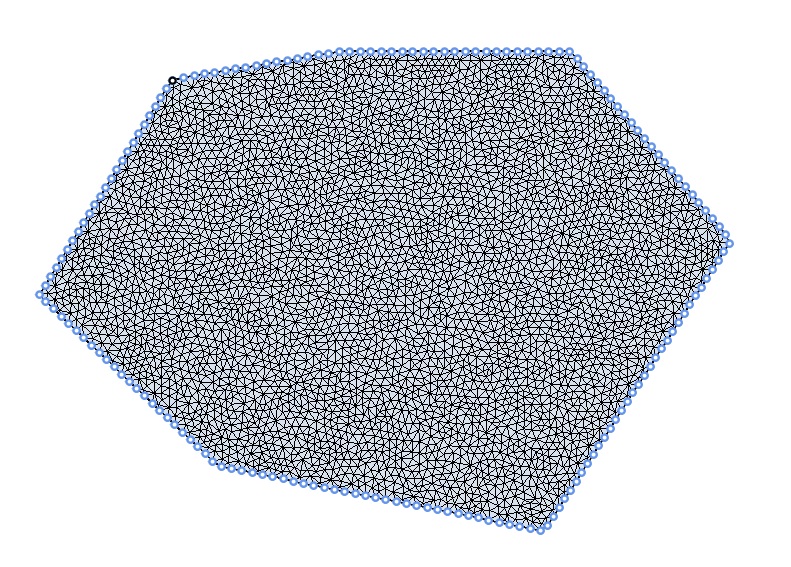
Creating a triangular mesh inside a polygon
In this example a mesh is created by discretizing the polygon perimeter with the desired edge length.
Mesh orthogonalization
Finite volume staggered flow solvers require the mesh to be as orthogonal as possible. MeshKernel provides an algorithm to adapt the mesh and achieve a good balance between mesh orthogonality and smoothness.

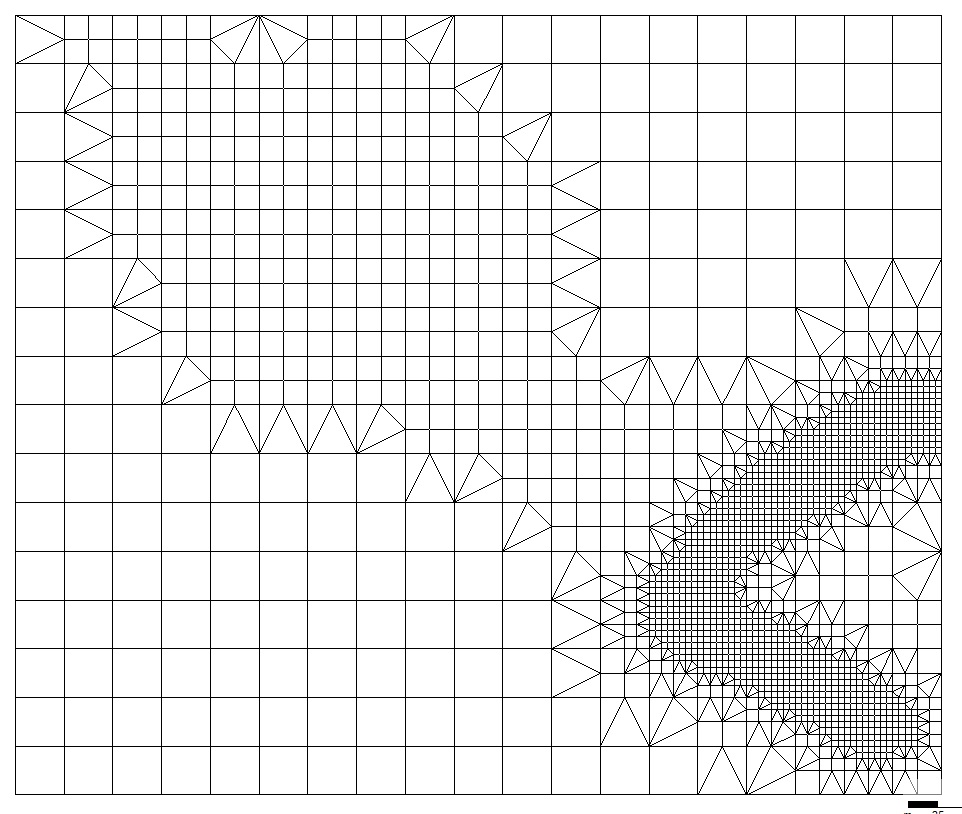
Mesh refinement
A mesh can be refined in areas based on samples or polygon selections.
Contributing
In order to install MeshKernelPy locally, please execute the following line inside your virtual environment
pip install -e ".[tests, lint, docs]"
Then add a compiled MeshKernelApi.dll into your src folder.
Also make sure that your editor is configured to format the code with black and isort.
When modifying Jupyter notebooks, the jupyterlab-code-formatter can be used.
Building and installing the wheel
Platform-specific build
A setup script is provided for building the wheel. The script is known to work under Windows, Linux and macOS.
To install the dependencies, use
python -m pip install --upgrade pip
python -m pip install wheel numpy matplotlib pytest
The environment variable BACK_END_BRANCH must be set prior to building the wheel. It specifies which MeshKernel branch should be built during the generation of the wheel. If one is on the main branch of MeshKernelPy, BACK_END_BRANCH must be either set to master. If one is an a release branch, BACK_END_BRANCH should be set to release. The version of the MeshKernel release branch is hardcoded in meshkernel/version.py.
While in the project's root directory, to build the wheel use
python setup.py build_ext
python setup.py sdist bdist_wheel
To install use: The wheel is installed
python -m pip install <meshkernel_wheel_name>
where <meshkernel_wheel_name> is the name of the generated wheel.
To test, simply run pytest.
Manylinux Docker image
To deploy Linux wheels to PyPI, we provide a Docker image that is based on manylinux_2_28_x86_64. This image includes cmake and boost, which are necessary for compiling the native MeshKernel library (written in C++). To build the Docker image, use:
docker build --progress=plain ./scripts -t build_linux_library
Once the Docker image has been built, build the manylinux wheel using the following command:
docker run -e BACK_END_BRANCH=<meshkernel_back_end_branch_name> -v $(pwd):/root --rm build_linux_library
where <meshkernel_back_end_branch_name> is either master or release, as described in Platform-specific build.
The deployable manylinux wheels will be located in dist/wheelhouse.
License
MeshKernelPy uses the MIT license.
However, the wheels on PyPI bundle the LGPL licensed MeshKernel.
Please make sure that this fits your needs before depending on it.
7 maintainers


Metadata
7 maintainers
Release files for meshkernel 8.3.0
For a detailed explanation of source distributions (sdists) and built distributions (wheels), please see the package formats documentation.
Built distributions (wheels)
| File | Reset | |||
|---|---|---|---|---|
| meshkernel-8.3.0-py3-none-win_amd64.whl | Python 3 | none | Windows x86-64 | Details |
| meshkernel-8.3.0-py3-none-manylinux_2_28_x86_64.whl | Python 3 | none | Linux glibc 2.28+ x86-64 | Details |
| meshkernel-8.3.0-py3-none-macosx_26_0_arm64.whl | Python 3 | none | macOS 26.0+ ARM64 | Details |
| meshkernel-8.3.0-py3-none-macosx_15_0_x86_64.whl | Python 3 | none | macOS 15.0+ x86-64 | Details |
| meshkernel-8.3.0-py3-none-macosx_15_0_arm64.whl | Python 3 | none | macOS 15.0+ ARM64 | Details |
| meshkernel-8.3.0-py3-none-macosx_14_0_arm64.whl | Python 3 | none | macOS 14.0+ ARM64 | Details |
Total release size: 6.9 MB
Release files / meshkernel-8.3.0-py3-none-win_amd64.whl
| Download URL | meshkernel-8.3.0-py3-none-win_amd64.whl |
|---|---|
| Size | 1.1 MB |
| Tags | Python 3 Windows x86-64 |
|
SHA-256 checksum How to use checksums |
1368811493affb5f84c6d1547b8e83dc4bb6d159b12b203a2916a2a891d12637
|
|
BLAKE2b-256 checksum How to use checksums |
001804ea74843dca6f281d30b1b39e6548ea4396c36bf663d506013c8ce5d61d
|
| Upload date | |
|
Uploaded using Trusted Publishing? What is trusted publishing? |
No |
| Uploaded via |
twine/6.2.0 CPython/3.10.20
|
Release files / meshkernel-8.3.0-py3-none-manylinux_2_28_x86_64.whl
| Download URL | meshkernel-8.3.0-py3-none-manylinux_2_28_x86_64.whl |
|---|---|
| Size | 1.5 MB |
| Tags | Linux glibc 2.28+ x86-64 Python 3 |
|
SHA-256 checksum How to use checksums |
f3a34e62c6c3c003df8c2dca319543edaf29968791790da5c34d012c4ea8d01e
|
|
BLAKE2b-256 checksum How to use checksums |
e357371ed4d8f165ba3033905683a8216b6c4f06d745cf4fd2aacb6df264a918
|
| Upload date | |
|
Uploaded using Trusted Publishing? What is trusted publishing? |
No |
| Uploaded via |
twine/6.2.0 CPython/3.10.20
|
Release files / meshkernel-8.3.0-py3-none-macosx_26_0_arm64.whl
| Download URL | meshkernel-8.3.0-py3-none-macosx_26_0_arm64.whl |
|---|---|
| Size | 1.1 MB |
| Tags | Python 3 macOS 26.0+ ARM64 |
|
SHA-256 checksum How to use checksums |
03370a45b3c64134536429eb6ea0083780c9b88e598ac513092404c758efb2ad
|
|
BLAKE2b-256 checksum How to use checksums |
c88901512be1edec75320963cb7f940d52150358a8217f99d5d5ba38f53670f5
|
| Upload date | |
|
Uploaded using Trusted Publishing? What is trusted publishing? |
No |
| Uploaded via |
twine/6.2.0 CPython/3.10.20
|
Release files / meshkernel-8.3.0-py3-none-macosx_15_0_x86_64.whl
| Download URL | meshkernel-8.3.0-py3-none-macosx_15_0_x86_64.whl |
|---|---|
| Size | 1.2 MB |
| Tags | Python 3 macOS 15.0+ x86-64 |
|
SHA-256 checksum How to use checksums |
f1c231535fa73dded23cca0882a2299f67edd112e36ee876b7ae5ad245bac4ad
|
|
BLAKE2b-256 checksum How to use checksums |
76a4cc7e6442e3e5266d4defb041636bbe1df1e4f3b38729bb085d7b211fc2ef
|
| Upload date | |
|
Uploaded using Trusted Publishing? What is trusted publishing? |
No |
| Uploaded via |
twine/6.2.0 CPython/3.10.20
|
Release files / meshkernel-8.3.0-py3-none-macosx_15_0_arm64.whl
| Download URL | meshkernel-8.3.0-py3-none-macosx_15_0_arm64.whl |
|---|---|
| Size | 1.1 MB |
| Tags | Python 3 macOS 15.0+ ARM64 |
|
SHA-256 checksum How to use checksums |
90771f4d789e3b7656f55cfe7b08f61345bfa4fd390b0227b4f57ace281d51f8
|
|
BLAKE2b-256 checksum How to use checksums |
b0122ea069a98fc1b6d775dbfca1733122c1e2a83c865746d1177d027b99089b
|
| Upload date | |
|
Uploaded using Trusted Publishing? What is trusted publishing? |
No |
| Uploaded via |
twine/6.2.0 CPython/3.10.20
|
Release files / meshkernel-8.3.0-py3-none-macosx_14_0_arm64.whl
| Download URL | meshkernel-8.3.0-py3-none-macosx_14_0_arm64.whl |
|---|---|
| Size | 1.1 MB |
| Tags | Python 3 macOS 14.0+ ARM64 |
|
SHA-256 checksum How to use checksums |
52e0179503b1c630c1d8a5e66d9a758e8f130dcd8300ac2bf8cdebf1ddc82e5e
|
|
BLAKE2b-256 checksum How to use checksums |
9682fad42ce5a336f1195bed651ba899ede758f6840d2a17df6b1fec4cfcb7eb
|
| Upload date | |
|
Uploaded using Trusted Publishing? What is trusted publishing? |
No |
| Uploaded via |
twine/6.2.0 CPython/3.10.20
|














