
MeshPatrol
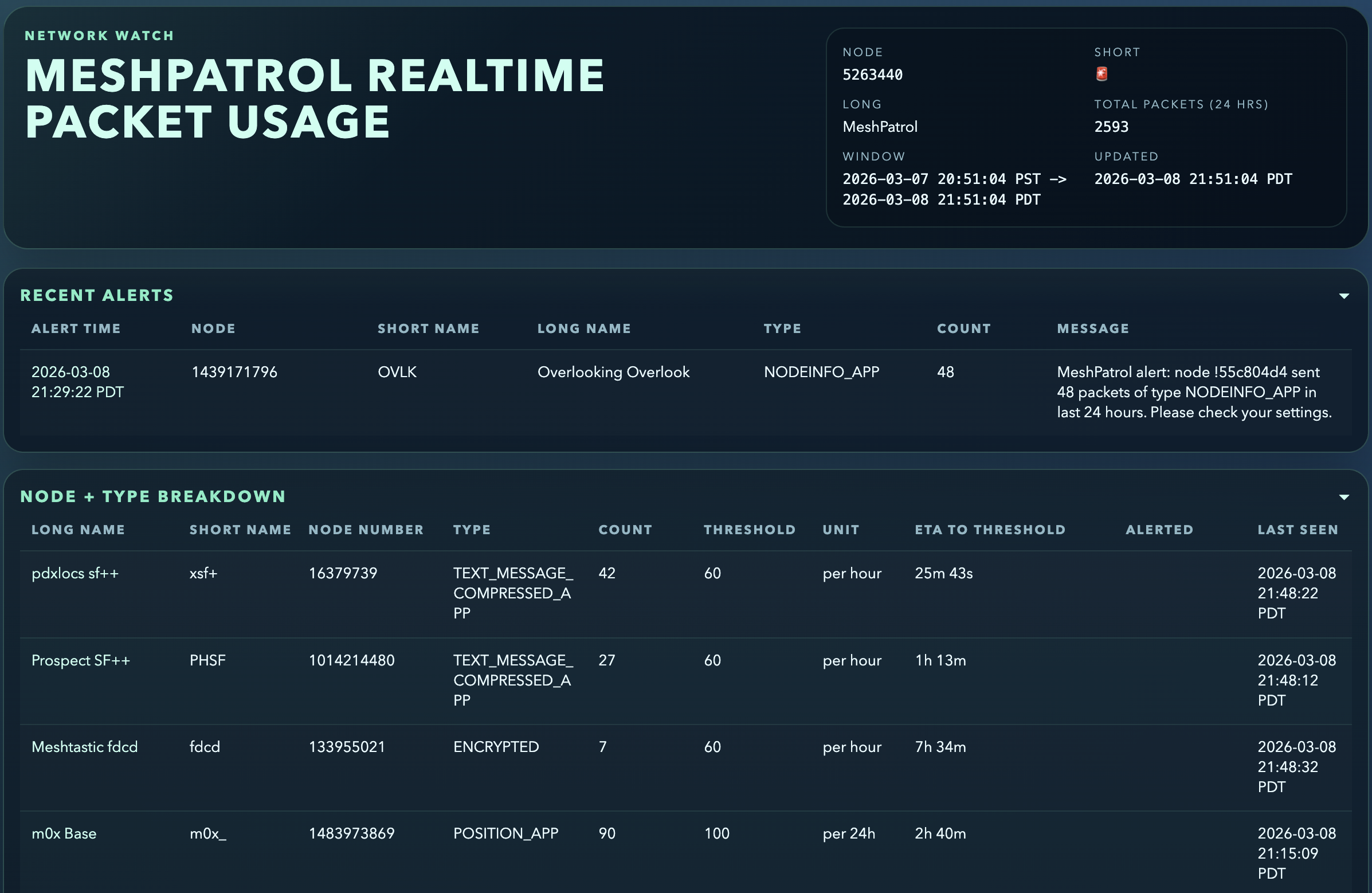
MeshPatrol is a Meshtastic packet-monitoring bot that:
- subscribes to incoming packets from a Meshtastic node (serial or TCP)
- stores packet payloads using
meshdb - tracks per-node and per-packet-type hourly counts in SQLite
- sends a direct message (DM) to nodes that exceed configured thresholds
- serves a dashboard over HTTP (window follows configured threshold unit)
Requirements
- Python
>=3.9,<3.15 - A Meshtastic-compatible radio reachable by USB serial or Meshtastic TCP
- Runtime dependencies:
meshtasticmeshdbPyPubSubFlask
Installation
Install from PyPI (recommended)
pip install meshpatrol
Install from source
git clone https://github.com/pdxlocations/meshpatrol.git
cd meshpatrol
python3 -m venv .venv
source .venv/bin/activate
pip install -e .
Running MeshPatrol
After installation, run:
meshpatrol
You can also run directly as a module:
python -m meshpatrol
Connection selection (CLI)
Use one of these optional flags to pick the interface at runtime:
# Serial device path
python -m meshpatrol --serial /dev/ttyUSB0

# TCP host:port
python -m meshpatrol --tcp 192.168.1.50:4403

# IPv6 TCP target
python -m meshpatrol --tcp [fe80::1]:4403
On startup, MeshPatrol:
- connects to your Meshtastic interface (
SerialInterfaceorTCPInterface) - subscribes to
meshtastic.receive - starts a web dashboard on
0.0.0.0:5050(by default), accessible from your LAN viahttp://<host-ip>:5050
Stop with Ctrl+C.
Configuration
Runtime settings live in APP_SETTINGS in meshpatrol/__main__.py.
Threshold values are loaded from config/thresholds.json.
APP_SETTINGS = {
    "interface": "serial",
    "port": None,
    "tcp_hostname": "127.0.0.1",
    "tcp_port": 4403,
    "meshdb_path": "./meshpatrol-data/databases/mesh_packets.db",
    "counter_db_path": "./meshpatrol-data/databases/packet_counters.db",
    "thresholds_path": "./meshpatrol-data/thresholds.json",
    "threshold_unit": "hour",
    "default_threshold": 120,
    "threshold_overrides": [],
    "alert_template": "...",
    "log_level": "INFO",
    "web_ui": True,
    "web_host": "0.0.0.0",
    "web_port": 5050,
}
Key settings
interface:"serial"or"tcp"(used when no CLI override is provided).port: serial device path. UseNonefor Meshtastic auto-detect.tcp_hostname/tcp_port: TCP destination wheninterface="tcp".thresholds_path: JSON file for threshold configuration.threshold_unit: legacy fallback default unit if missing from thresholds JSON ("hour"or"24h").default_threshold/threshold_overrides: legacy fallback only, used ifthresholds_pathfile is missing.alert_template: fallback DM text used when the thresholds JSON does not definedefault_alert_template. Supports{node_id},{packet_type},{count},{threshold},{hour_bucket},{window_label},{threshold_unit}.web_ui: enable/disable dashboard.meshdb_path: SQLite file used bymeshdbpacket storage.counter_db_path: SQLite file used for rate counters and alert history.
Threshold file format
config/thresholds.json:
{
  "threshold_unit": "hour",
  "default_threshold": 120,
  "default_alert_template": "MeshPatrol alert: node {node_id} sent {count} packets of type {packet_type} in {window_label}. Please check your settings.",
  "overrides": {
    "POSITION_APP": 300,
    "TELEMETRY_APP": {
      "threshold": 180,
      "unit": "24h"
    },
    "POSITION_REPEATED": {
      "threshold": 1,
      "unit": "24h",
      "alert_template": "MeshPatrol alert: node {node_id} reported the same position {position_repeat_count} times in {window_label}. Please check tracking settings."
    }
  }
}
threshold_unit: default unit ("hour"or"24h") for entries that do not specify a unit.default_threshold: fallback threshold value in the default unit for packet types without an override.default_alert_template: default DM template used for packet types without their own override template.overrides: per-port thresholds keyed by Meshtastic port name. Each value can be:- integer: threshold using default
threshold_unit - object:
{ "threshold": <int>, "unit": "hour" | "24h", "alert_template": "<text>" }for per-port unit and alert-template override
- integer: threshold using default
POSITION_REPEATED is a synthetic packet type emitted when the same normalized position is seen 3 times from the same node within a rolling 24-hour window. A threshold of 1 on POSITION_REPEATED therefore alerts on the first such repeat event.
Dashboard and API
When web_ui is enabled, MeshPatrol serves:
GET /- HTML dashboardGET /api/snapshot- JSON snapshot for the active threshold windows (hour, 24h, or mixed)
Dashboard includes:
- top nodes by packet count (active window)
- totals by packet type (active window)
- configured thresholds
- node+type breakdown with ETA to threshold (per-port threshold unit)
- recent alerts (active window)
Alert Cadence
hourthresholds alert at most once pernode_id + packet_type + UTC hour bucket24hthresholds alert at most once per rolling 24-hour window fornode_id + packet_type- alerts are only evaluated when a new packet is received, so MeshPatrol does not resend on a timer by itself
Data files
By default, MeshPatrol creates/updates files in the working-directory ./meshpatrol-data/ folder:
./meshpatrol-data/databases/mesh_packets.<owner_node_num>.db(created bymeshdb)./meshpatrol-data/databases/packet_counters.db./meshpatrol-data/thresholds.json
If WAL mode is active, you may also see -wal and -shm sidecar files.
Logging
Logging is controlled by APP_SETTINGS["log_level"] and defaults to INFO.
License
GPL-3.0-only. See LICENSE.
Meshtastic® is a registered trademark of Meshtastic LLC. Meshtastic software components are released under various licenses, see GitHub for details. No warranty is provided - use at your own risk.
1 maintainer

Metadata
1 maintainer
Release files for meshpatrol 0.0.21
For a detailed explanation of source distributions (sdists) and built distributions (wheels), please see the package formats documentation.
Source distribution (sdist)
| File | Size | Uploaded | Provenance | |
|---|---|---|---|---|
| meshpatrol-0.0.21.tar.gz | 35.1 kB | With provenance | Details |
Built distribution (wheel)
| File | Interpreter | ABI | Platform | Reset |
|---|---|---|---|---|
| meshpatrol-0.0.21-py3-none-any.whl | Python 3 | none | any | Details |
Total release size: 70.0 kB
Release files / meshpatrol-0.0.21.tar.gz
| Download URL | meshpatrol-0.0.21.tar.gz |
|---|---|
| Size | 35.1 kB |
| Tags | Source |
|
SHA-256 checksum How to use checksums |
209faa6e8b6210fdc42fdb44058bfc49c7277f40a7a8cbd3a793e6a64fdad169
|
|
BLAKE2b-256 checksum How to use checksums |
38fdfeb5af0efb2d9a63cbfb7da79bbd87a95719bb12f895d8751aa06e052592
|
| Upload date | |
|
Uploaded using Trusted Publishing? What is trusted publishing? |
Yes |
| Uploaded via |
twine/6.1.0 CPython/3.13.7
|
Provenance
Provenance describes where a file came from. On PyPI, provenance is shared via attestations, which provide a verifiable record of the build or publishing details. View details, limitations and caveats.


PyPI Publish Attestation
PyPI verified that this artifact, at this checksum, originated from the publisher listed below.
Signed by GitHub Actions, verified by PyPI on Mar 9, 2026.
Transparency logRelease files / meshpatrol-0.0.21-py3-none-any.whl
| Download URL | meshpatrol-0.0.21-py3-none-any.whl |
|---|---|
| Size | 34.9 kB |
| Tags | Python 3 |
|
SHA-256 checksum How to use checksums |
d552760e7363d87fa5491a655c328e9a6f6d6466990e9c6fd11ab5c01b6b8986
|
|
BLAKE2b-256 checksum How to use checksums |
47f781c0753695c342cb191052dc3d98fb45042c607f58606df0fa658dedf0d8
|
| Upload date | |
|
Uploaded using Trusted Publishing? What is trusted publishing? |
Yes |
| Uploaded via |
twine/6.1.0 CPython/3.13.7
|
Provenance
Provenance describes where a file came from. On PyPI, provenance is shared via attestations, which provide a verifiable record of the build or publishing details. View details, limitations and caveats.
PyPI Publish Attestation
PyPI verified that this artifact, at this checksum, originated from the publisher listed below.
Signed by GitHub Actions, verified by PyPI on Mar 9, 2026.
Transparency logSecurity for meshpatrol 0.0.21
Provenance
Provenance describes where a file came from. On PyPI, provenance is shared via attestations, which provide a verifiable record of the build or publishing details. View details, limitations and caveats.
Full provenance
All 2 files in this release have been uploaded with provenance metadata.
Attestation for meshpatrol-0.0.21.tar.gz
PyPI Publish Attestation
PyPI verified that this artifact, at this checksum, originated from the publisher listed below.
Signed by GitHub Actions, verified by PyPI on Mar 9, 2026.
Transparency logA note on package security
PyPI is a repository for distributing packages, not a service for auditing them. While third-party security researchers and our staff do their best to detect and remove malicious packages, PyPI cannot guarantee the quality, security or suitability of any given package.
To learn more about protecting yourself from malicious actors, visit our package security documentation.














