





Medial Tractography Analysis (MeTA)
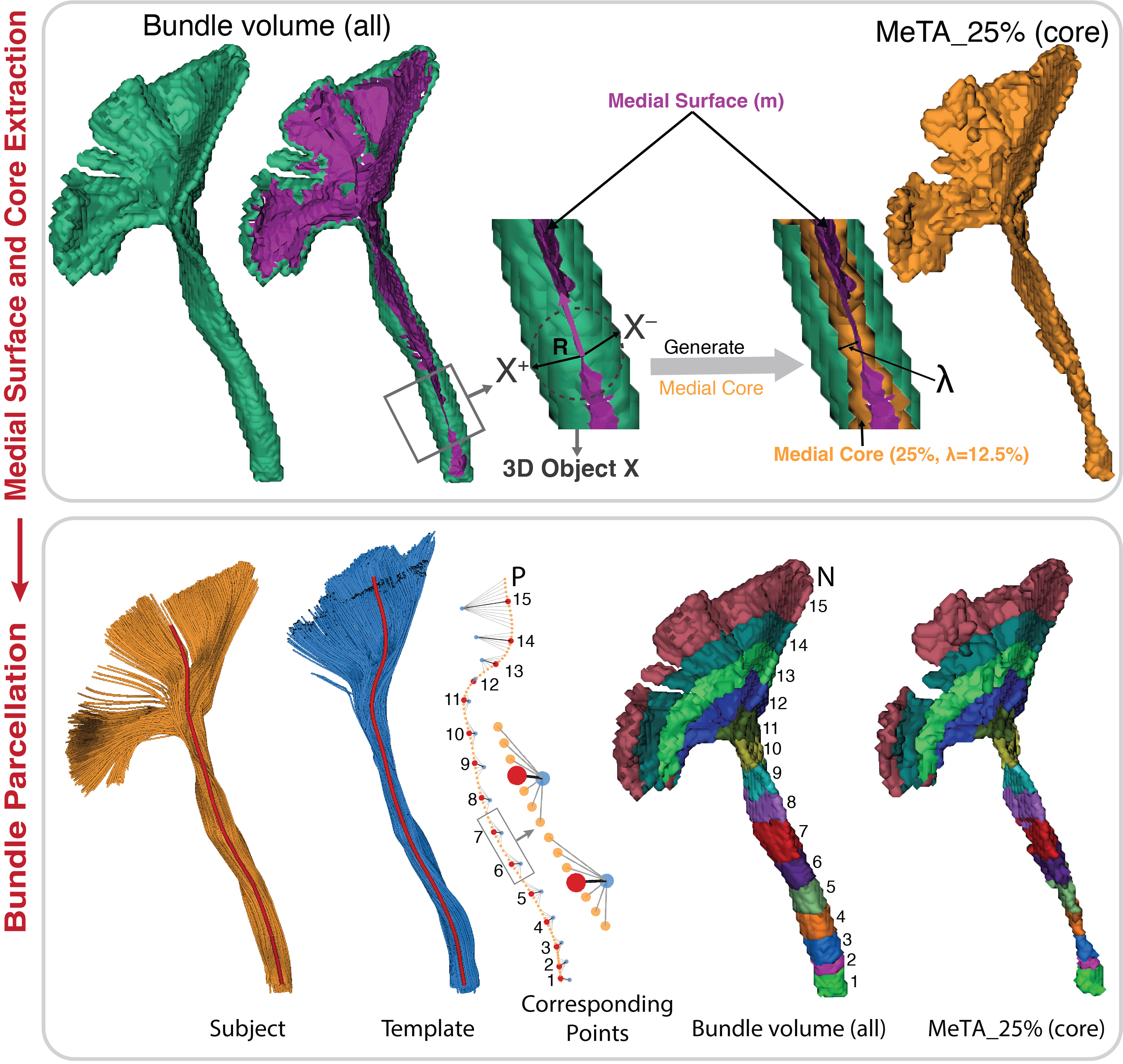
MeTA is a workflow implemented to minimize microstructural heterogeneity in diffusion MRI (dMRI) metrics by extracting and parcellating the core volume along the bundle length in the voxel-space directly while effectively preserving bundle shape and efficiently capturing the regional variation within and along white matter (WM) bundles.
Contact: Iyad Ba Gari iyad.bagari@usc.edu
If you use MeTA code, please cite the following publication:
- Ba Gari, I., et al.: Heritability and Genetic Correlations Along the Corticospinal Tract. International Workshop on Computational Diffusion MRI. Cham: Springer Nature Morocco, 2024
- Ba Gari, I., et al.: Along-tract parameterization of white matter microstructure using medial tractography analysis (MeTA). In: The 19th International Symposium on Medical Information Processing and Analysis (2023)
Installation
MeTA supports Python version >=3.11 and <3.14. Using pip:
pip install meta-neuro
Using Bioconda:
conda config --add channels bioconda
conda install bioconda::meta-neuro
Usage
## Using DSI Studio transforms:
# Compute density map and convert streamlines to a binary image:
density_map --tractogram subject_CST.tt.gz --reference subject_FA.nii.gz \
            --output "output_dir/subjectID_CST.nii.gz"

# Medial Tractography Analysis (MeTA):
meta --subject "subjectID_12345" --bundle "CST" \
    --mbundle "model_CST.tt.gz" --sbundle "subject_CST.tt.gz" \
    --mask "output_dir/subjectID_CST.nii.gz" \
    --warp "subjectID.1InverseWarp.nii.gz" --warp_source "dsi_studio" \
    --seg_method "hyperplane" --num_segments 15 --output "output_dir"

# Extract Voxel-based Bundle Profile: Compute volumetric profile for DTI maps e.g., FA, MD, RD, AD, etc. Output two files: 1) *_segments_average.csv file with the average profile along the bundle length, and 2) *_segments_voxelwise.h5 (with option `--voxelwise `): the profile for each voxel in the bundle.
volumetric_profile --subject "subjectID_12345" --bundle "CST" --mask CST_local_all.nii.gz --map subject_FA.nii.gz --output "output_dir"

# Extract Streamline-based Profile: Compute streamline profile based on tractography and DTI maps e.g., FA, MD, RD, AD, etc. output two files: 1) *_streamlines_average.csv file with the average profile along the bundle length, and 2) *_streamlines_pointwise.h5 (with option `--pointwise `): the profile for each point of streamline.

streamlines_profile --subject "subjectID_12345" --bundle "CST" --tractogram "subject_CST.tt.gz" --mask CST_local_all.nii.gz --map subject_FA.nii.gz --output "output_dir"

# Extract Bundle Shape Features: Bundle shape features implemented based on Yeh et al., 2020. The following features are extracted: Total number of streamlines, Average streamlines length, Span, Curl, Volume, Surface area, Diameter, Elongation, Irregularity


shape_metrics --subject "subjectID_12345" --bundle "CST" --mask CST_local_all.nii.gz --tractogram "subject_CST.tt.gz" --output CST_streamlines_metrics.csv


Release files for meta-neuro 2.1.1
For a detailed explanation of source distributions (sdists) and built distributions (wheels), please see the package formats documentation.
Source distribution (sdist)
| File | Size | Uploaded | |
|---|---|---|---|
| meta_neuro-2.1.1.tar.gz | 28.9 kB | Details |
Built distribution (wheel)
| File | Interpreter | ABI | Platform | Reset |
|---|---|---|---|---|
| meta_neuro-2.1.1-py3-none-any.whl | Python 3 | none | any | Details |
Total release size: 62.8 kB
Release files / meta_neuro-2.1.1.tar.gz
| Download URL | meta_neuro-2.1.1.tar.gz |
|---|---|
| Size | 28.9 kB |
| Tags | Source |
|
SHA-256 checksum How to use checksums |
fe73b09084f35a2ecf0214e63ed0833abc4d085850614d44a0563b2e66bfd402
|
|
BLAKE2b-256 checksum How to use checksums |
a7cafbbe2138e70685b023a58edc0d2b3b2ae7dd1b26c3689dc5b896a97ead08
|
| Upload date | |
|
Uploaded using Trusted Publishing? What is trusted publishing? |
Yes |
| Uploaded via |
twine/6.1.0 CPython/3.13.14
|
Provenance
Provenance describes where a file came from. On PyPI, provenance is shared via attestations, which provide a verifiable record of the build or publishing details. View details, limitations and caveats.


PyPI Publish Attestation
PyPI verified that this artifact, at this checksum, originated from the publisher listed below.
Signed by GitHub Actions, verified by PyPI on Jul 20, 2026.
Transparency logRelease files / meta_neuro-2.1.1-py3-none-any.whl
| Download URL | meta_neuro-2.1.1-py3-none-any.whl |
|---|---|
| Size | 34.0 kB |
| Tags | Python 3 |
|
SHA-256 checksum How to use checksums |
65b69c7305d36aa7147c40bf7251f0d17c1c8d0c06d8caa135158557ab62eb8b
|
|
BLAKE2b-256 checksum How to use checksums |
32c17d9e143f5e14fecaa11a5e54cf80b4f3046835ac5c27f358490a08b2e418
|
| Upload date | |
|
Uploaded using Trusted Publishing? What is trusted publishing? |
Yes |
| Uploaded via |
twine/6.1.0 CPython/3.13.14
|
Provenance
Provenance describes where a file came from. On PyPI, provenance is shared via attestations, which provide a verifiable record of the build or publishing details. View details, limitations and caveats.
PyPI Publish Attestation
PyPI verified that this artifact, at this checksum, originated from the publisher listed below.
Signed by GitHub Actions, verified by PyPI on Jul 20, 2026.
Transparency log













