




Bulk metadata scrubbing for PDF, Office and image files.
Strip the metadata, keep the document — with a before/after proof report.
Pairs with MetaScout: MetaScout finds the leaks, MetaCLS fixes them.
🇬🇧 English · 🇹🇷 Türkçe
What is this?
An organisation runs MetaScout against its own site and finds a pile of published PDFs and Office documents leaking author names, internal file paths, software/OS fingerprints and GPS coordinates. Now someone has to actually clean those files. That's MetaCLS.
Point it at a folder (or drag files into the web UI, or POST them to the API) and it:
- scans every supported file for embedded metadata,
- strips it — aggressively by default — writing cleaned copies (originals untouched) or overwriting in place,
- verifies each cleaned file by re-scanning it, and
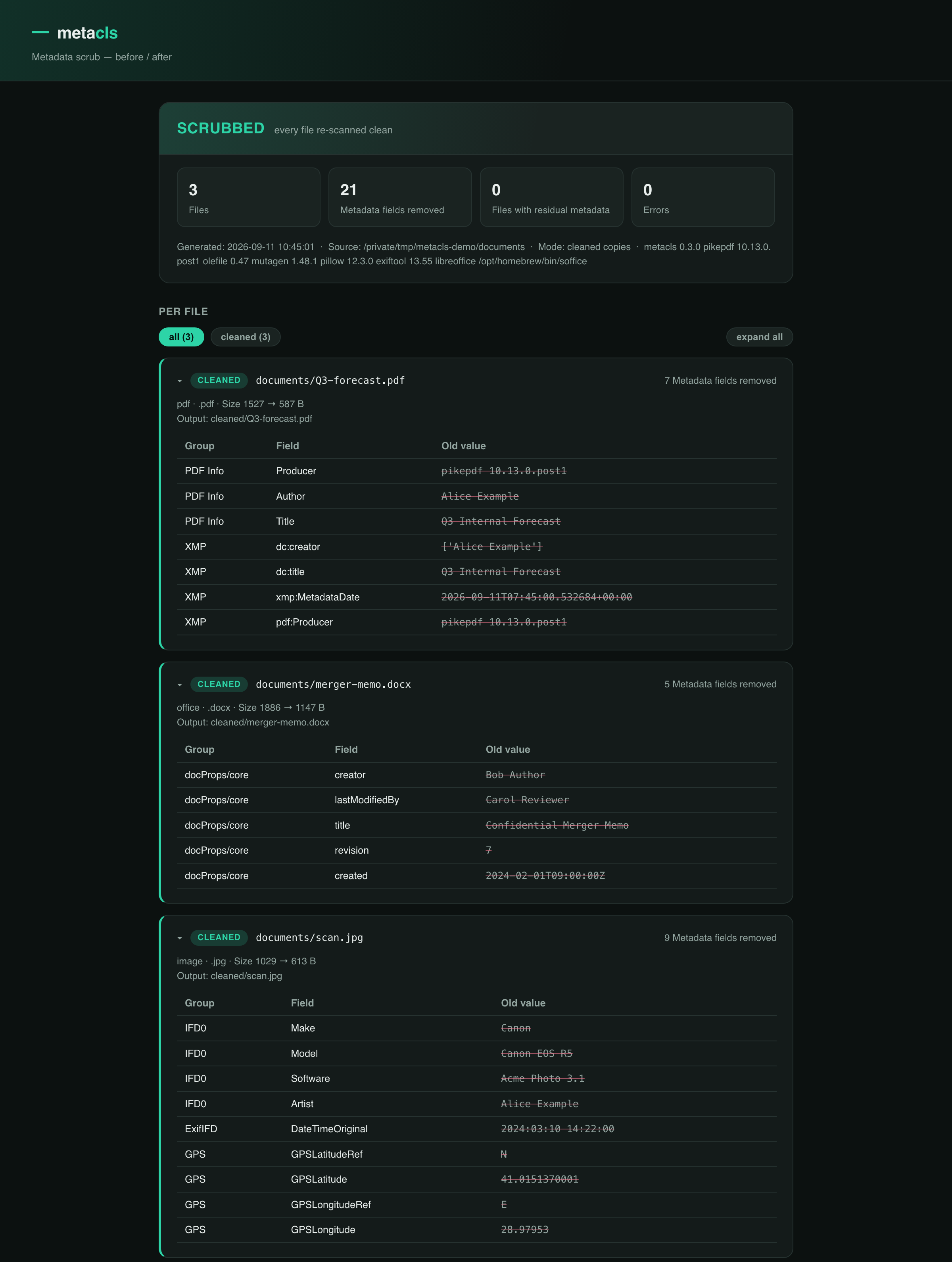
- reports exactly what was removed, per file, as JSON and a styled HTML page you can hand to a security team as evidence.
It only touches metadata — the document's visible content (body text, images, a scanned signature) is never modified.
What it removes
| Format | Engine | Removed |
|---|---|---|
| pikepdf (QPDF) | /Info dictionary (Author, Title, Producer, Creator, CreationDate, …), the XMP metadata packet, /PieceInfo and other application-private data, page-level metadata, annotation authors + timestamps (/T /M /CreationDate), and the description + timestamps on embedded-file attachments. The file is fully rewritten, so values sitting in superseded cross-reference sections can't be recovered from the output. Encrypted PDFs need --password. With --strip-form-values: AcroForm field values and the XFA <xfa:data> packet too. |
|
Office .docx .xlsx .pptx (+ macro-enabled .docm .xlsm .pptm and templates .dotx .dotm .xltx .xltm .potx .potm) |
stdlib zipfile |
docProps/core.xml (creator, lastModifiedBy, revision, timestamps), docProps/app.xml (Company, Manager, Template path), docProps/custom.xml, the embedded thumbnail, and Word revision-save-id fingerprints (w:rsids) from settings.xml. Dangling relationships and content-type overrides are pruned; per-member zip timestamps are normalised. vbaProject.bin is kept (breaking macros is worse than the small chance a name hides in it) and the report flags that the file was only partly scrubbed. |
OpenDocument .odt .ods .odp |
stdlib zipfile |
meta.xml — initial-creator, creator, generator, editing-cycles/duration, timestamps, document statistics, user-defined fields — plus the Thumbnails/ preview image (a rendered snapshot of the first page) and its META-INF/manifest.xml entry. |
Legacy Office .doc .xls .ppt |
olefile (pure Python) |
The \x05SummaryInformation / \x05DocumentSummaryInformation property streams — author, last-saved-by, company, manager, template, title, timestamps, custom properties — are patched out in place: same file size, same format, same structure. --in-place works. If a container can't be parsed, MetaCLS falls back to a LibreOffice (soffice) re-render to .docx/.xlsx/.pptx. |
SVG .svg |
stdlib xml |
<metadata> (RDF/Dublin-Core author/title/licence), sodipodi: / inkscape: / Adobe-Illustrator elements and attributes, and editor comments (<!-- Created with … -->). The drawing itself is untouched. |
Images .jpg .jpeg .png .gif .tif .tiff .heic .heif .webp |
ExifTool | All EXIF / IPTC / XMP / GPS / MakerNotes, PNG/WebP text chunks and the JPEG/GIF comment block. The ICC colour profile and EXIF orientation are kept by default so the picture still renders correctly (--no-keep-color-profile / --no-keep-orientation to drop those too). HEIC also works via pillow-heif when exiftool is absent. |
Audio / video .mp3 .m4a .flac .ogg .opus .wav .aiff / .mp4 .mov .m4v .3gp .mkv .webm .avi |
mutagen / ExifTool / pure Python |
Audio: all tags (ID3 / Vorbis / iTunes) and embedded cover art — pip install 'metacls[media]'. MP4-family video: exiftool clears the metadata atoms (ItemList, Keys, UserData, XMP — artist, Make/Model from a phone, GPS, CreationDate). Matroska / WebM / AVI (exiftool can't write these): the whole EBML Tags block and the Info title / dates / muxer-and-writer app names are blanked in place — overwritten with Void / JUNK padding of identical length, so the file length is unchanged and --in-place works; the track data is never touched. Not scanned by default — pass --media (or list the extensions in --filetypes). Spot-check playback. |
Containers .zip .eml .tar .tar.gz .tgz .tar.bz2 .tar.xz .7z .msg |
stdlib zipfile / tarfile / email; py7zr / extract-msg (optional) |
With --recurse: each supported member of an archive, and each email attachment, is scrubbed with its own engine and the archive/message repacked. .tar* also has its per-member uid/gid/username/mtime headers normalised (a leak of the packer's identity). .7z needs pip install 'metacls[archive]'. .msg (Outlook) is read-only — metacls inspect --recurse lists what's inside (needs metacls[msg]); export to .eml to scrub. Non-scrubbable members pass through untouched. Nesting is followed (depth-limited). |
--keep Title (repeatable) spares a named field from the otherwise-aggressive strip.
--backup keeps <name>.orig next to an --in-place scrub.
Two opt-in flags go past metadata into identity data that's technically content:
--strip-form-values blanks PDF form values — AcroForm fields (/V /DV) and their cached
appearance, plus the <xfa:data> packet of an XFA form (the XFA template and schema are kept);
--strip-office-authors blanks Office tracked-change / comment author names and dates
(the change and comment text stays, so accept/reject still works).
Install
pip install metacls                     # core: PDF + Office scrubbing
pip install 'metacls[api]'              # + the REST API service
pip install 'metacls[media]'            # + audio tag scrubbing (mutagen)
pip install 'metacls[archive]'          # + .7z recursion (py7zr)
pip install 'metacls[msg]'              # + read-only .msg inspection (extract-msg)
pip install 'metacls[image-fallback]'   # + Pillow (weak image fallback if exiftool is absent)
Image scrubbing needs the exiftool binary on PATH:
brew install exiftool                        # macOS
sudo apt install libimage-exiftool-perl      # Debian / Ubuntu
PDF, Office (modern and legacy .doc/.xls/.ppt), ODF and SVG scrubbing are pure Python
and need nothing extra. LibreOffice (soffice) is only used as a fallback for a legacy
container the in-place patcher can't parse.
Python 3.10+ is supported. On a brand-new Python where
pikepdfhas no wheel yet, install under 3.12 instead.
CLI
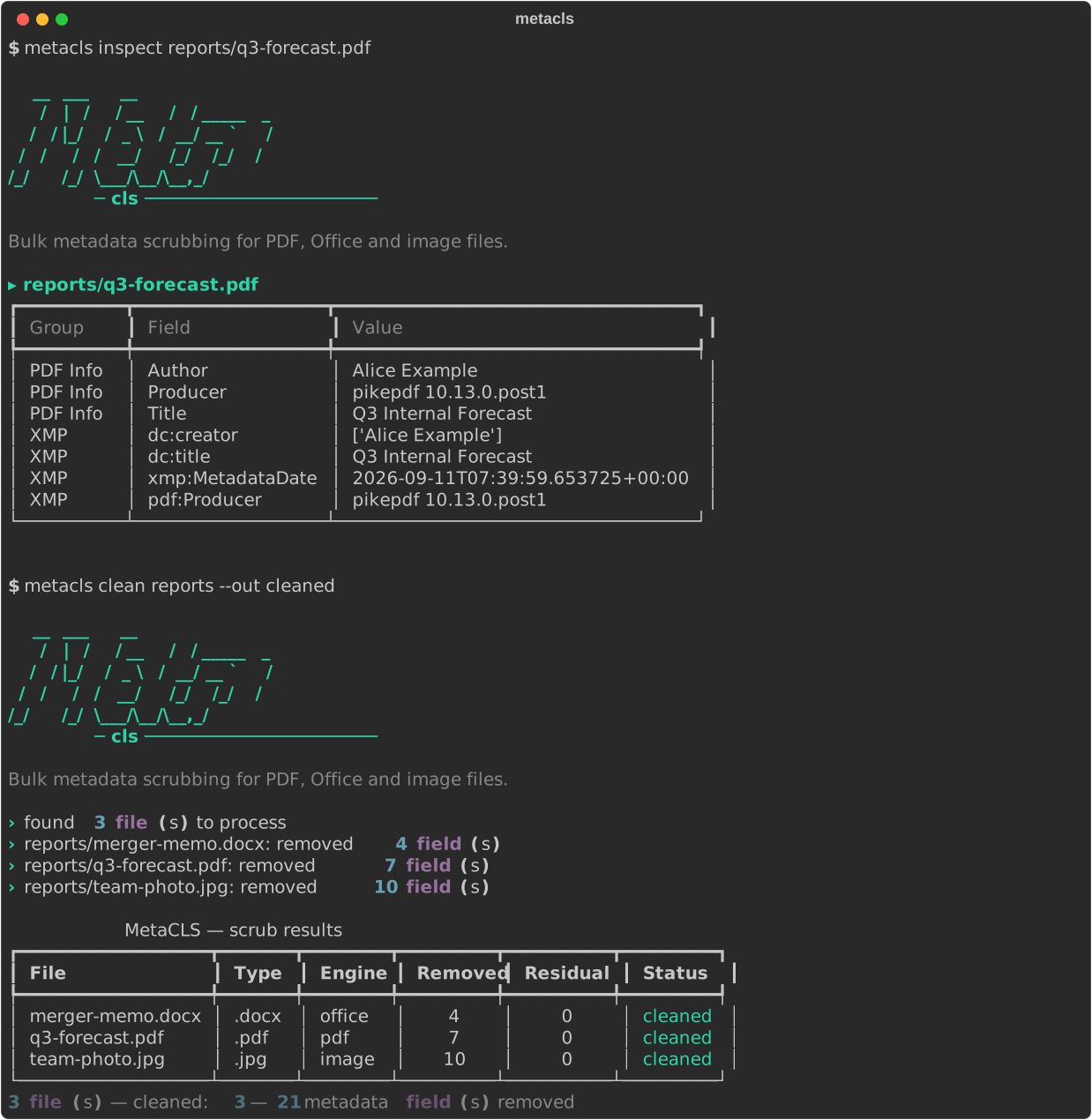
Inspect — see what's in the files (read-only)
metacls inspect ./published-docs
metacls inspect leak.pdf report.docx --json
Run this on the files MetaScout flagged to see exactly what they carry before you scrub.
Clean
# default: originals untouched, cleaned copies written under ./metacls_cleaned/,
# mirroring the input tree, plus report.json + report.html
metacls clean ./published-docs

# overwrite the originals instead (asks first; -y to skip the prompt)
metacls clean ./published-docs --in-place

# preview only, change nothing
metacls clean ./published-docs --dry-run

# keep document titles, Turkish report
metacls clean ./published-docs --keep Title --report-lang tr

# just some files
metacls clean a.pdf b.docx c.jpg --out ./clean
Useful flags: --filetypes, --no-recursive, --out DIR, --keep FIELD, --dry-run,
--no-verify, --no-keep-color-profile, --no-keep-orientation, --report-lang en|tr,
--password (encrypted PDFs), --strip-pdf-id, --backup (keep <name>.orig with --in-place),
--strip-form-values, --strip-office-authors (opt-in — see above),
--jobs N (scrub N files in parallel), --quarantine DIR (overwrite the original but move
it to DIR/<date>/ first — recoverable, safer than --in-place),
--policy publish|internal|minimal (named presets),
--exclude GLOB (repeatable — skip files/dirs when walking),
--no-follow-symlinks (don't scrub a symlinked file), --progress (a progress bar), and the
group-level metacls --debug … (re-raise on the first failing file instead of recording it).
metacls inspect takes --media and --recurse too, so you can point it at an archive or a
video and see what's inside before scrubbing.
Project config: a .metacls.toml in the working directory or a parent (up to the git
root) sets defaults per command — CLI flags and env vars still win.
[clean]
strip-office-authors = true
jobs = 4
keep = ["Title"]
Exit codes (so it works as a CI gate): 0 clean · 1 a file errored · 2 a cleaned file
still carried metadata on the verify re-scan · 3 (--check only) metadata found.
Diff — track a directory over time
metacls clean ./published --out ./scan-jan     # once a month, into dated dirs
metacls clean ./published --out ./scan-feb
metacls diff ./scan-jan ./scan-feb             # what changed?
Shows files added/removed between the two runs and, the useful part, files where metadata
reappeared (someone re-saved the document in an editor). Exit code 1 if anything
regained metadata — drop it in a cron job.
Watch — keep a drop folder scrubbed
metacls watch /srv/ftp/incoming --move-processed /srv/ftp/scrubbed --interval 10 --settle 5
metacls watch ./inbox --once                       # one pass, for cron
metacls watch ./inbox --pattern 'invoice-*.pdf' -j 4   # filter + parallel backlog
A poll loop for an FTP/SFTP landing zone: a file is only touched once it has stopped
changing for --settle seconds (a half-finished upload is never scrubbed), state lives in
<dir>/.metacls-watch.json so a restart doesn't reprocess everything, and a file
re-dropped with a newer timestamp is handled again. A .metacls-watch.lock file keeps a
second watcher off the same directory (a lock left by a dead process is stolen).
--pattern GLOB (repeatable) narrows what's picked up; -j/--jobs N scrubs a backlog in
parallel; state entries for files that have since vanished are pruned each pass. Scrubs in
place by default; --to DIR writes cleaned copies instead. A systemd template unit is in
platform/linux/.
Web UI
metacls web # opens http://127.0.0.1:8770/
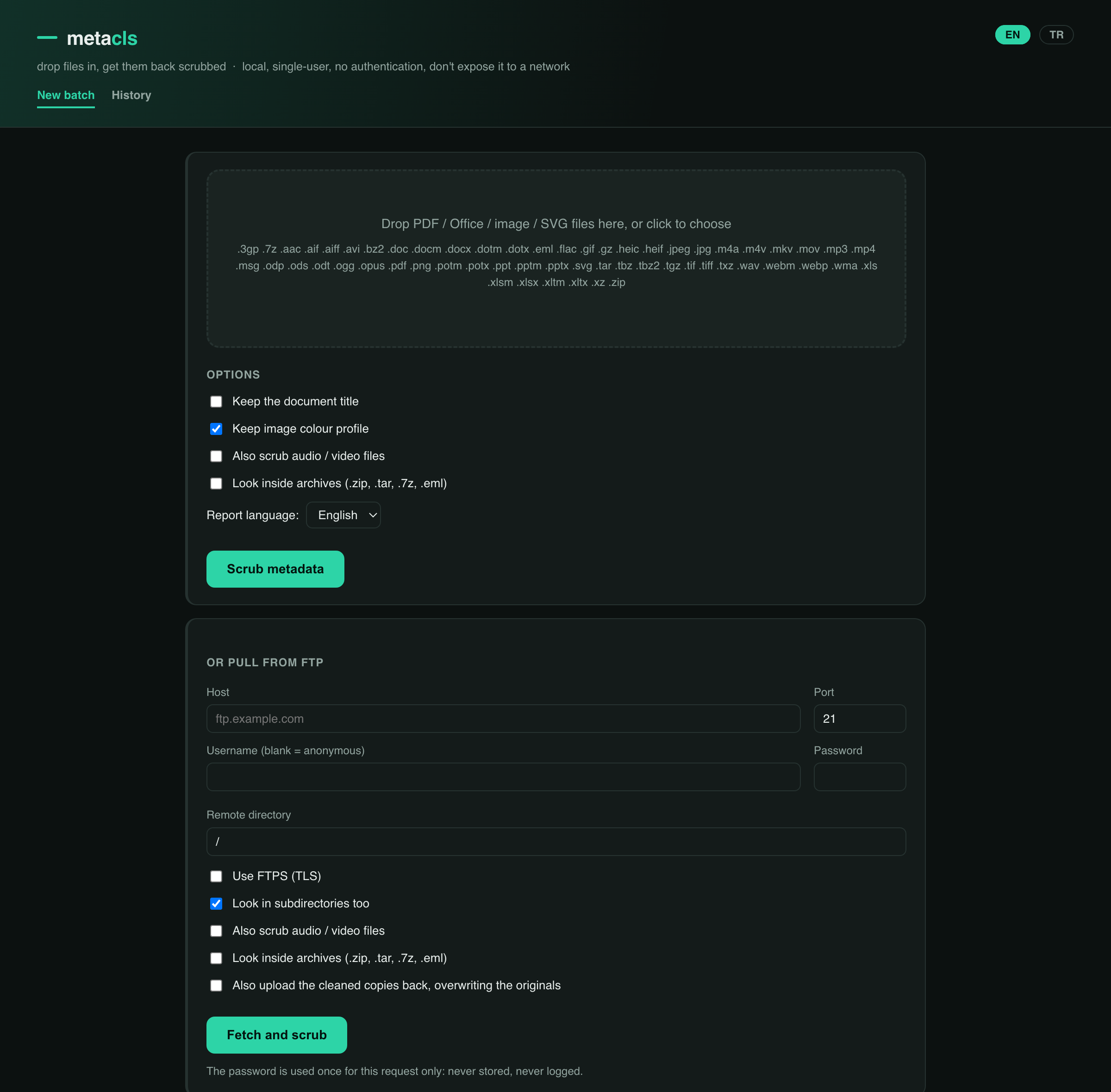
Drag files onto the page, get them back scrubbed — individually or as a zip — with a per-file before/after view and the full report. Past runs are listed under History. Local, single-user, no authentication — don't expose it to a network.
REST API
For a Linux server, an FTP drop-box, or a CI pipeline that needs to hand files off to be cleaned:
pip install 'metacls[api]'
metacls api           # http://127.0.0.1:8000/  ·  interactive docs at /docs
# what can this server scrub, and which optional tools are installed?
curl -sS http://127.0.0.1:8000/v1/formats

# submit  (recurse: look inside .zip/.tar/.7z/.eml · media: also audio/video)
curl -sS -X POST http://127.0.0.1:8000/v1/clean \
  -F files=@leak.pdf -F files=@report.docx -F report_lang=en -F recurse=true
# -> {"job_id": "...", "links": {...}}

# poll
curl -sS http://127.0.0.1:8000/v1/clean/<job_id>

# pull the cleaned files + report as a zip
curl -sSL -o cleaned.zip http://127.0.0.1:8000/v1/clean/<job_id>/download
Jobs run in a bounded background thread pool; --max-workers / --max-pending size it.
Uploads stream to disk with --max-upload-mb / --max-files caps. GET /v1/formats and
GET /v1/health are open even when an API key is set.
Auth: metacls api --api-key KEY (or METACLS_API_KEY) requires that key on every
/v1 route except /v1/health and /v1/formats — send it as X-API-Key: KEY or
Authorization: Bearer KEY. Both api and web refuse to bind a non-loopback host
(0.0.0.0, a LAN IP) with no auth unless you pass --insecure; the supported way to expose
either is to bind 127.0.0.1 and put a reverse proxy in front —
docs/reverse-proxy.md has ready nginx / Caddy configs.
metacls api --host 0.0.0.0 --api-key "$(openssl rand -hex 24)"
curl -H "X-API-Key: $KEY" -F files=@leak.pdf http://server:8000/v1/clean
Docker
Pull the published image (built for amd64 + arm64 on every release):
docker pull ghcr.io/gorkemguler/metacls:latest
# web UI
docker run --rm -p 127.0.0.1:8770:8770 -v "$(pwd)/metacls_cleaned:/data" \
  ghcr.io/gorkemguler/metacls:latest

# REST API
docker run --rm -p 127.0.0.1:8000:8000 -v "$(pwd)/metacls_cleaned:/data" \
  ghcr.io/gorkemguler/metacls:latest api --host 0.0.0.0 --port 8000 --output-dir /data

# one-off: scrub a mounted folder
docker run --rm -v "$(pwd)/docs:/work" ghcr.io/gorkemguler/metacls:latest \
  clean /work --out /work/cleaned
Or build locally: docker build -t metacls .. docker compose up --build runs the web UI;
docker compose --profile api up metacls-api the API. Put a proxy in front before exposing
either — see docs/reverse-proxy.md.
How thorough is it?
- PDF — a full QPDF rewrite, not an incremental update, so the removed
/Infoand XMP aren't left behind in an old xref section. Annotation authors/dates and embedded-file metadata go too; the annotation's visible text and the attached file itself stay. Signed PDFs are skipped, not broken — scrubbing would invalidate the signature; re-export an unsigned copy if you need it cleaned. Encrypted PDFs without--passwordare skipped; with it, the cleaned copy is written unencrypted (the result says so). - Office / ODF — the metadata parts are deleted from the package (or, for ODF, emptied), not merely blanked, and the references to them are pruned so nothing dangles.
- Images —
exiftool -all=, which is the reference tool for this. --verify(on by default) re-scans every cleaned file and lists anything still present in the report; the CLI exits2if so.- Deterministic — scrubbing the same file twice with the same options gives byte-identical
output (checked in CI), so a scrub is auditable.
--strip-pdf-idis the deliberate exception.
Limitations
- Content is out of scope by design: text in the document body, a visible/scanned signature,
text baked into an image — MetaCLS won't touch those. (MetaScout's
--scan-contentfinds them; removing them is a manual edit.) - Legacy
.doc / .xls / .pptare not scrubbed (convert first). - Not a certified sanitisation tool. Verify anything high-stakes yourself — that's what
metacls inspecton the output, or a second pass with MetaScout, is for.
Desktop integration
All in platform/, one install command each — everything scrubs in place:
- macOS — a drag-and-drop
MetaCLS.app(built withosacompile, no Xcode), plus a Finder Quick Action. - Windows — a WinForms drop window, a Send to menu entry, an Explorer
right-click entry, and a
wingetmanifest (template). - Linux — a
.desktoplauncher / Open With handler (with azenitypicker), a Nautilus/Nemo/Caja script, and asystemdwatch unit.
CI / hooks
metacls clean --check implies --dry-run and exits 3 if any file still carries
metadata (0 if clean, 1 on error) — a gate for pre-commit and CI.
# .pre-commit-config.yaml
- repo: https://github.com/gorkemguler/MetaCLS
  rev: main
  hooks: [{ id: metacls }]
# .github/workflows/no-metadata.yml
- uses: gorkemguler/MetaCLS@main
  with:
    paths: docs/ public/
    mode: check        # or "fix" to scrub in place and commit
Roadmap
See ROADMAP.md for what's shipped, the known limitations, and the backlog
(inotify watch, SFTP mode, --jobs, --quarantine, .metacls.toml, policy profiles,
audio/video, PyPI, recursive-container scrubbing).
License
MIT — see LICENSE.
1 maintainer

Metadata
1 maintainer
Release files for metacls 0.3.1
For a detailed explanation of source distributions (sdists) and built distributions (wheels), please see the package formats documentation.
Source distribution (sdist)
| File | Size | Uploaded | |
|---|---|---|---|
| metacls-0.3.1.tar.gz | 106.8 kB | Details |
Built distribution (wheel)
| File | Interpreter | ABI | Platform | Reset |
|---|---|---|---|---|
| metacls-0.3.1-py3-none-any.whl | Python 3 | none | any | Details |
Total release size: 195.6 kB
Release files / metacls-0.3.1.tar.gz
| Download URL | metacls-0.3.1.tar.gz |
|---|---|
| Size | 106.8 kB |
| Tags | Source |
|
SHA-256 checksum How to use checksums |
cdc2d9cd7bb388104e50604ac73c7fa285005faa8ebc40f4349a83cc4e0c939c
|
|
BLAKE2b-256 checksum How to use checksums |
438a00c70ae7cb590219486f7ceab010cdc517bec241188f8a207f9b71a4e45d
|
| Upload date | |
|
Uploaded using Trusted Publishing? What is trusted publishing? |
Yes |
| Uploaded via |
twine/7.0.0 CPython/3.13.14
|
Provenance
Provenance describes where a file came from. On PyPI, provenance is shared via attestations, which provide a verifiable record of the build or publishing details. View details, limitations and caveats.


PyPI Publish Attestation
PyPI verified that this artifact, at this checksum, originated from the publisher listed below.
Signed by GitHub Actions, verified by PyPI on Sep 11, 2026.
Transparency logRelease files / metacls-0.3.1-py3-none-any.whl
| Download URL | metacls-0.3.1-py3-none-any.whl |
|---|---|
| Size | 88.8 kB |
| Tags | Python 3 |
|
SHA-256 checksum How to use checksums |
564711bfbc40ce2dff29dc562f9b9129fd970b870f9fbad49659698ba32a9ab9
|
|
BLAKE2b-256 checksum How to use checksums |
564b3b2dea8865e674f0c62aaa50054ef740a373c5993e586f2622cfb51060d5
|
| Upload date | |
|
Uploaded using Trusted Publishing? What is trusted publishing? |
Yes |
| Uploaded via |
twine/7.0.0 CPython/3.13.14
|
Provenance
Provenance describes where a file came from. On PyPI, provenance is shared via attestations, which provide a verifiable record of the build or publishing details. View details, limitations and caveats.
PyPI Publish Attestation
PyPI verified that this artifact, at this checksum, originated from the publisher listed below.
Signed by GitHub Actions, verified by PyPI on Sep 11, 2026.
Transparency log













