
📷 Metadata Stripper

Your photos know more than you do. Read it, then erase it.




"The photo was innocent. The GPS coordinates were not."
What is it?
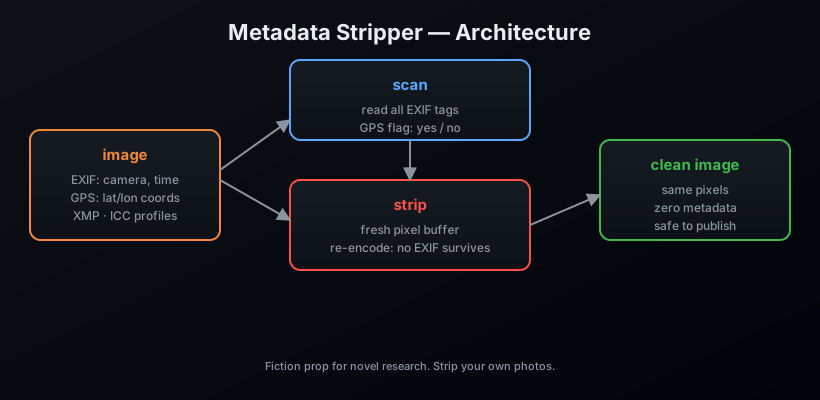
Every JPEG whispers: where it was taken, with what camera, at what exact moment. That whisper is EXIF — and half the time it includes the GPS coordinates. Metadata Stripper reads the whisper, shows it to you, and then removes it for good by re-encoding the pixels clean. No EXIF, no ICC, no XMP survives the trip.
Features
- 🔍
scan— dump every metadata field, flag GPS presence - ✂️
strip— re-encode without metadata, in place or to a new file - 🗂️
strip-dir— clean every image in a folder - 📡
hasgps— one-word answer for scripts:yes/no - 🖼️ JPEG, PNG, WebP, TIFF, BMP
Install
pip install metadata-stripper
From source:
git clone https://github.com/AnonymoDGH/metadata-stripper
cd metadata-stripper
pip install -e .
Quickstart
# What is this photo hiding?
metastrip scan vacation.jpg
# [*] vacation.jpg (2,345,678 bytes)
#     Make: Secret Agent Camera
#     DateTime: 2026:08:13 03:33:33
#     GPS: ⚠ present

# Kill it
metastrip strip vacation.jpg
# [+] vacation.jpg -> vacation.jpg  (removed 5 EXIF entries)

# Or clean a whole folder of camera exports
metastrip strip-dir ./export/
# [=] 142 images cleaned in place.

# Scripting? Ask a yes/no question
metastrip hasgps vacation.jpg
# no
CLI reference
| Command | What it does |
|---|---|
metastrip scan <path> |
Show all metadata in file(s)/dir |
metastrip strip <path> [--out <f>] |
Remove metadata (in place unless --out) |
metastrip strip-dir <dir> |
Clean every image in a dir, in place |
metastrip hasgps <file> |
Print yes/no for GPS presence |
How it works
Tests
pip install pytest
pytest
The test suite hand-crafts a JPEG with a real GPS IFD (the way cameras write it) and proves the strip removes it.
License
MIT — a fiction research prop. Clean your own photos and let the protagonist's geotag be a plot point, not a leak.
1 maintainer

Release files for metadata-stripper 0.1.0
For a detailed explanation of source distributions (sdists) and built distributions (wheels), please see the package formats documentation.
Source distribution (sdist)
| File | Size | Uploaded | |
|---|---|---|---|
| metadata_stripper-0.1.0.tar.gz | 7.0 kB | Details |
Built distribution (wheel)
| File | Interpreter | ABI | Platform | Reset |
|---|---|---|---|---|
| metadata_stripper-0.1.0-py3-none-any.whl | Python 3 | none | any | Details |
Total release size: 13.4 kB
Release files / metadata_stripper-0.1.0.tar.gz
| Download URL | metadata_stripper-0.1.0.tar.gz |
|---|---|
| Size | 7.0 kB |
| Tags | Source |
|
SHA-256 checksum How to use checksums |
b842ff1627995fc75fe428b8fc7308ecc616dbba033d0e32a9e2f941ec1f8510
|
|
BLAKE2b-256 checksum How to use checksums |
faa80c5f05089a54212aa866465df42c51ea52caa8850331758fd55a77143f65
|
| Upload date | |
|
Uploaded using Trusted Publishing? What is trusted publishing? |
No |
| Uploaded via |
twine/7.0.0 CPython/3.14.3
|
Release files / metadata_stripper-0.1.0-py3-none-any.whl
| Download URL | metadata_stripper-0.1.0-py3-none-any.whl |
|---|---|
| Size | 6.4 kB |
| Tags | Python 3 |
|
SHA-256 checksum How to use checksums |
375ddb98a6d324705a240354b7b50940b04231f46f6c80bb96912b3a422324eb
|
|
BLAKE2b-256 checksum How to use checksums |
0963b2e5673dcb9fa3729f3b79911dc85d716fd629e544657e3b91c9713ffa28
|
| Upload date | |
|
Uploaded using Trusted Publishing? What is trusted publishing? |
No |
| Uploaded via |
twine/7.0.0 CPython/3.14.3
|














