

3D Gaussian Splatting that trains on Apple Silicon. Metal kernels, no CUDA, no Xcode.







3D Gaussian Splatting that trains on Apple Silicon. Metal compute kernels compiled at runtime, so there is no CUDA and no Xcode — Command Line Tools are enough.
🏆 Quality per minute
Given N minutes, what is the best reconstruction you can get? All 8 NeRF-synthetic scenes, identical seed cloud per scene, one evaluator on the official 200-view test split, strictly sequential.
| you have | metal-gauss | msplat | Brush | spirula |
|---|---|---|---|---|
| 30 s | 21.6 | 19.9 | 12.8 | 13.8 |
| 1 min | 24.7 | 20.8 | 14.4 | 15.1 |
| 3 min | 29.8 | 22.1 | 18.4 | 17.4 |
| 6 min | 31.3 | 22.3 | 23.4 | 19.6 |
| 15 min | 31.9 | 22.4 | 26.9 | 22.1 |
| 30 min | 31.9 | 22.4 | 26.9 | 28.5 |
Best 8-scene-mean PSNR reachable without exceeding each budget; msplat takes its better variant at each point. Em dash means the implementation produces nothing within that budget on all 8 scenes. Full per-rung ladder in docs/BENCHMARKS.md.
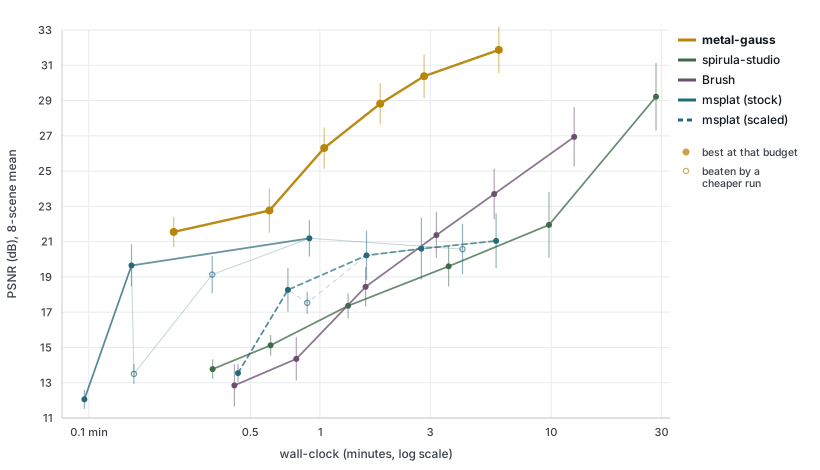
Lines trace best-achievable-by-budget. Hollow dots are measured but beaten by a cheaper run of the same implementation. Whiskers are ±1 s.e.m. across the 8 scenes.
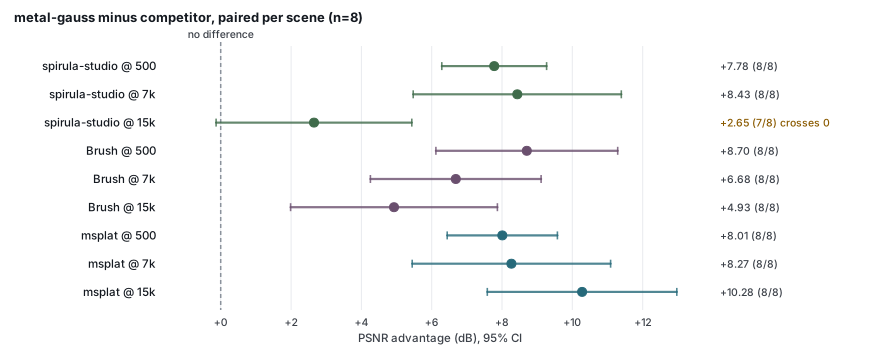
Paired per scene, because every implementation ran the same 8 scenes. One interval crosses zero: our quality margin over spirula at 15 k is not resolved by 8 scenes, though the wall-clock margin there (6.0 min vs 28.4) is not in question.
Domination (faster and better) on PSNR / on PSNR+SSIM: Brush 48/48 · 48/48, spirula-studio 45/48 · 41/48, msplat 66/96 · 50/96.
⏱️ Watch it converge
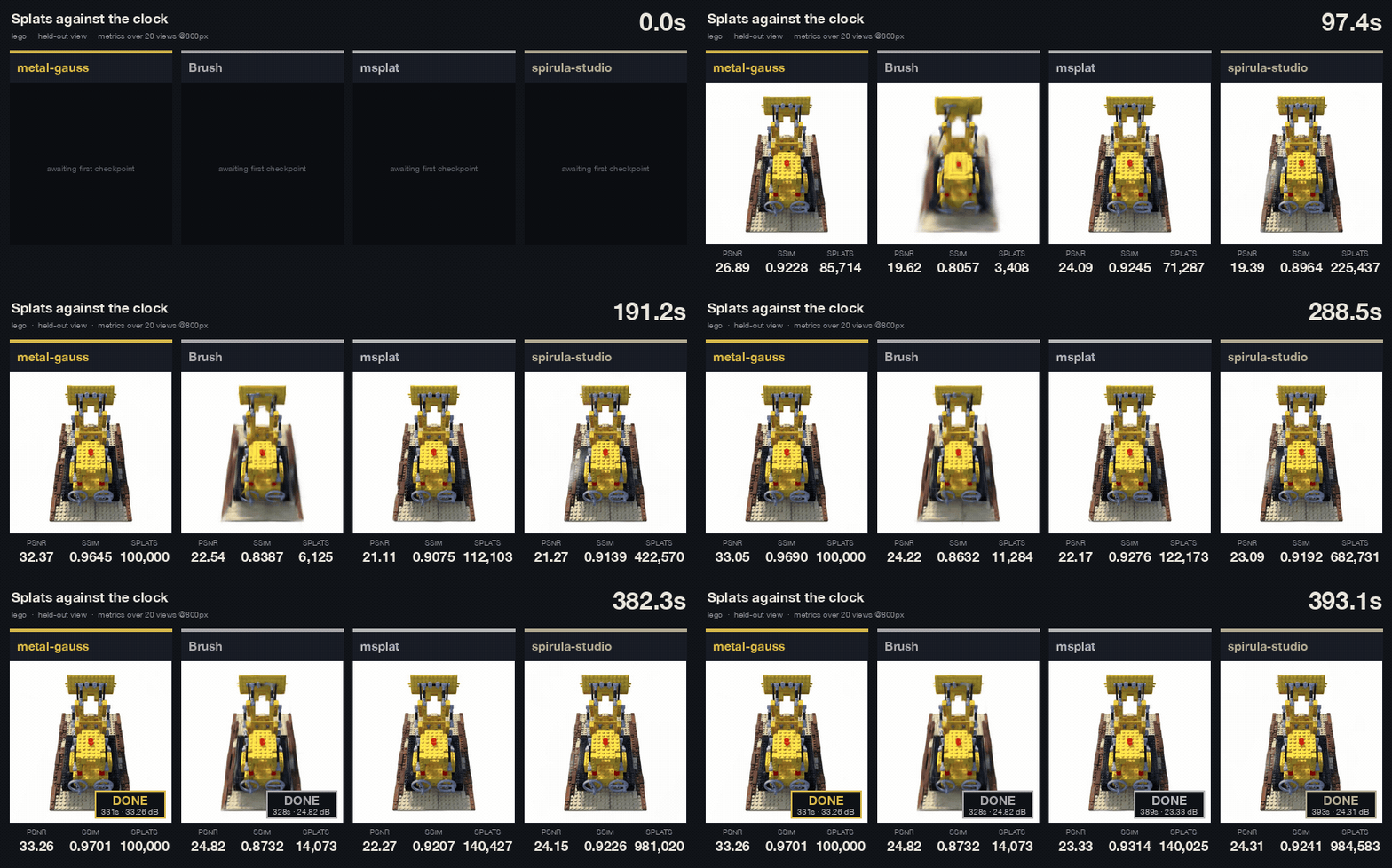
Four trainers, same seed cloud, each given the same ~390 s, running however many iterations fit.
| final PSNR | first 20 dB | first 24 dB | first 27 dB | |
|---|---|---|---|---|
| metal-gauss (15 k it) | 33.26 | 19.4 s | 57.5 s | 147.1 s |
| Brush (7 k it) | 24.82 | 105.6 s | 270.0 s | — |
| spirula-studio (5.5 k it) | 24.31 | 147.8 s | 371.6 s | — |
| msplat (19 k it) | 23.33 | 7.9 s | 58.5 s | — |
lego, panel at 400 px, metrics over 20 held-out views at 800 px. Build the interactive version with
python bench/compare/build_timelapse_page.py.
📦 Install
pip install "git+https://github.com/nandometzger/metal-gauss"
macOS on Apple Silicon, Python ≥3.10, PyTorch ≥2.5. Metal kernels compile at runtime — no Xcode,
no .metallib step.
🚀 Train
metal-gauss-train --colmap scene/sparse/0 --images scene/images --steps 7000 --export scene.ply
metal-gauss-train --blender data/nerf_synthetic/lego --steps 30000
Every 8th view is held out. The exported .ply is standard INRIA-convention 3DGS. Capacity follows
the step count; --budget overrides it. Blender scenes are not vendored — unpack
nerf_synthetic into data/nerf_synthetic/.
🎥 Render
metal-gauss-render prediction.ply --out frame0.png --still --like-photo portrait.jpg
metal-gauss-render prediction.ply --out wiggle.mp4 --like-photo portrait.jpg
metal-gauss-render scene.ply --out orbit.mp4 --frame bbox --path orbit --sweep-deg 20
metal-gauss-render lego.ply --out lego.mp4 --frame bbox --up +z --path orbit --sweep-deg 60
Renders an existing .ply along a camera path the tool generates itself, so a file is no longer tied
to the dataset it came from. Training already wrote .ply files, but every render path in the repo
borrowed its cameras from a dataset, which left no way to look at a checkpoint, a scene trained
elsewhere, a download, or anything a feedforward model predicted. Point this at a file and get a png
or an mp4: --path picks still, wiggle or orbit, --frame picks what that path is built around,
and --resolution, --fov, --background and --convention do what they say.
--frame input anchors on the predicting camera, because a monocular predictor works in the input
photograph's frame and the identity world-to-camera matrix reproduces that shot. --frame bbox
places the camera around the cloud instead, for a trained scene that has no input camera, level
with it and orbiting its vertical axis. --up says which axis that is: the default -y is the
OpenCV world, and a scene trained with --blender keeps Blender's Z-up world, so it needs
--up +z or it is seen from underneath (--up=-z for a negative axis). The
default auto picks by the fraction of splats sitting in front of the origin, taking input above
99%.
--like-photo matters more than it looks, and it is the flag that makes a monocular prediction come
out right. A .ply carries no camera, but the prediction was made under one, taken from the
photograph's EXIF. Render it back at some other FOV and the geometry is right while the crop is not,
so frame 0 stops reproducing the photograph, which is the whole point of anchoring to it. Worked
example: Apple's SHARP reads FocalLengthIn35mmFilm and
converts it with f_px = f_35mm · diag(W, H) / diag(36, 24); this flag reproduces that conversion
rather than approximating it, because the goal is to agree with the predictor and not to be
independently correct about the lens. Without the flag the FOV is fitted to the cloud and the tool
says so. The gap is not subtle: a 135 mm portrait is 12.9°, SHARP's no-EXIF fallback of 30 mm
is 54°. SHARP is also a fair test of the whole entry point, since its own video renderer
requires CUDA — predict on MPS, render here.
--aperture renders through a thin lens instead of a pinhole: the frame becomes the mean of many
views spread over the lens area, every one aimed at the focal plane, so that plane stays sharp and
everything else disperses. Defocus therefore needs no new rasteriser, only more cameras. Radius 0 is
the default and is bit-identical to the pinhole path. Below about 32 samples the sampling disc shows
as a lattice in the bokeh.
metal-gauss-render prediction.ply --out bokeh.mp4 --like-photo portrait.jpg \
    --aperture 0.03 --aperture-samples 96
Forward-only, so it is much faster than a training step: 69 fps at 600k splats and 768², 91
at 512², 481 at 100k splats and 384², on an M5 with the GPU to itself (bench/render_fps.py,
three round-robin repeats agreeing to within 10%). A defocused frame costs that times the sample
count.
Defaults are 60 frames at 30 fps, 512 px square, ±5° wiggle; ffmpeg on PATH writes the mp4.
--still dumps frame 0 as a .png, the cheap way to check a file's convention before rendering 60
frames of it; --convention opengl if it comes out flipped. A monocular prediction only has
evidence for what the photograph saw, so past roughly 8° the sweep starts showing invented
surface. That is why the default sweep is small.
👀 View
pip install "metal-gauss[viewer] @ git+https://github.com/nandometzger/metal-gauss"
metal-gauss-view scene.ply --up +z
Open http://127.0.0.1:8080, drag to orbit and scroll to dolly. Every view is rendered on the Mac's
GPU and sent to the browser tab as an image, so the browser does no splatting of its own and the
viewer shows exactly what metal-gauss-render would. While the camera moves, a frame too slow for
30 fps is rendered at a lower resolution. Once the camera stops, it gets one full-resolution frame,
and after that nothing, so an idle viewer leaves the GPU alone.
The Lens panel is the same thin lens as --aperture. It refines while the camera is still, showing
the running mean at 8, 16, 32 and 64 samples and then at all of them. --up, --convention, --fov
and --background mean what they do for metal-gauss-render.
The Crop panel cuts away what you do not want: drag the box, rotate it, or set its size, and everything outside it disappears from the view, from an exported video, and from Export cropped .ply. A short run leaves a haze of near-transparent floaters around the model, and this is what removes them from the file rather than merely framing around them. Training is never affected.
The Path panel flies a camera through the scene and writes an mp4. Orbit and Wiggle lay down keyframes around the current view; Add keyframe captures wherever you are, and the path runs smoothly through them and loops. Frames, fps and resolution are yours to set, and the current aperture can come along for a defocused video. Rendering happens here rather than in the browser, so the video comes out at full resolution with the depth of field intact.
The server listens on localhost only. To view from another machine, tunnel it
(ssh -L 8080:127.0.0.1:8080 your-mac) or pass --host 0.0.0.0 to serve it to the network.
viser is an optional extra, so the base install
does not pull it in. Keep the tab visible: a hidden one stops the browser's render loop, and the
page goes blank until you come back to it.
Watch it train
metal-gauss-train --blender data/nerf_synthetic/lego --steps 7000 --viewer
The same page shows the model while it trains. It opens on the first training camera, with the up
direction taken from the cameras themselves. It is rendered between optimisation steps, on the
training thread, and may take at most --viewer-budget of wall-clock (10% by default, adjustable
from the page). The budget also pays for the GPU syncs the preview forces.
On lego, 2000 steps, in interleaved runs:
-
No browser connected: no measurable cost (−1.2%, against 3.4% run-to-run noise).
-
One browser connected: +5.4% ms/step on means and +8.6% on medians, against about 10% noise.
-
Training panel: step, loss, held-out PSNR, an ETA, and the preview's share of wall-clock. The ETA prices the curriculum that is left — the resolution schedule, the capacity ramp and the evals still to come — so it does not read low early. It is in the terminal log too, with or without the viewer. Pause gives the preview the whole GPU, lens included; paused time is left out of every reported time.
-
Cameras: the training cameras (blue) and held-out cameras (orange). Held-out cameras appear once that split has been loaded for evaluation. Click one to jump to it.
-
Snapped view: shows that camera's PSNR, and Show photo swaps the render for its photograph, pixel-aligned.
-
When training ends, the page keeps serving the final model until Ctrl-C.
Exporting a video while training shares the same budget, so it renders slowly and the model keeps improving between frames — a progress flythrough rather than a turntable. Pause first for a consistent one, which also runs at full speed.
--viewer is off by default. The benchmark harness refuses reports from runs that used it, because
the preview shares the GPU.
⚠️ Caveats
- msplat is 1.3–1.8× faster per step. Our fixed startup at that end was ~8.4 s and is now ~3 s: 6.1 s of it was decoding PNGs, and 4.1 s of that decoded the 200 held-out views a run without evaluation never reads. The metal-gauss rows above were re-measured after that change; the competitor rows were not, and predate it.
- That re-measurement moves the 1 min budget by +0.5 dB and nothing else — and do not lean on that +0.5 dB. It comes from three scenes whose 2 000-iteration rung cleared 60 s by 0.5, 0.9 and 2.2 s; re-measured later the same day against a machine also driving a desktop, none of the eight cleared it. The rung boundary, not the loader, decides that row. What is solid is the saving itself: ~4 s, visible at the 500 rung (median −4.4 s over 8 scenes, every scene negative) and invisible past ~2 000, where run-to-run spread is ±40 s.
- Wall-clock rows need a machine that is not also drawing a screen. The same 2 000-iteration rung
measured 57–68 s on an idle machine and 74–96 s while a browser was open.
require_gpu_exclusive()catches a second trainer, not a compositor. - 7 k numbers are not comparable to published 30 k numbers — 5.1 dB apart.
--antialiasis off by default; worth +6.68 dB at 200 px render resolution.- Run-to-run noise floors: ours 0.19 dB, Brush 0.74, spirula 0.15–1.27, msplat 3.35 (no seed flag).
--budgetat 1 M splats: +2.75 dB lego, +1.40 mic, −0.20 ship, all at ~5× the time.
📚 More
| docs/BENCHMARKS.md | full results, protocol, calibration, noise floors |
| docs/ARCHITECTURE.md | how it works, the kernels, correctness oracle |
| bench/results/NEGATIVE_RESULTS.md | every rejected lever and measurement lesson, with numbers |
| bench/compare/STATUS.md | every Apple-native implementation surveyed, and the traps |
NEGATIVE_RESULTS.md is the most useful file here: several published speedups measure near zero on
this hardware, and several of this repo's own conclusions were wrong until re-measured.
📄 License
MIT. Credits: 3DGS-MCMC, Taming 3DGS, Speedy-Splat, LiteGS, Mip-Splatting, gsplat, LichtFeld Studio, Brush, and the original INRIA rasterizer.
1 maintainer

Release files for metal-gauss 0.2.1
For a detailed explanation of source distributions (sdists) and built distributions (wheels), please see the package formats documentation.
Source distribution (sdist)
| File | Size | Uploaded | |
|---|---|---|---|
| metal_gauss-0.2.1.tar.gz | 163.9 kB | Details |
Built distribution (wheel)
| File | Interpreter | ABI | Platform | Reset |
|---|---|---|---|---|
| metal_gauss-0.2.1-py3-none-any.whl | Python 3 | none | any | Details |
Total release size: 283.8 kB
Release files / metal_gauss-0.2.1.tar.gz
| Download URL | metal_gauss-0.2.1.tar.gz |
|---|---|
| Size | 163.9 kB |
| Tags | Source |
|
SHA-256 checksum How to use checksums |
0eb9bb5af986240912c77714765e566bfd832063c278b6e7a56c19e831311095
|
|
BLAKE2b-256 checksum How to use checksums |
6fbb6330cb852c5912be9dc167276b7db3f65c7aa6ee5804c459cfdc64546ff9
|
| Upload date | |
|
Uploaded using Trusted Publishing? What is trusted publishing? |
No |
| Uploaded via |
uv/0.11.4 {"installer":{"name":"uv","version":"0.11.4","subcommand":["publish"]},"python":null,"implementation":{"name":null,"version":null},"distro":{"name":"macOS","version":null,"id":null,"libc":null},"system":{"name":null,"release":null},"cpu":null,"openssl_version":null,"setuptools_version":null,"rustc_version":null,"ci":null}
|
Release files / metal_gauss-0.2.1-py3-none-any.whl
| Download URL | metal_gauss-0.2.1-py3-none-any.whl |
|---|---|
| Size | 119.9 kB |
| Tags | Python 3 |
|
SHA-256 checksum How to use checksums |
954ea0673d24456f584eb0425ecc737fdcfe5cf649b9d01dc40ee15f91c7f2d4
|
|
BLAKE2b-256 checksum How to use checksums |
23bc892150d9e6709ed66889fdb81f12924590de5e9b1645635f04f68e441210
|
| Upload date | |
|
Uploaded using Trusted Publishing? What is trusted publishing? |
No |
| Uploaded via |
uv/0.11.4 {"installer":{"name":"uv","version":"0.11.4","subcommand":["publish"]},"python":null,"implementation":{"name":null,"version":null},"distro":{"name":"macOS","version":null,"id":null,"libc":null},"system":{"name":null,"release":null},"cpu":null,"openssl_version":null,"setuptools_version":null,"rustc_version":null,"ci":null}
|














