
Metalcyte






Single-cell RNA-seq analysis of atlas-sized datasets on an Apple silicon laptop.
Metalcyte runs the standard single-cell RNA-seq analysis, from raw counts to clusters and marker genes, on a Mac with an Apple M-series chip. You call it from Python, and it stores its results in an AnnData object. The calculations run in Rust and use all parts of the chip:
- all CPU cores,
- the AMX matrix coprocessor, through Apple's Accelerate,
- the GPU, through Metal compute kernels.
On Apple silicon the CPU and the GPU share one pool of memory, so Metalcyte does not copy data between them. Metalcyte can also analyse datasets larger than memory. It reads the count matrix from disk in blocks and keeps one block in memory at a time.
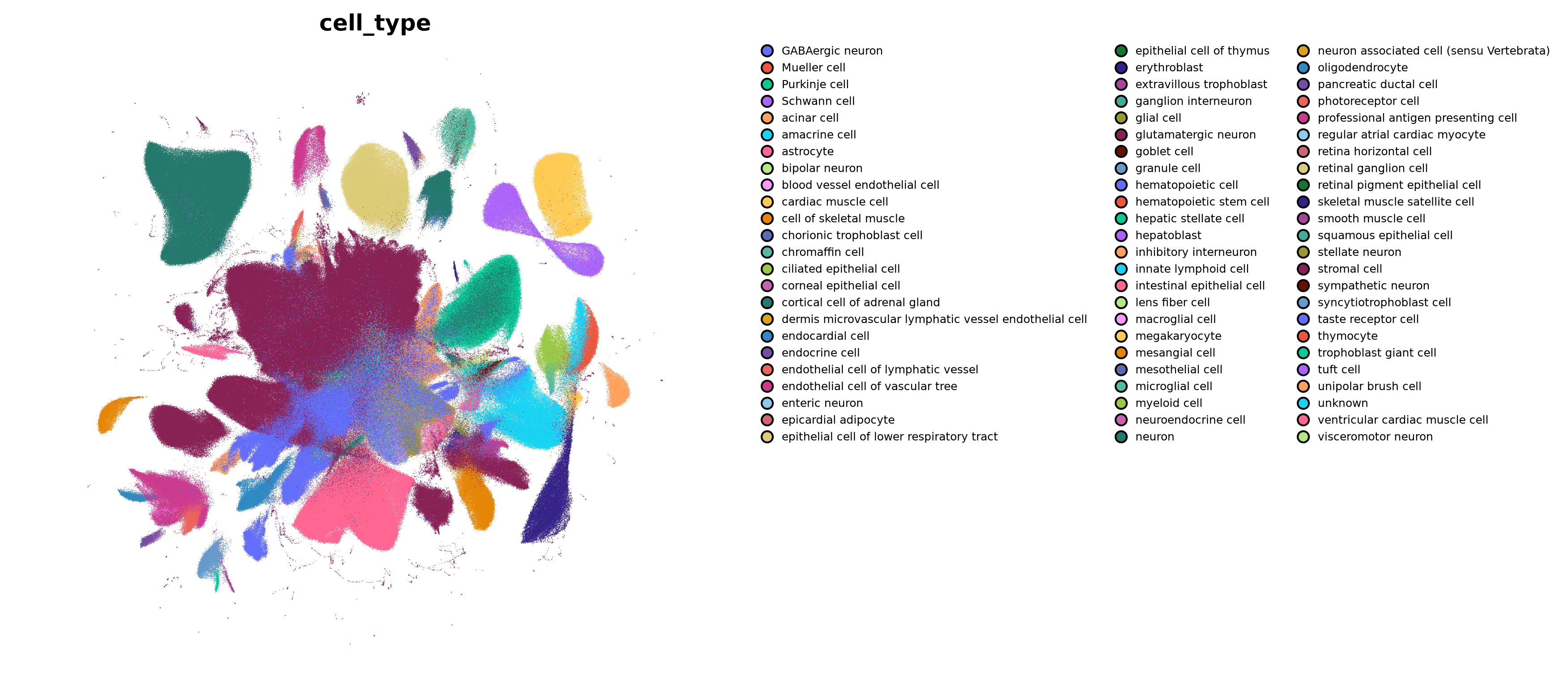
The complete survey of human embryonic development, 4 062 980 cells by 45 676 genes. Metalcyte took it from raw counts to clusters in 9 minutes on a laptop with 18 GB of memory.
Main results
- Fast. A bone-marrow atlas of 117 308 cells goes from counts to marker genes in 12 s.
- Low memory use. A million cells fit within 18 GB of memory. The 4 million cells above used about 9 GB at most.
- Low energy use. The analysis of those 117 308 cells uses 168 J of energy.
- Tested. Each algorithm has a test that checks its numerical output against a reference result and states the tolerance.
- Standard AnnData layout. Results are stored in the usual AnnData slots, so other single-cell tools can read them.
Features
Preprocessing. Quality-control metrics, filtering of cells and genes, total-count normalisation, log and square-root transforms, highly variable gene selection (Seurat and Cell Ranger methods), scaling, and PCA on the GPU.
Datasets larger than memory. Quality control, normalisation, HVG selection, scaling and PCA work on an h5ad file on disk. Metalcyte reads the file four times from start to end and never loads the whole matrix.
Batch correction and integration. Regression of unwanted covariates such as total counts
(regress_out), ComBat, and Harmony integration, all running on every CPU core.
Neighbour graphs. Up to 200 000 cells, Metalcyte computes exact k-nearest neighbours on the GPU. Above that size it uses NN-descent, an approximate search that finds almost all true neighbours. It picks the method from the number of cells.
Embeddings. UMAP, computed on several cores in parallel, and t-SNE, with FIt-SNE interpolation on the GPU for large datasets. Also diffusion maps, force-directed layouts and PAGA.
Clustering and trajectories. Leiden and Louvain clustering of the neighbour graph, diffusion pseudotime, and dendrograms of clusters.
Marker genes. Wilcoxon rank-sum, t-test and logistic-regression tests. A Wilcoxon test that reads the counts from disk, for datasets larger than memory. Overlap between marker lists, and scoring of gene sets and cell-cycle phase.
Spatial and clustering metrics. Moran's I, Geary's C, modularity and confusion matrices.
Plotting. Scatter plots of embeddings. The GPU draws the points, so a plot of millions of cells takes about a second.
The full reference is in docs/API.md.
Installation
On a Mac with Apple silicon (macOS 13 or later) and Python 3.11 to 3.13:
pip install metalcyte
pip install "metalcyte[plot]"   # with matplotlib for plotting
The wheels are prebuilt, so you do not need Rust or Xcode. To build from source, see docs/INSTALL.md.
Quick start
import anndata as ad
import metalcyte as mc

adata = ad.read_h5ad("counts.h5ad")  # raw counts, cells by genes

mc.pp.filter_cells(adata, min_genes=200)
mc.pp.filter_genes(adata, min_cells=3)
mc.pp.normalize_total(adata, target_sum=1e4)
mc.pp.log1p(adata)
mc.pp.highly_variable_genes(adata, n_top_genes=2000)
adata = adata[:, adata.var["highly_variable"].to_numpy()].copy()
mc.pp.scale(adata, max_value=10)
mc.pp.pca(adata, n_comps=50)
mc.pp.neighbors(adata, n_neighbors=15)
mc.tl.umap(adata, parallel=True)
mc.tl.leiden(adata)
mc.tl.rank_genes_groups(adata, "leiden", method="wilcoxon")

mc.pl.umap(adata, color="leiden")
If the dataset is larger than memory, give Metalcyte the path of the counts file on disk:
adata = mc.pp.preprocess_backed("atlas_counts.h5ad", n_top_genes=2000, n_comps=50)
mc.pp.neighbors(adata)
mc.tl.umap(adata, parallel=True)
mc.tl.leiden(adata)
A step-by-step tutorial is in docs/tutorials/pbmc3k_clustering.ipynb.
Benchmarks
All timings come from an Apple M3 Pro laptop with 18 GB of memory. The methods are described in docs/PERFORMANCE.md.
| Dataset | Cells | Time | Memory |
|---|---|---|---|
| Bone marrow, counts to marker genes | 117 308 | 12 s | |
| Human embryo, counts to clusters | 1 001 288 | 103 s | under 1.5 GB per step |
| Human embryo, full survey, counts to clusters | 4 062 980 | 538 s | about 9 GB at peak |
| Energy | Cells | Time | Energy |
|---|---|---|---|
| Bone marrow, counts to marker genes | 117 308 | 13 s | 168 J |
| Human embryo, full survey, counts to clusters | 4 062 980 | 557 s | 6.2 kJ |
Energy is the extra power drawn by the chip during the run, measured every 100 ms with the power monitor of macOS, with the idle power subtracted.
Documentation
- Installation
- API reference
- Performance and methodology
- Validation
- How it works and architecture
- Changelog
Citation
If you use Metalcyte in your research, please cite the archived software (DOI 10.5281/zenodo.23210563, all versions) as described in CITATION.cff. A manuscript is in preparation.
Contributing
Bug reports and feature requests are welcome in the issue tracker. See CONTRIBUTING.md for the development setup.
License
Metalcyte is released under the MIT License.
1 maintainer

Metadata
1 maintainer
Release files for metalcyte 0.3.1
For a detailed explanation of source distributions (sdists) and built distributions (wheels), please see the package formats documentation.
Source distribution (sdist)
| File | Size | Uploaded | |
|---|---|---|---|
| metalcyte-0.3.1.tar.gz | 395.6 kB | Details |
Built distributions (wheels)
| File | Interpreter | ABI | Platform | Reset |
|---|---|---|---|---|
| metalcyte-0.3.1-cp313-cp313-macosx_11_0_arm64.whl | CPython 3.13 | CPython 3.13 | macOS 11.0+ ARM64 | Details |
| metalcyte-0.3.1-cp312-cp312-macosx_11_0_arm64.whl | CPython 3.12 | CPython 3.12 | macOS 11.0+ ARM64 | Details |
| metalcyte-0.3.1-cp311-cp311-macosx_11_0_arm64.whl | CPython 3.11 | CPython 3.11 | macOS 11.0+ ARM64 | Details |
Total release size: 5.8 MB
Release files / metalcyte-0.3.1.tar.gz
| Download URL | metalcyte-0.3.1.tar.gz |
|---|---|
| Size | 395.6 kB |
| Tags | Source |
|
SHA-256 checksum How to use checksums |
3e0960e718f07ec984844d56a499b6416c58444656a517c736a96fb46fb66dbf
|
|
BLAKE2b-256 checksum How to use checksums |
08b5c9e2f8a28cbf81bd0b9dfadc732c73fcd7b140f052f308f0771f1499aa3c
|
| Upload date | |
|
Uploaded using Trusted Publishing? What is trusted publishing? |
Yes |
| Uploaded via |
twine/7.0.0 CPython/3.13.14
|
Provenance
Provenance describes where a file came from. On PyPI, provenance is shared via attestations, which provide a verifiable record of the build or publishing details. View details, limitations and caveats.


PyPI Publish Attestation
PyPI verified that this artifact, at this checksum, originated from the publisher listed below.
Signed by GitHub Actions, verified by PyPI on Oct 7, 2026.
Transparency logRelease files / metalcyte-0.3.1-cp313-cp313-macosx_11_0_arm64.whl
| Download URL | metalcyte-0.3.1-cp313-cp313-macosx_11_0_arm64.whl |
|---|---|
| Size | 1.8 MB |
| Tags | CPython 3.13 macOS 11.0+ ARM64 |
|
SHA-256 checksum How to use checksums |
7ccda9ef80af5cc243a6a2111c882e02109e9d0f18f56a20a2103b5cfba158b1
|
|
BLAKE2b-256 checksum How to use checksums |
034be8aafdc4f4e35257e1367c04508e2f86f26c133cea89be0ba2ae2aa599c2
|
| Upload date | |
|
Uploaded using Trusted Publishing? What is trusted publishing? |
Yes |
| Uploaded via |
twine/7.0.0 CPython/3.13.14
|
Provenance
Provenance describes where a file came from. On PyPI, provenance is shared via attestations, which provide a verifiable record of the build or publishing details. View details, limitations and caveats.
PyPI Publish Attestation
PyPI verified that this artifact, at this checksum, originated from the publisher listed below.
Signed by GitHub Actions, verified by PyPI on Oct 7, 2026.
Transparency logRelease files / metalcyte-0.3.1-cp312-cp312-macosx_11_0_arm64.whl
| Download URL | metalcyte-0.3.1-cp312-cp312-macosx_11_0_arm64.whl |
|---|---|
| Size | 1.8 MB |
| Tags | CPython 3.12 macOS 11.0+ ARM64 |
|
SHA-256 checksum How to use checksums |
c680626d85354c7767fdda52ca403700e620642b3f07545bac44326d495485c2
|
|
BLAKE2b-256 checksum How to use checksums |
58a1df8f63f064a4e5da1638e2642adab9b8183d725fdb40894f5c3bc810bf44
|
| Upload date | |
|
Uploaded using Trusted Publishing? What is trusted publishing? |
Yes |
| Uploaded via |
twine/7.0.0 CPython/3.13.14
|
Provenance
Provenance describes where a file came from. On PyPI, provenance is shared via attestations, which provide a verifiable record of the build or publishing details. View details, limitations and caveats.
PyPI Publish Attestation
PyPI verified that this artifact, at this checksum, originated from the publisher listed below.
Signed by GitHub Actions, verified by PyPI on Oct 7, 2026.
Transparency logRelease files / metalcyte-0.3.1-cp311-cp311-macosx_11_0_arm64.whl
| Download URL | metalcyte-0.3.1-cp311-cp311-macosx_11_0_arm64.whl |
|---|---|
| Size | 1.8 MB |
| Tags | CPython 3.11 macOS 11.0+ ARM64 |
|
SHA-256 checksum How to use checksums |
790866fb61cd12eb63be14166128da01d594fea43e0d1b99528a593b69ac47e7
|
|
BLAKE2b-256 checksum How to use checksums |
f9e24a752446aaa6e71d19784f0e0ed996c05d1c55bca999ee89415a4bc3175f
|
| Upload date | |
|
Uploaded using Trusted Publishing? What is trusted publishing? |
Yes |
| Uploaded via |
twine/7.0.0 CPython/3.13.14
|
Provenance
Provenance describes where a file came from. On PyPI, provenance is shared via attestations, which provide a verifiable record of the build or publishing details. View details, limitations and caveats.
PyPI Publish Attestation
PyPI verified that this artifact, at this checksum, originated from the publisher listed below.
Signed by GitHub Actions, verified by PyPI on Oct 7, 2026.
Transparency log













