
SQLLineage
SQL Lineage Analysis Tool powered by Python









Never get the hang of a SQL parser? SQLLineage comes to the rescue. Given a SQL command, SQLLineage will tell you its source and target tables, without worrying about Tokens, Keyword, Identifier and all the jagons used by SQL parsers.
Behind the scene, SQLLineage uses the fantastic sqlparse library to parse
the SQL command, and bring you all the human-readable result with ease.
Demo & Documentation
Talk is cheap, show me a demo.
Documentation is online hosted by readthedocs, and you can check the release note there.
Quick Start
Install sqllineage via PyPI:
$ pip install sqllineage
Using sqllineage command to parse a quoted-query-string:
$ sqllineage -e "insert into db1.table1 select * from db2.table2"
Statements(#): 1
Source Tables:
    db2.table2
Target Tables:
    db1.table1
Or you can parse a SQL file with -f option:
$ sqllineage -f foo.sql
Statements(#): 1
Source Tables:
    db1.table_foo
    db1.table_bar
Target Tables:
    db2.table_baz
Advanced Usage
Multiple SQL Statements
Lineage result combined for multiple SQL statements, with intermediate tables identified:
$ sqllineage -e "insert into db1.table1 select * from db2.table2; insert into db3.table3 select * from db1.table1;"
Statements(#): 2
Source Tables:
    db2.table2
Target Tables:
    db3.table3
Intermediate Tables:
    db1.table1
Verbose Lineage Result
And if you want to see lineage result for every SQL statement, just toggle verbose option
$ sqllineage -v -e "insert into db1.table1 select * from db2.table2; insert into db3.table3 select * from db1.table1;"
Statement #1: insert into db1.table1 select * from db2.table2;
    table read: [Table: db2.table2]
    table write: [Table: db1.table1]
    table cte: []
    table rename: []
    table drop: []
Statement #2: insert into db3.table3 select * from db1.table1;
    table read: [Table: db1.table1]
    table write: [Table: db3.table3]
    table cte: []
    table rename: []
    table drop: []
==========
Summary:
Statements(#): 2
Source Tables:
    db2.table2
Target Tables:
    db3.table3
Intermediate Tables:
    db1.table1
Column-Level Lineage
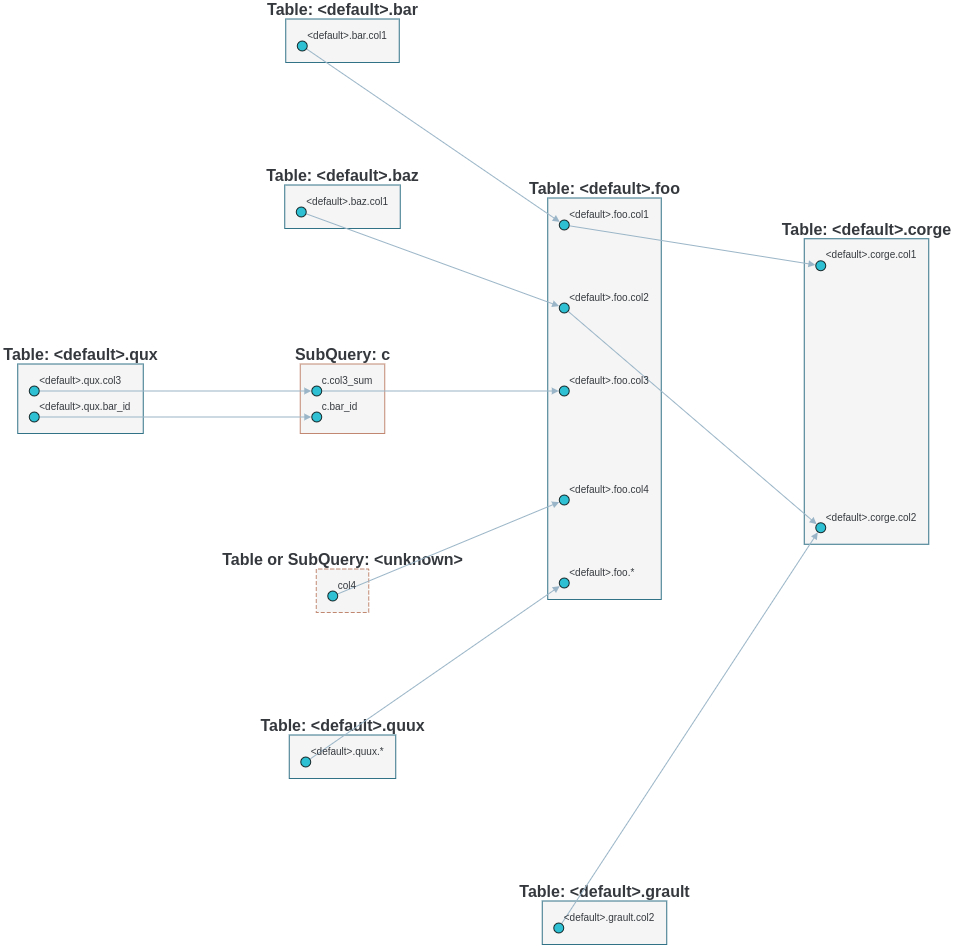
We also support column level lineage in command line interface, set level option to column, all column lineage path will be printed.
INSERT OVERWRITE TABLE foo
SELECT a.col1,
       b.col1     AS col2,
       c.col3_sum AS col3,
       col4,
       d.*
FROM bar a
         JOIN baz b
              ON a.id = b.bar_id
         LEFT JOIN (SELECT bar_id, sum(col3) AS col3_sum
                    FROM qux
                    GROUP BY bar_id) c
                   ON a.id = sq.bar_id
         CROSS JOIN quux d;

INSERT OVERWRITE TABLE corge
SELECT a.col1,
       a.col2 + b.col2 AS col2
FROM foo a
         LEFT JOIN grault b
              ON a.col1 = b.col1;
Suppose this sql is stored in a file called foo.sql
$ sqllineage -f foo.sql -l column
<default>.corge.col1 <- <default>.foo.col1 <- <default>.bar.col1
<default>.corge.col2 <- <default>.foo.col2 <- <default>.baz.col1
<default>.corge.col2 <- <default>.grault.col2
<default>.foo.* <- <default>.quux.*
<default>.foo.col3 <- c.col3_sum <- <default>.qux.col3
<default>.foo.col4 <- col4
Lineage Visualization
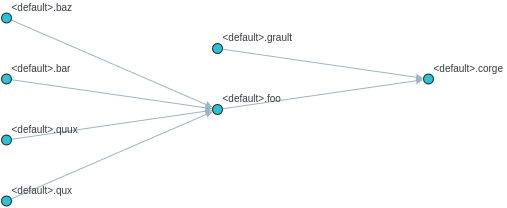
One more cool feature, if you want a graph visualization for the lineage result, toggle graph-visualization option
Still using the above SQL file
sqllineage -g -f foo.sql
A webserver will be started, showing DAG representation of the lineage result in browser:
- Table-Level Lineage
- Column-Level Lineage
1 maintainer

Metadata
1 maintainer
Release files for metaphor-sqllineage 2.0.16
For a detailed explanation of source distributions (sdists) and built distributions (wheels), please see the package formats documentation.
Source distribution (sdist)
| File | Size | Uploaded | Provenance | Actions |
|---|---|---|---|---|
| metaphor-sqllineage-2.0.16.tar.gz | 377.5 kB | Without provenance | Details for metaphor-sqllineage-2.0.16.tar.gz |
Built distribution (wheel)
| File | Interpreter | ABI | Platform | Actions Reset |
|---|---|---|---|---|
| metaphor_sqllineage-2.0.16-py3-none-any.whl | Python 3 | none | any | Details for metaphor_sqllineage-2.0.16-py3-none-any.whl |
Total release size: 472.8 kB
Release files / metaphor-sqllineage-2.0.16.tar.gz
| Download URL | metaphor-sqllineage-2.0.16.tar.gz |
|---|---|
| Size | 377.5 kB |
| Tags | Source |
|
SHA-256 checksum How to use checksums |
d6a7adb92eb51cd2e931e53b9cc70458283787863f6d7150891f5b1a0cf148af
|
|
BLAKE2b-256 checksum How to use checksums |
8ba1ee36d96a5605581ffba2ee902a4b03380b143c1e043e8a9b3461f1ed2bbd
|
| Upload date | |
|
Uploaded using Trusted Publishing? What is trusted publishing? |
No |
| Uploaded via |
twine/4.0.2 CPython/3.11.3
|
Release files / metaphor_sqllineage-2.0.16-py3-none-any.whl
| Download URL | metaphor_sqllineage-2.0.16-py3-none-any.whl |
|---|---|
| Size | 95.3 kB |
| Tags | Python 3 |
|
SHA-256 checksum How to use checksums |
960f14b4ece94035145190516dd73777bf3251dd5986cd336b65905f86501cc5
|
|
BLAKE2b-256 checksum How to use checksums |
6a3164f5b5390be3d153ed9becdae95e79facd8d8186e07a38c0fa7552f51335
|
| Upload date | |
|
Uploaded using Trusted Publishing? What is trusted publishing? |
No |
| Uploaded via |
twine/4.0.2 CPython/3.11.3
|
Security for metaphor-sqllineage 2.0.16
Provenance
Provenance describes where a file came from. On PyPI, provenance is shared via attestations, which provide a verifiable record of the build or publishing details. View details, limitations and caveats.
No provenance found
None of the files in this release were uploaded with provenance metadata.
A note on package security
PyPI is a repository for distributing packages, not a service for auditing them. While third-party security researchers and our staff do their best to detect and remove malicious packages, PyPI cannot guarantee the quality, security or suitability of any given package.
To learn more about protecting yourself from malicious actors, visit our package security documentation.














