

An XAI performance tool for the identification of reliable metrics
PyTorch
This repository contains the code and experimental results for the paper The Meta-Evaluation Problem in Explainable AI: Identifying Reliable Estimators with MetaQuantus by Hedström et al., 2023.





MetaQuantus is currently under active development. Carefully note the release version to ensure reproducibility of your work.
Citation
If you find this toolkit or its companion paper interesting or useful in your research, use the following Bibtex annotation to cite us:
@article{hedstrom2023metaquantus,
 author = {Hedström, Anna and Bommer, Philine and Wickstrøm, Kristoffer K. and Samek, Wojciech and Lapuschkin, Sebastian and Höhne, Marina M. -C.},
  title = {The Meta-Evaluation Problem in Explainable AI: Identifying Reliable Estimators with MetaQuantus},
  journal={Transactions on Machine Learning Research},
  issn={2835-8856},
  year={2023},
  url={https://openreview.net/forum?id=j3FK00HyfU},
  note={}
  }
Table of Contents
Motivation
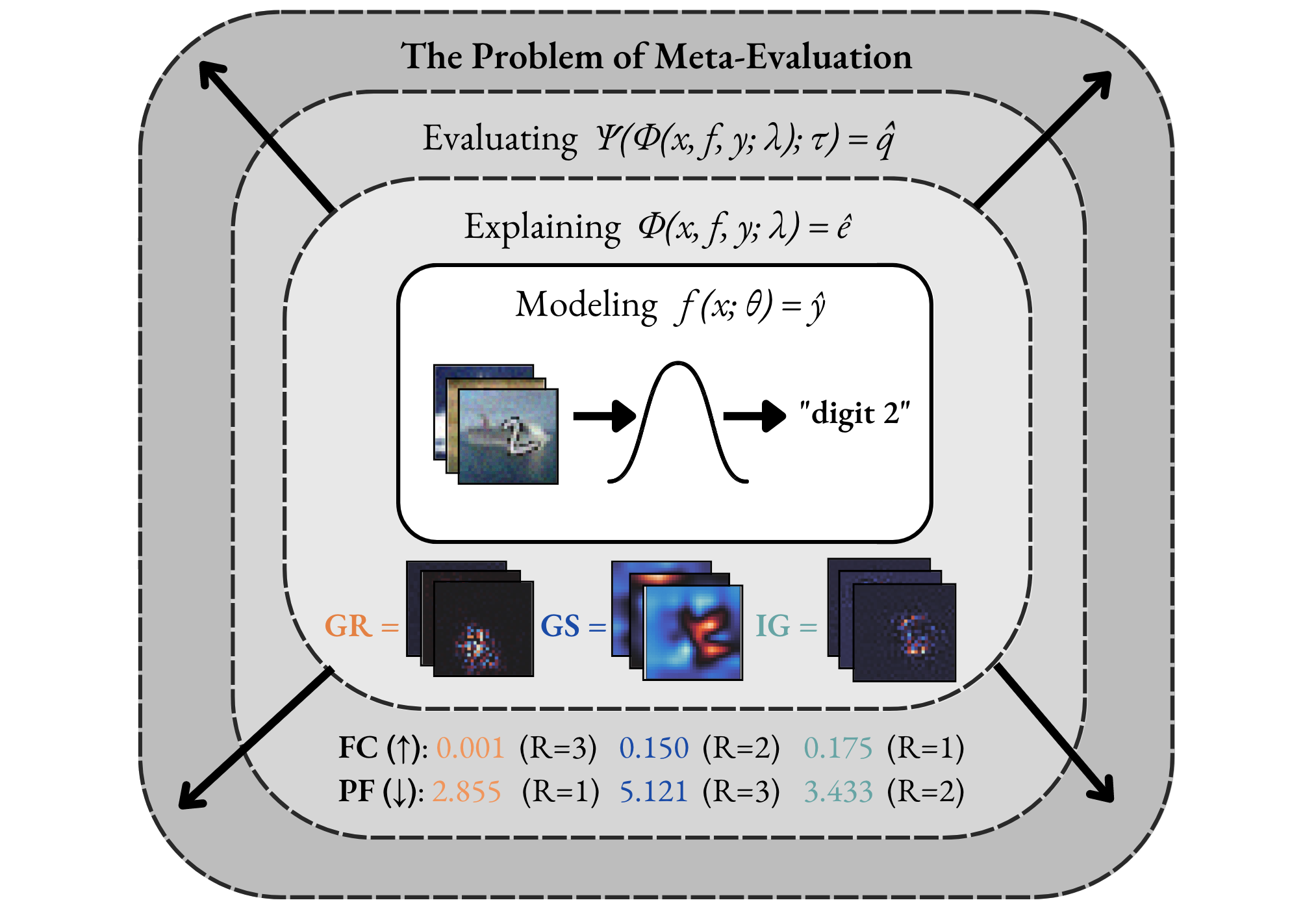
The Evaluation Disagreement Problem. In Explainable AI (XAI), the need of meta-evaluation (i.e., the process of evaluating the evaluation method) arises as we select and quantitatively compare explanation methods for a given model, dataset and task---where the use of multiple metrics or evaluation techniques oftentimes lead to conflicting results. For example, scores from different metrics vary, both in range and direction, with lower or higher scores indicating higher quality explanations, making it difficult for practitioners to interpret the scores and select the best explanation method.
As illustrated in the Figure below, the two metrics, Faithfulness Correlation (FC) (Bhatt et al., 2020) and Pixel-Flipping (PF) (Bach et al., 2015) rank the same explanation methods differently. For example, the Gradient method (Mørch et al., 1995) (Baehrens et al., 2010) is both ranked the highest (R=1) and the lowest (R=3) depending on the metric used. From a practitioner's perspective, this causes confusion.
Our Meta-Evaluation Approach. With MetaQuantus, we address the problem of meta-evaluation by providing a simple yet comprehensive framework that evaluates metrics against two failure modes: resilience to noise (NR) and reactivity to adversaries (AR). In a similar way that software systems undergo vulnerability and penetration tests before deployment, this open-sourced tool is designed to stress test evaluation methods (e.g., as provided by Quantus).
Library
MetaQuantus is an open-source, development tool for XAI researchers and Machine Learning (ML) practitioners to verify and benchmark newly constructed metrics (i.e., ``quality estimators''). It offers an easy-to-use API that simplifies metric selection such that the explanation method selection in XAI can be performed more reliably, with minimal code. MetaQuantus includes:
- A series of pre-built tests such as
ModelPerturbationTestandInputPertubrationTestthat can be applied to various metrics - Supporting source code such as for plotting and analysis
- Various tutorials e.g., Getting-Started-with-MetaQuantus and Reproduce-Paper-Experiments
Installation
If you already have PyTorch installed on your machine, the most light-weight version of MetaQuantus can be obtained from PyPI:
pip install metaquantus
Alternatively, you can download a local copy (and then, access the folder):
git clone https://github.com/annahedstroem/MetaQuantus.git
cd MetaQuantus
And then install it locally:
pip install -e .
Alternatively, you can simply install MetaQuantus with requirements.txt.
pip install -r requirements.txt
Note that these installation options require that PyTorch is already installed on your machine.
Package requirements
The package requirements are as follows:
python>=3.7.1
pytorch>=1.10.1
quantus>=0.3.2
captum>=0.4.1
Getting started
Please see
Tutorial-Getting-Started-with-MetaQuantus.ipynb under tutorials/ folder to get started. Note that PyTorch framework and the XAI evalaution library Quantus is needed to run MetaQuantus.
Reproduce the paper experiments
To reproduce the results of this paper, you will need to follow these three steps:
- Generate the dataset. Run the notebook
Tutorial-Data-Generation-Experiments.ipynb to generate the necessary data for the experiments. This notebook will guide you through the process of downloading and preprocessing the data in order to save it to appropriate test sets. Please store the models in a folder called
assets/models/and the tests sets underassets/test_sets/. - Run the experiments. To obtain the results for the respective experiments, you have to run the respective Python experiments which are detailed below. All these Python files are located in the
experiments/folder. If you want to run the experiments on other explanation methods, datasets or models, feel free to change the hyperparameters. - Analyse the results. Once the results are obtained for your chosen experiments, run the Tutorial-Reproduce-Paper-Experiments.ipynb to analyse the results. (In the notebook itself, we have also listed which specific Python experiments that need to be run in order to obtain the results for this analysis step.)
Additional details on step 2 (Run the Experiments)
Test: Go to the root folder and run a simple test that meta-evaluation work.
python3 experiments/run_test.py --K=5 --iters=10 --dataset=MNIST
Application: Run the benchmarking experiments (also used for category convergence analysis).
python3 experiments/run_benchmarking.py --dataset=MNIST --fname=f --K=5 --iters=3
python3 experiments/run_benchmarking.py --dataset=fMNIST --fname=f --K=5 --iters=3
python3 experiments/run_benchmarking.py --dataset=cMNIST --fname=f --K=5 --iters=3
python3 experiments/run_benchmarking.py --dataset=ImageNet --fname=ResNet18 --K=5 --iters=3 --batch_size=50 --start_idx_fixed=100 --end_idx_fixed=150 --reverse_order=False --folder=benchmarks_imagenet/ --PATH_ASSETS=../assets/ --PATH_RESULTS=results/
Application: Run hyperparameter optimisation experiment.
python3 experiments/run_hp.py --dataset=MNIST --K=3 --iters=2 --PATH_ASSETS=../assets/ --PATH_RESULTS=results/
python3 experiments/run_hp.py --dataset=ImageNet --K=3 --iters=2 --PATH_ASSETS=../assets/ --PATH_RESULTS=results/
Experiment: Run the faithfulness ranking disagreement exercise.
python3 experiments/run_ranking.py --dataset=cMNIST --fname=f --K=5 --iters=3 --category=Faithfulness --PATH_ASSETS=../assets/ --PATH_RESULTS=results/
Sanity-Check: Run sanity-checking exercise: adversarial estimators.
python3 experiments/run_sanity_checks.py --dataset=ImageNet --K=3 --iters=2 --PATH_ASSETS=../assets/ --PATH_RESULTS=results/
Sanity-Check: Run sanity-checking exercise: L dependency.
python3 experiments/run_l_dependency.py --dataset=MNIST --K=5 --iters=3 --PATH_ASSETS=../assets/ --PATH_RESULTS=results/
python3 experiments/run_l_dependency.py --dataset=fMNIST --K=5 --iters=3 --PATH_ASSETS=../assets/ --PATH_RESULTS=results/
python3 experiments/run_l_dependency.py --dataset=cMNIST --K=5 --iters=3 --PATH_ASSETS=../assets/ --PATH_RESULTS=results/
Benchmarking Transformers: Run transformer benchmarking experiment.
python3 experiments/run_benchmarking_transformers.py --dataset=ImageNet --K=5 --iters=3 --start_idx=0 --end_idx=40 --category=localisation --PATH_ASSETS=../assets/ --PATH_RESULTS=results/
python3 experiments/run_benchmarking_transformers.py --dataset=ImageNet --K=5 --iters=3 --start_idx=40 --end_idx=80 --category=localisation --PATH_ASSETS=../assets/ --PATH_RESULTS=results/
python3 experiments/run_benchmarking_transformers.py --dataset=ImageNet --K=5 --iters=3 --start_idx=80 --end_idx=120 --category=localisation --PATH_ASSETS=../assets/ --PATH_RESULTS=results/
python3 experiments/run_benchmarking_transformers.py --dataset=ImageNet --K=5 --iters=3 --start_idx=120 --end_idx=160 --category=localisation --PATH_ASSETS=../assets/ --PATH_RESULTS=results/
python3 experiments/run_benchmarking_transformers.py --dataset=ImageNet --K=5 --iters=3 --start_idx=40 --end_idx=80 --category=complexity --PATH_ASSETS=../assets/ --PATH_RESULTS=results/
python3 experiments/run_benchmarking_transformers.py --dataset=ImageNet --K=5 --iters=3 --start_idx=0 --end_idx=40 --category=complexity --PATH_ASSETS=../assets/ --PATH_RESULTS=results/
python3 experiments/run_benchmarking_transformers.py --dataset=ImageNet --K=5 --iters=3 --start_idx=80 --end_idx=120 --category=complexity --PATH_ASSETS=../assets/ --PATH_RESULTS=results/
python3 experiments/run_benchmarking_transformers.py --dataset=ImageNet --K=5 --iters=3 --start_idx=120 --end_idx=160 --category=complexity --PATH_ASSETS=../assets/ --PATH_RESULTS=results/
Note. For all steps, please make sure to adjust any local paths so that the approriate files can be retrieved. Make sure to have all the necessary packages installed as well as ensure to have GPUs enabled throughout the computing as this will speed up the experimentation considerably. Also, note that the results may vary slightly depending on the random seed and other hyperparameters of the experiments. Nonetheless, the overall trends and conclusions should remain the same as in the paper.
Currently, the experiments are limited to the following experimental combinations:
- XAI methods: any method provided by querying
quantus.AVAILABLE_XAI_METHODS_CAPTUM - XAI metrics: any metric provided by querying
quantus.AVAILABLE_METRICS - Models: any
PyTorchmodel (i.e.,torch.nn.module) - Datasets:
MNIST,fMNSIT,cMNISTandImageNet
Please feel free to raise an Issue if you'd like to extend these set-ups.
1 maintainer

Metadata
1 maintainer
Release files for metaquantus 0.0.5
For a detailed explanation of source distributions (sdists) and built distributions (wheels), please see the package formats documentation.
Source distribution (sdist)
| File | Size | Uploaded | |
|---|---|---|---|
| metaquantus-0.0.5.tar.gz | 54.6 kB | Details |
Built distribution (wheel)
| File | Interpreter | ABI | Platform | Reset |
|---|---|---|---|---|
| metaquantus-0.0.5-py3-none-any.whl | Python 3 | none | any | Details |
Total release size: 135.8 kB
Release files / metaquantus-0.0.5.tar.gz
| Download URL | metaquantus-0.0.5.tar.gz |
|---|---|
| Size | 54.6 kB |
| Tags | Source |
|
SHA-256 checksum How to use checksums |
a32be1952658f7f9a0dd35ae0230c8c50f90fdb116c0298b566f8ed69afabe08
|
|
BLAKE2b-256 checksum How to use checksums |
4ff0139180ba4b27c406b304192252ea78e24edd6f2e4d17bca626f1d04c07bb
|
| Upload date | |
|
Uploaded using Trusted Publishing? What is trusted publishing? |
No |
| Uploaded via |
twine/3.7.1 importlib_metadata/4.10.1 pkginfo/1.8.2 requests/2.26.0 requests-toolbelt/0.9.1 tqdm/4.64.0 CPython/3.9.17
|
Release files / metaquantus-0.0.5-py3-none-any.whl
| Download URL | metaquantus-0.0.5-py3-none-any.whl |
|---|---|
| Size | 81.2 kB |
| Tags | Python 3 |
|
SHA-256 checksum How to use checksums |
e05f7d45b4321c880cfc239629b55acacad2e7acb327ff4464d979e1538cfaff
|
|
BLAKE2b-256 checksum How to use checksums |
40cb9538e5e736e7a736c3c585896517d261e54b30a5be3b70386929b073a0cf
|
| Upload date | |
|
Uploaded using Trusted Publishing? What is trusted publishing? |
No |
| Uploaded via |
twine/3.7.1 importlib_metadata/4.10.1 pkginfo/1.8.2 requests/2.26.0 requests-toolbelt/0.9.1 tqdm/4.64.0 CPython/3.9.17
|














