
metar-cli
Terminal METAR + TAF dashboard for pilots and aviation nerds. Live weather data rendered straight in your terminal — think wttr.in but aviation-focused.
Default station: MMML (General Rodolfo Sánchez Taboada Intl, Mexicali, BC, MX)
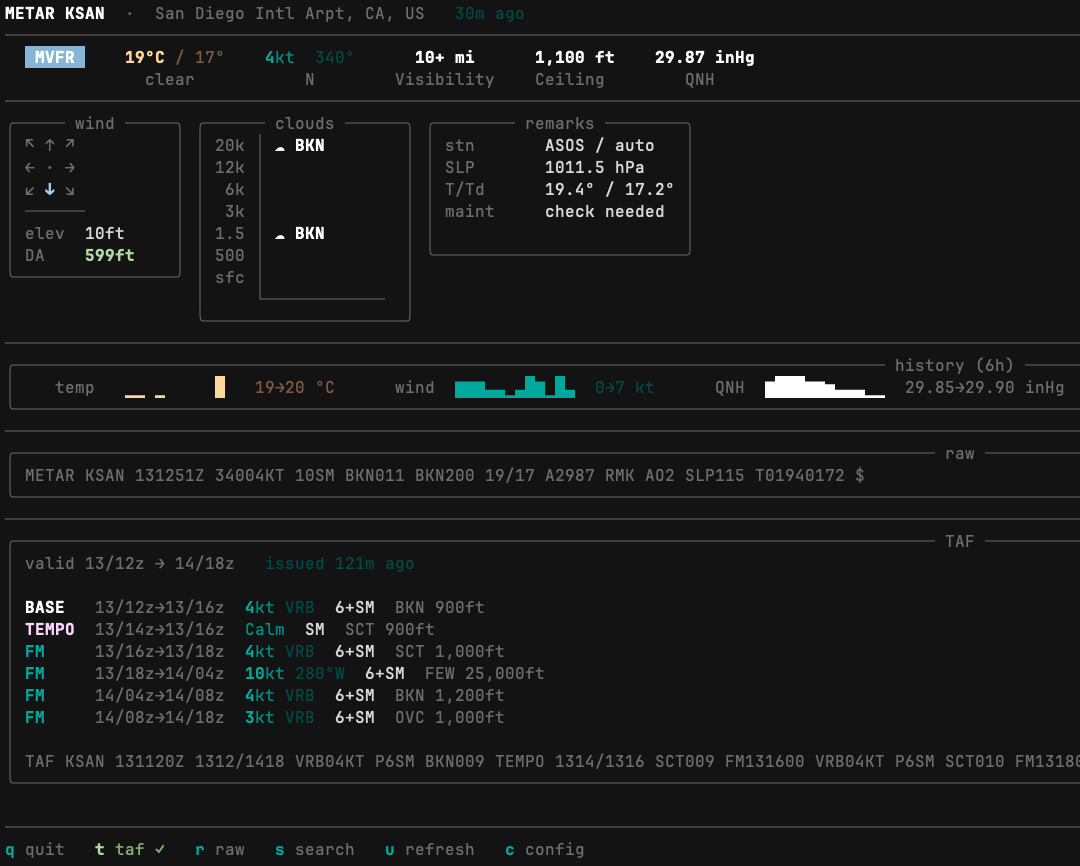
METAR MMML  ·  Mexicali Intl, BC, MX   12m ago
────────────────────────────────────────────────
  VFR    30°C / 14°   3kt 60°   10+ mi  None  29.71 inHg
          clear          NE    Visibility Ceiling  QNH
────────────────────────────────────────────────
╭─── wind ───╮ ╭──── clouds ────╮ ╭──── remarks ────╮
│ ↖ ↑ ↗      │ │ 20k │          │ │ stn   ASOS/auto │
│ ← · →      │ │ 12k │          │ │ SLP   1008.1 hPa│
│ ↙ ↓ ↘      │ │  6k │          │ │ T/Td  30.0/14.4 │
│ ──────     │ │  3k │          │ ╰─────────────────╯
│ elev  69ft │ │ 1.5 │          │
│ DA  2,141ft│ │ 500 │          │
╰────────────╯ │ sfc │          │
               │     └────────  │
               ╰────────────────╯
────────────────────────────────────────────────
  temp  ▁▂▄▆█▅▃▂▁▂▃▄   30→37 °C
  wind  ▃▂▁▁▂▃▄▃▂▁▂▃    0→10 kt
  QNH   ▅▄▃▄▅▆▇▆▅▄▅▆   29.66→29.72 inHg
────────────────────────────────────────────────
  METAR MMML 130647Z 06003KT 10SM SKC 30/14 A2971
Install
The recommended way is pipx, which installs metar as a global command without polluting your system Python:
pipx install metar-cli
That’s it. metar is now available from anywhere.
Don’t have pipx?
# macOS (MacPorts)
sudo port install pipx

# macOS (Homebrew)
brew install pipx

# Linux / other
pip install --user pipx
For development / contributing:
git clone https://github.com/alexgc96/metar-cli.git
cd metar-cli
python3 -m venv .venv && source .venv/bin/activate
pip install -e .
Usage
metar [-h] [--taf] [--raw] [-i] [--set-default ICAO] [ICAO ...]

positional arguments:
  ICAO                One or more ICAO station codes

options:
  -h, --help          show this help message and exit
  --taf               Include TAF forecast block
  --raw               Print raw METAR string only
  -i, --interactive   Interactive mode
  --set-default ICAO  Save a default station to ~/.config/metar/config
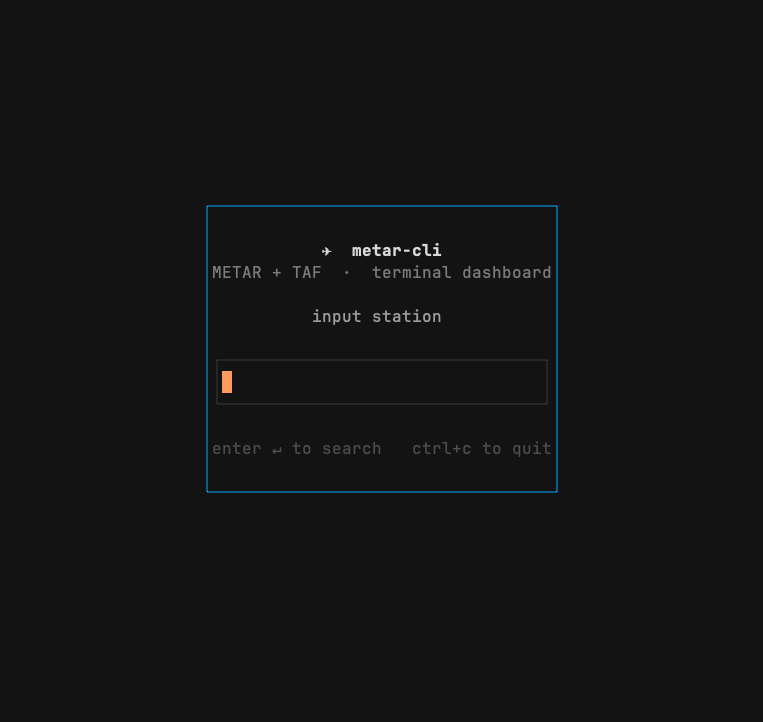
Interactive mode (-i)
metar -i
Full-screen ICAO search box. Once a station is loaded:
| Key | Action |
|---|---|
t |
Toggle TAF forecast |
r |
Toggle raw METAR string |
u |
Refresh / re-fetch data |
s |
New station search |
c |
Set default station |
q |
Quit |
Data sources
METAR + TAF — aviationweather.gov
All primary weather data comes from the Aviation Weather Center (AWC) public API operated by NOAA/NWS. No API key required.
| Data | Endpoint |
|---|---|
| METAR (current) | https://aviationweather.gov/api/data/metar?ids=MMML&format=json |
| TAF (forecast) | https://aviationweather.gov/api/data/taf?ids=MMML&format=json |
Fields used from METAR JSON:
temp,dewp— temperature and dew point (°C)wdir,wspd,wgst— wind direction (°), speed and gust (kt)visib— visibility (statute miles)altim— altimeter setting (hPa, converted to inHg for display)clouds— array of{cover, base}objects (e.g.BKN,OVCat feet MSL)fltCat— computed flight category (VFR / MVFR / IFR / LIFR)wxString— present weather string (e.g.TSRA,-RA,BR)rawOb— full raw METAR string including remarkselev— station elevation (metres)lat,lon— station coordinatesobsTime— observation Unix timestamp
Fields used from TAF JSON:
validTimeFrom,validTimeTo— forecast valid period (Unix timestamps)issueTime— issue time (ISO 8601 string)rawTAF— full raw TAF stringfcsts— array of forecast periods, each withtimeFrom,timeTo,fcstChange,wdir,wspd,wgst,visib,clouds,wxString
Historical observations — Iowa State Mesonet (ASOS)
The 6-hour sparkline history uses the Iowa State University Environmental Mesonet ASOS archive. Free, no auth required.
https://mesonet.agron.iastate.edu/cgi-bin/request/asos.py
  ?station=MMML
  &data=tmpf,drct,sknt,alti
  &format=onlycomma
  &missing=null
  &tz=UTC
Fields used: tmpf (temp °F, converted to °C), sknt (wind speed kt), alti (altimeter inHg). Up to 76 observations per 6h window are sampled down to 12 points for the sparkline; the full dataset is used for accurate min/max ranges.
Computed values
- Density altitude — calculated from OAT, altimeter setting, and station elevation using the standard ISA lapse rate formula. No external data required.
- wx string decode — parsed locally from the
wxStringfield using ICAO intensity/descriptor/phenomenon codes. No external data required. - Remarks decode — parsed locally from the
rawObRMK section (SLP, precise T/Td, station type, peak wind, pressure tendency, precip, maintenance flag).
Configuration
Set a persistent default station:
metar --set-default KJFK
# saves to ~/.config/metar/config
Or use an environment variable (takes priority over the config file):
export METAR_ICAO=MMML
Safety disclaimer
metar-cli is a convenience tool for curiosity and preflight awareness — not a substitute for an official weather briefing.
Real and virtual pilots alike should always consult their country’s aviation authority and any flight planning services available to them before flight. In the US this means a standard weather briefing via 1800wxbrief.com or ForeFlight. In Mexico, consult SENEAM and your applicable NOTAMs. In other countries, use whatever official sources your CAA provides.
A single METAR is a snapshot in time at one point on the ground. It does not capture en-route conditions, winds aloft, SIGMETs, AIRMETs, TFRs, or anything happening above the field. Always get the full picture.
Stack
- Python 3.10+
rich— terminal layout, panels, color, sparklinesrequests— HTTPprompt_toolkit— interactive mode UI
Inspiration
- wttr.in — terminal weather density as a design goal
- metar-taf.com — MMML dashboard, June 2026
1 maintainer

Metadata
1 maintainer
Release files for metar-cli 0.3.5
For a detailed explanation of source distributions (sdists) and built distributions (wheels), please see the package formats documentation.
Source distribution (sdist)
| File | Size | Uploaded | |
|---|---|---|---|
| metar_cli-0.3.5.tar.gz | 16.3 kB | Details |
Built distribution (wheel)
| File | Interpreter | ABI | Platform | Reset |
|---|---|---|---|---|
| metar_cli-0.3.5-py3-none-any.whl | Python 3 | none | any | Details |
Total release size: 29.8 kB
Release files / metar_cli-0.3.5.tar.gz
| Download URL | metar_cli-0.3.5.tar.gz |
|---|---|
| Size | 16.3 kB |
| Tags | Source |
|
SHA-256 checksum How to use checksums |
e2c0d8410670156a07f0ff036183b303d463f01b0f538389ba2560a9e49174ae
|
|
BLAKE2b-256 checksum How to use checksums |
9c6fb55da4d5bcf5a069d07851207e4f5445598c66868451b7dea443c2017a7d
|
| Upload date | |
|
Uploaded using Trusted Publishing? What is trusted publishing? |
Yes |
| Uploaded via |
twine/6.1.0 CPython/3.13.12
|
Provenance
Provenance describes where a file came from. On PyPI, provenance is shared via attestations, which provide a verifiable record of the build or publishing details. View details, limitations and caveats.


PyPI Publish Attestation
PyPI verified that this artifact, at this checksum, originated from the publisher listed below.
Signed by GitHub Actions, verified by PyPI on Jun 18, 2026.
Transparency logRelease files / metar_cli-0.3.5-py3-none-any.whl
| Download URL | metar_cli-0.3.5-py3-none-any.whl |
|---|---|
| Size | 13.6 kB |
| Tags | Python 3 |
|
SHA-256 checksum How to use checksums |
95b9a0480bd076da4eb01989c253ca353b1cd6467ca211ee5968c650a676a191
|
|
BLAKE2b-256 checksum How to use checksums |
e9c11cd60345212e449e8acf4f2f64b2f68c9739a602686badec0f3f29dd9dd6
|
| Upload date | |
|
Uploaded using Trusted Publishing? What is trusted publishing? |
Yes |
| Uploaded via |
twine/6.1.0 CPython/3.13.12
|
Provenance
Provenance describes where a file came from. On PyPI, provenance is shared via attestations, which provide a verifiable record of the build or publishing details. View details, limitations and caveats.
PyPI Publish Attestation
PyPI verified that this artifact, at this checksum, originated from the publisher listed below.
Signed by GitHub Actions, verified by PyPI on Jun 18, 2026.
Transparency log













