
An nvitop-like terminal monitor for MetaX GPUs.
Verified details
These details have been verified by PyPIProject links
GitHub Statistics
Maintainers

Project description
metax-mxtop






metax-mxtop is an nvitop-like terminal monitor for MetaX GPUs. Install the PyPI package, then run the mxtop command.
Built upon onlylrs/metax-mxtop, with thanks to the original project for the foundation.
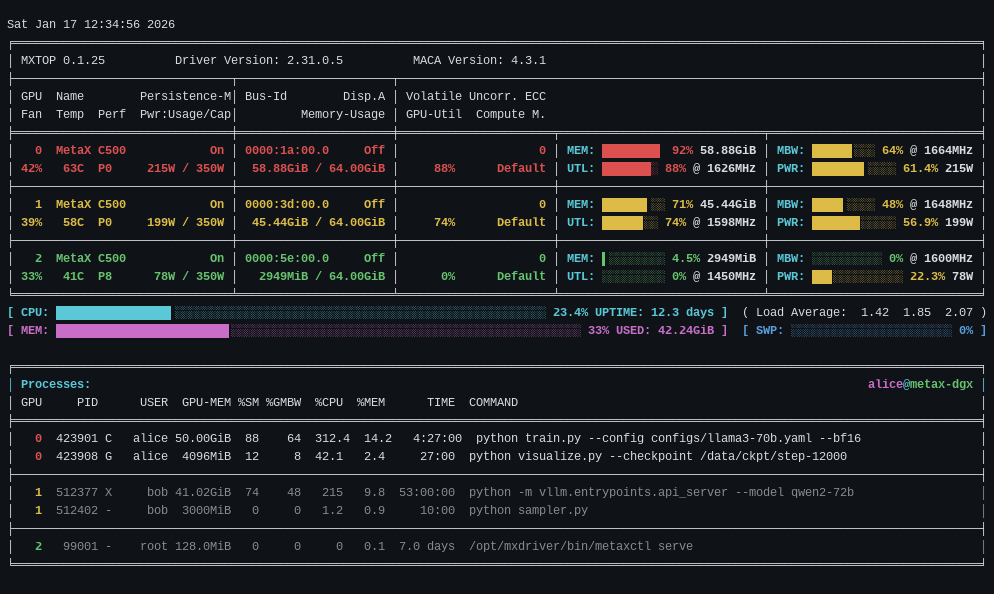
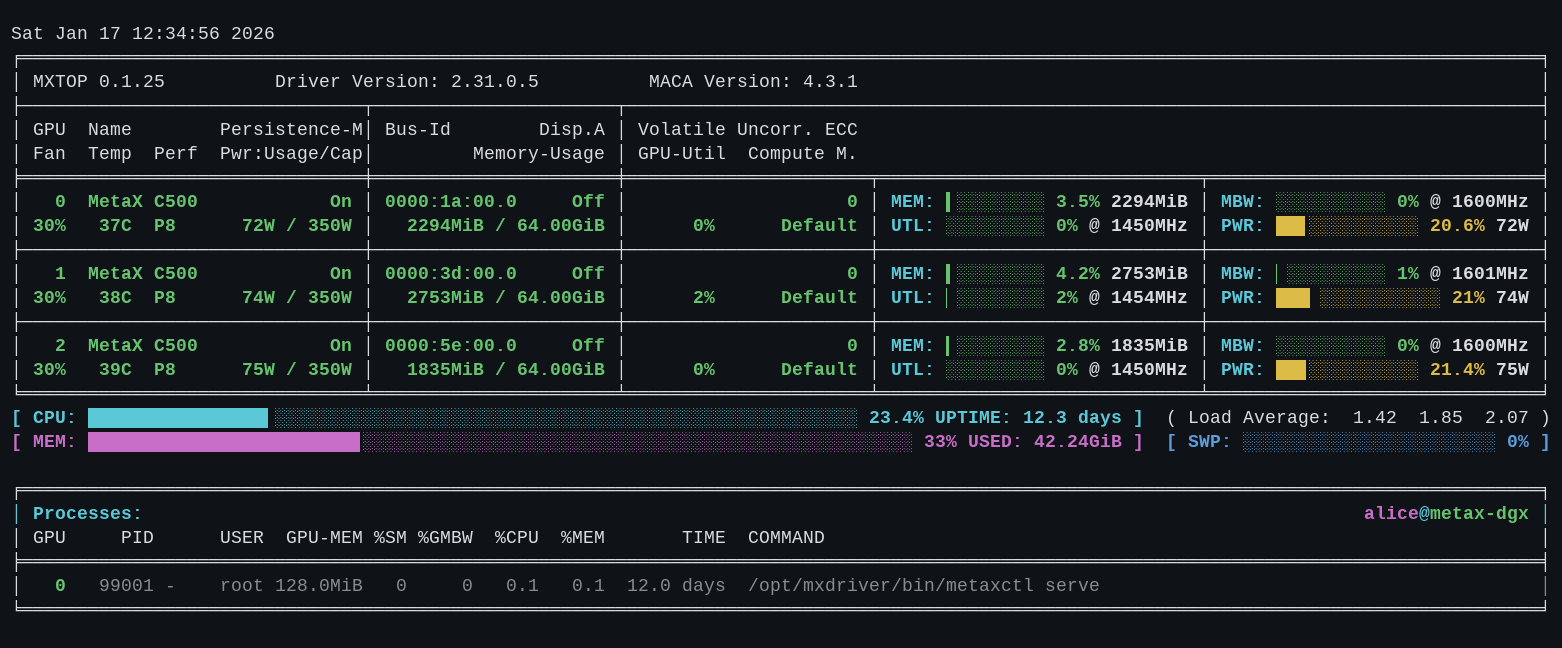
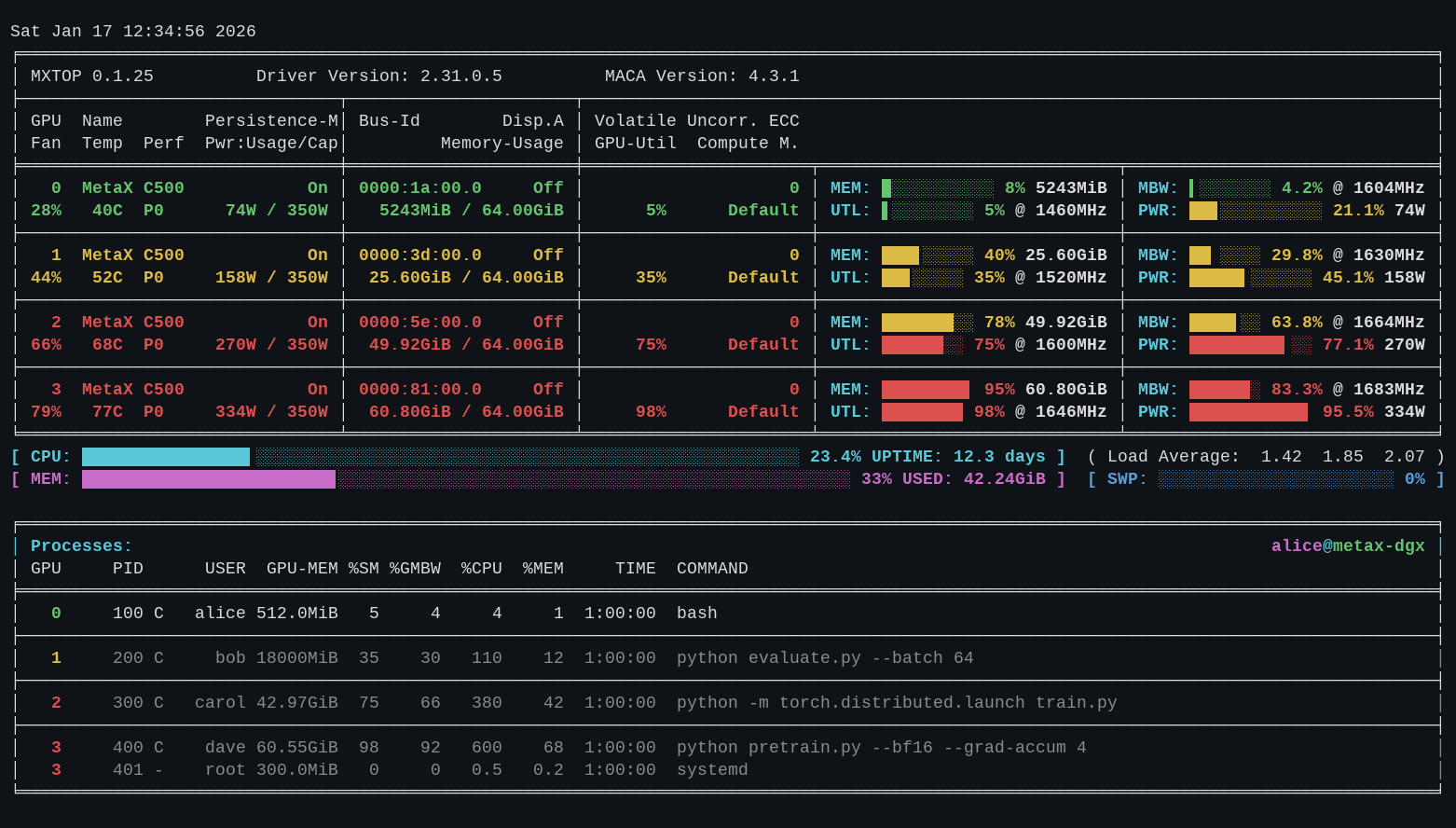
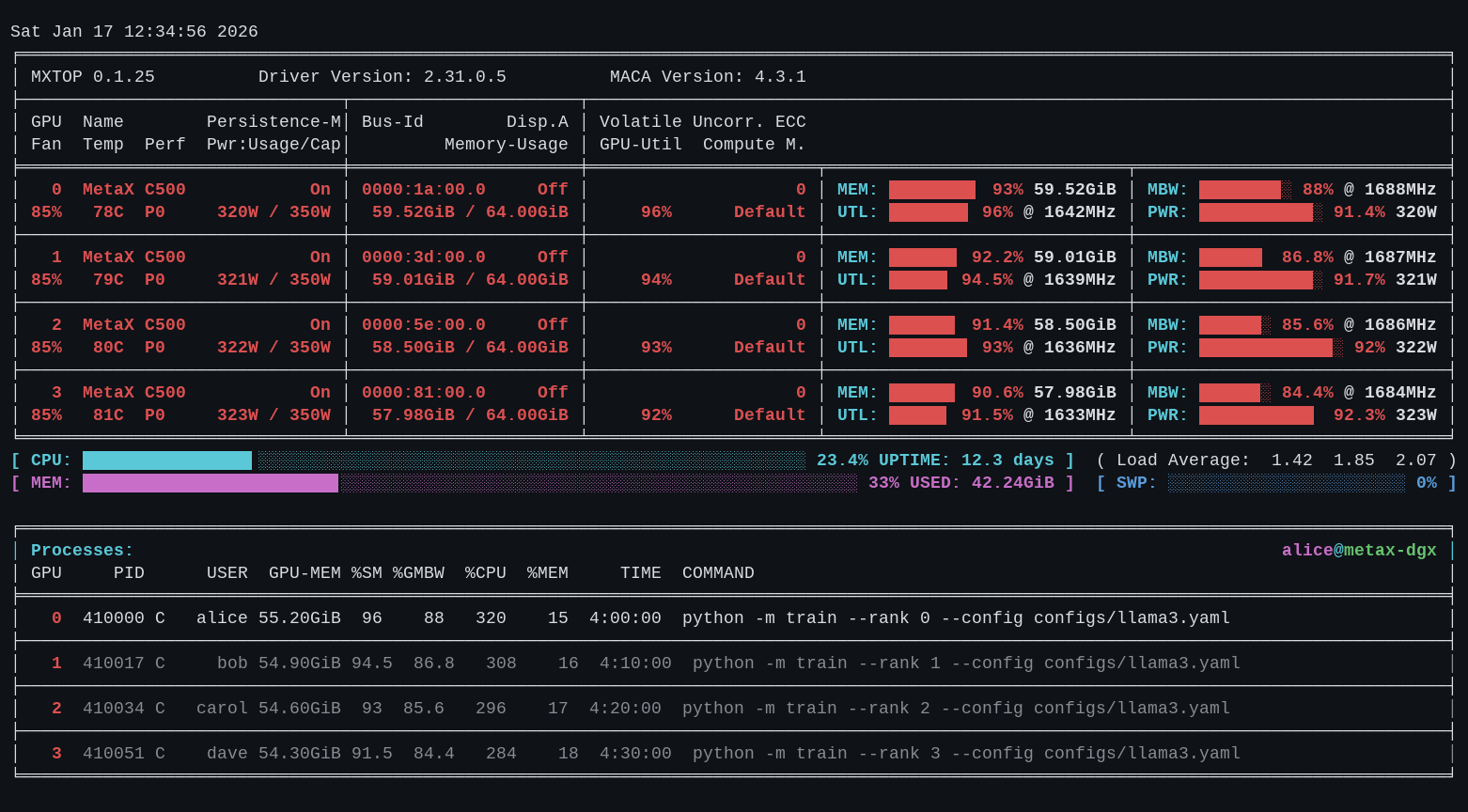
Colors follow nvitop's intensity model: each device summary uses its dominant GPU or memory load, while the detailed MEM / MBW / UTL / PWR bars retain metric-specific colors (memory thresholds 10/80, GPU thresholds 10/75).
| Idle — light load, mostly green | Mixed — per-bar color bands | Heavy — saturation across the cluster |
 |
 |
 |
Hosts with up to 16 GPUs retain the detailed nvitop-style list. Larger 32/64-GPU fleets use an adaptive overview grid in auto, compact, and one-shot views, while full mode keeps every detailed field.
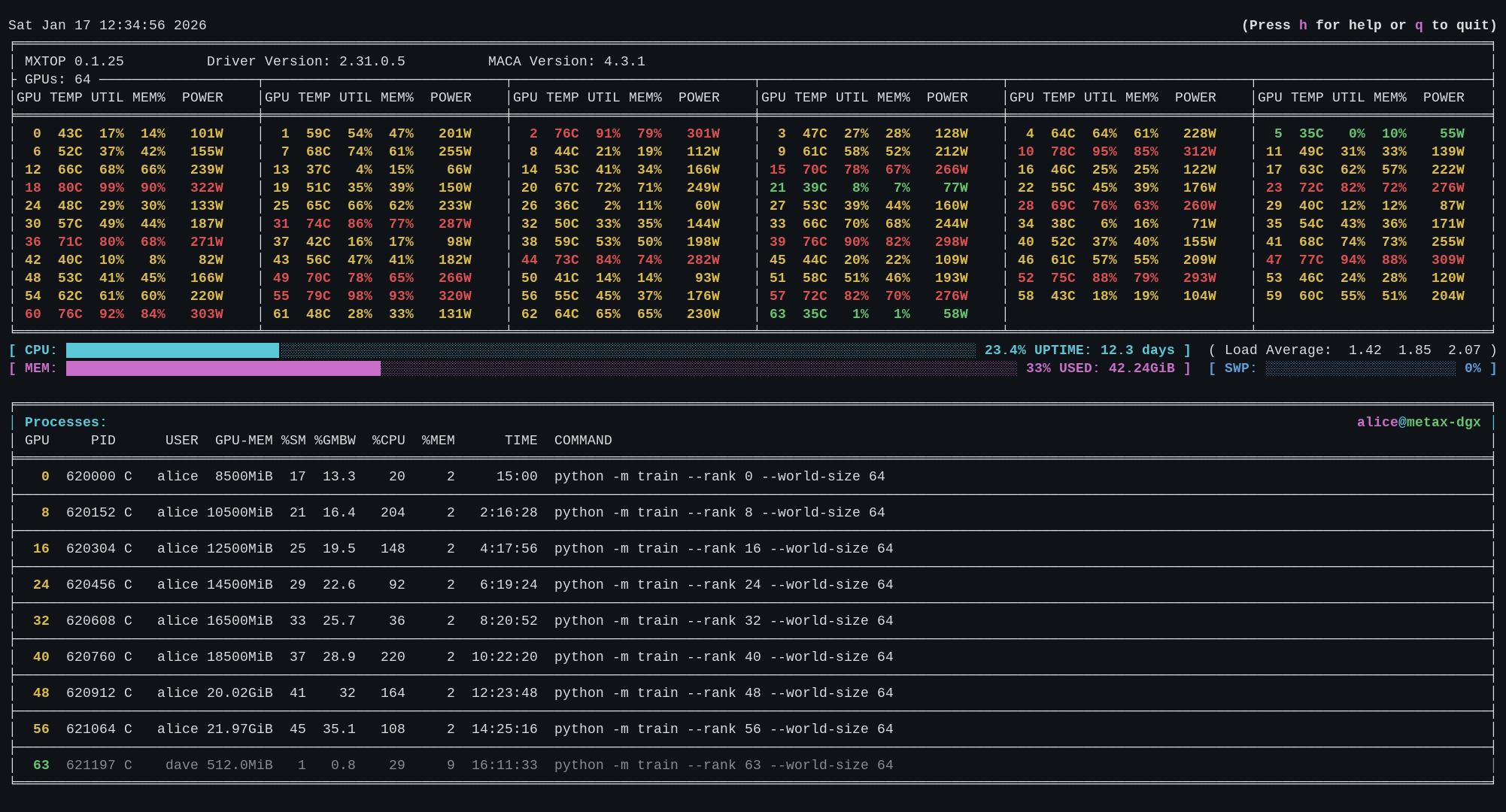
Preview and gallery images use fixed-time deterministic synthetic MetaX-shaped telemetry so every state is reproducible. Live monitoring data still comes exclusively from the selected MetaX backend; optional fields in the fixtures illustrate presentation states rather than proving that every backend reports them.
Features
- nvitop-like terminal dashboard for MetaX GPUs, with full, compact, and automatic layouts.
- Read-only GPU telemetry through MXSML/Pymxsml or
mx-smi. - GPU device panel with temperature, power, utilization, memory, memory bandwidth, clocks, bus id, persistence, performance state, and driver fields when available.
- Adaptive 32/64-GPU fleet grid that preserves per-device load colors and leaves substantially more room for host/process data.
- Host panel with load average and scrolling history graphs for CPU, memory, swap, and the selected GPU's memory/utilization.
- Process table with selection, multi-process tagging, vertical and horizontal scrolling, and nvitop-compatible sorting.
- Process environment, host/GPU process-tree, per-process metrics, and built-in help screens.
- Confirmed
SIGINT,SIGTERM, andSIGKILLactions for selected host processes, with--readonlyto disable every process-changing action. - ANSI-colored one-shot output, curses colors, ASCII fallback, and JSON output from the same filtered snapshot model.
- Shared device, user, PID, visibility, compute, and graphics filters across TUI, text, and JSON output.
GPU management remains read-only: mxtop does not update firmware, reset GPUs, or change persistence/admin settings. Interactive process signals are always presented for confirmation, validate process identity to guard against PID reuse, and enforce process ownership unless mxtop is running as root. Use --readonly when even confirmed host-process actions must be unavailable.
Install
From PyPI:
pip install -U metax-mxtop
The installed command is:
mxtop
From source:
git clone https://github.com/linkedlist771/metax-mxtop.git
cd metax-mxtop
pip install -e .
MetaX backend discovery
mxtop tries backends in this order when --backend auto is used:
- Pymxsml/MXSML, when importable and usable.
mx-smi, when the CLI is available.
For the mx-smi backend, the executable path is resolved in this order:
- Explicit backend path when constructed by callers.
MXTOP_MXSMI_PATHenvironment variable./opt/mxdriver/bin/mx-smi.mx-smifromPATH.
Example:
MXTOP_MXSMI_PATH=/opt/mxdriver/bin/mx-smi mxtop --backend mxsmi
Usage
On a terminal, the default command opens the interactive dashboard:
mxtop
Use --monitor / -m to request it explicitly or choose a layout:
mxtop -m
mxtop -m full
mxtop -m compact
An explicit monitor requires both stdin and stdout to be TTYs. When the default command is redirected or piped, it prints one snapshot instead. --once / -1 always selects one-shot text output:
mxtop --once
ANSI color is enabled for a terminal and can be disabled or forced:
mxtop --once --no-color
mxtop --once --force-color
--json prints one machine-readable snapshot without ANSI styling:
mxtop --json
Common filters:
mxtop --only 0 1
mxtop --only-visible
mxtop --user alice bob
mxtop --user                 # current user
mxtop --pid 1234 5678
mxtop --compute
mxtop --only-compute
mxtop --graphics
mxtop --only-graphics
--compute and --graphics include processes with those contexts, including mixed X / C+G processes. Their uppercase --only-* forms require an exact compute-only or graphics-only type. Multiple supplied filters are combined. If a backend reports processes without context-type telemetry, as some mx-smi versions do, requesting one of these filters exits with a stable error instead of silently excluding every process.
Backend and layout options:
mxtop --backend auto
mxtop --backend pymxsml
mxtop --backend mxsmi
mxtop --interval 1.0
mxtop --no-unicode
mxtop --readonly
Useful CLI flags:
| Flag | Meaning |
|---|---|
--version, -V |
Print the runtime version. |
--backend {auto,pymxsml,mxsmi} |
Select telemetry backend. |
--interval SECONDS |
Refresh interval (default 2.0, minimum 0.25). |
--once, -1 |
Print one text snapshot and exit. |
--monitor, -m [auto|full|compact] |
Run interactively, optionally choosing the layout. |
--json |
Print one JSON snapshot and exit. |
--no-color |
Disable ANSI colors in text output. |
--force-color |
Emit ANSI colors even when stdout is not a TTY. |
--colorful |
Use spectrum-like gradient colors for bar charts. |
--light |
Use colors suitable for a light terminal theme. |
--gpu-util-thresh LOW HIGH |
Override GPU utilization intensity thresholds. |
--mem-util-thresh LOW HIGH |
Override GPU-memory intensity thresholds. |
--only INDEX..., -o INDEX... |
Show only selected GPU indices and their processes. |
--only-visible, -ov |
Follow MACA_VISIBLE_DEVICES or CUDA_VISIBLE_DEVICES. |
--user [USER...], -u [USER...] |
Show selected users; with no value, use the current user. |
--pid PID..., -p PID... |
Show only selected process IDs. |
--compute, -c |
Require a compute-capable process context. |
--only-compute, -C |
Require an exact compute-only process context. |
--graphics, -g |
Require a graphics-capable process context. |
--only-graphics, -G |
Require an exact graphics-only process context. |
--no-unicode, --ascii, -U |
Use ASCII characters only. This is automatic for non-UTF-8 locales. |
--readonly |
Disable process signals in the interactive UI. |
Environment variables
| Variable | Meaning |
|---|---|
MXTOP_MXSMI_PATH |
Override the local mx-smi executable discovered by the backend. |
MXTOP_MONITOR_MODE |
Comma-separated defaults: one of auto, full, compact, plus colorful/plain, light/dark, and/or readonly. Explicit CLI options take precedence. |
MXTOP_GPU_UTILIZATION_THRESHOLDS=LOW,HIGH |
Set GPU utilization thresholds when the CLI option is omitted. |
MXTOP_MEMORY_UTILIZATION_THRESHOLDS=LOW,HIGH |
Set GPU-memory thresholds when the CLI option is omitted. |
MACA_VISIBLE_DEVICES |
Device indices, UUID prefixes, or BDF prefixes used by --only-visible. |
CUDA_VISIBLE_DEVICES |
Fallback visibility list when MACA_VISIBLE_DEVICES is not set. |
ANSI_COLORS_DISABLED |
Disable ANSI output unless --force-color is explicit. |
NO_COLOR |
Disable ANSI output unless --force-color is explicit. |
FORCE_COLOR |
Force ANSI output when neither disable variable is present. |
Remote mode (cluster dashboard)
Aggregate several SSH-reachable nodes into one local web dashboard:
pip install 'metax-mxtop[remote]'        # pulls in asyncssh
mxtop --remote-mode --nodes nodeA nodeB nodeC --open
# or list hosts in a file (one per line, # comments allowed)
mxtop --remote-mode --nodes-file ~/hosts.txt --port 8080
- Host names are plain SSH aliases resolved from your
~/.ssh/config(HostName/User/Port/IdentityFile/ProxyJump all honoured), so nodes with different MetaX card configurations work without extra setup. - Authentication uses your SSH keys /
ssh-agent— the "login once" model. For password-only nodes, runssh-copy-idfirst; mxtop does not store passwords. - The dashboard polls every node concurrently (
--interval, default 2s), serves on127.0.0.1by default (--bindto change), and streams live updates over Server-Sent Events. Unreachable nodes are shown as down instead of breaking the page. - Each node runs the same
mx-smiqueries as the local backend; override the remote binary with--remote-mxsmi-pathif it is not onPATH.
Interactive keys
General and navigation
| Key | Action |
|---|---|
q, Q |
Quit from the main screen; return from a detail screen. |
h, ? |
Open help. Any key returns to the previous screen. |
r, R, Ctrl-R, F5 |
Refresh immediately. On the main screen this also resets selection and scrolling. |
a, f, c |
Switch to auto, full, or compact layout. |
Up/Down, Shift-Tab/Tab, Alt-k/Alt-j |
Select the previous/next process or detail row. |
Home, End |
Select the first/last row. |
Space |
Tag or untag the current process, then advance. Tagged processes form the action target set. |
Esc |
Clear the main-screen selection and tags; return from environment or metrics. It does not quit mxtop. |
PageUp/PageDown, [/] |
Scroll the viewport vertically; Alt-K/Alt-J are main-screen aliases. |
Left/Right, Alt-h/Alt-l |
Scroll horizontally. |
Ctrl-A, ^ |
Return to the leftmost column. |
Ctrl-E, $ |
Jump to the rightmost process-table column. |
| Mouse wheel | Move vertically; hold Ctrl for 5x movement or Shift for horizontal movement. Click a row to select it. |
Screens and process actions
| Key | Action |
|---|---|
e |
Show the selected process environment. Press e, q, or Esc to return. |
t |
Show the GPU process tree, including related host ancestors and descendants. Press t or q to return. |
Enter |
Show rolling metrics for the selected process. Press Enter, q, or Esc to return. |
T |
Open confirmation for SIGTERM. |
K, k |
Open confirmation for SIGKILL. |
Ctrl-C, I |
Open confirmation for SIGINT. Ctrl-C does not quit the TUI. |
Signals apply to all tagged processes when tags exist, otherwise to the selected process (or highlighted process-tree entry). The dialog supports Left/Right, Tab/Shift-Tab, ,/., mouse wheel, and button clicks; choose SIGTERM, SIGKILL, SIGINT, or Cancel, then confirm with Enter or Space. Process actions require psutil and are disabled by --readonly.
Process sorting
| Key | Action |
|---|---|
,, < / ., > |
Cycle to the previous/next sort column. |
/ |
Invert the current sort order. |
on / oN |
Sort by GPU index in normal/reverse order. |
op / oP |
Sort by PID in normal/reverse order. |
ou / oU |
Sort by user in normal/reverse order. |
og / oG |
Sort by GPU memory in normal/reverse order. |
os / oS |
Sort by GPU utilization in normal/reverse order. |
ob / oB |
Sort by GPU memory-bandwidth utilization in normal/reverse order. |
oc / oC |
Sort by CPU utilization in normal/reverse order. |
om / oM |
Sort by host-memory utilization in normal/reverse order. |
ot / oT |
Sort by runtime in normal/reverse order. |
Packaging and releases
The PyPI distribution name is metax-mxtop; the Python import package and CLI command are both mxtop.
pip install metax-mxtop
mxtop --version
Branch and pull-request workflows run tests and build the offline wheelhouse. A push to main also creates a commit-addressed prerelease; versioned GitHub and PyPI publication is tag-driven:
- Bump
pyproject.toml,src/mxtop/__init__.py, and the local package entry inuv.lock. - Regenerate the preview, gallery, and showcase assets and run their
--checkcommands. - Run the full test, lint, and package-build commands below.
- Commit the change.
- Create a new semver tag, for example
v0.1.22. - Push the commit and that tag.
GitHub Actions then builds the wheelhouse, creates or updates the versioned GitHub Release, and publishes the package to PyPI through Trusted Publishing for v* tags.
More previews
See the output gallery and screen showcase for rendered stdout and deterministic secondary-screen fixtures across palettes, layouts, filters, edge telemetry, and 32/64-GPU fleets.
Development
Run tests and lint locally:
uv run --locked --with pytest --with psutil --with pillow==11.3.0 pytest -q
uv run --locked --with ruff ruff check .
uv run --locked --with build python -m build
Canonical assets use Pillow 11.3.0, the vendored Liberation Mono fonts, and an algorithmic Braille renderer. Their metadata fingerprints the Pillow and FreeType versions as well as the font bytes and renderer source. Regenerate the three canonical asset sets with:
uv run --locked --with pillow==11.3.0 --with psutil python scripts/generate_preview.py --all
uv run --locked --with pillow==11.3.0 --with psutil python scripts/render_gallery.py
uv run --locked --with pillow==11.3.0 --with psutil python scripts/render_showcase.py
To create an explicitly noncanonical preview with local fonts, set MXTOP_PREVIEW_FONT, MXTOP_PREVIEW_BOLD_FONT, and optionally MXTOP_PREVIEW_SYMBOL_FONT, then pass --custom-fonts with a noncanonical output path:
uv run --locked --with pillow==11.3.0 --with psutil python scripts/generate_preview.py \
  --custom-fonts --output /tmp/mxtop-custom.png
More background is available in the usage guide.
Project details
Verified details
These details have been verified by PyPIProject links
GitHub Statistics
Maintainers
Release history Release notifications | RSS feed


Download files
Download the file for your platform. If you're not sure which to choose, learn more about installing packages.
Source Distribution
Built Distribution
Filter files by name, interpreter, ABI, and platform.
If you're not sure about the file name format, learn more about wheel file names.
Copy a direct link to the current filters
File details
Details for the file metax_mxtop-0.1.22.tar.gz.
File metadata
- Download URL: metax_mxtop-0.1.22.tar.gz
- Upload date:
- Size: 119.0 kB
- Tags: Source
- Uploaded using Trusted Publishing? Yes
- Uploaded via: twine/6.1.0 CPython/3.13.12
File hashes
| Algorithm | Hash digest | |
|---|---|---|
| SHA256 |
138f718b784782e12c2f76766cdd5f8721ca889a7d0c2880213fc2bedd54186e
|
|
| MD5 |
ef3c35c03ff8426ae70bc07cc00bb6ff
|
|
| BLAKE2b-256 |
0c544eb5f5284541f7b14ac2c84cc3ef582ac1c87d0d695a2ff400718b893302
|
Provenance
The following attestation bundles were made for metax_mxtop-0.1.22.tar.gz:
Publisher:
wheels.yml on linkedlist771/metax-mxtop
-
Statement:
-
Statement type:
https://in-toto.io/Statement/v1 -
Predicate type:
https://docs.pypi.org/attestations/publish/v1 -
Subject name:
metax_mxtop-0.1.22.tar.gz -
Subject digest:
138f718b784782e12c2f76766cdd5f8721ca889a7d0c2880213fc2bedd54186e - Sigstore transparency entry: 2161249775
- Sigstore integration time:
-
Permalink:
linkedlist771/metax-mxtop@c4f96e09bbdf52628242a146b0ef6a226747ad2d -
Branch / Tag:
refs/tags/v0.1.22 - Owner: https://github.com/linkedlist771
-
Access:
public
-
Token Issuer:
https://token.actions.githubusercontent.com -
Runner Environment:
github-hosted -
Publication workflow:
wheels.yml@c4f96e09bbdf52628242a146b0ef6a226747ad2d -
Trigger Event:
push
-
Statement type:
File details
Details for the file metax_mxtop-0.1.22-py3-none-any.whl.
File metadata
- Download URL: metax_mxtop-0.1.22-py3-none-any.whl
- Upload date:
- Size: 89.2 kB
- Tags: Python 3
- Uploaded using Trusted Publishing? Yes
- Uploaded via: twine/6.1.0 CPython/3.13.12
File hashes
| Algorithm | Hash digest | |
|---|---|---|
| SHA256 |
ada1561d95a89626cc0e44eeb0cf71215d0c002dd43aa3b215009824b93e9a5e
|
|
| MD5 |
898ad4d407e7369c5c9b5869ae9e7d8c
|
|
| BLAKE2b-256 |
daf254fc4d5f7bc4c5a4dbf9742afcb1963d7cd731a13a3ac79a5fa5ee737f0d
|
Provenance
The following attestation bundles were made for metax_mxtop-0.1.22-py3-none-any.whl:
Publisher:
wheels.yml on linkedlist771/metax-mxtop
-
Statement:
-
Statement type:
https://in-toto.io/Statement/v1 -
Predicate type:
https://docs.pypi.org/attestations/publish/v1 -
Subject name:
metax_mxtop-0.1.22-py3-none-any.whl -
Subject digest:
ada1561d95a89626cc0e44eeb0cf71215d0c002dd43aa3b215009824b93e9a5e - Sigstore transparency entry: 2161249859
- Sigstore integration time:
-
Permalink:
linkedlist771/metax-mxtop@c4f96e09bbdf52628242a146b0ef6a226747ad2d -
Branch / Tag:
refs/tags/v0.1.22 - Owner: https://github.com/linkedlist771
-
Access:
public
-
Token Issuer:
https://token.actions.githubusercontent.com -
Runner Environment:
github-hosted -
Publication workflow:
wheels.yml@c4f96e09bbdf52628242a146b0ef6a226747ad2d -
Trigger Event:
push
-
Statement type:






