
Decentralized Cyber Threat Intelligence Kaizen Framework.

Project description

Metemcyber
Decentralized Cyber Threat Intelligence Kaizen Framework. https://www.metemcyber.ntt.com





Pricom Mainnet (rpc.metemcyber.ntt.com)
| Contract Name | Address |
|---|---|
| CTICatalog | 0xBcb4b84cdaB65C6e6Efe1697CC41a46D0AEaCA61 |
| CTIBroker | 0xC1814B834E1be7DeE7611fD5F747535369B8683e |
| CTIOperator | 0x35b3fbeABB802E9477b17a63073ABe874A386E25 |
| metemcyber_util (placeholder) |
0x0e5EECFF51a3ab2221fF6bBd240B20E8933ff28A __$47ceb01e1c551398bb2e8f2c8232f40551$__ |
💡 Overview
Metemcyber™ enables security collaboration and assessment all across the organization through the intelligence cycle.
✨ Features
Anyone can make a successful intelligence cycle.
- Content-oriented Workflow
- Comparable Data Analysis Process
- Fault-tolerant Collaboration
- Disclosure Control of CTIs
- Measuring the Cost-Effectiveness of CTIs
- Transparency for Trust
- Monitoring the trading activity of CTIs
- Unlocking achievements based on your contribution.
- MISP-friendly 🤗
🚅 QuickStart
This exercise will be performed on the test environment.
apt install build-essential python3-dev
pip install -U pip
pip install -U 'metemcyber[cli]'
Check the current configuration:
metemctl config show
🔑 Create a new account
Create a new account if no keyfile available:
metemctl account create
Display your account details you are currently using:
metemctl account show
⚠️ You must agree to the terms of service. This is an experimental project on the enterprise ethereum of NTT Communications. You will get a promo code if you agree to these terms.
Get a promo code via email, and airdrop yourself some ETH to get started:
metemctl account airdrop $PROMOTE_CODE_IN_THE_CONFIRMATION_MAIL
🛒 Collect CTIs
Search for the CTI token you want to buy (e.g. OSINT)
metemctl ix search 'OSINT'
Enter the index number of the CTI token to be purchased. The CTI token address can also be accepted.
metemctl ix buy $TOKEN_INDEX_OR_ADDRESS
⚠️ You need an account to use ngrok. Setup a local ngrok environment. Download ngrok and extract it. Open the application directory to put the ngrok executable file there:
metemctl open-app-dir$ ls "$(metemctl open-app-dir --print-only)" external-links.json metemctl.ini ngrok ...Ngrok need to connect your ngrok account. Make sure the ngrok authtoken exists after ngrok setup:
cat ~/.ngrok2/ngrok.ymlStart a daemon to receive data using ngrok:
metemctl seeker start --ngrok
metemctl seeker status
Use CTI token to receive the MISP object on your public URL of the ngrok.
metemctl ix use $TOKEN_INDEX_OR_ADDRESS
♻️ Run the Intelligence Cycle
In this section, you will run the intelligence cycle using the exercise ir-exercise for Incident Response.
⚠️ You need to enable the test catalog as primary catalog. Enable the test catalog & Disable the production catalog:
metemctl ix catalog enable 0x168DD95472cEaF5c28447C8b07A593e205E92A12 # test
metemctl ix catalog disable 0xBcb4b84cdaB65C6e6Efe1697CC41a46D0AEaCA61 # production
Check your catalog settings:
$ metemctl ix catalog show
Catalogs *:active
 *1 0x168DD95472cEaF5c28447C8b07A593e205E92A12 # test
  2 0xBcb4b84cdaB65C6e6Efe1697CC41a46D0AEaCA61 # production
🤖 Create a new workflow
Metemcyber can be used not only for CTI dissemination but also CTI creation.
metemctl new --starter=ir-exercise
Implement the analysis process into your workflow by selecting the event ID (In many cases, the same as the UUID of MISP object), the category of CTI (Fraud, Incident Response, Risk Analysis, Security Operations, Security Leadership, Vulnerability Management), and the content(IOCs, TTPs, etc.) you want to include in the CTI.
This is an important piece of evidence to check the "Direction" step in the intelligence cycle.
Select Intelligence Category (Fraud, IR, RA, SecOps, SecLead, Vuln) [IR]:
Input a new event_id(UUID) [70be8ba5-fa7f-4b8e-aa04-dc76e0fa8c42]:
0: IOC
1: TTP
2: Workflow
Choose contents to be include [0,1]:
================================================================
Event ID: 70be8ba5-fa7f-4b8e-aa04-dc76e0fa8c42
Category: Incident Response
Contents: ['TTPs', 'IOCs']
================================================================
Are you sure you want to create it? [y/N]:
📝 Summarize the data analysis process
⚠️ Make sure Seeker is running to receive the data.
metemctl seeker status
You need to use Kedro to summarize your data analysis process into a workflow.
In practice, it is difficult to clearly separate the steps of "Collection", "Processing" and "Analysis" in the intelligence cycle, which makes the data analysis process look complicated.
Please keep the following two points to make the data analysis process more maintainable.
- Using the Kedro pipeline to describe Analysis Strategy
- Using the Kedro nodes to describe Analysis Method
These are important pieces of evidence to check the "Processing" and "Analysis" step in the intelligence cycle.
For the success of the intelligence cycle, we are more focused on evaluating the data analysis process than on automating the CTI consumption process.
Get data for the exercise ir-exercise:
metemctl ix search '[ir-exercise]'
metemctl ix buy $TOKEN_INDEX_OR_ADDRESS
metemctl ix use $TOKEN_INDEX_OR_ADDRESS
metemctl ix extract $TOKEN_INDEX_OR_ADDRESS
Run the ir-exercise workflow:
metemctl run --setup
Check the contents of your CTI product and the workflow:
metemctl check --viz
The --viz option allows you to visualize your data analysis process described by the workflow. (the same as kedro viz)
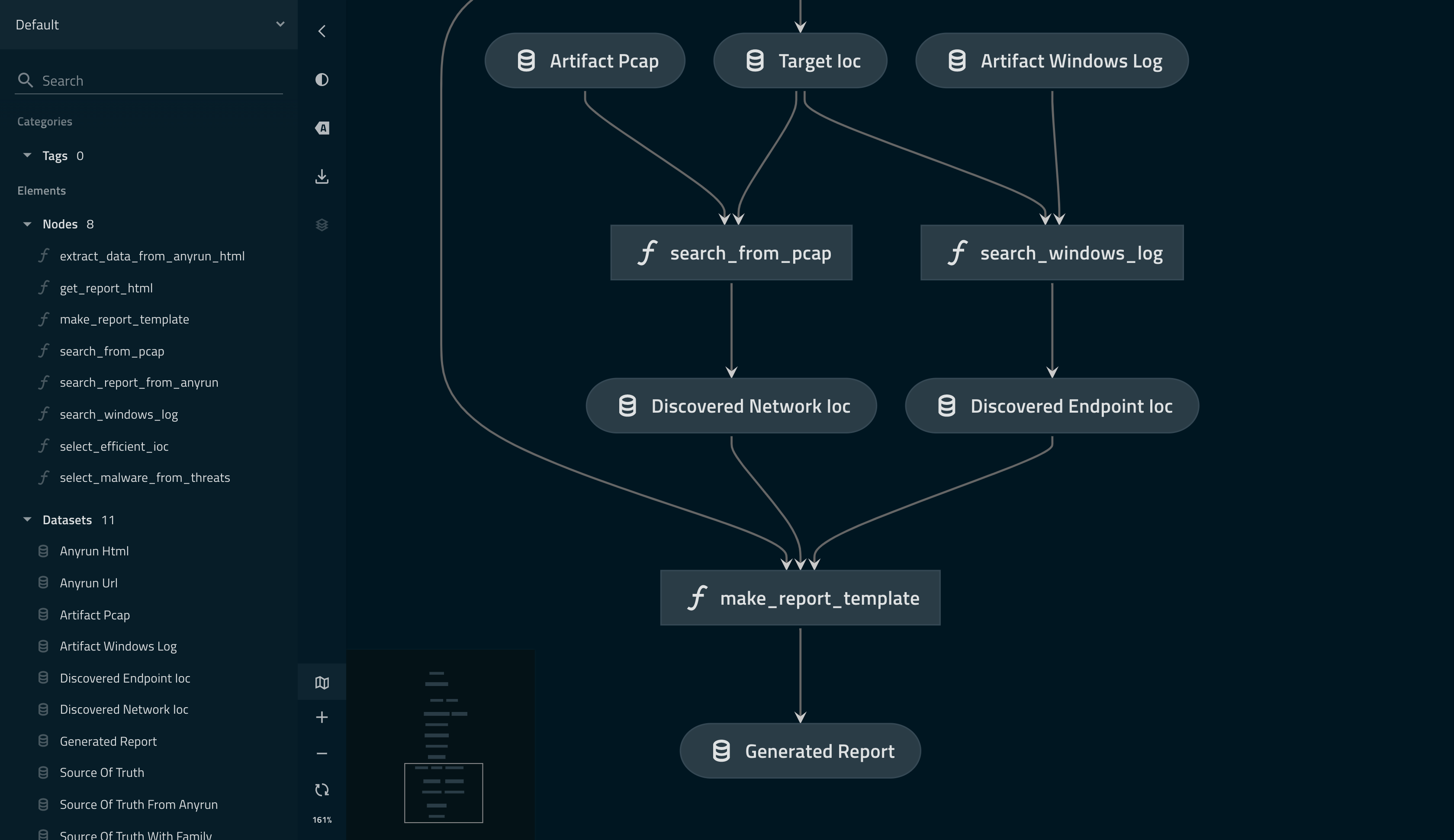
🚀 Disseminate your CTI products to everyone:
⚠️ Solver must be running to send the data to token holders.
metemctl solver start --enableMISP objects can be distributed when Solver is working properly.
$ metemctl solver status
Solver running with operator you configured(0xe889b84a209719B8f0272376dB49946DbD177aE6).
metemctl publish
🎉🎉🎉 Welcome to Metemcyber! 🎉🎉🎉
📖 Documentation
For more information see the documentation.
⚖️ LICENSE
Copyright 2021 NTT Communications Corporation

Licensed under the Apache License, Version 2.0 (the "License");
you may not use this file except in compliance with the License.
You may obtain a copy of the License at

    http://www.apache.org/licenses/LICENSE-2.0

Unless required by applicable law or agreed to in writing, software
distributed under the License is distributed on an "AS IS" BASIS,
WITHOUT WARRANTIES OR CONDITIONS OF ANY KIND, either express or implied.
See the License for the specific language governing permissions and
limitations under the License.
Release history Release notifications | RSS feed


Download files
Download the file for your platform. If you're not sure which to choose, learn more about installing packages.
Source Distribution
Built Distribution
Filter files by name, interpreter, ABI, and platform.
If you're not sure about the file name format, learn more about wheel file names.
Copy a direct link to the current filters
File details
Details for the file metemcyber-0.6.0.tar.gz.
File metadata
- Download URL: metemcyber-0.6.0.tar.gz
- Upload date:
- Size: 61.2 kB
- Tags: Source
- Uploaded using Trusted Publishing? No
- Uploaded via: twine/3.4.1 importlib_metadata/4.5.0 pkginfo/1.7.0 requests/2.25.1 requests-toolbelt/0.9.1 tqdm/4.61.1 CPython/3.8.2
File hashes
| Algorithm | Hash digest | |
|---|---|---|
| SHA256 |
e4aa50ec9915a8f8b24eb0724bb426e62d2d850a7b466d5a00166d590fc87524
|
|
| MD5 |
33d735c687c1debb338a668b8d774564
|
|
| BLAKE2b-256 |
7b761535a23a188884fe6861addea8aa22cc4fc700a324f5fbdc22899334fa68
|
File details
Details for the file metemcyber-0.6.0-py3-none-any.whl.
File metadata
- Download URL: metemcyber-0.6.0-py3-none-any.whl
- Upload date:
- Size: 504.9 kB
- Tags: Python 3
- Uploaded using Trusted Publishing? No
- Uploaded via: twine/3.4.1 importlib_metadata/4.5.0 pkginfo/1.7.0 requests/2.25.1 requests-toolbelt/0.9.1 tqdm/4.61.1 CPython/3.8.2
File hashes
| Algorithm | Hash digest | |
|---|---|---|
| SHA256 |
bf4782d5c9ddc5841725c22b3b0c69a3de6f36fbc7814f028aac256a246d78ea
|
|
| MD5 |
3e9c01b1b7f96950c1c86d63ed1bc7c2
|
|
| BLAKE2b-256 |
e3e11d6f507ed5d18f9b37a92f8174d68b2f19bdb163aa2b12eb43185b5f0bc0
|






