
metis
a cli second brain for your markdown notes: obsidian (recommended), an alternative, or just a normal folder.
ingest anything. search by meaning. chat with your knowledge. discover connections.
setup
install
uv (recommended). installs metis in its own isolated environment, so no dependency is missing and nothing collides with your other packages.
uv tool install metis-brain # no uv? run: curl -LsSf https://astral.sh/uv/install.sh | sh
pip requires python 3.10+. it installs into your current environment, so isolate it. easiest is pipx (isolated, no venv to manage):
pipx install metis-brain
or a manual virtualenv:
python3 -m venv .venv
source .venv/bin/activate     # windows: .venv\Scripts\activate
pip install metis-brain
a venv-installed
metisonly works while that venv is active. pipx anduv tool installavoid this: isolated and always on your PATH.
git (for development):
git clone https://github.com/itsautomata/metis
cd metis
uv tool install -e .             # global
uv tool install -e . --force     # update the global install
# or in a virtualenv:
uv venv && source .venv/bin/activate && uv pip install -e "."
then set up, whichever way you installed:
metis init                  # guided: vault, provider, key, and models in one flow
metis --install-completion  # enable tab completion for commands
exec $SHELL                 # restart shell to apply
metis init runs a guided wizard; metis --no-input init / metis --yes init write defaults for CI.
prefer to set things by hand:
metis secret set provider-key  # your one key (works for any provider via base_url)
metis secret set x-token       # optional, for full x/twitter extraction
metis secret set               # interactive, you pick which key you want to set
metis secret list              # show which keys are set (no values)
metis doctor                   # verify the whole setup: key, provider, models, index
metis models                   # show the chat + embedding models (and provider) in use
quick changes via metis config vault <path>. for everything else, edit ~/.metis/config.yaml.
upgrade
uv tool upgrade metis-brain               # installed with uv
pipx upgrade metis-brain                  # installed with pipx
pip install --upgrade metis-brain         # installed with pip
git pull && uv tool install -e . --force  # dev / git clone
uninstall
uv tool uninstall metis-brain     # installed with uv (or the editable/dev install)
pipx uninstall metis-brain        # installed with pipx
pip uninstall metis-brain         # installed with pip, inside the venv
commands
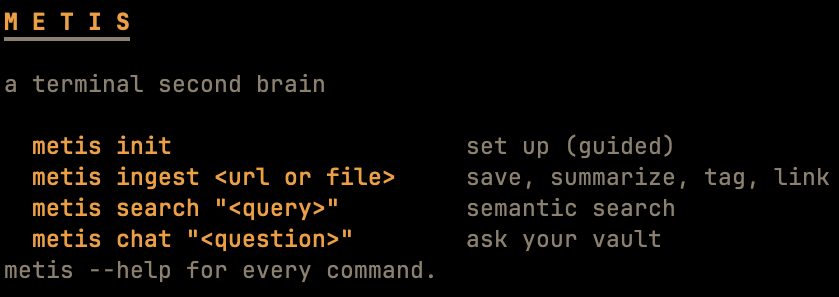
run metis --help or metis <command> --help for all options. --yes / --no-input make any command non-interactive for scripts and CI; METIS_ACCESSIBLE=1 swaps the arrow-key menus for numbered prompts (screen readers, no-arrow terminals).
ingest
save anything to your vault: summarized, tagged, embedded, and linked back to the source.
metis ingest https://en.wikipedia.org/wiki/Metis_(mythology)
metis ingest ~/books/project-hail-mary.pdf
metis ingest lecture-notes.md
metis ingest paper.pdf --folder research/ai
metis ingest https://www.youtube.com/watch?v=abc123 --lang fr
metis ingest "https://www.youtube.com/playlist?list=PLxxxx"   # a playlist: pick which videos
metis ingest https://arxiv.org/abs/2401.12345
metis ingest paper1.pdf paper2.pdf https://arxiv.org/abs/2402.00001
accepts one source or many at once. supports pdfs, urls, markdown, arxiv papers, youtube videos, and x/twitter posts. --folder organizes into vault subfolders.
interactive:
--pick-folder(vault folders) /--pick-lang(transcript languages)a youtube playlist url opens a menu of its videos to pick from (space toggles,
--yessaves all).
search
metis search "what role did titans play in greek mythos"
semantic search. finds by meaning, not keywords. pick a result to chat about it. add --json for machine-readable output (also on metis doctor).
chat
metis chat "how does project hail mary handle the fermi paradox?"
metis chat "what does he say about nash equilibrium?" --note game_theory/intro
metis chat "question" --note game_theory/intro --save
metis chat "question" --expand
answers grounded in your vault with sources cited. --note scopes to a specific note and offers to save the Q&A. --save saves without prompting. --expand searches wikipedia when your vault doesn't have enough.
interactive:
--pick(choose vault note to ask about)
link
metis link
metis link --write
metis link --verbose
discovers connections between notes. --write adds links in your vault's style, auto-detected: [[wikilinks]] for obsidian and similar apps, [markdown](links) for a plain folder (override with metis config link-style). --verbose explains why notes are connected.
interactive:
--pick(choose vault note to find connections for)
sync
metis sync
re-indexes the vault after you edit notes.
reindex
metis reindex
metis reindex --dry-run   # preview: how many notes would re-embed, no api calls
rebuilds the whole vector index from scratch. run it after changing your
embedding_model: the old vectors live in a different space, so metis refuses
search/link/health until you reindex. --dry-run reports how many notes would be
re-embedded (one call per chunk) without spending anything.
classification & clustering
metis learns from your vault to help you organize.
auto-categorization: when you ingest without --folder, metis suggests a folder based on your vault's content. accept, override, or pick from menu. every choice improves future suggestions.
vault health:
metis health
metis health --misplaced
metis health --split hermes_folder
metis health --unique
checkup on your vault structure. shows folder alignment, suggests which notes might belong in a different folder, and proposes subfolder splits for large folders.
folder descriptions:
metis folders
metis folders --edit
metis folders some_folder --edit        # just one folder (add --pick to choose from a menu)
list folders with their ML descriptions. --edit opens in your editor to refine how the classifier understands each folder.
config
metis config                       # show current settings
metis config vault ~/obsidian/my-vault
metis config folder metis-ingested
metis config link-style wikilink   # or markdown, or auto (default: detect from the vault)
for anything not covered above, edit ~/.metis/config.yaml:
# ~/.metis/config.yaml

vault_path: ~/obsidian/my-vault
output_folder: metis-ingested

openai:
  # base_url points at any OpenAI-compatible provider.
  # leave empty for OpenAI; set it for OpenRouter, Ollama, a local server, etc.
  base_url: ""              # e.g. https://openrouter.ai/api/v1
  chat_model: gpt-4o
  embedding_model: text-embedding-3-small
api keys live in your os keychain via metis secret set, or a METIS_* env var for automation (METIS_PROVIDER_KEY, METIS_EMBEDDING_KEY, METIS_X_BEARER). keys never go in the config file. one key covers both chat and embeddings; set an embedding-key only if you split embeddings to a different provider. run metis doctor to check your setup: it verifies the key, the provider, the models, and the index in one pass.
changing
embedding_modelre-spaces the whole index. metis will refuse until you runmetis reindex.on a gateway like OpenRouter, embedding ids are vendor-prefixed; metis auto-adapts the default
text-embedding-3-smalltoopenai/text-embedding-3-small.
1 maintainer

Metadata
1 maintainer
Release files for metis-brain 0.1.2
For a detailed explanation of source distributions (sdists) and built distributions (wheels), please see the package formats documentation.
Source distribution (sdist)
| File | Size | Uploaded | |
|---|---|---|---|
| metis_brain-0.1.2.tar.gz | 106.5 kB | Details |
Built distribution (wheel)
| File | Interpreter | ABI | Platform | Reset |
|---|---|---|---|---|
| metis_brain-0.1.2-py3-none-any.whl | Python 3 | none | any | Details |
Total release size: 179.1 kB
Release files / metis_brain-0.1.2.tar.gz
| Download URL | metis_brain-0.1.2.tar.gz |
|---|---|
| Size | 106.5 kB |
| Tags | Source |
|
SHA-256 checksum How to use checksums |
e6c1e30f5cbac631b9cf7e7cfc34cb610fd68d5bc0fa7f99e8f3d0c9bcf03252
|
|
BLAKE2b-256 checksum How to use checksums |
8a5bd9ce4c421af761a42fb76558c104d8e3cf1dacf0ab79eaad226225845690
|
| Upload date | |
|
Uploaded using Trusted Publishing? What is trusted publishing? |
No |
| Uploaded via |
uv/0.11.31 {"installer":{"name":"uv","version":"0.11.31","subcommand":["publish"]},"python":null,"implementation":{"name":null,"version":null},"distro":{"name":"macOS","version":null,"id":null,"libc":null},"system":{"name":null,"release":null},"cpu":null,"openssl_version":null,"setuptools_version":null,"rustc_version":null,"ci":null}
|
Release files / metis_brain-0.1.2-py3-none-any.whl
| Download URL | metis_brain-0.1.2-py3-none-any.whl |
|---|---|
| Size | 72.6 kB |
| Tags | Python 3 |
|
SHA-256 checksum How to use checksums |
4ec7c39af34205c9a7754273d7700277364bbb78af43664e480f6859f1f74afa
|
|
BLAKE2b-256 checksum How to use checksums |
3c28baa5df8d5bbdf3060cf77d9a5df3ee77cf732333308266e35ad82927f0c3
|
| Upload date | |
|
Uploaded using Trusted Publishing? What is trusted publishing? |
No |
| Uploaded via |
uv/0.11.31 {"installer":{"name":"uv","version":"0.11.31","subcommand":["publish"]},"python":null,"implementation":{"name":null,"version":null},"distro":{"name":"macOS","version":null,"id":null,"libc":null},"system":{"name":null,"release":null},"cpu":null,"openssl_version":null,"setuptools_version":null,"rustc_version":null,"ci":null}
|














