
metmux
Interactive, multi-format, command-line metadata editor with right-click integration.
100% local: no network, no telemetry.
Compatible with: Windows, macOS, Linux.
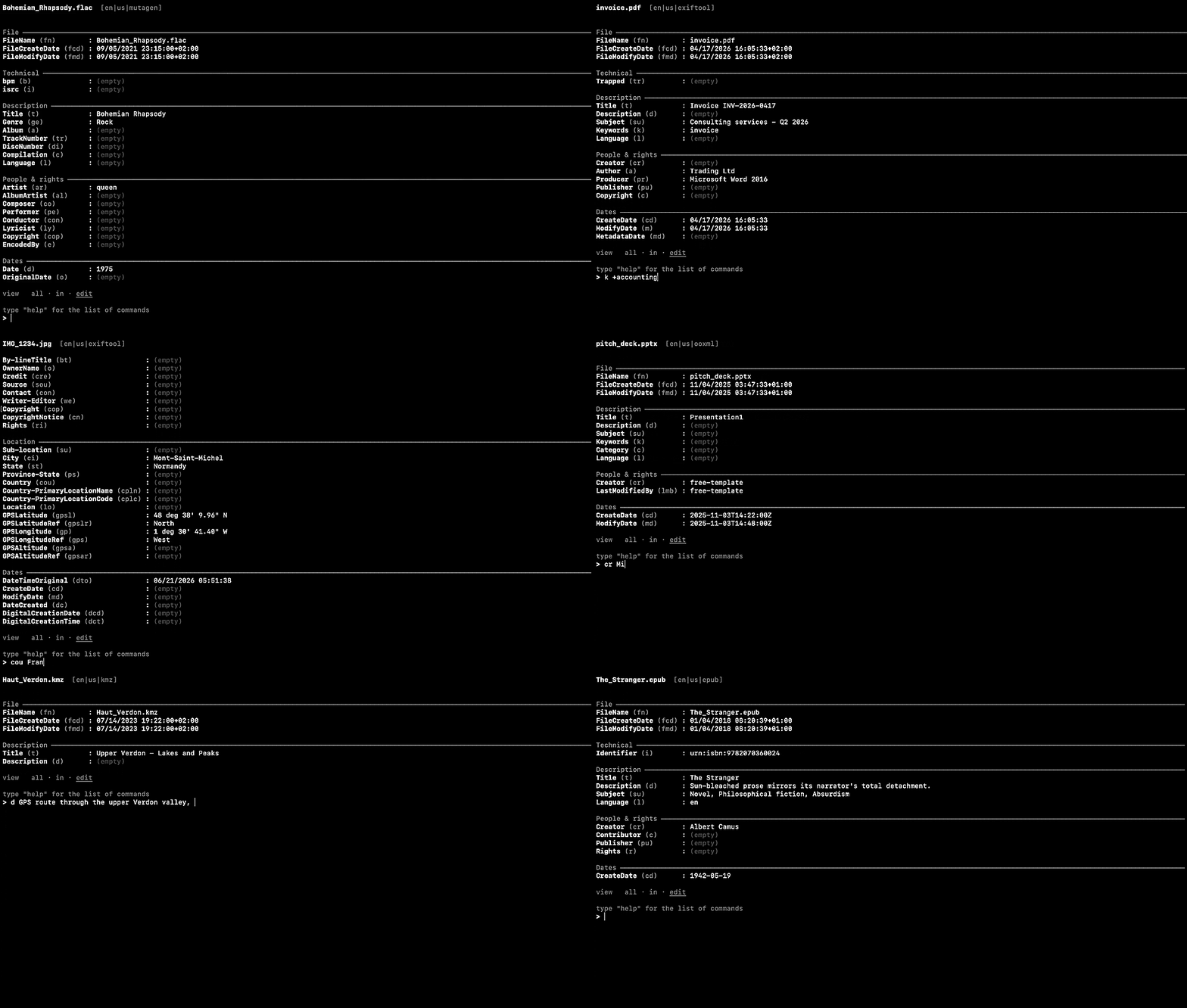
metmux is a Python program that lets you edit the metadata of a wide variety of files through a TUI (an interactive interface in the terminal).
Its name is a contraction of metadata multiplexer: met for metadata, its core business; mux for multiplexer, the system that picks the right specialised engine (exiftool, ffmpeg, mutagen…) according to the file type.
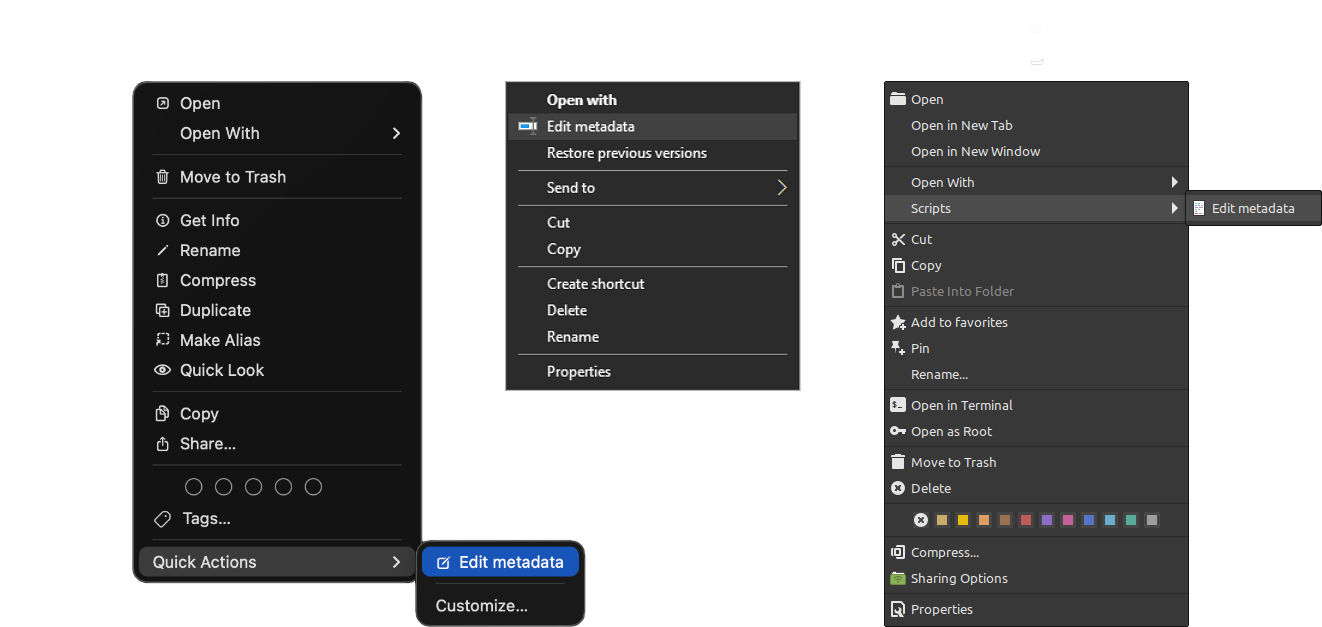
Its goal is practicality: it launches with a simple right-click on any file(s) or folder(s). It is a single tool where several would normally be needed, in a language that is literal and quick to use.
Installation
pipx install metmux
or, in an environment you manage yourself:
pip3 install metmux
Both bring mutagen (the audio engine) automatically. Two external programs unlock the other engines; pip cannot install them, and metmux tells you at startup if one is missing:
| Tool | Unlocks | Required? |
|---|---|---|
| exiftool | images, PDF, and the dates of all files | yes |
| ffmpeg / ffprobe | video containers (MKV, AVI, WebM…) | recommended |
- Windows:
winget install -e --id OliverBetz.ExifToolandwinget install -e --id Gyan.FFmpeg - macOS:
brew install exiftool ffmpeg - Debian / Ubuntu:
sudo apt install libimage-exiftool-perl ffmpeg
Manual installations and other systems: full installation guide.
Usage
metmux photo.jpg               # edit one file
metmux --mode=group ~/Music    # batch editing (same fields on all the files)
metmux --mode=wipe secret.jpg  # erase all metadata
Everything then happens at a single > prompt: field names, values, date shifts, wipe, undo, rename. metmux --help lists the modes, and the help panel inside the session documents every command.
The recommended way to launch metmux is the right-click integration (Windows, macOS, Linux). It relies on the scripts of the integrations/ folder, which live in the repository rather than in this package.
Supported formats
Images and RAW (jpg, png, webp, heic, cr3, nef, dng…), PDF, audio (mp3, flac, ogg, opus, m4a…), video (mp4, mov, mkv, avi, webm…), Office (docx, xlsx, pptx, odt…), EPUB, CBZ, Jupyter notebooks, playlists, e-mail, property lists, SQLite databases, and more. Whatever the format, the file name and the file-system dates stay editable.
The full table, engine by engine: supported formats.
Documentation
The complete documentation lives on GitHub: English · Français.
License
GNU GPL v3.0 or later © 2026 Michaël Bruzy.
1 maintainer

Metadata
1 maintainer
Release files for metmux 1.0.0
For a detailed explanation of source distributions (sdists) and built distributions (wheels), please see the package formats documentation.
Source distribution (sdist)
| File | Size | Uploaded | |
|---|---|---|---|
| metmux-1.0.0.tar.gz | 229.2 kB | Details |
Built distribution (wheel)
| File | Interpreter | ABI | Platform | Reset |
|---|---|---|---|---|
| metmux-1.0.0-py3-none-any.whl | Python 3 | none | any | Details |
Total release size: 347.1 kB
Release files / metmux-1.0.0.tar.gz
| Download URL | metmux-1.0.0.tar.gz |
|---|---|
| Size | 229.2 kB |
| Tags | Source |
|
SHA-256 checksum How to use checksums |
d7685fec869b21f87df8c73cdf755e622cff0a39cdeef1fe30d34bfda0118105
|
|
BLAKE2b-256 checksum How to use checksums |
1cf86a0bc34ecbfabd3a3c0ad962b0774850f8bdfb0e33f867e943f058f60e36
|
| Upload date | |
|
Uploaded using Trusted Publishing? What is trusted publishing? |
No |
| Uploaded via |
twine/6.2.0 CPython/3.14.6
|
Release files / metmux-1.0.0-py3-none-any.whl
| Download URL | metmux-1.0.0-py3-none-any.whl |
|---|---|
| Size | 117.9 kB |
| Tags | Python 3 |
|
SHA-256 checksum How to use checksums |
29b4ebe1c6cc34c27ccd00f26bc13ed9283333903e31682179ca1d1b7139b43a
|
|
BLAKE2b-256 checksum How to use checksums |
e885ff644ac6b74e019374fbca238166683a7bc021b7d102a49f0aae9bcfaa73
|
| Upload date | |
|
Uploaded using Trusted Publishing? What is trusted publishing? |
No |
| Uploaded via |
twine/6.2.0 CPython/3.14.6
|













