
Package for MGTron GUI, a user interface for signal generation

Project description
MGTron Signal Generator Interface
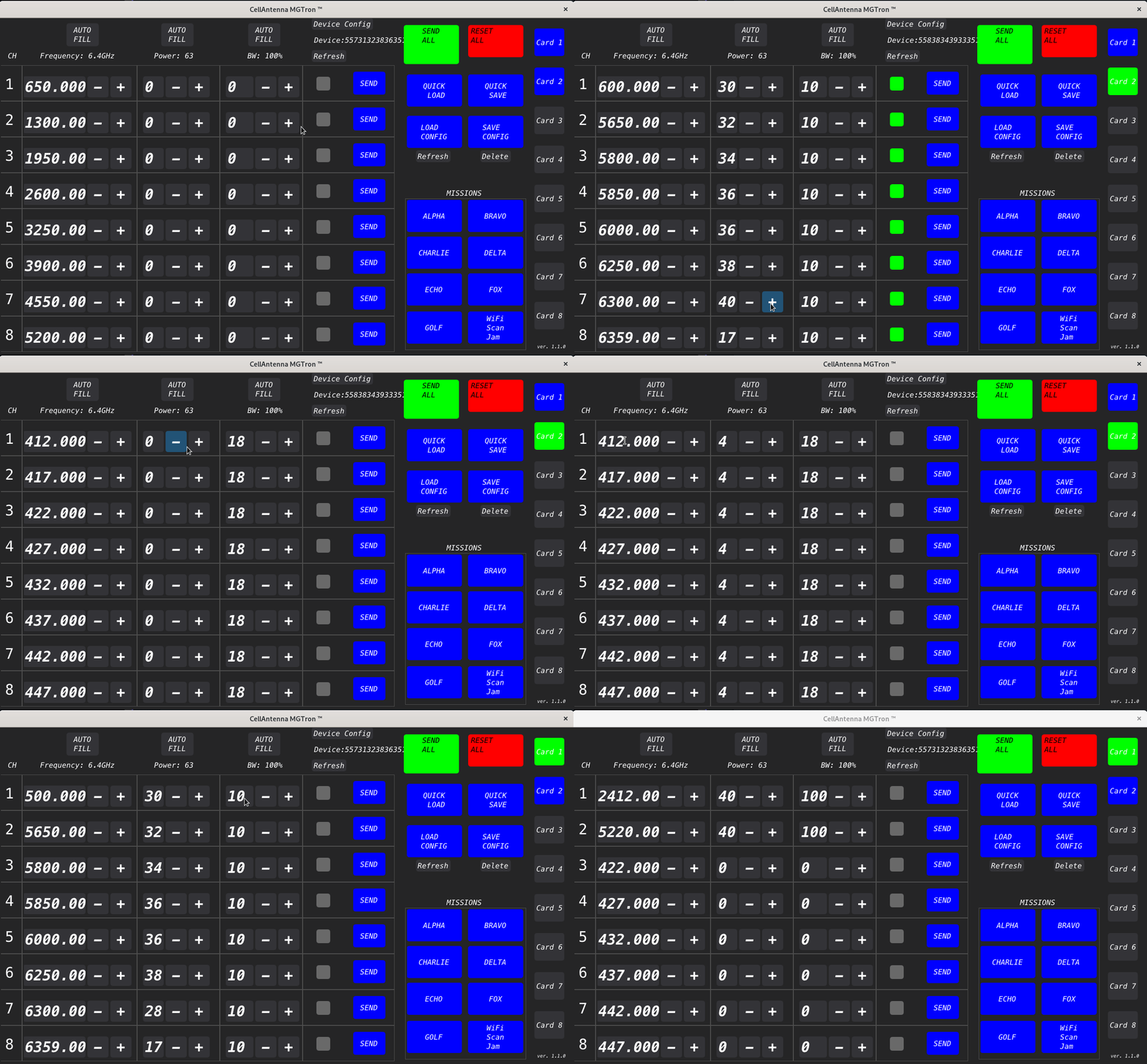
A functional mutlti card interface for the MGTron Signal Generator
This project revolves around the MGTron signal generator. The graphical user interface (GUI) is written purely in python. There are some facets that utilize linux command line tools. Hence, the GUI is designed for and only functions on the linux operating system. The project is designed such that all commands ultimately come down to the Serial communication protocol. Serial communication, via the pyserial library, is from a linux operating system to an Arduino based microcontroller. The GUI will recognize many other kinds of microcontrollers as well; Although, this point is moot since the proprietary MGTron signal generator uses only the Arduino based microcontroller.
- Set the frequency, power, and bandwidth of each of the eight channels.
- Send to all channels at once or individually.
- Easy one-click to turn off a generating channel.
- Choose a specific device based on its serial number.
- Easy install to most Linux distributions.
- Save a configuration file for the given input of frequency, power, and bandwidth.
- Pre-configurable configurations for up to eight devices.
- Pre-configurable mission buttons.
- Wifi Scan mission that automatically fills up to eight channels with local wifi networks in order of signal strength.
- Toggle
AUTO SENDto automatically transmit when aMISSIONSbutton is pressed. - Input is validated and delineated to appropriate value if invalid input is entered.
Special Features
- If the
Custom Savesave name is identical to a pre-configured mission button, the mission button will be updated to the new configuration. - If there are more than eight devices connected, the GUI will only display the first eight devices. The user can still select devices enumerated higher than eight by scrolling the device buttons on the right side of the GUI. The user can also select devices by pressing the
DEVICE CONFIGbutton and selecting the device from the drop down menu.
Visualization
Installation
Requirements
- Python 3.10+
- git
install from GitHub
git clone https://github.com/cellantenna/mg_tron.git
cd mg_tron
python3.10 -m venv venv - Optional, but recommended.
source venv/bin/activate - Required, if last line is executed.
pip install -r requirements.txt
python -m main
Known Issues
Permissions
- Depending on your OS of choice, you may need to change the permissions of the serial port. The following commands may be required to change the permissions of the serial port.
-
sudo chmod 777 /dev/ttyACM*- temporary fix -
sudo usermod -a -G dialout $USER- permanent fix; reboot required -
sudo usermod -a -G uucp $USER- permanent fix; reboot required -
Version
Update to Python3.10
GUI never launches
- The Teensy is not properly initialized. This appears to happen randomly in testing. The solution is to power cycle the Teensy. This can be done by unplugging the USB cable from the Teensy and plugging it back in. The Teensy will then be recognized by the linux operating system and the GUI will launch.
- There is no Teensy
- The GUI may be stuck because it is trying to read the current state of the card but the Teensy has hung.
- The log file is named mg.log and is located in the mg_tron directory. The log file is overwritten everytime the GUI launches.
- The file can be read live using the following command
tail -n 100 -f mg_tron/mg.log - It is important to remember to input the full path of the log file.
Wifi Scan broken
- Ensure wifi is enabled on the device.
Release history Release notifications | RSS feed

Download files
Download the file for your platform. If you're not sure which to choose, learn more about installing packages.
Source Distribution
Built Distribution
Filter files by name, interpreter, ABI, and platform.
If you're not sure about the file name format, learn more about wheel file names.
Copy a direct link to the current filters
File details
Details for the file mgtron_gui-2.15.5.tar.gz.
File metadata
- Download URL: mgtron_gui-2.15.5.tar.gz
- Upload date:
- Size: 3.0 MB
- Tags: Source
- Uploaded using Trusted Publishing? No
- Uploaded via: twine/4.0.2 CPython/3.11.3
File hashes
| Algorithm | Hash digest | |
|---|---|---|
| SHA256 |
78ef1c37717d61af51177d790b13755c31054af43b4a5ba692b3874d6f7c9a63
|
|
| MD5 |
c9d900946e9d5302c77cd75858d0d657
|
|
| BLAKE2b-256 |
ae22b2ebc4092fe5d0ffead27d9b1e5a388a1353ed26b03dcef2cd9bb7b5d1d0
|
File details
Details for the file mgtron_gui-2.15.5-py3-none-any.whl.
File metadata
- Download URL: mgtron_gui-2.15.5-py3-none-any.whl
- Upload date:
- Size: 32.9 kB
- Tags: Python 3
- Uploaded using Trusted Publishing? No
- Uploaded via: twine/4.0.2 CPython/3.11.3
File hashes
| Algorithm | Hash digest | |
|---|---|---|
| SHA256 |
67ba3252eb08f8dcae7895a54a3f53569aeda942abac6b11ed5948f70c28afdc
|
|
| MD5 |
3e0f4b9fc5f597d1fb7e1f024d709360
|
|
| BLAKE2b-256 |
4d1bb03970e0f397d51d5d53252287ce5ba5e4cdc1366514789c4eb6a511a33d
|






