
MHAgentA
MHAgentA (Modular Hybrid Agent Architecture) is a framework for developing container-based agents with complex behaviors. Each agent is composed of a number of semi-autonomous modules, each focusing on their own tasks (either reactively or proactively) and communicating with each other.
The framework handles all the internal workings of each agent automatically, but leaves the exact implementations of their modules' behaviors up to the user. This way agents of varying levels of complexity can be developed, from simple reactive ones, to sophisticated deliberative (or hybrid) ones.
High-level Model
Full high-level model of MHAgentA modules and their interaction scheme is shown below. An agent can have instances of each of them (including multiple instances of modules of the same type) or just a subset. Note that it is not necessary to use all of these module types, as simplest behaviors can be implemented even with just one of them.
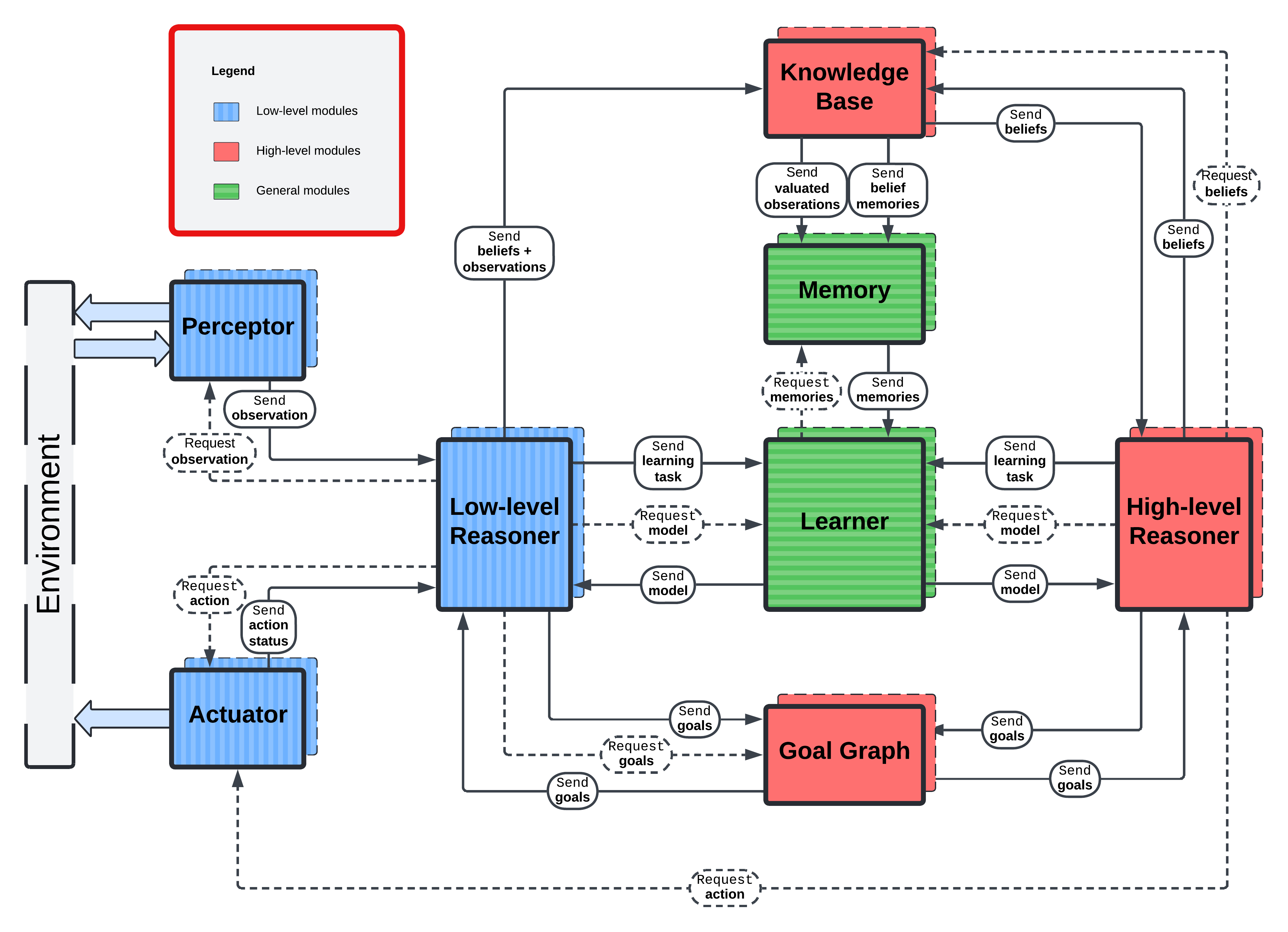
There are 8 types of agent modules, defined by their role in the agent's internal communication scheme. Each module is run as a separate process communicating with others as necessary. Each of them can be purely reactive, or can have additional periodic internal computations. Essentially, one can view each agent's module as an agent in itw own right, and a MHAgentA agent – as a closed multi-agent system with strongly defined communication scheme.
- Low-level reasoner. Handles basic fast decision-making and reactions to the environment.
- Perceptor. Observes the agent's environment.
- Actuator. Acts upon the environment.
- Knowledge model. Contains and processes inherent and acquired knowledge of the agent and/or the world model.
- High-level reasoner. Strategizes and comes up with long-term plans.
- Goal graph. Represents agent's plan structure and handles its updates.
- Memory. Stores, processes, and allows access to old observation data and outdated knowledge.
- Learner. Handles (machine learning-based) training of models used by the reasoners.
When interacting with each other, each model can either request or send some data as per the communication scheme above.
Agent Implementation and Execution
To define an agent, you need to define all the relevant modules. You can to that by extending base classes for them from
the mhagenta.bases submodule. Each of these base classes have the nameplate functions related to the module's periodic
step function, utility functions, and reaction to messages from other modules functions. Override their default (empty)
implementations to define a desired behavior.
The functions to override are:
step(state: State) -> State– is called in set intervals as defined by thestep_frequencyparameter when defining an agent;on_init(**kwargs) -> None– is called when the module has finished initializing, before the agent execution start is scheduled. Use it if your custom module needs additional setup steps;on_first(state: State) -> State– is called right after the execution start before the first call to thestepfunctionon_last(state: State) -> State– is called when the stop signal is received (or when the timeout is reached), right before the module execution stops;on_<message_type>(state: State, ...) -> State– is called when a message of a predefined type received.
Each module base has its own set of nameplates for the message reactions that you can override. Additionally, when
overriding these functions, it is recommended to use module specific State classes from mhagenta.states as type hints,
such as PerceptorState or LLState instead of the default one, as they will provide hints for outboxes (see below).
All the functions executed during the agent execution have State as their first argument. States contain user defined
fields (you can specify them during the module initialization), additional useful information, such as module ID, time
since the start of the agent execution, a directory of all other module IDs organized by module types, and the outbox
object. The latter is used to send out messages to other modules. If module-specific state class is used, it will
display the functions for sending all the established message types to their designated recipients. For instance, to
send a set of beliefs from a low-level reasoner to a knowledge module, you type:
state.outbox.send_beliefs(knowledge_id='knowledge_module_id', beliefs=[...], ...)
Be sure to return the modified state at the end of the function, and all the outgoing messages will get processed automatically.
After defining all the necessary module classes, you need an Orchestrator (available from module's root) object to
handle the creation and execution of the agents. When creating an orchestrator you can also redefine default values of
agent parameters if different agents share them a lot. Full signature of the Orchestrator's init function is
provided in the MHAgentA's API documentation.
Use Orchestrator.add_agent(...) then to compose an agent. To it you need to pass on instances of the relevant modules
and various parameters, such as agent's ID, frequencies of periodic functions, number of copies of this agent to run,
whether to resume execution with previously saved stated, etc.
Note that when instantiating modules, you need to define a unique ID for the module, any keyword arguments for its
on_init function (if any), and initial fields and their value for the module's state as a dict[str, Any]. These
fields will be added to the state's field dictionary and so that they can be accessed at the runtime with
state.field_name.
When done, you can run all the agents togather with
orchestrator.run()
The internal run function is asynchronous. If you want to hande its execution yourself (i.e. add it to another task
group), you can use orchestrator.arun() instead.
1 maintainer

Release files for mhagenta 1.4.10
For a detailed explanation of source distributions (sdists) and built distributions (wheels), please see the package formats documentation.
Source distribution (sdist)
| File | Size | Uploaded | |
|---|---|---|---|
| mhagenta-1.4.10.tar.gz | 58.5 kB | Details |
Built distribution (wheel)
| File | Interpreter | ABI | Platform | Reset |
|---|---|---|---|---|
| mhagenta-1.4.10-py3-none-any.whl | Python 3 | none | any | Details |
Total release size: 143.0 kB
Release files / mhagenta-1.4.10.tar.gz
| Download URL | mhagenta-1.4.10.tar.gz |
|---|---|
| Size | 58.5 kB |
| Tags | Source |
|
SHA-256 checksum How to use checksums |
dfd418dca22995c445bfbf25537738ced20bd8491649fca30307577c749b5088
|
|
BLAKE2b-256 checksum How to use checksums |
2ea0b3d6c7dc13aaef4b2e4c8c18b12b341ca83a10847bf33f0c18337d4a4580
|
| Upload date | |
|
Uploaded using Trusted Publishing? What is trusted publishing? |
No |
| Uploaded via |
poetry/1.8.2 CPython/3.12.2 Windows/11
|
Release files / mhagenta-1.4.10-py3-none-any.whl
| Download URL | mhagenta-1.4.10-py3-none-any.whl |
|---|---|
| Size | 84.5 kB |
| Tags | Python 3 |
|
SHA-256 checksum How to use checksums |
6d8008a7d93f0b4b298d2314140e3c39338490615af723e55f31ee3ec649da3f
|
|
BLAKE2b-256 checksum How to use checksums |
5830de61208e3b15c0156b5cd6a11dc821145889d9d612ac6778552fd3c67d3c
|
| Upload date | |
|
Uploaded using Trusted Publishing? What is trusted publishing? |
No |
| Uploaded via |
poetry/1.8.2 CPython/3.12.2 Windows/11
|














