
Blueprint Model Debugger
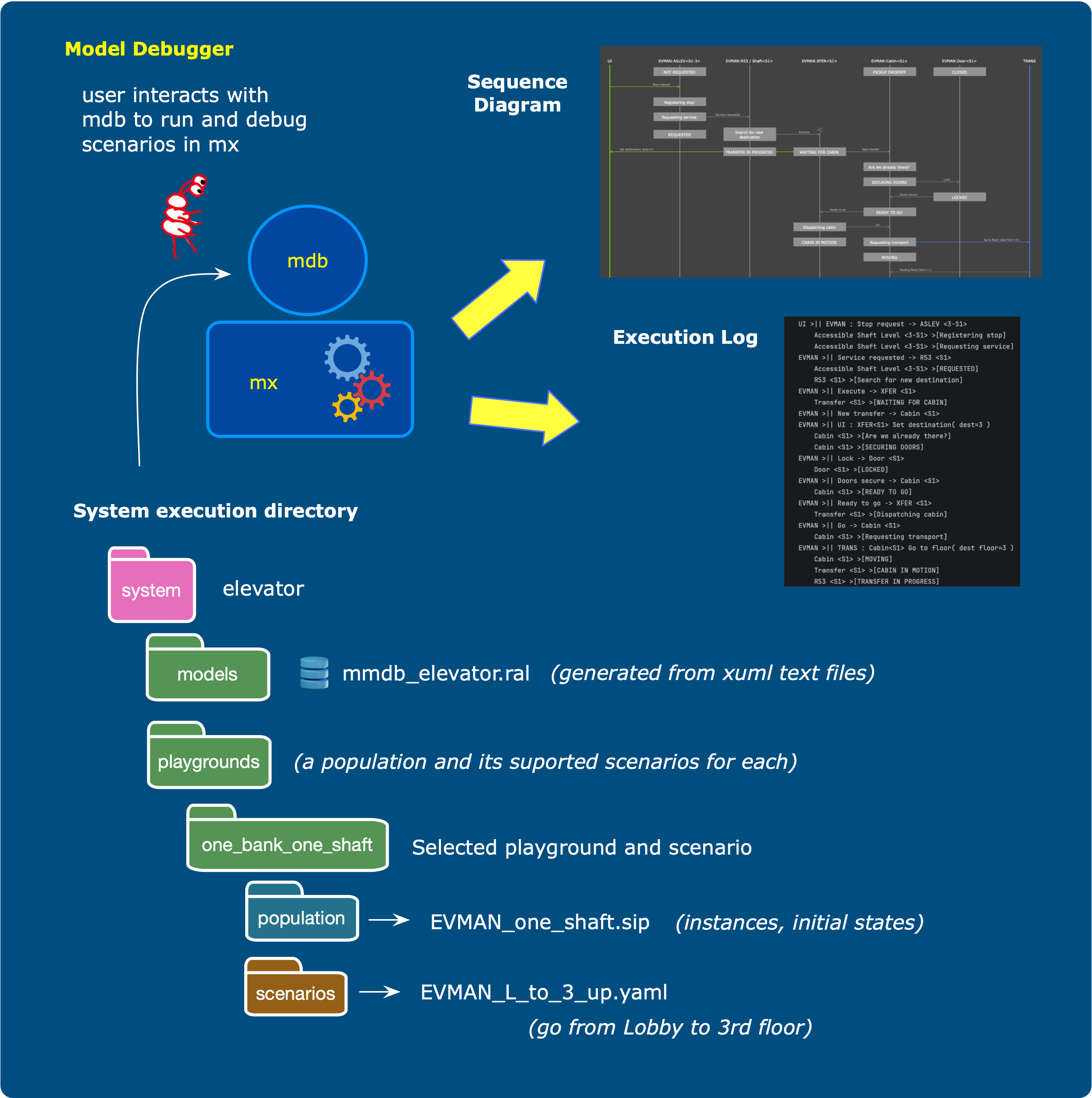
An interactive debugger for Shlaer-Mellor Executable UML models. MDB drives the MX model execution engine through user-defined scenarios, letting you step through model level interactions and inspect model properties such as current states, event queue status, and current instance populations and such.
Installation
pip install mi-mdb
Usage
mdb [-s <system>] [-p <playground>] [-x <scenario>] [-L] [-v] [-V]
All path arguments are optional at launch and can be set interactively once the debugger is running.
| Argument | Description |
|---|---|
-s / --system |
Path to the system directory |
-p / --playground |
Name of the playground to load |
-x / --scenario |
Name of the scenario to run (without extension) |
-L / --log |
Keep mdb.log after exit (deleted by default) |
-v / --verbose |
Verbose console output |
-V / --version |
Print version and exit |
System directory structure
The system directory contains all artifacts needed to load and run a modeled system:
<system>/
    models/
        mmdb_<domain>.ral        - Populated SM metamodels, one per domain
    playgrounds/                 - A playground is like a sandbox, as many as you like
        <playground_name>/       - Define one or more scenarios and one initial population
            scenarios/
                <scenario>.yaml  - The scenario name specified as a yaml file
            population/
                <domain>.ral     - A modeled domain populated with initial instances
A playground is a named initial context — a population of instances in known states from which scenarios are launched. Multiple playgrounds can be defined for the same system, and multiple scenarios can be defined for each playground.
Interactive commands
Once running, MDB presents a # prompt:
show path                   - Show the active system path
show playgrounds            - List all playgrounds defined in the system
show playground             - Show the active playground
show scenarios              - List all scenarios for the active playground
show states                 - Display the current state of all state machines
show step                   - Show stepping mode status
show descriptions           - Show descriptions mode status
set path <abs_path>         - Set the system directory path
set playground <name_or_#>  - Select a playground by name or list number
set scenario <name_or_#>    - Select a scenario by name or list number
set step                    - Toggle stepping mode
set descriptions            - Toggle printing of interaction descriptions
execute / exec / x          - Run the active scenario
help                        - Show available commands
quit / exit                 - Exit the debugger
Playgrounds and scenarios can be selected by the integer shortcut shown in their listing
(e.g., set playground 2).
Running a scenario
In run-to-completion mode (default), MDB executes the full scenario and prints each interaction and any announcements triggered by the model engine.
In stepping mode (set step), MDB pauses after each interaction at a >: prompt:
[enter] / n / next / s / step  - Advance to the next interaction
show states                    - Inspect current state machine states
r / run                        - Switch to run-to-completion for the remainder
q / quit / abort               - Abort the scenario
h / help / ?                   - Show stepping commands
Scenario file format
Scenarios are YAML files placed in a playground's scenarios/ directory:
Actors:
  internal:
    <Domain>:
      <ActorName>:
        class: <ClassName>
        instance:
          <AttributeName>: <value>
  external:
    - <DomainName>

Interactions:
  - description: "Human-readable description of this step"
    direction: stimulus        # or: response
    action: signal instance    # or: external event
    name: <EventName>
    source: <Domain>:<ActorName>
    target: <Domain>:<ActorName>
    parameters:                # optional
      <ParamName>: <value>
Please look in the example elevator yaml file for more detailed documentation.
stimulus interactions inject an event into the system; response interactions
pass control back to the model engine and collect any announcements it emits.
Development
For a code walkthrough of how MDB works internally — module map, control flow, and the boundary to the MX engine — see documentation/internals.md.
1 maintainer

Metadata
1 maintainer
Release files for mi-mdb 0.2.0
For a detailed explanation of source distributions (sdists) and built distributions (wheels), please see the package formats documentation.
Source distribution (sdist)
| File | Size | Uploaded | |
|---|---|---|---|
| mi_mdb-0.2.0.tar.gz | 19.5 kB | Details |
Built distribution (wheel)
| File | Interpreter | ABI | Platform | Reset |
|---|---|---|---|---|
| mi_mdb-0.2.0-py3-none-any.whl | Python 3 | none | any | Details |
Total release size: 39.7 kB
Release files / mi_mdb-0.2.0.tar.gz
| Download URL | mi_mdb-0.2.0.tar.gz |
|---|---|
| Size | 19.5 kB |
| Tags | Source |
|
SHA-256 checksum How to use checksums |
35382dff706851aa5258e9dd976c6eb52f0d0eaee16d02dc12d98a77dd9cd2b5
|
|
BLAKE2b-256 checksum How to use checksums |
ad994cd73986eed62b9f2715c45e36574bab891098ce0af0e38ca9310df012c1
|
| Upload date | |
|
Uploaded using Trusted Publishing? What is trusted publishing? |
No |
| Uploaded via |
twine/6.2.0 CPython/3.13.3
|
Release files / mi_mdb-0.2.0-py3-none-any.whl
| Download URL | mi_mdb-0.2.0-py3-none-any.whl |
|---|---|
| Size | 20.2 kB |
| Tags | Python 3 |
|
SHA-256 checksum How to use checksums |
cc8c26ba8dcf208f32bdb91fe868e6a0bbfdf3f60a1244ede103fe617e144e24
|
|
BLAKE2b-256 checksum How to use checksums |
fdaa18bda856e0157db197ba4a0da6ed144eabe08a022769c0f38335c7ab1241
|
| Upload date | |
|
Uploaded using Trusted Publishing? What is trusted publishing? |
No |
| Uploaded via |
twine/6.2.0 CPython/3.13.3
|














