
mx — Model Execution Platform
mx is a Shlaer-Mellor Executable UML model execution engine. It takes a populated metamodel —
one or more modeled domains produced by xuml-populate —
and executes it: driving state machines, running state and method activities, evaluating actions, and
dispatching events, the way a compiled xUML model would run, but interpreted directly against the model.
mx does not parse model text. It reads serialized TclRAL .ral
databases that already hold the populated metamodel and domain data, and interprets them at runtime.
Using mx as a library
mx is primarily a library package, intended to be driven by the Model Debugger (mdb). The mdb loads a system, injects stimuli, steps execution, and inspects results while mx does the underlying model execution work. Control is handed back and forth between the two: mx announces significant events (state entries, dispatched signals, external events) and suspends so a supervisor like mdb can observe and decide what happens next.
Install into the environment that hosts mdb (or your own driver):
pip install mi-mx
Then drive it from your own code much as mdb does — create the System singleton, load a system and a
playground, inject stimuli, and run:
from pathlib import Path
from mx.system import System

s = System()
s.initialize(system_path=Path("path/to/elevator"), verbose=False)
s.load_domains(playground="one_bank_one_shaft")
# ... inject stimuli and call s.go() ...
Running mx standalone ("demo" mode)
You can also exercise mx on its own, independently of mdb, to put it through its paces. The mx command
runs a built-in demonstration driver, mx/_mdb.py — a stand-in for the real Model
Debugger that loads a system, selects a playground, and injects a hard-coded scenario:
mx -s path/to/elevator      # -s / --system : path to a system directory
mx -s path/to/elevator -v   # verbose console output
mx -s path/to/elevator -L   # keep the mx.log diagnostic file (removed on exit otherwise)
mx -V                       # print version
An example system ships in the repo, so from a source checkout you can run:
mx -s src/mx/systems/elevator
Demo mode is for shaking out the engine in isolation. The playground and scenario it runs are currently fixed in
_mdb.py; real, varied scenarios are meant to be driven through mdb.
What a "system" looks like
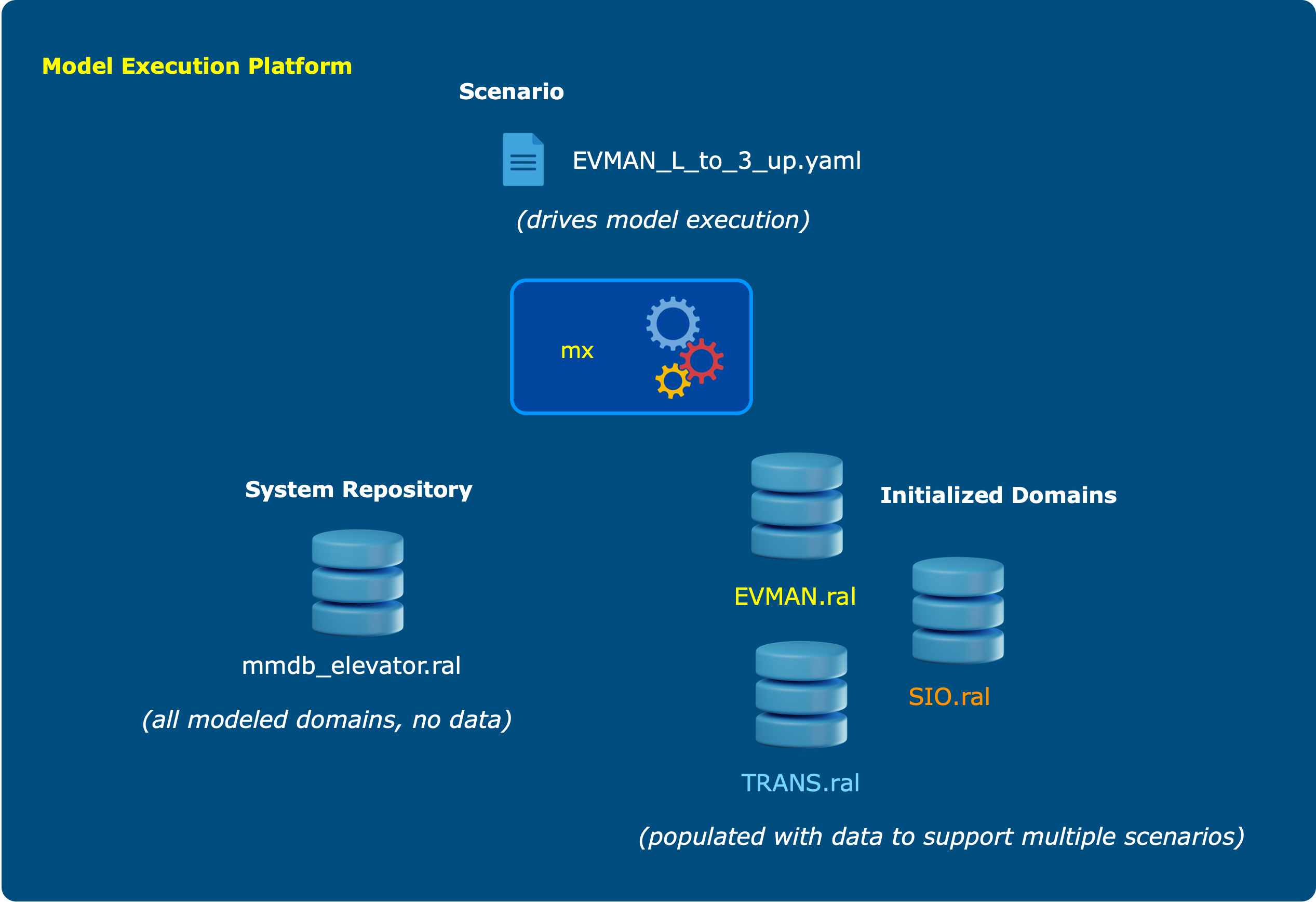
The three pieces in the banner above map to the on-disk layout that mx -s <system> expects:
<system>/
  models/
    mmdb_<name>.ral          # System Repository: the populated metamodel — all modeled
                             # domains, no instance data. Exactly one .ral file lives here.
    <ALIAS>_types.yaml       # per-domain user-type -> TclRAL type mapping (prefixed by domain alias)
  playgrounds/
    <playground_name>/
      population/
        <ALIAS>.ral          # an Initialized Domain: one domain database populated with instance
        <ALIAS>_*.sip        # data + initial states (one .ral / .sip per domain, named by alias)
      scenarios/
        <name>.yaml          # a Scenario: the sequence of interactions that drives execution
- System Repository (
mmdb_<name>.ral) — the populated Shlaer-Mellor metamodel holding every modeled domain, but no instance data. In the elevator example this is the Elevator Management (EVMAN) domain; a system may hold several (e.g. EVMAN, TRANS, SIO). - Initialized Domains (
playgrounds/<name>/population/) — each domain's starting instance population and initial state-machine states, so a run can begin from a known configuration. Instance populations are defined in.sip(Scenario Instance Population) files; see the sip-parser wiki for the grammar. A single system can host many playgrounds, and you can run different scenarios against each. - Scenario (
playgrounds/<name>/scenarios/*.yaml) — a sequence of interactions (e.g. a cabin is requested up from the lobby, it arrives, a floor is selected, doors close, the cabin transits and arrives with doors opening). Interactions inject events into the loaded system and collect the responses and status updates of interest along the way, for validation or exploration.
Each *_types.yaml and *.sip file name must begin with a domain name or alias (case-insensitive), so
mx can associate it with the right domain.
Documentation
See the project wiki for more detail.
1 maintainer

Metadata
1 maintainer
Release files for mi-mx 0.6.0
For a detailed explanation of source distributions (sdists) and built distributions (wheels), please see the package formats documentation.
Source distribution (sdist)
| File | Size | Uploaded | |
|---|---|---|---|
| mi_mx-0.6.0.tar.gz | 70.5 kB | Details |
Built distribution (wheel)
| File | Interpreter | ABI | Platform | Reset |
|---|---|---|---|---|
| mi_mx-0.6.0-py3-none-any.whl | Python 3 | none | any | Details |
Total release size: 179.4 kB
Release files / mi_mx-0.6.0.tar.gz
| Download URL | mi_mx-0.6.0.tar.gz |
|---|---|
| Size | 70.5 kB |
| Tags | Source |
|
SHA-256 checksum How to use checksums |
3cb3a0b8b2f2454eb92e6f8edd6e57ede72ae71ba2bd8080c58258fe5a598bd1
|
|
BLAKE2b-256 checksum How to use checksums |
2f34d5f5b94ed2d422d66e709cbb2514603f40ea6825081fbde384d0c7804007
|
| Upload date | |
|
Uploaded using Trusted Publishing? What is trusted publishing? |
No |
| Uploaded via |
twine/6.2.0 CPython/3.12.7
|
Release files / mi_mx-0.6.0-py3-none-any.whl
| Download URL | mi_mx-0.6.0-py3-none-any.whl |
|---|---|
| Size | 108.8 kB |
| Tags | Python 3 |
|
SHA-256 checksum How to use checksums |
35e904d28cafc20ec56ca30c40b8e064868c760e56c29121b003130dd2f6263e
|
|
BLAKE2b-256 checksum How to use checksums |
1d5df19f19f68d9445074f81171fa13bb620e5ea988a341aa08ba9c35f7f1ade
|
| Upload date | |
|
Uploaded using Trusted Publishing? What is trusted publishing? |
No |
| Uploaded via |
twine/6.2.0 CPython/3.12.7
|














