
🤖 Microbots
MicroBots is a lightweight, extensible AI agent for code comprehension and controlled file edits. It integrates cleanly into automation pipelines, mounting a target directory with explicit read-only or read/write modes so LLMs can safely inspect, refactor, or generate files with least-privilege access.
🚀 Quick Start
Pre-requisites
- Docker
- AI LLM Provider and API Key
Install
pip install microbots
Example
from microbots import WritingBot

myWritingBot = WritingBot(
    model="azure-openai/my-gpt5",
    folder_to_mount=str("myReactApp"),
)

data = myWritingBot.run(
    "Fix the build error and make sure the build is successful.",
    timeout_in_seconds=600,
)
print(data.results)
🤖 Available Bots
| Bot | Description |
|---|---|
| ReadingBot | Reads files and extracts information based on instructions (read-only) |
| WritingBot | Reads and writes files based on instructions (read/write) |
| BrowsingBot | Browses the web to gather information |
| LogAnalysisBot | Analyzes logs for debugging |
| AgentBoss | Orchestrates multiple bots for complex tasks |
⚙️ How it works
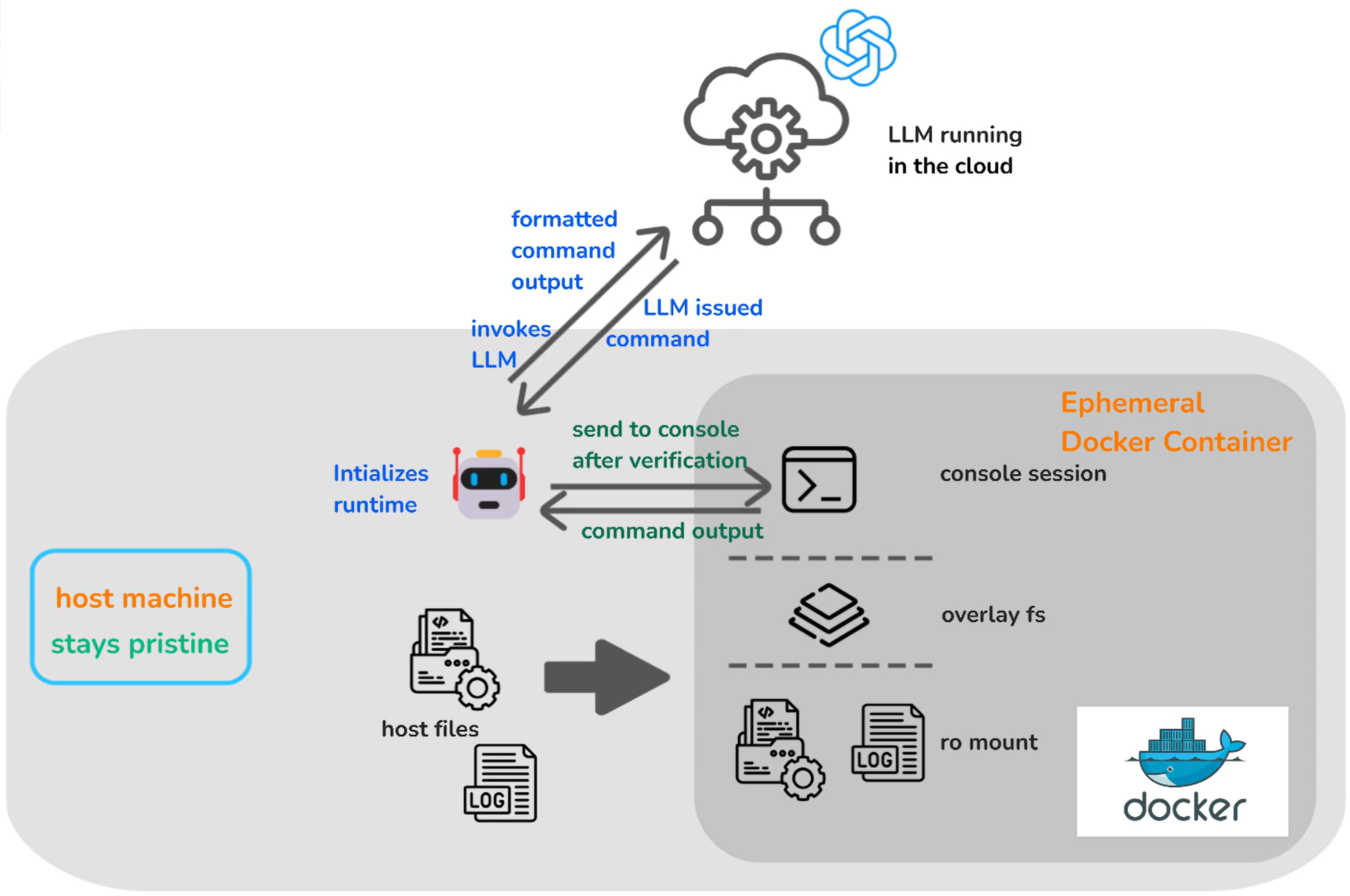
MicroBots creates a containerized environment and mounts the specified directory, restricting permissions to read-only or read/write based on the Bot used. This ensures AI agents operate within defined boundaries, enhancing security and control over code modifications while protecting the local environment.
✨ LLM Support
Microbots supports multiple LLM providers — pick whichever fits your stack:
| Provider string | Description |
|---|---|
openai |
OpenAI or Azure OpenAI via the OpenAI SDK (API key) |
azure-openai |
Azure OpenAI via the Azure SDK (API key or Azure AD token) |
anthropic |
Anthropic models, direct or via Azure AI Foundry |
ollama-local |
Local models via Ollama |
Each provider has its own set of environment variables (endpoint, API key, deployment name, etc.). See the Authentication guide for the exact .env variables required for each provider and for Azure AD / managed identity setup.
Azure Pipelines Log Analyzer
Microbots includes a published Azure DevOps Marketplace task, MicrobotsLogAnalyzer@0, for analyzing logs with Azure OpenAI models through an Azure Resource Manager Service Connection. See docs/advanced/azure-pipelines-log-analyzer.md to install and use the task in Azure Pipelines.
🎯 Getting Started
Ready to build your first Microbot project? Follow the step-by-step onboarding guide:
🛠️ Developer Contribution Guidance
Want to contribute to Microbots? Follow the step-by-step guide to set up your environment and meet the project's code and documentation standards:
➡️ Developer Contribution Guidance
📚 Links
Legal Notice
Trademarks: this project may contain trademarks or logos for projects, products, or services. Authorized use of Microsoft trademarks or logos is subject to and must follow Microsoft's Trademark & Brand Guidelines. Use of Microsoft trademarks or logos in modified versions of this project must not cause confusion or imply Microsoft sponsorship. Any use of third-party trademarks or logos are subject to those third-party's policies.
3 maintainers


Metadata
3 maintainers
Release files for microbots 0.0.21
For a detailed explanation of source distributions (sdists) and built distributions (wheels), please see the package formats documentation.
Source distribution (sdist)
| File | Size | Uploaded | |
|---|---|---|---|
| microbots-0.0.21.tar.gz | 2.0 MB | Details |
Built distribution (wheel)
| File | Interpreter | ABI | Platform | Reset |
|---|---|---|---|---|
| microbots-0.0.21-py3-none-any.whl | Python 3 | none | any | Details |
Total release size: 2.2 MB
Release files / microbots-0.0.21.tar.gz
| Download URL | microbots-0.0.21.tar.gz |
|---|---|
| Size | 2.0 MB |
| Tags | Source |
|
SHA-256 checksum How to use checksums |
95ff3f2cd3477986c8ec1ac5ae2d8bdec7e0832e6f468d5d7ece0885f47bebd5
|
|
BLAKE2b-256 checksum How to use checksums |
abd0cdf4cf9d7831de0a6e6dfc22596e6e124e29eaef1eb315acdf478a21b879
|
| Upload date | |
|
Uploaded using Trusted Publishing? What is trusted publishing? |
No |
| Uploaded via |
twine/7.0.0 CPython/3.13.14
|
Release files / microbots-0.0.21-py3-none-any.whl
| Download URL | microbots-0.0.21-py3-none-any.whl |
|---|---|
| Size | 109.6 kB |
| Tags | Python 3 |
|
SHA-256 checksum How to use checksums |
21824f49aeee0a12a0e2d6595f1a09cd50c53de5d6419a9aaecb1c31fc1a54be
|
|
BLAKE2b-256 checksum How to use checksums |
054a05fa7cf0b868b3c0cb6386ec66e816f4ef91fbffea999c688a721c107024
|
| Upload date | |
|
Uploaded using Trusted Publishing? What is trusted publishing? |
No |
| Uploaded via |
twine/7.0.0 CPython/3.13.14
|














