
microdlms


A lightweight, zero-core-dependency Python 3.14+ library for read-only DLMS/COSEM utility meter polling. Designed with a pure sans-I/O state machine architecture and a modern asynchronous client powered by serialx.

Overview & Key Features
microdlms provides an independent, clean-room implementation of the read-only DLMS/COSEM communication stack (Green Book / Blue Book standards). It was created to power utility meter integrations (such as smart electricity meters over optical IR probes) with an open, OSI-compliant MIT license.
- Zero Core Dependencies (Sans-I/O): Core codecs, frame parsers, and session state machines use only the Python standard library.
- Asynchronous Client via
serialx: High-level async API (AsyncMeterClient) supporting physical serial ports (/dev/ttyUSB0,COM3) and network bridges (socket://ip:port) or ESPHomeserial_proxy(withpip install microdlms[esphome]). - Essential DLMS/COSEM Services:
- Logical Name (LN) referencing.
- HDLC data-link connection (
SNRM$\rightarrow$UA) and disconnection (DISC$\rightarrow$UA). - Frame validation with CRC-16-CCITT (FCS-16 and HCS) and HDLC sequence tracking ($N(S)$ / $N(R)$ modulo 8).
- Low-Level Security (LLS) password authentication and No Security (
AARQ$\rightarrow$AARE). - Data retrieval (
Get-Request-Normal$\rightarrow$Get-Response-Normal). - Association release (
RLRQ$\rightarrow$RLRE).
- Linear Recursive-Descent A-XDR Parser: Decodes primitive types, arrays, structures, strings, and enums into native Python types.
- Domain Dataclasses:
ObisCode: 6-group OBIS identifier (A.B.C.D.E.F) with dot-string parsing and byte serialization.ScalerUnit: Scales raw meter values using decimal exponents and unit metadata.CosemDateTime: Parses DLMS 12-byte octet strings into timezone-awaredatetime.datetimeobjects.
- Dual Error Model:
- Sans-I/O layer yields typed event objects preserving stream continuity.
- Client layer translates errors into structured Python exceptions (
CommunicationError,AuthenticationError,DataAccessError).
- Permissive MIT License: Fully OSI-compliant and clean-room implemented.
Architecture Overview
microdlms is structured in two distinct tiers:
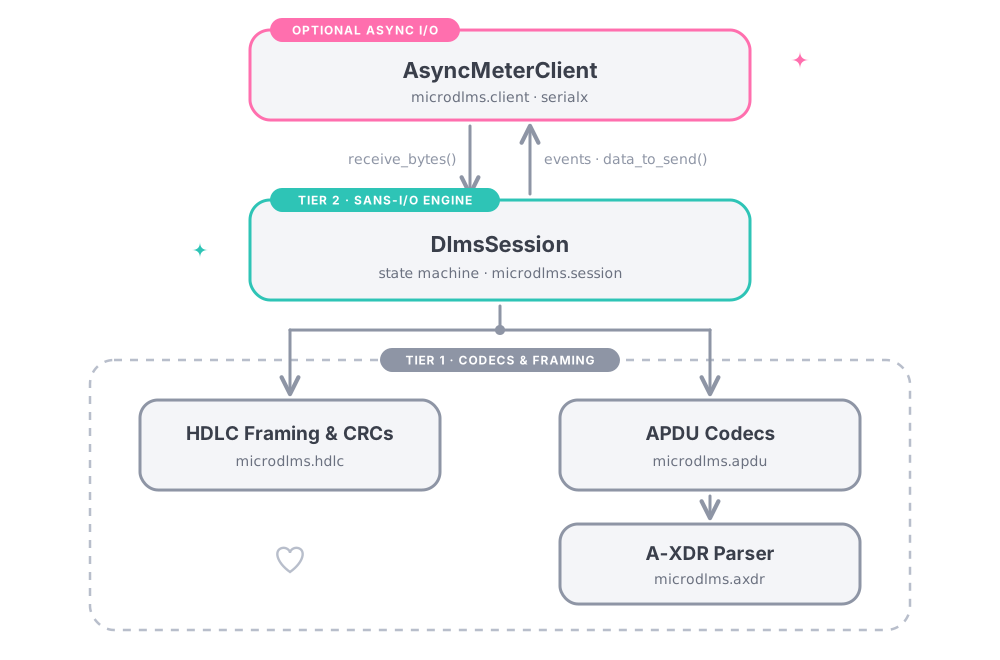
- Tier 1: Codecs & Framing:
microdlms.hdlc: HDLC frame packaging, FCS/HCS CRC-16 calculations, LLC encapsulation (0xE6, 0xE6, 0x00/0xE6, 0xE7, 0x00), and sequence counters.microdlms.axdr: Linear recursive-descent decoder parsing A-XDR data types.microdlms.apdu: Application Protocol Data Unit encoders and decoders (AARQ,AARE,Get-Request-Normal,Get-Response-Normal,RLRQ,RLRE).
- Tier 2: Sans-I/O Engine:
microdlms.session.DlmsSession: Manages the protocol state machine (DISCONNECTED,CONNECTING,CONNECTED,ASSOCIATING,ASSOCIATED,DISCONNECTING) without performing any direct network or serial I/O.
- Optional I/O Layer:
microdlms.client.AsyncMeterClient: WrapsDlmsSessionwith an async I/O loop backed byserialx.
Installation
Install microdlms using uv:
uv add microdlms
Or using pip:
pip install microdlms
Usage Examples
Example 1: Asynchronous Meter Client (AsyncMeterClient)
Read attributes from a utility meter over an ESPHome TCP socket proxy or physical serial port:
import asyncio
from microdlms import AsyncMeterClient, CosemAttribute, InterfaceClass, ObisCode, ScalerUnit


async def main() -> None:
    # Connect via ESPHome TCP socket proxy (or serial port like "/dev/ttyUSB0" or "COM3")
    client = AsyncMeterClient(
        port="socket://192.168.1.50:8888",
        baudrate=9600,
        password="password1",
        client_logical_address=32,
        server_logical_address=1,
        server_physical_address=42,
        timeout=10.0,
    )

    async with client:
        # Read Serial Number (Class ID 1: Data, OBIS 0.0.96.1.0.255, Attribute 2)
        serial_attribute = CosemAttribute(
            interface=InterfaceClass.DATA,
            obis=ObisCode.from_string("0.0.96.1.0.255"),
            attribute=2,
        )
        serial_number = await client.get(serial_attribute)
        print(f"Meter Serial Number: {serial_number}")

        # Read Voltage Scaler & Unit (Class ID 3: Register, OBIS 1.0.32.7.0.255, Attribute 3)
        scaler_attribute = CosemAttribute(
            interface=InterfaceClass.REGISTER,
            obis=ObisCode.from_string("1.0.32.7.0.255"),
            attribute=3,
        )
        scaler_data = await client.get(scaler_attribute)
        scaler_unit = ScalerUnit.from_structure(scaler_data)

        # Read Voltage Value (Attribute 2)
        voltage_attribute = CosemAttribute(
            interface=InterfaceClass.REGISTER,
            obis=ObisCode.from_string("1.0.32.7.0.255"),
            attribute=2,
        )
        raw_voltage = await client.get(voltage_attribute)
        print(f"Voltage: {scaler_unit.scale(raw_voltage)} {scaler_unit.unit_of_measurement}")


if __name__ == "__main__":
    asyncio.run(main())
Example 2: Sans-I/O State Machine (DlmsSession)
For custom transports, simulation pipelines, or testing environments without direct async serial bindings:
from microdlms import (
    AssociatedEvent,
    ConnectedEvent,
    CosemAttribute,
    DlmsSession,
    GetResponseEvent,
    InterfaceClass,
    ObisCode,
)

# Initialize the sans-I/O session
session = DlmsSession(
    client_logical_address=32,
    server_logical_address=1,
    server_physical_address=42,
)

# Step 1: Prepare SNRM connection frame
session.initiate_connect()
snrm_bytes = session.data_to_send()
# Transmit snrm_bytes over serial/socket...

# Simulate receiving UA response frame from meter
ua_response = bytes.fromhex(
    "7ea021410255737f4f8180140502008006020080070400000001080400000001ce6a7e"
)
events = session.receive_bytes(ua_response)
for event in events:
    if isinstance(event, ConnectedEvent):
        print("HDLC data link established!")

# Step 2: Initiate application association (AARQ)
session.initiate_association(password="111111")
aarq_bytes = session.data_to_send()
# Transmit aarq_bytes over serial/socket...

# Simulate receiving AARE response frame
aare_response = bytes.fromhex(
    "7ea03841025530c4dae6e7006129a109060760857405080101a203020100a305a103020100be10040e0800065f1f040000101d00640007828b7e"
)
events = session.receive_bytes(aare_response)
for event in events:
    if isinstance(event, AssociatedEvent):
        print("DLMS Application Association established!")

# Step 3: Query an attribute (Get-Request-Normal)
attribute = CosemAttribute(
    interface=InterfaceClass.DATA,
    obis=ObisCode.from_string("0.0.96.1.0.255"),
    attribute=2,
)
invoke_id = session.request_attribute(attribute)
get_req_bytes = session.data_to_send()
# Transmit get_req_bytes over serial/socket...

# Simulate receiving Get-Response frame (Meter Serial Number: "41920942")
get_response = bytes.fromhex("7ea01b41025574b9a3e6e700c401c1000a083431393230393432d4217e")
events = session.receive_bytes(get_response)
for event in events:
    if isinstance(event, GetResponseEvent):
        print(f"Meter Serial Number: {event.value}")
Development & Testing
This project uses uv for project management, formatting, linting, and tests.
Running Tests
Execute the full test suite with coverage report:
uv run pytest
Coverage is configured to fail under 95% target.
Code Quality & Linting
Run formatting and linting tools:
# Code linting
uv run ruff check

# Formatting check
uv run ruff format --check

# Strict static type checking
uv run mypy src tests

# Cognitive complexity checking
uv run complexipy .

# Spell checking
uv run codespell
License
This project is licensed under the MIT License.
1 maintainer

Metadata
1 maintainer
Release files for microdlms 0.1.4
For a detailed explanation of source distributions (sdists) and built distributions (wheels), please see the package formats documentation.
Source distribution (sdist)
| File | Size | Uploaded | Provenance | |
|---|---|---|---|---|
| microdlms-0.1.4.tar.gz | 116.8 kB | Without provenance | Details |
Built distribution (wheel)
| File | Interpreter | ABI | Platform | Reset |
|---|---|---|---|---|
| microdlms-0.1.4-py3-none-any.whl | Python 3 | none | any | Details |
Total release size: 145.0 kB
Release files / microdlms-0.1.4.tar.gz
| Download URL | microdlms-0.1.4.tar.gz |
|---|---|
| Size | 116.8 kB |
| Tags | Source |
|
SHA-256 checksum How to use checksums |
8b1b9570f1aa180b9da8802549657ede2536a1aa11a79e269f00cafdc2ff8ad6
|
|
BLAKE2b-256 checksum How to use checksums |
a626fe752714758879e95b7c3363ca98296e272eb5e42cf13ca3ca556478bb18
|
| Upload date | |
|
Uploaded using Trusted Publishing? What is trusted publishing? |
Yes |
| Uploaded via |
uv/0.13.0 {"installer":{"name":"uv","version":"0.13.0","subcommand":["publish"]},"python":null,"implementation":{"name":null,"version":null},"distro":{"name":"Ubuntu","version":"24.04","id":"noble","libc":null},"system":{"name":null,"release":null},"cpu":null,"openssl_version":null,"setuptools_version":null,"rustc_version":null,"ci":true}
|
Release files / microdlms-0.1.4-py3-none-any.whl
| Download URL | microdlms-0.1.4-py3-none-any.whl |
|---|---|
| Size | 28.2 kB |
| Tags | Python 3 |
|
SHA-256 checksum How to use checksums |
08bf5231883f108b4c426ef6851f8942bb6ce74f452eec6afe7b767b24a13a0f
|
|
BLAKE2b-256 checksum How to use checksums |
3a7e625ad500a65edb03cbf69316b4d3ca36a32401df2a7eaf81c84823f51957
|
| Upload date | |
|
Uploaded using Trusted Publishing? What is trusted publishing? |
Yes |
| Uploaded via |
uv/0.13.0 {"installer":{"name":"uv","version":"0.13.0","subcommand":["publish"]},"python":null,"implementation":{"name":null,"version":null},"distro":{"name":"Ubuntu","version":"24.04","id":"noble","libc":null},"system":{"name":null,"release":null},"cpu":null,"openssl_version":null,"setuptools_version":null,"rustc_version":null,"ci":true}
|
Security for microdlms 0.1.4
Provenance
Provenance describes where a file came from. On PyPI, provenance is shared via attestations, which provide a verifiable record of the build or publishing details. View details, limitations and caveats.
No provenance found
None of the files in this release were uploaded with provenance metadata.
A note on package security
PyPI is a repository for distributing packages, not a service for auditing them. While third-party security researchers and our staff do their best to detect and remove malicious packages, PyPI cannot guarantee the quality, security or suitability of any given package.














