

Micro Dot pHAT is an unashamedly old school LED matrix display board, with up to 30x7 pixels, using the Lite-On LTP-305 matrices. Perfect for building a retro scrolling message display or a tiny 30 band spectrum analyser.
Installing
Full install (recommended):
We’ve created an easy installation script that will install all pre-requisites and get your Micro Dot pHAT up and running with minimal efforts. To run it, fire up Terminal which you’ll find in Menu -> Accessories -> Terminal on your Raspberry Pi desktop, as illustrated below:
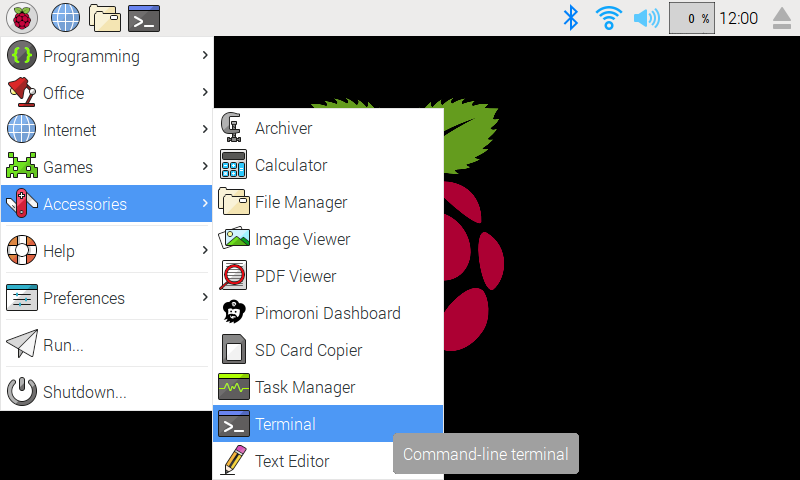
In the new terminal window type the command exactly as it appears below (check for typos) and follow the on-screen instructions:
curl https://get.pimoroni.com/microdotphat | bashAlternatively, on Raspbian, you can download the pimoroni-dashboard and install your product by browsing to the relevant entry:
sudo apt-get install pimoroni(you will find the Dashboard under ‘Accessories’ too, in the Pi menu - or just run pimoroni-dashboard at the command line)
If you choose to download examples you’ll find them in /home/pi/Pimoroni/microdotphat/.
Manual install:
Library install for Python 3:
on Raspbian:
sudo apt-get install python3-microdotphatother environments:
sudo pip3 install microdotphatLibrary install for Python 2:
on Raspbian:
sudo apt-get install python-microdotphatother environments:
sudo pip2 install microdotphatDevelopment:
If you want to contribute, or like living on the edge of your seat by having the latest code, you should clone this repository, cd to the library directory, and run:
sudo python3 setup.py install(or sudo python setup.py install whichever your primary Python environment may be)
In all cases you will have to enable the i2c bus.
Documentation & Support
Guides and tutorials - https://learn.pimoroni.com/microdot-phat
Function reference - http://docs.pimoroni.com/microdotphat/
GPIO Pinout - https://pinout.xyz/pinout/micro_dot_phat
Get help - http://forums.pimoroni.com/c/support
Unofficial / Third-party libraries
Java library by Jim Darby - https://github.com/hackerjimbo/PiJava
0.2.2
BugFix: Reset scroll X and Y to zero when cleared - The Sequel
Switch to smbus2 for i2c back-end
Feature: add is_connected to check for presence of HAT
0.2.1
BugFix: Call setup within set_brightness, fixes #20
0.2.0
BugFix: Defer setup to avoid import side effects
BugFix: Reset scroll X and Y to zero when cleared
Feature: Added Japanese text support
0.1.3
Added __version__ string to module
Added degrees symbol
Added mirroring: flip display left to right
Added DocStrings
0.1.2
Added set_decimal for toggling decimal places
Replaced clear_on_exit with set_clear_on_exit method
Added support for 180 degree rotation
0.1.1
Added set_brightness
0.1.0
Vertical scrolling
Tweaks to write_string
0.0.1
Initial Release
1 maintainer

Metadata
1 maintainer
Release files for microdotphat 0.2.2
For a detailed explanation of source distributions (sdists) and built distributions (wheels), please see the package formats documentation.
Source distribution (sdist)
| File | Size | Uploaded | Provenance | Actions |
|---|---|---|---|---|
| microdotphat-0.2.2.tar.gz | 16.1 kB | Without provenance | Details for microdotphat-0.2.2.tar.gz |
Built distribution (wheel)
| File | Interpreter | ABI | Platform | Actions Reset |
|---|---|---|---|---|
| microdotphat-0.2.2-py3-none-any.whl | Python 3 | none | any | Details for microdotphat-0.2.2-py3-none-any.whl |
Total release size: 29.3 kB
Release files / microdotphat-0.2.2.tar.gz
| Download URL | microdotphat-0.2.2.tar.gz |
|---|---|
| Size | 16.1 kB |
| Tags | Source |
|
SHA-256 checksum How to use checksums |
79270fff76f81f9d31ef7c7f469d3342f43fdcce66d483f5ab5e4a4dd1c1d238
|
|
BLAKE2b-256 checksum How to use checksums |
5c156167272dc0660b992d0ae64f0bf7607bafceadaa8c46c81b1d8fe7dab7d0
|
| Upload date | |
|
Uploaded using Trusted Publishing? What is trusted publishing? |
No |
| Uploaded via |
twine/3.7.1 importlib_metadata/4.10.1 pkginfo/1.8.2 requests/2.25.1 requests-toolbelt/0.9.1 tqdm/4.62.3 CPython/3.9.2
|
Release files / microdotphat-0.2.2-py3-none-any.whl
| Download URL | microdotphat-0.2.2-py3-none-any.whl |
|---|---|
| Size | 13.3 kB |
| Tags | Python 3 |
|
SHA-256 checksum How to use checksums |
8b3923f275216216faece68ea25f39528eea66b9327d325d1c85b6b767531b73
|
|
BLAKE2b-256 checksum How to use checksums |
4538c6b81809348f46909cdb668f3fac9f84e67c9d62fd002a97b3b1b4ab6a47
|
| Upload date | |
|
Uploaded using Trusted Publishing? What is trusted publishing? |
No |
| Uploaded via |
twine/3.7.1 importlib_metadata/4.10.1 pkginfo/1.8.2 requests/2.25.1 requests-toolbelt/0.9.1 tqdm/4.62.3 CPython/3.9.2
|
Security for microdotphat 0.2.2
Provenance
Provenance describes where a file came from. On PyPI, provenance is shared via attestations, which provide a verifiable record of the build or publishing details. View details, limitations and caveats.
No provenance found
None of the files in this release were uploaded with provenance metadata.
A note on package security
PyPI is a repository for distributing packages, not a service for auditing them. While third-party security researchers and our staff do their best to detect and remove malicious packages, PyPI cannot guarantee the quality, security or suitability of any given package.
To learn more about protecting yourself from malicious actors, visit our package security documentation.














