
Live-cell microscopy image analysis and single-molecule measurements

Project description
MicroLive 
Authors: Luis U. Aguilera, William S. Raymond, Rhiannon M. Sears, Nathan L. Nowling, Brian Munsky, Ning Zhao





About
MicroLive is a Python-based GUI application for live-cell microscopy image analysis and single-molecule measurements. It provides an end-to-end workflow from image loading through particle tracking, colocalization analysis, and statistical analysis.
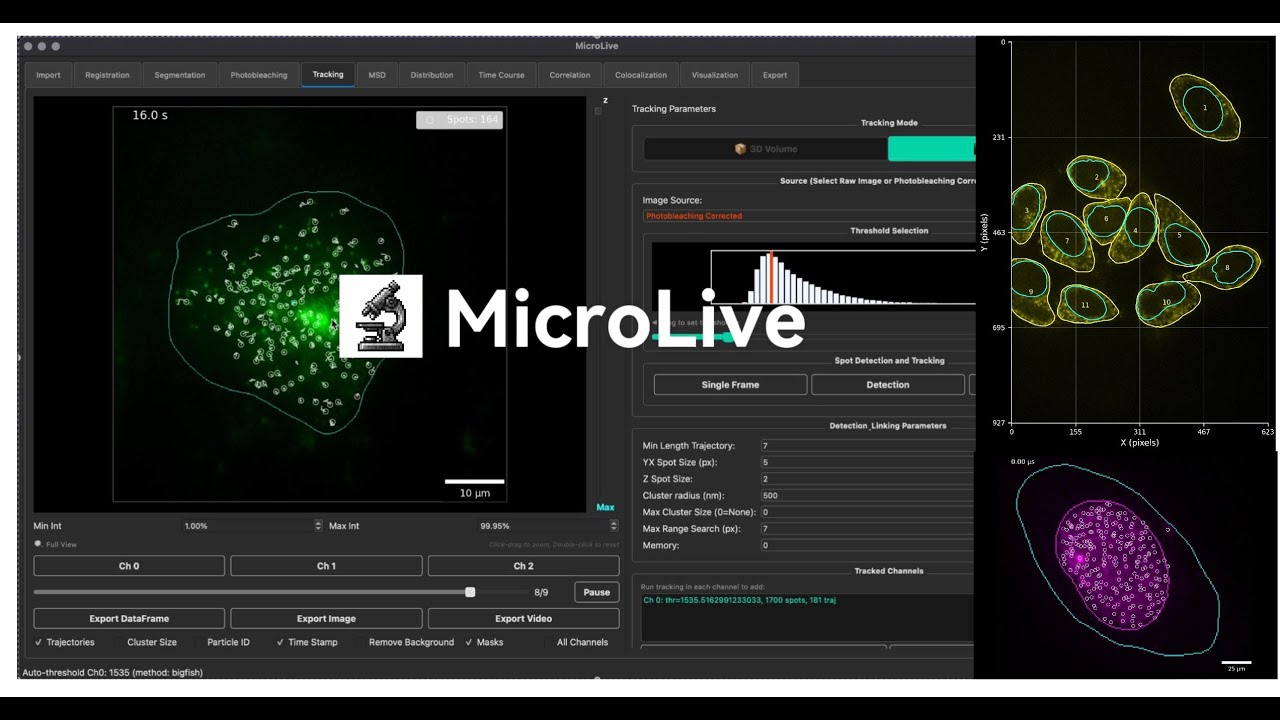
Click the image above to watch the demo video on YouTube
Features
- Image I/O: Load .lif, .tif, .ome.tif with metadata extraction and dimension mapping
- Registration: Drift correction via phase correlation
- Segmentation: Cellpose (GPU), watershed, manual ROI, or external mask import
- Photobleaching correction: Exponential decay modeling
- Particle tracking: 2D (TrackPy) and 3D (Big-FISH) detection with multi-channel support
- Automated threshold detection: Hybrid Big-FISH/TrueSpot method
- Trajectory linking: Nearest-neighbor with memory and cluster analysis
- Intensity quantification: Background subtraction, PSF fitting, SNR calculation
- Colocalization: CNN-based, distance-based, and manual verification
- MSD analysis: Per-cell diffusion coefficient calculation
- Correlation: Auto- and cross-correlation with exponential/linear fitting
- Export: PNG, TIFF, CSV, MP4/GIF with full metadata logging
Documentation
- User Guide — Complete guide to using MicroLive
- Tutorial — Step-by-step tutorials for all workflows
- API Reference — Technical documentation for developers
Installation
Quick Install (Recommended)
# Create and activate conda environment
conda create -n microlive python=3.10 -y
conda activate microlive

# Install MicroLive
pip install microlive

# Launch the GUI
microlive
That's it! MicroLive will launch with GPU acceleration automatically enabled:
- macOS (Apple Silicon): MPS GPU acceleration works automatically
- Linux/Windows (CPU): Works out of the box
GPU Acceleration for NVIDIA (Windows/Linux)
For NVIDIA GPU acceleration, install PyTorch with CUDA support before installing MicroLive:
# Create environment
conda create -n microlive python=3.10 -y
conda activate microlive

# Install PyTorch with CUDA 12.4 (adjust version as needed)
pip install torch torchvision --index-url https://download.pytorch.org/whl/cu124

# Then install MicroLive
pip install microlive

# Launch
microlive
Using Conda Environment Files
Pre-configured environment files are available:
# macOS / CPU
conda env create -f installation/microlive.yml
conda activate microlive

# Windows/Linux with NVIDIA GPU
conda env create -f installation/microlive_cuda.yml
conda activate microlive
Verify GPU Support
from microlive.utils.device import check_gpu_status
check_gpu_status()
Expected output:
PyTorch version: 2.x.x
✅ CUDA available: NVIDIA GeForce RTX ...
   Memory: 8.0 GB
Or for Apple Silicon:
PyTorch version: 2.x.x
✅ MPS available: Apple Silicon GPU (MPS)
Development Installation
For developers who want to modify the source code:
# Clone the repository
git clone --depth 1 https://github.com/ningzhaoAnschutz/microlive.git
cd microlive

# Create environment
conda create -n microlive python=3.10 -y
conda activate microlive

# Install in editable mode
pip install -e .

# Launch
microlive
Troubleshooting Installation
If you encounter errors during installation (especially on Python 3.12):
# Option 1: Upgrade pip and pre-install numpy
pip install --upgrade pip setuptools wheel
pip install numpy
pip install microlive

# Option 2: Use Python 3.10 (most compatible)
conda create -n microlive python=3.10 -y
conda activate microlive
pip install microlive
Common error: ModuleNotFoundError: No module named 'numpy' during pystackreg build
- This occurs when pip tries to build older package versions from source
- Solution: Pre-install NumPy before installing MicroLive
Usage
GUI Application
conda activate microlive
microlive
Programmatic API
import microlive.microscopy as mi

# Load images from a Leica .lif file
reader = mi.ReadLif("experiment.lif")
images = reader.get_images()

# Access image data
image = reader.list_images[0]
print(f"Image shape: {image.shape}")  # (T, Z, Y, X, C)

# Run Cellpose segmentation
cellpose = mi.Cellpose(image_for_segmentation=image[0, 0, :, :, 0])
masks = cellpose.calculate_masks()

# Spot detection
spots = mi.SpotDetection(
    image=image,
    spot_size_yx=5,
    threshold=100
)
detected = spots.detect_spots()
Project Structure
microlive/
├── microlive/                    # Core package (pip installable)
│   ├── microscopy.py             # Main analysis classes
│   ├── imports.py                # Central import management
│   ├── ml_spot_detection.py      # ML-based spot detection
│   ├── gui/                      # GUI application
│   │   ├── app.py                # Main GUI window
│   │   └── main.py               # CLI entry point
│   ├── utils/                    # Utility modules
│   │   ├── device.py             # GPU detection
│   │   └── resources.py          # Resource paths
│   ├── data/                     # ML models and resources
│   └── pipelines/                # Analysis pipeline modules
├── simulations/                  # Spot simulation & validation (not in pip)
│   ├── spot_simulator.py         # Multi-cell simulation engine
│   ├── run_simulation.py         # CLI runner
│   ├── visualize_results.py      # Visualization tools
│   ├── config_*.yaml             # Configuration examples
│   └── tests/                    # 8-test validation suite (100% pass)
├── docs/                         # Documentation
│   ├── user_guide.md             # User manual
│   ├── tutorial.md               # Step-by-step tutorials
│   └── api_reference.md          # API documentation
├── modeling/                     # Research/development (not in pip package)
├── notebooks/                    # Example Jupyter notebooks
├── installation/                 # Environment files
│   ├── microlive.yml             # Conda env (macOS / CPU)
│   └── microlive_cuda.yml        # Conda env (NVIDIA GPU)
├── tests/                        # Test suite
├── pyproject.toml                # Package configuration
└── LICENSE                       # GPL v3 License
License
This project is licensed under the GNU General Public License v3 (GPLv3). See LICENSE for details.
Citation
If you use MicroLive in your research, please cite:
Aguilera LU, Raymond WS, Sears RM, Nowling NL, Munsky B, Zhao N. MicroLive: An Image Processing Toolkit for Quantifying Live-cell Single-Molecule Microscopy. bioRxiv, 2025.
DOI: 10.1101/2025.09.25.678587
@article{aguilera2025microlive,
  title={MicroLive: An Image Processing Toolkit for Quantifying Live-cell Single-Molecule Microscopy},
  author={Aguilera, Luis U and Raymond, William S and Sears, Rhiannon M and Nowling, Nathan L and Munsky, Brian and Zhao, Ning},
  journal={bioRxiv},
  pages={2025--09},
  year={2025},
  publisher={Cold Spring Harbor Laboratory},
  doi={10.1101/2025.09.25.678587}
}
Support
- Documentation: User Guide | Tutorial | API Reference
- Issues & Contributions: GitHub
Release history Release notifications | RSS feed


Download files
Download the file for your platform. If you're not sure which to choose, learn more about installing packages.
Source Distribution
Built Distribution
Filter files by name, interpreter, ABI, and platform.
If you're not sure about the file name format, learn more about wheel file names.
Copy a direct link to the current filters
File details
Details for the file microlive-1.0.9.tar.gz.
File metadata
- Download URL: microlive-1.0.9.tar.gz
- Upload date:
- Size: 661.5 kB
- Tags: Source
- Uploaded using Trusted Publishing? No
- Uploaded via: twine/6.2.0 CPython/3.10.19
File hashes
| Algorithm | Hash digest | |
|---|---|---|
| SHA256 |
2969490d7fb9e22f308e425f397bf368322465f140606827d68c15324a6c4804
|
|
| MD5 |
0cc3666877fd4110d01910ba6419c0b7
|
|
| BLAKE2b-256 |
0fea55feb0aba051831166cf0225548a383f2ddee0e2398d03a38ce591b8bc36
|
File details
Details for the file microlive-1.0.9-py3-none-any.whl.
File metadata
- Download URL: microlive-1.0.9-py3-none-any.whl
- Upload date:
- Size: 674.0 kB
- Tags: Python 3
- Uploaded using Trusted Publishing? No
- Uploaded via: twine/6.2.0 CPython/3.10.19
File hashes
| Algorithm | Hash digest | |
|---|---|---|
| SHA256 |
2e9f3fcbd28ff98d14946c8ac5a1f81f73b457e9e7bf3fb7e4f373cb452d84ca
|
|
| MD5 |
5545d1ee1c9c2ffd4a7114379c096e63
|
|
| BLAKE2b-256 |
f126edec6d9d3234b3b71ef7ec67e3c18bca9791f89503662dca8e208fe91b6c
|






