
A micro test runner

Project description


microPyTest
microPyTest is a minimal, pure python-based test runner that you can use directly in code.
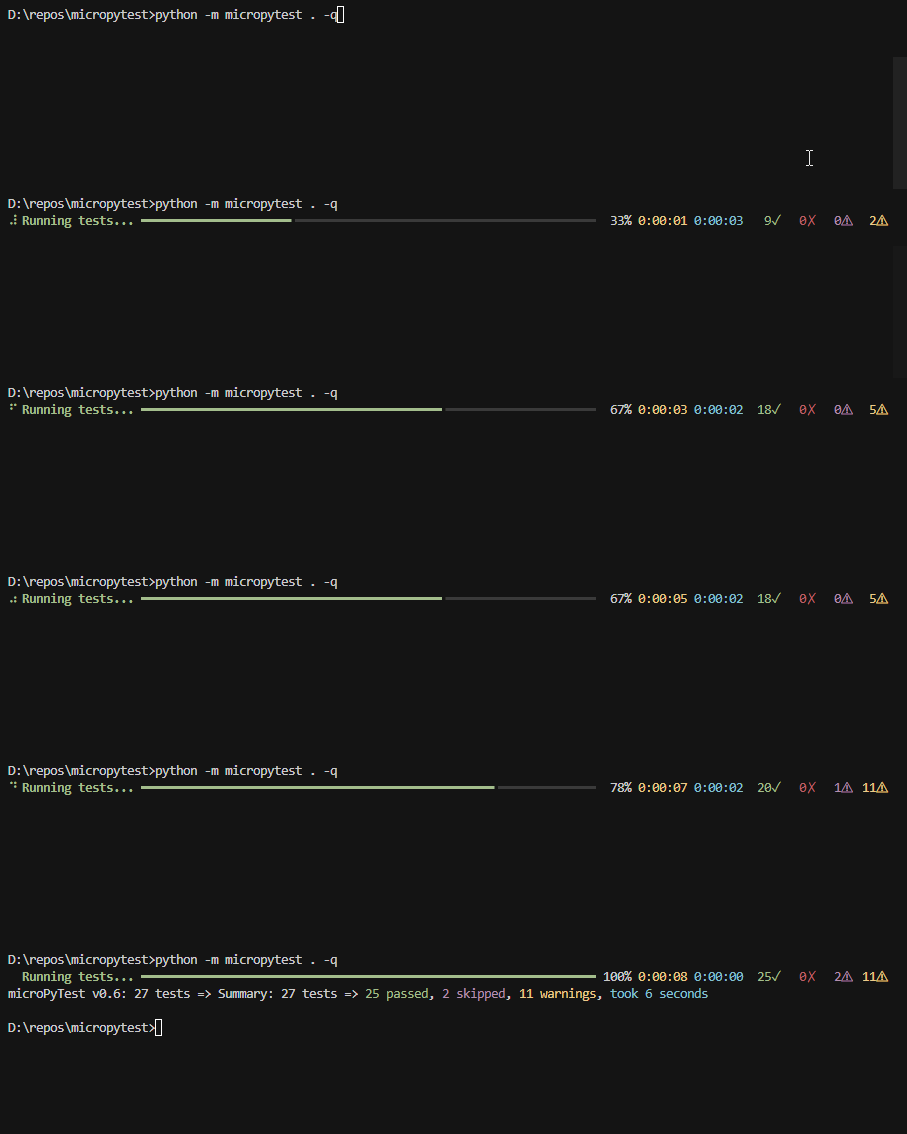
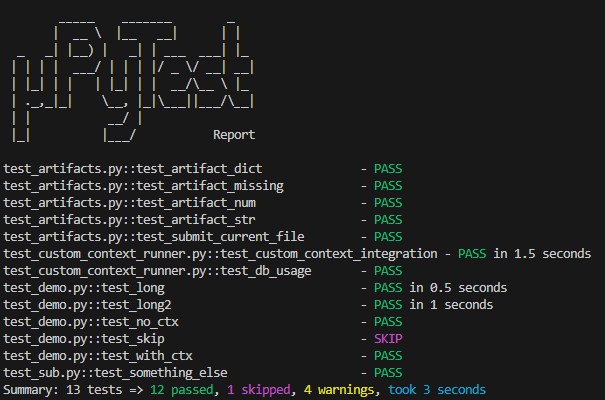
Key Points
- Code-first approach: Import and run tests from your own scripts.
- Artifact tracking: Each test can record artifacts (files or data) via a built-in test context.
- Command execution: Run and interact with external processes with real-time output processing.
- Test filtering: Run only the tests you need by specifying patterns.
- Test arguments: Pass command-line arguments directly to your tests.
- Lightweight: Just Python. No special config or advanced fixtures.
- Optional CLI: You can also run tests via the
micropytestcommand, but embedding in your own code is the primary focus.
Installation
Install directly from PyPI:
pip install micropytest
Usage in Code
Suppose you have some test files under my_tests/:
# my_tests/test_example.py
def test_basic():
    assert 1 + 1 == 2

def test_with_context(ctx):
    ctx.debug("Starting test_with_context")
    assert 2 + 2 == 4
    ctx.add_artifact("numbers", {"lhs": 2, "rhs": 2})
You can run them from a Python script:
import micropytest.core

results = micropytest.core.run_tests(tests_path="my_tests")
passed = sum(r.status == "pass" for r in results)
total = len(results)
print(f"Test run complete: {passed}/{total} passed")
- Each test that accepts a
ctxparameter gets a TestContext object with.debug(),.warn(),.add_artifact(), etc. - Results include logs, artifacts, pass/fail/skip status, and duration.
Command Execution
microPyTest includes a Command class for running and interacting with external processes:
from micropytest.command import Command
import sys

def test_interactive_command(ctx):
    # Run a Python interpreter interactively
    with Command([sys.executable, "-i"]) as cmd:
        # Send a command
        cmd.write("print('Hello, world!')\n")

        # Check the output
        stdout = cmd.get_stdout()

        # Exit the interpreter
        cmd.write("exit()\n")

    # Verify the output
    assert any("Hello, world!" in line for line in cmd.get_stdout())
Key features:
- Run commands with callbacks for real-time output processing
- Interact with processes via stdin
- Access stdout/stderr at any point during execution
- Set custom environment variables and working directories
- Allow ignoring test files by using
.micropytestignorefiles.
Test Filtering
You can run a subset of tests by specifying a filter pattern:
# Run only tests with "artifact" in their name
results = micropytest.core.run_tests(tests_path="my_tests", test_filter="artifact")
This is especially useful when you're focusing on a specific area of your codebase.
Passing Arguments to Tests
Tests can accept and parse command-line arguments using standard Python's argparse:
def test_with_args(ctx):
    import argparse

    # Create parser
    parser = argparse.ArgumentParser(description="Test with arguments")
    parser.add_argument("--string", "-s", default="default string", help="Input string")
    parser.add_argument("--number", "-n", type=int, default=0, help="Input number")

    # Parse arguments (ignoring unknown args)
    args, _ = parser.parse_known_args()

    # Log the parsed arguments
    ctx.debug(f"Parsed arguments:")
    for key, value in vars(args).items():
        ctx.debug(f"  {key}: {value}")

    # Use the arguments in your test
    assert args.string != "", "String should not be empty"
    assert args.number >= 0, "Number should be non-negative"
When running from the command line, you can pass these arguments directly:
micropytest --test test_with_args --string="Hello World" --number=42
The arguments after your test filter will be passed to your test functions, allowing for flexible test parameterization.
Differences from pyTest
-
Code-first: You typically call
run_tests(...)from Python scripts. The CLI is optional if you prefer it. -
Artifact handling is built-in:
ctx.add_artifact("some_key", value)can store data for later review. No extra plugin required. -
Command execution built-in: No need for external plugins to run and interact with processes.
-
No fixtures or plugins: microPyTest is intentionally minimal. Tests can still share state by passing a custom context class if needed.
-
No configuration: There's no
pytest.iniorconftest.py. Just put your test functions intest_*.pyor*_test.py. -
Time estimates for each test
Quickstart
See the examples subfolder
Optional CLI
If you prefer a command-line flow:
micropytest -p tests/
--verbose: Show all debug logs & artifacts.--quiet: Only prints a final summary.--test: Run only tests matching the specified pattern.--dry-run: Show what tests would be run without actually running them (will assume them to pass).
Examples:
# Run all tests in my_tests directory
micropytest -v my_tests

# Run only tests with "artifact" in their name
micropytest -t artifact my_tests

# Run a specific test and pass arguments to it
micropytest -t test_cmdline_parser --string="Hello" --number=42
Development
To develop with microPyTest, install the required dependencies and run the tests in the project:
pip install rich
python -m micropytest .
Uploading to PyPI
To build and upload a new version to PyPI:
# Install build tools
pip install build twine

# Build the distribution packages
python -m build

# Upload to PyPI
python -m twine upload dist/micropytest-xxx.tar.gz
Make sure to update the version number in __init__.py and pyproject.toml before building a new release.
Changelog
- v0.19.0 – Add support for ignoring test files by using
.micropytestignorefiles - v0.18.5 – Fix bugs in TestStore (artifacts and logs not being transmitted)
- v0.18.4 – Fix bug in TestStore
- v0.18.3 – Fix bugs related to KeepAlive
- v0.18.2 – Fix error handling, fix bug in SVN helper
- v0.18.1 – Transmit logs and artifacts asynchronously for improved performance
- v0.18.0 – Allow passing Command callbacks and timeout when using context manager
- v0.17.8 – Add TestAttributes.with_args()
- v0.17.7 – Fix problem with KeyboardInterrupt not being raised on headless Windows
- v0.17.6 – Fix exception cases in Command
- v0.17.5 – Improve error handling in test store
- v0.17.4 – Terminate also child processes in Command.terminate()
- v0.17.3 – Bugfix in Command.wait()
- v0.17.2 – Refactor logging
- v0.17.1 – Bugfix in SVN helper
- v0.17 – Improve SVN helper
- v0.16 – Improve test store terminology
- v0.15 – Add support for environment variables for SVN credentials
- v0.14 – Add support for storing test results on a remote server using REST API, make core functions sync
- v0.13 – Make ctrl+c responsively abort tests, fix bugs, add VCS helper functions
- v0.12 – Improved type safety, allow detecting changes using VCS
- v0.11.1 – Add dry-run mode
- v0.11 – Add support for parameterized tests
- v0.10 – Refactoring, make VSCHelper extensible, breaking: you need to create an instance of VCSHelper to use its functions
- v0.9.2 – Fix dependency issues and require Python 3.9 or newer
- v0.9.1 – Make pyproject.toml compatible with Python older than 3.9 (attempt did not work)
- v0.9 – Several fixes
- v0.8 – Several fixes and minor improvements
- v0.7 – Added asyncio support
- v0.6 – Added rich display support, tag filtering, improved warnings display, VCS helper, and improved command execution
- v0.5 – Added test filtering and argument passing capabilities
- v0.4 – Added Command class for process execution and interaction
- v0.3.1 – Fixed screenshot in pypi
- v0.3 – Added ability to skip tests
- v0.2 – Added support for custom context classes
- v0.1 – Initial release
Enjoy your micro yet mighty test runner!
Release history Release notifications | RSS feed


Download files
Download the file for your platform. If you're not sure which to choose, learn more about installing packages.
Source Distribution
File details
Details for the file micropytest-0.19.0.tar.gz.
File metadata
- Download URL: micropytest-0.19.0.tar.gz
- Upload date:
- Size: 33.7 kB
- Tags: Source
- Uploaded using Trusted Publishing? No
- Uploaded via: twine/6.1.0 CPython/3.13.5
File hashes
| Algorithm | Hash digest | |
|---|---|---|
| SHA256 |
ba4bf25a91371ae5f5dc133615847ad3362daf73cf77fb4c8b28b753857cca60
|
|
| MD5 |
90221ccf727e5f4768ca6c7f1583345d
|
|
| BLAKE2b-256 |
774255bb4755f88bc440133dedce5dc3c5182d81e91f62b70016099e1184789a
|






