
microui-py
A Python wrapper for the microui immediate-mode UI library



microui-py provides Python bindings for microui, a tiny (~1100 SLOC) portable immediate-mode UI library written in ANSI C. This wrapper allows you to create lightweight, responsive user interfaces in Python while maintaining the performance and simplicity of the original C library.
Note: Earlier iterations of microui-py were created with the intent to contribute the python wrapper back into the original microui project. However, it is now clear that the author of microui is not accepting PRs and wants to keep the project miminal. While this is fair enough, it was decided to move pymui to its own repo to develop it independently and possibly track other active forks which may emerge.
Features
-
Pythonic API - Clean, intuitive Python interface
-
High Performance - Direct Cython bindings to C library
-
Immediate Mode - No retained widget objects, simple state management
-
Flexible Layout - Dynamic row-based layout system
-
Customizable - Full control over styling and rendering
-
Memory Safe - Comprehensive bounds checking and error handling
-
Easy Integration - Bundled SDL2/OpenGL app loop, or feed draw commands to your own renderer
-
Unicode Text - Load any TrueType/OpenType font with
pymui.load_font()
Upgrading from 0.2
0.3.0 changes behavior that 0.2 code may rely on. Full list in the CHANGELOG.
-
The PyPI distribution is
microui-py(pip install microui-py);import pymuiis unchanged. -
textbox(text, bufsz)returns(result, text); it was a stub returning0. -
draw_text(text, pos, color)lost its unusedfontargument. -
Two widgets with the same ID in one frame raise
DuplicateIDError. Repeated labels needkey=orctx.id_scope(). -
Misuse that used to crash the interpreter raises
RuntimeErrororValueError; see Errors Instead of Aborts. -
Colorchannels outside 0..255 raise instead of wrapping.
Quick Start
Installation
The distribution is named microui-py; the import name is pymui.
pip install microui-py # abi3 wheels for CPython 3.12+; 3.10/3.11 build from source
import pymui
From a clone, for development:
git clone https://github.com/shakfu/pymui.git
cd pymui
uv sync --dev
make build                 # editable build of the extension
Basic Usage
import pymui

# Recommended: Use context managers for both frame and window management
with pymui.Context() as ctx:
    # Window context manager (automatically calls begin_window/end_window)
    with ctx.window("My Window", 10, 10, 200, 150) as window:
        if window.is_open:
            # Create a button
            if ctx.button("Click me!"):
                print("Button was clicked!")

            # Create a checkbox
            result, checked = ctx.checkbox("Enable feature", True)

            # Create a slider
            result, value = ctx.slider(50.0, 0.0, 100.0)

# Alternative: Manual window management
with pymui.Context() as ctx:
    if ctx.begin_window("Manual Window", pymui.Rect(10, 10, 200, 150)):
        # UI elements here...
        ctx.end_window()

# Legacy: Manual frame management
ctx = pymui.Context()
ctx.begin()
try:
    # UI code here...
    pass
finally:
    ctx.end()
Core Concepts
Immediate Mode UI
microui-py follows the immediate-mode paradigm where UI elements are created and processed every frame:
# No widget objects to manage - just call functions each frame
for frame in main_loop():
    with pymui.Context() as ctx:  # Automatic begin/end
        # UI is rebuilt each frame
        if ctx.button("Dynamic Button"):
            handle_click()

    render_frame(ctx)
Context Manager vs Manual Frame Management
microui-py supports both automatic and manual frame management:
# Recommended: Context Manager (Automatic)
with pymui.Context() as ctx:
    # begin() called automatically
    if ctx.button("Safe Button"):
        print("Clicked!")
    # end() called automatically, even on exceptions

# Manual Management (Advanced)
ctx = pymui.Context()
ctx.begin()
try:
    if ctx.button("Manual Button"):
        print("Clicked!")
finally:
    ctx.end()  # Must always call end()
Benefits of Context Manager:
-
Automatic cleanup -
end()always called, even on exceptions -
Cleaner code - No need to remember begin/end pairs
-
Exception safety - Proper cleanup guaranteed
-
Pythonic - Follows Python's context manager idiom
Context Manager Best Practices
# Good: Use context manager for each frame
def render_frame():
    with pymui.Context() as ctx:
        # All UI code here
        if ctx.begin_window("Window", pymui.rect(10, 10, 200, 150)):
            ctx.label("Hello!")
            ctx.end_window()

# Good: Exception handling is automatic
def risky_ui_operation():
    with pymui.Context() as ctx:
        if ctx.begin_window("Risk", pymui.rect(10, 10, 200, 150)):
            if some_condition():
                raise ValueError("Something went wrong")
            ctx.label("This might not execute")
            ctx.end_window()
        # ctx.end() called automatically even if exception occurs

# Avoid: Manual management without proper exception handling
def bad_manual_approach():
    ctx = pymui.Context()
    ctx.begin()
    # If exception occurs here, end() won't be called!
    risky_operation()
    ctx.end()

# Better: Manual with proper exception handling
def good_manual_approach():
    ctx = pymui.Context()
    ctx.begin()
    try:
        risky_operation()
    finally:
        ctx.end()  # Always called
Window Context Manager
microui-py provides an additional context manager for windows that automatically handles begin_window() and end_window() calls:
# Recommended: Window context manager
with pymui.Context() as ctx:
    with ctx.window("My App", 10, 10, 300, 200) as window:
        if window.is_open:
            ctx.label("Content goes here")
            if ctx.button("Click me"):
                print("Button clicked!")
        # end_window() called automatically

# Alternative: Manual window management
with pymui.Context() as ctx:
    if ctx.begin_window("Manual", pymui.Rect(10, 10, 300, 200)):
        ctx.label("Content goes here")
        ctx.end_window()  # Must remember to call this

# Multiple windows with context managers
with pymui.Context() as ctx:
    with ctx.window("Window 1", 10, 10, 200, 150) as w1:
        if w1.is_open:
            ctx.label(f"Window: {w1.title}")

    with ctx.window("Window 2", 220, 10, 200, 150) as w2:
        if w2.is_open:
            ctx.label(f"Size: {w2.rect.w}x{w2.rect.h}")
Window Context Manager Benefits:
-
Automatic cleanup -
end_window()always called -
Exception safety - Cleanup on errors
-
Window state access -
window.is_open,window.title,window.rect,window.opt -
Cleaner code - No manual begin/end window pairs
-
Convenient API -
ctx.window(title, x, y, w, h, opt=0)
Layout System
microui-py uses a flexible row-based layout system:
with pymui.Context() as ctx:
    if ctx.begin_window("Layout Demo", pymui.Rect(10, 10, 300, 200)):
        # Two columns: 100px wide, remaining space
        ctx.layout_row([100, -1], 25)

        ctx.label("Name:")
        result, name = ctx.textbox("", 64)

        # Three equal columns
        ctx.layout_row([80, 80, 80], 25)

        if ctx.button("OK"):
            print("OK clicked")
        if ctx.button("Cancel"):
            print("Cancel clicked")
        if ctx.button("Help"):
            print("Help clicked")

        ctx.end_window()
State Management
Since immediate-mode UIs rebuild every frame, you manage state in your application:
class AppState:
    def __init__(self):
        self.counter = 0
        self.text = ""
        self.enabled = True

state = AppState()

def update_ui():
    with pymui.Context() as ctx:
        with ctx.window("Counter", 10, 10, 200, 100) as window:
            if window.is_open:
                ctx.label(f"Count: {state.counter}")

                if ctx.button("Increment"):
                    state.counter += 1

                result, state.enabled = ctx.checkbox("Enabled", state.enabled)
Complete Example: Todo App
pymui.app.App owns the SDL window, event translation, and rendering. Override frame(ctx); it runs between ctx.begin() and ctx.end().
import pymui
from pymui.app import App

class TodoApp(App):
    def __init__(self):
        super().__init__("Todo", 640, 480)
        self.todos = ["Learn microui-py", "Build an app"]
        self.new_todo = ""

    def frame(self, ctx):
        with ctx.window("Todo App", 50, 50, 400, 300) as window:
            if not window.is_open:
                return
            ctx.layout_row([-1], 25)
            ctx.label("My Todo List")

            for i, todo in enumerate(list(self.todos)):
                ctx.layout_row([-50, -1], 25)
                ctx.label(todo)
                with ctx.id_scope(i):  # "Delete" repeats; scope its ID
                    if ctx.button("Delete"):
                        self.todos.remove(todo)

            ctx.layout_row([-80, -1], 25)
            result, self.new_todo = ctx.textbox(self.new_todo, 128, key="new")
            if (ctx.button("Add") or result & pymui.Result.SUBMIT) and self.new_todo.strip():
                self.todos.append(self.new_todo.strip())
                self.new_todo = ""

if __name__ == "__main__":
    TodoApp().run()
App.run() blocks until the window closes or app.quit() is called. The renderer requests vsync; App(max_fps=120) (the default) caps the loop where the driver ignores it. Pass max_fps=None to disable the cap. For a custom loop, call app.step(frame) per iteration, or use pymui.render(ctx, bg) with renderer_init_window() directly.
Available Widgets
Basic Controls
# Text display
ctx.text("Hello World")
ctx.label("Label text")

# Buttons
if ctx.button("Click me"):
    print("Button pressed")

# Checkboxes
result, checked = ctx.checkbox("Enable feature", current_state)

# Sliders
result, value = ctx.slider(current_value, min_val, max_val)

# Text input
result, text = ctx.textbox(current_text, buffer_size)
Widget IDs
microui tracks hover and focus by widget ID. Buttons, checkboxes, headers and tree nodes derive the ID from their label. Sliders, number fields and textboxes have no label; their default ID comes from the calling line plus a count of earlier calls from that line in the same scope. Widgets shown conditionally elsewhere therefore do not change it.
Two widgets with the same ID in one frame would share hover, focus and clicks, so pymui raises DuplicateIDError. Typical causes are repeated labels and widgets inside a reusable helper function. Disambiguate with key= or a scope:
_, volume = ctx.slider(volume, 0, 100, key="volume")
_, on = ctx.checkbox("Enabled", on, key=("channel", i))

with ctx.id_scope(row_index):   # scope every ID inside the block
    if ctx.button("Delete"):
        ...
Layout Controls
# Windows
with ctx.window("Window Title", x, y, w, h) as win:
    if win.is_open:
        ...

# Tree nodes (collapsible sections)
with ctx.treenode("Section") as expanded:
    if expanded:
        ...

# Headers (no end call)
if ctx.header("Section Header"):
    ...

# Panels (scrollable areas)
with ctx.panel("Panel Name") as panel:
    ...

# Popups
if ctx.button("Menu"):
    ctx.open_popup("menu")
with ctx.popup("menu") as is_open:
    if is_open:
        ...
Each scope calls its end_* function even if the body raises. The begin_*/end_* methods remain available; an end_* that does not match the innermost open scope raises RuntimeError. If an exception escapes a frame, Context.__exit__ discards that frame instead of calling end().
Container fields read as copies. Assign a whole value to change one: win.rect = pymui.Rect(...), panel.scroll = pymui.Vec2(...).
Layout Functions
# Set row layout: [col1_width, col2_width, ...], row_height
ctx.layout_row([100, -1, 50], 25)  # 100px, remaining, 50px

# Set individual dimensions
ctx.layout_width(200)
ctx.layout_height(30)

# Columns
with ctx.column():
    ...
Errors Instead of Aborts
microui checks its limits with abort(), which kills the interpreter. pymui checks first and raises:
| Condition | Error |
|---|---|
| Widget, layout or draw call outside a window or panel | RuntimeError |
Mismatched end_*/pop_*, or end() with scopes open |
RuntimeError |
| More than 32 nested ID scopes, 32 clips, 16 layouts, 32 windows per frame | RuntimeError |
| More than 48 live containers, or 48 toggled headers/tree nodes | RuntimeError |
| Command buffer (256 KB per frame) full | RuntimeError |
| Repeated widget ID, or a window begun twice in one frame | DuplicateIDError |
fmt other than one %f/%e/%g conversion |
ValueError |
| Color channel outside 0..255 | ValueError |
Typed text beyond microui's 31-byte per-frame buffer is delivered over the following frames.
Custom Widgets
def toggle(ctx, name, on):
    wid = ctx.get_id(name)
    r = ctx.layout_next()
    ctx.update_control(wid, r)
    if ctx.mouse_pressed & pymui.Mouse.LEFT and ctx.focus == wid:
        on = not on
    ctx.draw_control_frame(wid, r, pymui.ColorIndex.BUTTON)
    ctx.draw_control_text("ON" if on else "OFF", r, pymui.ColorIndex.TEXT,
                          pymui.Option.ALIGNCENTER)
    return on
Data Types
Core Types
# 2D Vector
pos = pymui.Vec2(x=10, y=20)
print(f"Position: {pos.x}, {pos.y}")

# Rectangle
rect = pymui.Rect(x=10, y=20, w=100, h=50)

# Color (RGBA)
color = pymui.Color(r=255, g=128, b=0, a=255)  # Orange
color = pymui.Color(255, 128, 0)  # Alpha defaults to 255

# Convenience functions
pos = pymui.vec2(10, 20)
rect = pymui.rect(10, 20, 100, 50)
color = pymui.color(255, 128, 0, 255)
Text Input
# Simple textbox
textbox = pymui.Textbox(buffer_size=128)
textbox.text = "Initial text"
current_text = textbox.text

# In UI context: pass the text in, keep what comes back
result, current_text = ctx.textbox(current_text, 128, key="name")
if result & pymui.Result.SUBMIT:
    print(f"User submitted: {new_text}")
Styling
microui-py supports comprehensive styling through the style system:
# Get current style
style = ctx.style

# Modify colors
style.set_color(pymui.ColorIndex.BUTTON, pymui.Color(100, 150, 200))
style.set_color(pymui.ColorIndex.TEXT, pymui.Color(255, 255, 255))

# Available color indices
colors = [
    pymui.ColorIndex.TEXT,
    pymui.ColorIndex.BORDER,
    pymui.ColorIndex.WINDOWBG,
    pymui.ColorIndex.TITLEBG,
    pymui.ColorIndex.BUTTON,
    pymui.ColorIndex.BUTTONHOVER,
    # ... and more
]
Building and Development
Prerequisites
-
Python 3.10 or higher
-
CMake 3.28+
-
C11 compiler (GCC or Clang; Windows is untested)
-
SDL2 development libraries, including its CMake config
-
OpenGL development libraries (Linux:
libgl-dev, macOS: included)
Building from Source
git clone https://github.com/shakfu/pymui.git
cd pymui

# Install dependencies
uv sync --dev

# Build the project
make build

# Run tests
make test

# Run the demo
make demo
Development Commands
# Build
make build

# Run all tests
make test

# Run memory leak detection
make memory-test

# Run performance benchmarks
make performance-test

# Clean build artifacts
make clean
Project Structure
pymui/
├── src/pymui/          # Main Python package
│   ├── pymui.pyx      # Cython wrapper
│   ├── app.py         # SDL window and event loop
│   └── __init__.py    # Package init
├── microui/           # Vendored microui, SDL/OpenGL renderer, stb_truetype
├── tests/            # Test suite
├── examples/         # showcase.py, demo.py, context-manager demos
├── scripts/          # Leak, valgrind and benchmark tools
├── doc/              # Architecture and development guides
└── .github/          # CI workflow
Examples
| File | Run | Shows |
|---|---|---|
examples/showcase.py |
make showcase |
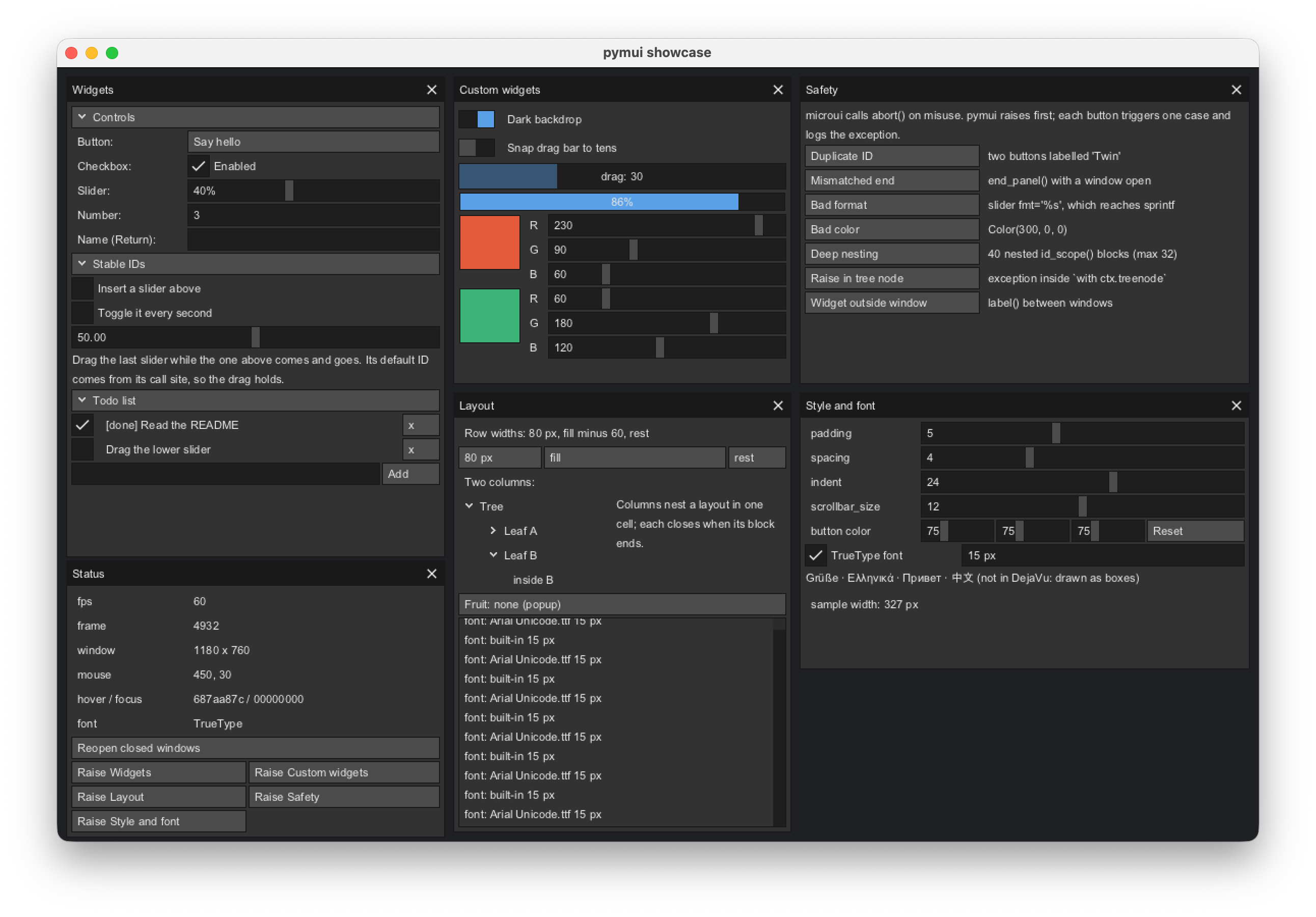
Every feature: widgets, stable IDs, scopes, custom widgets, layout, live guard errors, style editing, TrueType fonts |
examples/demo.py |
make demo |
Port of microui's C demo |
examples/context_manager_demo.py |
uv run python examples/context_manager_demo.py |
Frame context manager, printed to the console |
examples/window_context_demo.py |
uv run python examples/window_context_demo.py |
Window context manager, printed to the console |
tests/test_examples.py runs the first two headless, so they stay in step with the API.
Fonts and Unicode
The bundled bitmap font covers ASCII; other characters draw as a box. Load a TrueType or OpenType font for everything else:
pymui.load_font("/usr/share/fonts/truetype/dejavu/DejaVuSans.ttf", 15)  # path or bytes
pymui.reset_font()                                                       # back to the bitmap font
The font is global: it applies to text measurement in every Context (and so to layout) and to rendering. Characters missing from the font draw as the font's own missing-glyph box. Glyphs are rasterized on first use into a 512x512 texture shared with the icons.
Only load trusted font files. The renderer uses stb_truetype, which does not validate font tables; pymui rejects files whose table directory points past the end of the data (truncated files) but cannot make a crafted file safe.
Custom Renderers
After ctx.end(), the frame is a list of commands. pymui.render(ctx, bg) draws them with the bundled renderer; to draw them elsewhere, iterate:
def draw_frame(ctx, backend):
    ctx.reset_command_iterator()
    while (cmd := ctx.next_command()) is not None:
        if cmd.type == pymui.Command.RECT:
            backend.draw_rect(cmd.rect, cmd.color)
        elif cmd.type == pymui.Command.TEXT:
            backend.draw_text(cmd.text, cmd.pos, cmd.color)
        elif cmd.type == pymui.Command.ICON:
            backend.draw_icon(cmd.icon_id, cmd.rect, cmd.color)
        elif cmd.type == pymui.Command.CLIP:
            backend.set_clip(cmd.rect)
Layout measures text with the current pymui font, so a custom renderer should draw text with the same font and size.
Testing
make test           # all tests, headless
make memory-test    # RSS and tracemalloc growth
See doc/development.md for valgrind, AddressSanitizer and benchmark instructions.
Contributing
Setup, the checklist for adding wrapper methods, and test-writing notes are in doc/development.md. Design and the safety layer are in doc/architecture.md.
API Reference
The type stubs in src/pymui/pymui.pyi list every class, method and signature. By area:
| Area | Names |
|---|---|
| Frame | begin, end, abort_frame, in_frame, with ctx: |
| Containers | window, popup, panel, begin_*/end_*, open_popup, get_current_container, get_container, bring_to_front |
| Widgets | button, checkbox, slider, number, textbox, label, text, header, treenode |
| Layout | layout_row, layout_width, layout_height, column, layout_set_next, layout_next |
| IDs | id_scope, push_id, pop_id, get_id, key= arguments |
| Custom widgets | update_control, draw_control_frame, draw_control_text, draw_rect, draw_box, draw_text, draw_icon, mouse_over |
| Input state | hover, focus, mouse_pos, mouse_delta, mouse_down, mouse_pressed, key_down, key_pressed |
| Input | input_mousemove, input_mousedown, input_mouseup, input_scroll, input_keydown, input_keyup, input_text |
| Rendering | render, renderer_init_window, renderer_resize, renderer_shutdown, next_command, load_font, reset_font |
| Events | poll_event, Event, EventType |
| App | pymui.app.App: frame, run, step, quit, handle_event |
Result Flags
Bit flags; 0 means no interaction.
pymui.Result.ACTIVE   # Widget is active
pymui.Result.SUBMIT   # Widget was submitted (Enter key, etc.)
pymui.Result.CHANGE   # Widget value changed
Options
pymui.Option.ALIGNCENTER   # Center-align content
pymui.Option.ALIGNRIGHT    # Right-align content
pymui.Option.NOINTERACT    # Disable interaction
pymui.Option.NOFRAME       # Don't draw frame
pymui.Option.NORESIZE      # Disable resizing
pymui.Option.NOSCROLL      # Disable scrolling
pymui.Option.NOCLOSE       # Disable close button
pymui.Option.NOTITLE       # Don't draw title
pymui.Option.HOLDFOCUS     # Hold focus
pymui.Option.AUTOSIZE      # Auto-size to content
pymui.Option.POPUP         # Popup window
pymui.Option.CLOSED        # Window is closed
pymui.Option.EXPANDED      # Header is expanded
Troubleshooting
Common Issues
Import Error: ImportError: cannot import name 'pymui'
# Make sure you've built the project
make build

# Check that build artifacts exist
ls src/pymui/pymui.*.so
RuntimeError or DuplicateIDError from a widget call: pymui checks microui's preconditions and raises instead of letting microui abort. See Errors Instead of Aborts.
Fatal error: ... assertion ... failed from microui: a precondition pymui does not check yet. Please report it with the call that triggered it.
Non-ASCII text draws as boxes: the bundled font is ASCII-only; call pymui.load_font() (see Fonts and Unicode).
Getting Help
-
Check the documentation
-
Review examples
-
Search issues
-
Read the microui usage guide
License
microui-py is released under the MIT License. See LICENSE for details.
The underlying microui library is also MIT licensed.
Acknowledgments
-
rxi for creating the excellent microui library
-
The Cython team for making Python-C integration seamless
-
Contributors and testers who helped improve microui-py
Happy UI building with microui-py! 🎨🐍
1 maintainer

Metadata
1 maintainer
Release files for microui-py 0.3.0
For a detailed explanation of source distributions (sdists) and built distributions (wheels), please see the package formats documentation.
Source distribution (sdist)
| File | Size | Uploaded | |
|---|---|---|---|
| microui_py-0.3.0.tar.gz | 1.2 MB | Details |
Built distributions (wheels)
| File | Reset | |||
|---|---|---|---|---|
| microui_py-0.3.0-cp312-abi3-win_amd64.whl | CPython 3.12 | abi3 | Windows x86-64 | Details |
| microui_py-0.3.0-cp312-abi3-manylinux_2_27_x86_64.manylinux_2_28_x86_64.whl | CPython 3.12 | abi3 | Linux glibc 2.27+ x86-64, Linux glibc 2.28+ x86-64 | Details |
| microui_py-0.3.0-cp312-abi3-manylinux_2_27_aarch64.manylinux_2_28_aarch64.whl | CPython 3.12 | abi3 | Linux glibc 2.27+ ARM64, Linux glibc 2.28+ ARM64 | Details |
| microui_py-0.3.0-cp312-abi3-macosx_11_0_x86_64.whl | CPython 3.12 | abi3 | macOS 11.0+ x86-64 | Details |
| microui_py-0.3.0-cp312-abi3-macosx_11_0_arm64.whl | CPython 3.12 | abi3 | macOS 11.0+ ARM64 | Details |
Total release size: 5.8 MB
Release files / microui_py-0.3.0.tar.gz
| Download URL | microui_py-0.3.0.tar.gz |
|---|---|
| Size | 1.2 MB |
| Tags | Source |
|
SHA-256 checksum How to use checksums |
acfd3d615e441926a3c0bdc0f5ac46e22f7a8b87bc91962867df72bee1d95511
|
|
BLAKE2b-256 checksum How to use checksums |
89cb5e1c23d99332c0cf50374971ff99875ca8b9aed776544386f94c5d3465ea
|
| Upload date | |
|
Uploaded using Trusted Publishing? What is trusted publishing? |
No |
| Uploaded via |
twine/7.0.0 CPython/3.13.2
|
Release files / microui_py-0.3.0-cp312-abi3-win_amd64.whl
| Download URL | microui_py-0.3.0-cp312-abi3-win_amd64.whl |
|---|---|
| Size | 860.1 kB |
| Tags | CPython 3.12 Windows x86-64 abi3 |
|
SHA-256 checksum How to use checksums |
fca993e844b31ebdb624952dbf2737b17cab8c37a00545a55a314d4d3ebc38ec
|
|
BLAKE2b-256 checksum How to use checksums |
ef71162969eb59fe81d8ba61e684f9bb3f1119798927836cbfc51b720c203504
|
| Upload date | |
|
Uploaded using Trusted Publishing? What is trusted publishing? |
No |
| Uploaded via |
twine/7.0.0 CPython/3.13.2
|
Release files / microui_py-0.3.0-cp312-abi3-manylinux_2_27_x86_64.manylinux_2_28_x86_64.whl
| Download URL | microui_py-0.3.0-cp312-abi3-manylinux_2_27_x86_64.manylinux_2_28_x86_64.whl |
|---|---|
| Size | 1.1 MB |
| Tags | CPython 3.12 Linux glibc 2.27+ x86-64 Linux glibc 2.28+ x86-64 abi3 |
|
SHA-256 checksum How to use checksums |
5485441282d9f0f85997aea871fb7686b97171ad1fce41f7413561a91133af41
|
|
BLAKE2b-256 checksum How to use checksums |
0d28adaa1e47ef7bba703a6dde22f5aadc1f74f4ed73aae9cff01e0335ba5f24
|
| Upload date | |
|
Uploaded using Trusted Publishing? What is trusted publishing? |
No |
| Uploaded via |
twine/7.0.0 CPython/3.13.2
|
Release files / microui_py-0.3.0-cp312-abi3-manylinux_2_27_aarch64.manylinux_2_28_aarch64.whl
| Download URL | microui_py-0.3.0-cp312-abi3-manylinux_2_27_aarch64.manylinux_2_28_aarch64.whl |
|---|---|
| Size | 1.0 MB |
| Tags | CPython 3.12 Linux glibc 2.27+ ARM64 Linux glibc 2.28+ ARM64 abi3 |
|
SHA-256 checksum How to use checksums |
dd199d45f1bb9bff7ec8a5971268871c0d496e39430a8ce5a2979bf561730577
|
|
BLAKE2b-256 checksum How to use checksums |
2aa62c50c177c258f9ed0f507a7db06c0650bc99397e4e5afa93f67c63110f8d
|
| Upload date | |
|
Uploaded using Trusted Publishing? What is trusted publishing? |
No |
| Uploaded via |
twine/7.0.0 CPython/3.13.2
|
Release files / microui_py-0.3.0-cp312-abi3-macosx_11_0_x86_64.whl
| Download URL | microui_py-0.3.0-cp312-abi3-macosx_11_0_x86_64.whl |
|---|---|
| Size | 843.2 kB |
| Tags | CPython 3.12 abi3 macOS 11.0+ x86-64 |
|
SHA-256 checksum How to use checksums |
03dedeb32c4b4a743905fbb57f39a09b6ae7f167aae1f9b30153a51181c5179b
|
|
BLAKE2b-256 checksum How to use checksums |
6c6c9e3ef950043e533b180134a6931b7e89040aa2661ca8b18423bf7561a004
|
| Upload date | |
|
Uploaded using Trusted Publishing? What is trusted publishing? |
No |
| Uploaded via |
twine/7.0.0 CPython/3.13.2
|
Release files / microui_py-0.3.0-cp312-abi3-macosx_11_0_arm64.whl
| Download URL | microui_py-0.3.0-cp312-abi3-macosx_11_0_arm64.whl |
|---|---|
| Size | 752.5 kB |
| Tags | CPython 3.12 abi3 macOS 11.0+ ARM64 |
|
SHA-256 checksum How to use checksums |
0f7b14ca0ef048d2b46e3e936fdf628f0d4495f46a24415d0a2175371ee22194
|
|
BLAKE2b-256 checksum How to use checksums |
7948d8765d4ac4630b69b337b1c6f4c950a6bfbf4692ee9b1e861283fbae8a46
|
| Upload date | |
|
Uploaded using Trusted Publishing? What is trusted publishing? |
No |
| Uploaded via |
twine/7.0.0 CPython/3.13.2
|













