
MIDIOgre


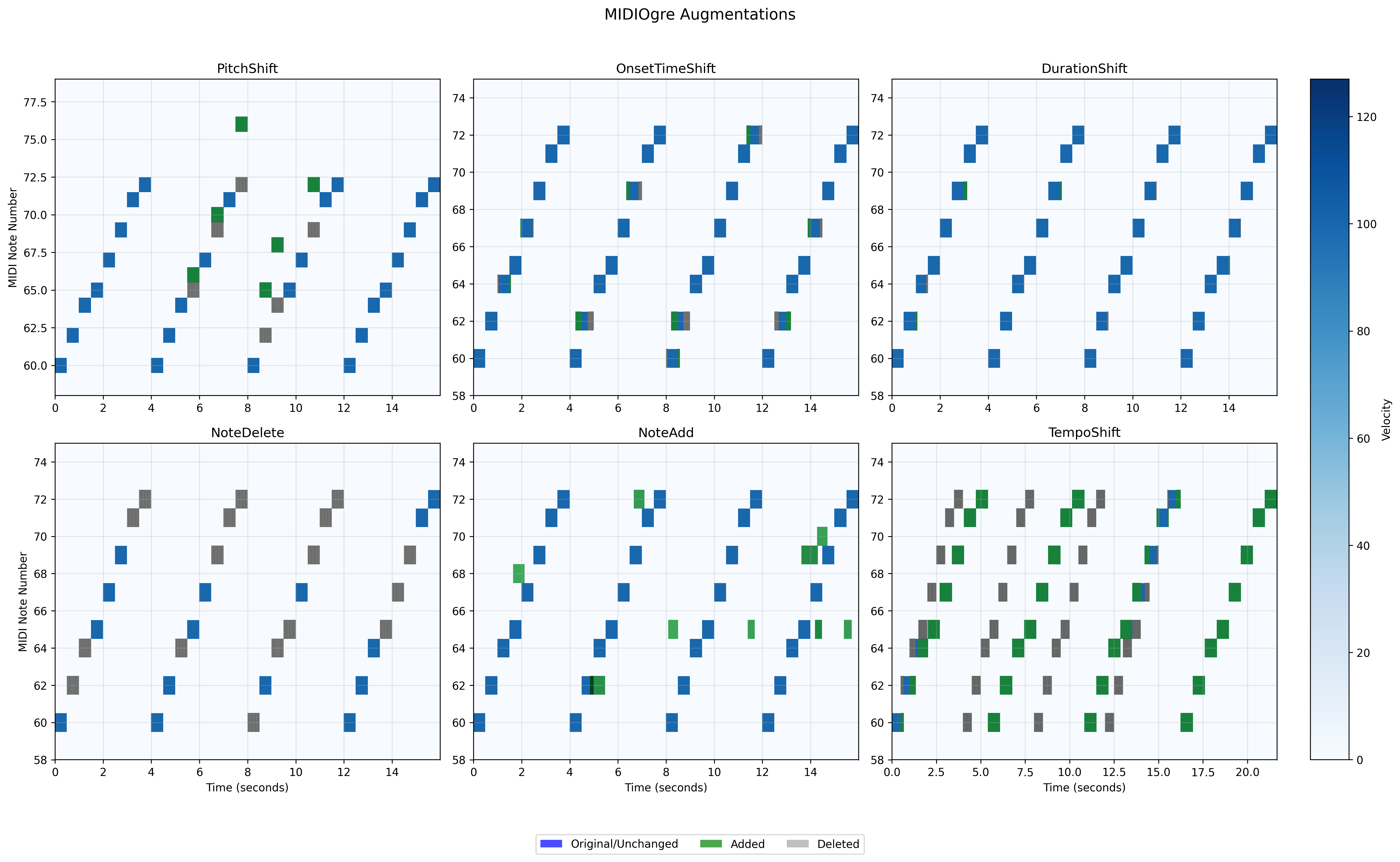
MIDIOgre is a powerful Python library for performing data augmentations on MIDI inputs, primarily designed for machine learning models operating on symbolic music data. With MIDIOgre, you can easily generate variations of MIDI sequences to enrich your training data and improve the robustness and generalization of your models.
While inspired by the functionalities of existing libraries like mdtk and miditok, MIDIOgre offers on-the-fly augmentation similar to albumentation and audiomentation, generating randomly modified MIDI data directly in RAM to enable extensive augmentation with minimal memory overhead.
Features
- Comprehensive MIDI Augmentations: A wide range of transformations including pitch shifting, onset time modification, duration changes, and more
- Easy Integration: API design follows PyTorch augmentation scheme to integrate seamlessly with machine learning workflows
- Customizable: Flexible parameters for fine-tuning augmentations to your needs
- Efficient: Optimized for handling large MIDI datasets
Installation
Prerequisites
- Python 3.8 or higher
- pip package manager
Install from PyPI
pip install midiogre
The following scenarios will require the development version of pretty-midi from GitHub:
- When using
TempoShiftfollowed by other MIDIOgre augmentations in aComposepipeline - This is because
TempoShiftreturns amido.MidiFileobject that needs to be converted back to apretty_midi.PrettyMIDIobject
If you need this functionality, install the development version of pretty-midi:
pip install "pretty-midi @ git+https://github.com/craffel/pretty-midi"
If you encounter any installation issues, try upgrading pip first:
pip install --upgrade pip
Install from source (for development)
# Clone the repository
git clone https://github.com/a-pillay/MIDIOgre.git
cd MIDIOgre

# Create and activate a virtual environment (optional but recommended)
python -m venv .venv
source .venv/bin/activate  # On Windows, use `.venv\Scripts\activate`

# Install in editable mode with development dependencies
pip install -e ".[dev]"
Documentation
The complete documentation for MIDIOgre is available online at https://a-pillay.github.io/MIDIOgre/. The documentation includes:
- Detailed API reference
- Usage examples
- Tutorials
- Best practices
- Development guidelines
Quick Start
from midiogre.augmentations import PitchShift, OnsetTimeShift, NoteDelete
from midiogre.core import Compose
import pretty_midi

# Basic usage - single file augmentation
midi_data = pretty_midi.PrettyMIDI('input.mid')
transform = Compose([
    PitchShift(max_shift=3, mode='both', p=0.8),
    OnsetTimeShift(max_shift=0.1, mode='both', p=0.5)
])
augmented = transform(midi_data)
augmented.write('output.mid')

# Integration with ML pipelines
class MIDIDataset(torch.utils.data.Dataset):
    def __getitem__(self, idx):
        # Your MIDI loading logic here
        midi_data = load_midi(idx)
        return self.transform(midi_data) if self.transform else midi_data

# Define augmentation pipeline for training
transform = Compose([
    PitchShift(max_shift=3, mode='both', p=0.8),      # Randomly transpose by ±3 semitones
    OnsetTimeShift(max_shift=0.1, mode='both', p=0.5), # Shift note timings by up to 100ms
    NoteDelete(p=0.3)                                  # Randomly remove up to 30% of notes
])

# Use in your training pipeline
train_dataset = MIDIDataset(transform=transform)
val_dataset = MIDIDataset(transform=None)  # No augmentation for validation
Available Augmentations
Currently Implemented
- PitchShift: Transpose MIDI note values of selected instruments
- OnsetTimeShift: Modify note onset times while preserving durations
- DurationShift: Alter note durations while maintaining onset times
- NoteDelete: Remove notes from instrument tracks
- NoteAdd: Add new notes to instrument tracks
- TempoShift: Modify the global tempo of MIDI files
Planned Features
- NoteSplit: Split notes into multiple segments
- VelocityShift: Modify MIDI note velocities
- Swing-based augmentations
- MIDI CC based augmentations
- Semantically-meaningful augmentations (respecting rhythms & beats)
Development
Please note that this project is developed with the assistance of Cursor, mostly for runtime optimizations, unit-testing, documentation and build pipelines.
Setting up for development
# Install development dependencies
pip install -r requirements-dev.txt

# Install documentation dependencies (if working on docs)
pip install -r requirements-docs.txt
Running Tests
pytest tests/
# For coverage report
pytest --cov=midiogre tests/
Versioning
MIDIOgre uses setuptools_scm for versioning based on git tags:
-
Release versions (e.g.,
vX.Y.Z): Created from git tags. To create a new release:git tag -a vX.Y.Z -m "Release vX.Y.Z" git push origin vX.Y.Z
This will trigger the release workflow and publish to PyPI with version
X.Y.Z.post0. -
Development versions (e.g.,
vX.Y.Z.postN): Automatically generated for commits to the main branch. These are also published to PyPI but marked as development releases.
Contributing
Contributions are welcome! Here's how you can help:
- Fork the repository
- Create a new branch (
git checkout -b feature/amazing-feature) - Make your changes
- Run the tests to ensure everything works
- Commit your changes (
git commit -m 'Add amazing feature') - Push to the branch (
git push origin feature/amazing-feature) - Open a Pull Request
Areas where we particularly welcome contributions:
- Comprehensive unit tests
- Documentation improvements
- New augmentation techniques
- Performance optimizations
- Bug fixes
License
This project is licensed under the MIT License - see the LICENSE file for details.
Citation
If you use MIDIOgre in your research, please cite:
@software{midiogre2024,
  author = {Pillay, A},
  title = {MIDIOgre: MIDI Data Augmentation Library},
  year = {2024},
  publisher = {GitHub},
  url = {https://github.com/a-pillay/MIDIOgre}
}
Acknowledgments
- Inspired by:
- Built with pretty-midi
Contact
For questions, suggestions, or collaboration opportunities, please reach out via GitHub Issues.
1 maintainer

Metadata
1 maintainer
Release files for midiogre 0.1.12.post0
For a detailed explanation of source distributions (sdists) and built distributions (wheels), please see the package formats documentation.
Source distribution (sdist)
| File | Size | Uploaded | Provenance | Actions |
|---|---|---|---|---|
| midiogre-0.1.12.post0.tar.gz | 946.7 kB | With provenance | Details for midiogre-0.1.12.post0.tar.gz |
Built distribution (wheel)
| File | Interpreter | ABI | Platform | Actions Reset |
|---|---|---|---|---|
| midiogre-0.1.12.post0-py3-none-any.whl | Python 3 | none | any | Details for midiogre-0.1.12.post0-py3-none-any.whl |
Total release size: 979.2 kB
Release files / midiogre-0.1.12.post0.tar.gz
| Download URL | midiogre-0.1.12.post0.tar.gz |
|---|---|
| Size | 946.7 kB |
| Tags | Source |
|
SHA-256 checksum How to use checksums |
f36c2c10168f063bdca95fe31bff66aca45277de42d27c665cb8fada0d90b052
|
|
BLAKE2b-256 checksum How to use checksums |
a50b9ccd3fdb07465a1870e85936d237694530d8f3bb120e255bb73cd3bd166a
|
| Upload date | |
|
Uploaded using Trusted Publishing? What is trusted publishing? |
Yes |
| Uploaded via |
twine/6.1.0 CPython/3.12.9
|
Provenance
Provenance describes where a file came from. On PyPI, provenance is shared via attestations, which provide a verifiable record of the build or publishing details. View details, limitations and caveats.


PyPI Publish Attestation
PyPI verified that this artifact, at this checksum, originated from the publisher listed below.
Signed by GitHub Actions, verified by PyPI on Mar 24, 2025.
Transparency logRelease files / midiogre-0.1.12.post0-py3-none-any.whl
| Download URL | midiogre-0.1.12.post0-py3-none-any.whl |
|---|---|
| Size | 32.5 kB |
| Tags | Python 3 |
|
SHA-256 checksum How to use checksums |
87d8448d53c5345fdf503d2aaab4aa62a72d41551faac3f16357d052b9b6b5d0
|
|
BLAKE2b-256 checksum How to use checksums |
ce5ae2ee9d2f467212660c644781733b604fdd08481046ee5f36a26360bb166c
|
| Upload date | |
|
Uploaded using Trusted Publishing? What is trusted publishing? |
Yes |
| Uploaded via |
twine/6.1.0 CPython/3.12.9
|
Provenance
Provenance describes where a file came from. On PyPI, provenance is shared via attestations, which provide a verifiable record of the build or publishing details. View details, limitations and caveats.
PyPI Publish Attestation
PyPI verified that this artifact, at this checksum, originated from the publisher listed below.
Signed by GitHub Actions, verified by PyPI on Mar 24, 2025.
Transparency logSecurity for midiogre 0.1.12.post0
Provenance
Provenance describes where a file came from. On PyPI, provenance is shared via attestations, which provide a verifiable record of the build or publishing details. View details, limitations and caveats.
Full provenance
Both files in this release have been uploaded with provenance metadata.
Attestation for midiogre-0.1.12.post0.tar.gz
PyPI Publish Attestation
PyPI verified that this artifact, at this checksum, originated from the publisher listed below.
Signed by GitHub Actions, verified by PyPI on Mar 24, 2025.
Transparency logA note on package security
PyPI is a repository for distributing packages, not a service for auditing them. While third-party security researchers and our staff do their best to detect and remove malicious packages, PyPI cannot guarantee the quality, security or suitability of any given package.
To learn more about protecting yourself from malicious actors, visit our package security documentation.














