
Mikado Graph
Python tool to draw graphs for Mikado refactoring.
- Learn what is the Mikado method
- Learn how to leverage Mikado graphs in your refactoring tasks
- Python package hosted on pypi
Quickstart
Start by saving this description file as as example.txt
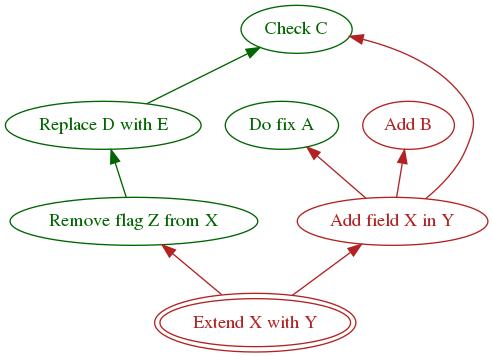
_ Extend X with Y
    x Remove flag Z from X
        x Replace D with E
            x Check C
    # Ignore this line
    _ Add field X in Y
        x Do fix A
        _ Add B
        x Check C
Then run
pip install mikado-graph
mikado example.txt --view
A new window should display the graph below
Explore the options using --help
mikado --help
And learn more about the description file format below.
Graph description symbols
Parent/child dependency is encoded by indentation.
There are three kinds of nodes in the graph
- Comments are prefixed by one of the following symbol:
//,# - Done tasks (drawn in green) are prefixed by one of the following symbols:
v,V,x,X - Pending tasks (drawn in red) are prefixed by any symbol that is not used by the above two choices.
We recommend using
_to keep the description file human readable
Dev & Deploy
Deploy by running
python setup.py sdist bdist_wheel
twine upload dist/*
Known issues
graphvizwill always save a temporary file when asked to render the graph.
1 maintainer

Release files for mikado-graph 0.1.5
For a detailed explanation of source distributions (sdists) and built distributions (wheels), please see the package formats documentation.
Source distribution (sdist)
| File | Size | Uploaded | |
|---|---|---|---|
| mikado_graph-0.1.5.tar.gz | 3.8 kB | Details |
Built distribution (wheel)
| File | Interpreter | ABI | Platform | Reset |
|---|---|---|---|---|
| mikado_graph-0.1.5-py3-none-any.whl | Python 3 | none | any | Details |
Total release size: 8.0 kB
Release files / mikado_graph-0.1.5.tar.gz
| Download URL | mikado_graph-0.1.5.tar.gz |
|---|---|
| Size | 3.8 kB |
| Tags | Source |
|
SHA-256 checksum How to use checksums |
1dc0527a61fd83020293f8d0daf70c96ca03d8f7e636b32c2702e1edfce7fd80
|
|
BLAKE2b-256 checksum How to use checksums |
ef9598b3ab0327012e4c0303ad46efec1dcafd8e236e5631b1cce5b1360f91ac
|
| Upload date | |
|
Uploaded using Trusted Publishing? What is trusted publishing? |
No |
Release files / mikado_graph-0.1.5-py3-none-any.whl
| Download URL | mikado_graph-0.1.5-py3-none-any.whl |
|---|---|
| Size | 4.2 kB |
| Tags | Python 3 |
|
SHA-256 checksum How to use checksums |
0c5997550b399a74cdb9fd7166ea09c97571f726348658f020672508d25292e6
|
|
BLAKE2b-256 checksum How to use checksums |
d43f509a110d1d365470b68872a904b3dec0a597408559fcee47ed9aa7d58401
|
| Upload date | |
|
Uploaded using Trusted Publishing? What is trusted publishing? |
No |














