
Unified AI agent framework: one interface for 9 LLM providers (Qwen, Kimi, GLM, DeepSeek, MiniMax, Doubao, ChatGPT, Gemini, Claude) with tools, MCP, sub-agents, skills, RAG knowledge base, scheduler, multi-channel IM gateway (WeChat/Feishu/Telegram) and multi-user serving

Project description
🦌 milu
Production-ready multi-user AI agents — with Chinese LLMs as first-class citizens.
Multi-user agent pool · One interface for 9 LLM providers (Chinese-first) · Built-in tools & MCP · Sub-agents · Skills · RAG · Scheduler · Multi-channel IM gateway · Observability dashboard



English | 简体中文
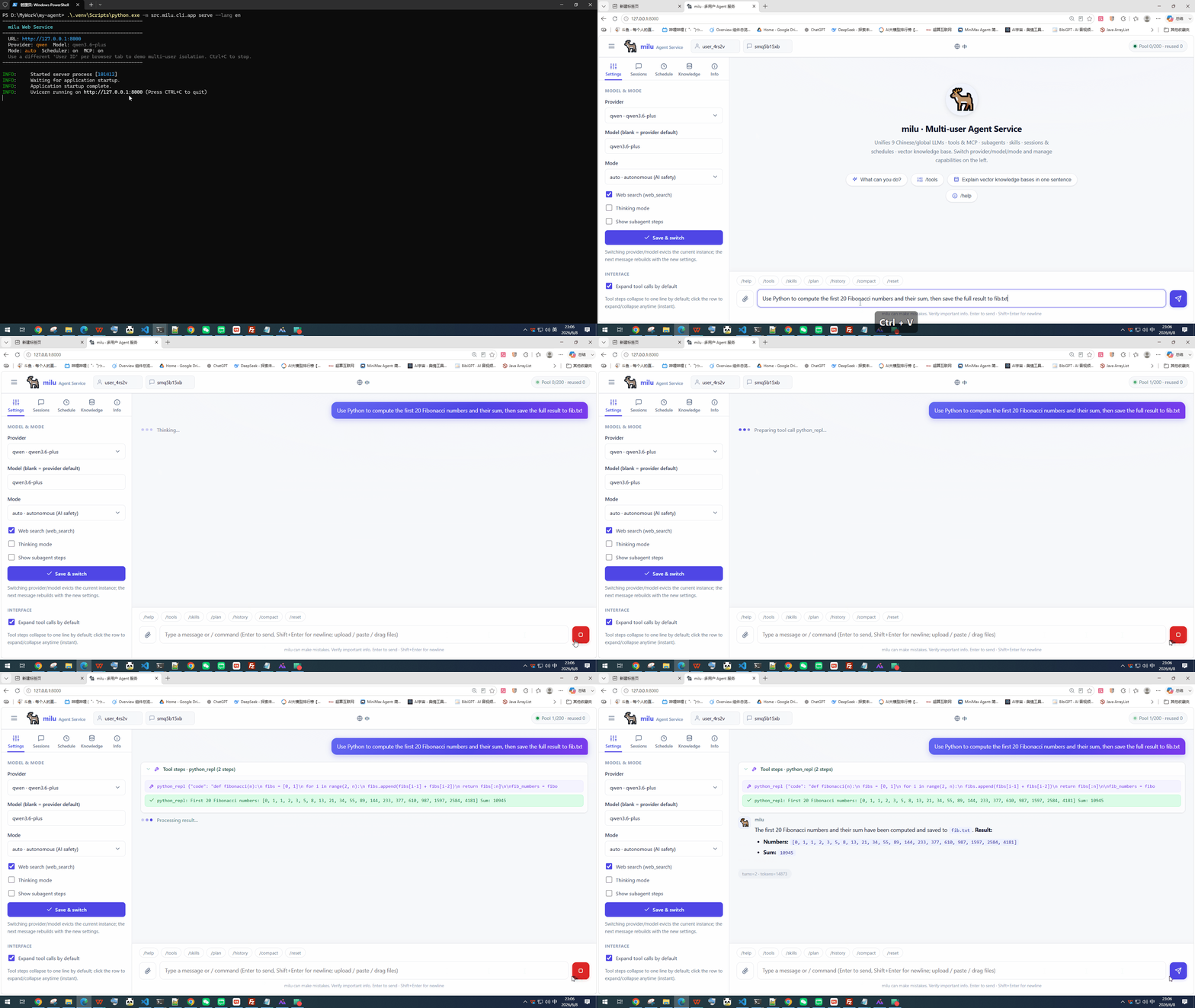
Multi-user web UI · milu serve — streaming chat with tools, skills & sub-agents
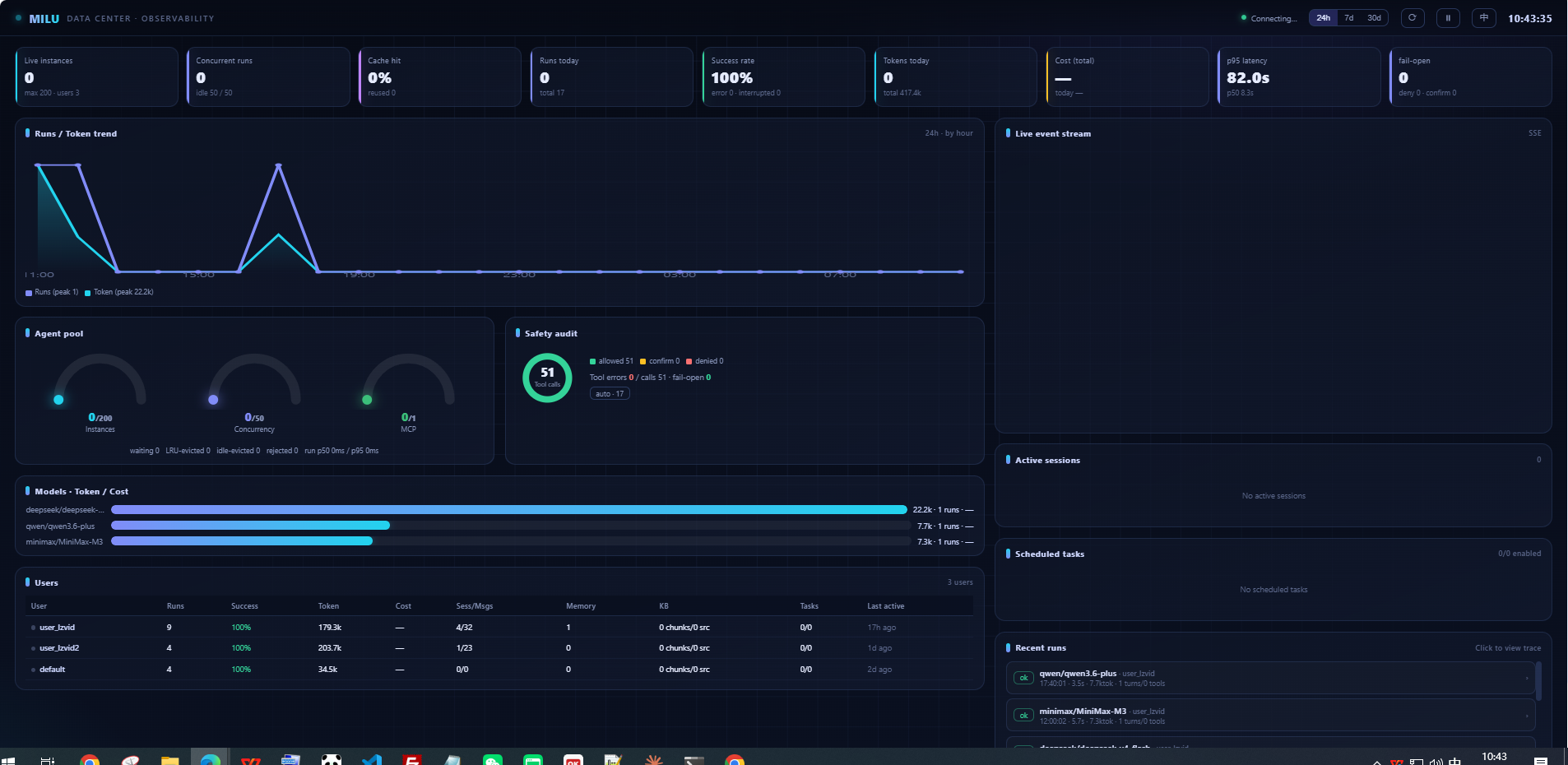
Built-in cross-user observability dashboard · milu serve → /dashboard
Why milu?
Most agent frameworks stop at single-user demos, and treat Chinese LLM providers as an afterthought. milu starts where they stop:
- 🏭 From demo to production in one library
AgentPoolgives you per-user agent isolation, LRU/TTL eviction, global concurrency limits and shared MCP processes. The question every framework leaves as "an exercise for the reader" — "my demo works, how do I serve 100 concurrent users without sessions bleeding into each other?" — is answered here, backed by 1300+ tests. The same pool maps tenants to their own API keys (KeyedLLMProvider), so it scales from a side project to multi-tenant SaaS. - 🇨🇳 Chinese LLMs as first-class citizens
Qwen, DeepSeek, Kimi, GLM, MiniMax, Doubao natively supported alongside OpenAI, Gemini and Claude. Nobase_urljuggling, provider quirks (thinking mode, built-in web search, parameter differences) pre-adapted, plus a China-reachable search backend out of the box. - 🔋 Batteries actually included
20+ built-in tools (files, shell, Python, web fetch/search, Office/PDF reading, vision input), MCP protocol (stdio/HTTP/SSE), sub-agents, skills, session persistence, automatic context compaction, long-term memory, RAG knowledge base, scheduled tasks, and a built-in multi-user web service. - 📡 Reach users on the platforms they already use
Onemilu gatewayconnects your agent to WeChat Work customer service, Feishu/Lark, and Telegram — Ports & Adapters under the hood, so adding a platform is just one Channel. Per-user isolation, image & file attachments, persistent dedup/cursor across restarts,/commands with admin tiers, and strict sandbox isolation for public deployments. WeChat/Feishu webhook & Telegram work with a plainpip install milu— no extra deps. - 🛡️ A real safety model — soft gate and hard isolation
Four operation modes (talk/manual/auto/superwork), an AI safety judge for unsafe tool calls (Claude-Code-style), human confirmation flows, and delegation that never bypasses approval. Beyond deciding whether a call runs, milu controls where it runs:python_repl/shell_commandexecute in a hardened subprocess by default (scrubs*_API_KEY, real timeout-kill, crash isolation), or a fully isolated Docker sandbox (no host FS / network / secrets, mounts only the per-user workspace) — andmultiuser=strictbundles Docker isolation with a file-tool workspace jail into one switch for public, multi-user deployments. - 🔭 Observability built in
EveryAgent.run()is a span tree (attribute names aligned with the OpenTelemetry GenAI semantic conventions): per-run tokens / cost / latency, TTFT, time split across LLM vs tools vs safety-judge vs approval-wait, sub-agent nesting, and fail-open audit. Inspect runs from the CLI (milu trace list/show/compare/stats), the per-run waterfall in the web "Observability" panel, or the cross-user dashboard at/dashboard(shown above) — pool & concurrency gauges, run / token trends, a safety-audit ring, per-model cost, per-user profiles and a live event stream across all users, admin-gated byMILU_ADMIN_TOKEN. - 🪶 Thin by design
Built directly on theopenaiSDK as the unified HTTP client. Events stream out as plain dataclasses. No chains, no graphs, no DSL to learn.
Two ways to use it
milu is both a ready-to-run agent and a framework to build on — start instantly, embed when you need to:
- 🚀 Run it
milufor chat,milu servefor a multi-user service — full capabilities, zero code. Both the CLI and the web UI ship in English and 中文. - 🧩 Build on it
from milu import Agentto embed agents in your own backend, then scale to multi-user / multi-tenant with AgentPool — you own your data and stack.
Install
[!TIP] One
pip install milugets everything — CLI, web service, RAG knowledge base and MCP are all included. You only need at least one provider API key to start.
With pip — if you already have Python 3.10+:
pip install -U milu           # everything included: CLI, web service, RAG, MCP, IM gateway
                              # -U installs fresh, and upgrades an existing install to the latest
pip install -U "milu[ddg]"    # optional: adds the key-free DuckDuckGo backend for web_search
                              # (Rust-based dep; kept optional so milu installs on Termux/Alpine)
pip install -U "milu[feishu-ws]"  # optional: Feishu/Lark long-connection mode (tunnel-free local dev)
[!TIP] In mainland China and the download is slow? Use a domestic mirror to speed it up, e.g.
pip install -U milu -i https://mirrors.aliyun.com/pypi/simple/(works from any machine with public internet).
New to Python? Beginner step-by-step
- Download Python 3.10+ from python.org/downloads. On Windows, tick "Add Python to PATH" during setup.
- Open a terminal (Windows: PowerShell · macOS: Terminal) and check:
python --versionshould print 3.10 or higher. pip install -U milumiluto start chatting.
No existing Python? — the easiest one-liner. uv installs Python and milu for you:
# 1. install uv (one line, needs no Python)
curl -LsSf https://astral.sh/uv/install.sh | sh            # macOS / Linux
powershell -c "irm https://astral.sh/uv/install.ps1 | iex" # Windows

# 2. install milu (uv fetches a Python automatically if missing)
uv tool install milu
Docker — no Python on the host at all (clone the repo first for the compose file; details in docs/Docker部署.md):
git clone https://github.com/stephonGAO/milu && cd milu
cp .env.example .env          # fill in at least one provider API key
docker compose up -d
Quick start
[!NOTE] First run launches an interactive setup wizard — pick a provider, paste an API key, and you're chatting. Zero config to first conversation.
CLI — zero config to first conversation:
milu # first run guides you through provider + API key setup
Multi-user web service — one command:
milu serve # multi-user chat + full-featured demo UI at http://127.0.0.1:8000
Code — a full-featured agent in 3 lines:
from milu import Agent, ModelRegistry

agent = Agent(ModelRegistry.create("deepseek", model="deepseek-v4-flash"))
async for event in agent.run("What time is it? Use a tool to check."):
    ...
Agent(llm) is the complete package by default: built-in system prompt, 20+ tools, skills, three sub-agents, session persistence and context compaction — pass explicit arguments only to override.
How it compares
| Capability | milu | LangChain | CrewAI | smolagents | Qwen-Agent |
|---|---|---|---|---|---|
| Chinese providers native (6) | ✅ | community pkgs | via LiteLLM | via LiteLLM | Qwen family |
| Multi-user pool, in-library | ✅ AgentPool | platform (paid) | platform | — | — |
| MCP protocol | ✅ 3 transports | ✅ | ✅ | ✅ | ✅ |
| Built-in tools (files/docs/vision/search) | ✅ 20+ | install per-integration | partial | minimal | partial |
| Tool-safety modes + AI judge | ✅ | — | — | sandbox only | — |
| RAG knowledge base, in-library | ✅ | assemble yourself | partial | — | ✅ |
| Scheduled tasks (multi-user) | ✅ | — | — | — | — |
| IM channel gateway (WeChat/Feishu/Telegram) | ✅ milu gateway |
— | — | — | — |
| Observability: tracing + dashboard | ✅ span-tree + /dashboard |
LangSmith (paid) | platform (paid) | OTel hooks | — |
| CLI + web service out of the box | ✅ | — | partial | — | demo UI |
✅ = built-in; "—" = not built-in (often available via an external platform or a few lines of your own code). Reflects each library as of June 2026 — these move fast, so corrections are welcome via issue/PR.
When milu is the right fit: you're building on Chinese LLMs, you need a production multi-user / multi-tenant service (not just a single-user demo), and you want batteries included — runnable as-is, embeddable as a library, or used as a powerful yet flexible core and intelligent base to build your own product on.
When to choose something else: for the largest integration ecosystem, LangChain; for pure multi-agent orchestration, CrewAI or AutoGen; for a tiny, barebones core with almost nothing built in, smolagents.
What you can build
- Personal AI assistant
miludrops you into a chat in one command; long-term memory remembers your preferences, scheduled tasks handle reminders and daily digests, and built-in tools (web search, files, docs, vision) are ready to use — all running locally, your data stays yours. - Enterprise knowledge assistant
Load manuals / FAQs / policies into the RAG knowledge base; auto-retrieval each turn, source-aware answers that separate "internal docs vs web", no hallucinated guesses. Per-user isolated sessions and memory. - Customer-support / ticket bot on IM platforms
milu gatewayputs your agent in WeChat Work customer service, Feishu or Telegram in one command; AgentPool handles many concurrent users, safety modes + strict sandbox isolation gate what actions run, and image/file attachments are read out of the box. - Vertical / industry assistant
Sub-agents + document & vision reading + MCP to plug into your own systems and databases, bringing domain knowledge and real data in. - An "AI coworker" for your team
Pull tasks from chat, nudge progress on a schedule, auto-generate recap summaries (scheduled tasks + multi-user + tools). - Private / on-prem deployment
docker compose up -d; runs entirely in your environment with Chinese (or any) LLMs, data never leaves. - Multi-tenant SaaS / a base for AI app vendors
KeyedLLMProvidermaps tenants to their own API keys; the pool enforces per-user instance and concurrency isolation — scale from a side project to a multi-tenant product.
Examples
1 · Call any LLM directly (streaming)
import asyncio
from milu import ModelRegistry, Message, MessageRole

async def main():
    llm = ModelRegistry.create("qwen", model="qwen3.6-plus")
    async for chunk in llm.chat([Message(role=MessageRole.USER, content="Hello!")]):
        if chunk.content:
            print(chunk.content, end="", flush=True)

asyncio.run(main())
Swap "qwen" for "deepseek", "kimi", "glm", "minimax", "doubao", "openai", "gemini" or "anthropic" — same interface, API keys read from {PROVIDER}_API_KEY environment variables.
2 · Agent with tools and events
import asyncio
from milu import Agent, ModelRegistry, AgentDone, TextDelta

async def main():
    agent = Agent(ModelRegistry.create("deepseek", model="deepseek-v4-flash"))
    async for evt in agent.run("Summarize the contents of ./report.pdf"):
        if isinstance(evt, TextDelta):
            print(evt.text, end="", flush=True)
        elif isinstance(evt, AgentDone):
            print(f"\n[done in {evt.turn_count} turns]")

asyncio.run(main())
The agent streams typed events — text deltas, reasoning, tool calls, confirmations, sub-agent progress — consume what you need, ignore the rest.
3 · Custom tools
from milu import Agent, tool

@tool(name="add", description="Add two numbers", is_safe=True)
async def add(a: int, b: int) -> int:
    """:param a: first number\n:param b: second number"""
    return a + b

agent = Agent(llm, tools=[add])        # explicit list replaces built-ins
is_safe=False routes the call through the active safety mode: auto-judged by AI, confirmed by a human, or blocked — depending on the mode.
4 · Safety modes
agent = Agent(llm, mode="manual")   # unsafe tools wait for human approval
agent.set_mode("talk")              # read-only: unsafe tools blocked
| Mode | Behavior |
|---|---|
talk |
read-only — every unsafe tool call is blocked |
manual |
safe tools run; unsafe tools emit a confirmation event and wait |
auto (default) |
autonomous; unsafe calls are screened by an AI safety judge (allow / confirm / deny) |
superwork |
full permissions, no checks |
[!WARNING]
superworkskips every safety check (including the AI judge). Use it only for fully trusted tasks.
Sub-agents inherit the parent's mode and confirmation callback — delegation is never a bypass.
5 · Long-term memory & RAG knowledge base
agent = Agent(llm, memory="user-42", knowledge="user-42")
- Memory: small set of durable facts, rendered into the system prompt every turn, survives across sessions and processes.
- Knowledge: chunked + embedded documents (pdf/docx/xlsx/pptx/md/txt) with cosine retrieval, source-catalog routing in the prompt, optional per-turn auto-retrieval, and
kb_search/kb_ingest/kb_managetools. Per-user isolated storage.
6 · Multi-user concurrency (AgentPool)
from milu import AgentPool, ModelRegistry

llm = ModelRegistry.create("qwen", model="qwen3.6-plus")   # coroutine-safe, shareable
pool = AgentPool.from_llm(llm)
await pool.start()

async with pool.acquire("user-1", "session-A") as h:
    async for evt in h.agent.run("Hello!"):
        ...

await pool.stop()
Four hard invariants: ≤1 agent per (user, session) · bounded instance count · bounded concurrent runs · idle agents evicted. Sessions, memory and knowledge are derived per-user automatically.
7 · MCP servers
// config/mcp_servers.json
{
  "mcpServers": {
    "playwright": { "command": "npx", "args": ["@playwright/mcp@latest"] },
    "my-http":    { "type": "streamable_http", "url": "http://localhost:3000/mcp" }
  }
}
stdio / streamable HTTP / SSE transports, parallel connection with error isolation, and a dormant-pool design: MCP tool schemas don't bloat the context — the agent discovers and activates them on demand. For high-concurrency deployments, one shared set of MCP processes can serve the entire pool.
8 · Scheduled tasks
milu chat
> Remind me every weekday at 9am to summarize yesterday's AI news   # agent creates the task
Cron-style scheduling per user, executed inside milu chat / milu serve (or a standalone milu scheduler start daemon) with a single-instance lock and automatic takeover. Results are delivered to an outbox file, server push, or desktop notification.
9 · Built-in web service (multi-user chat UI)
milu serve # multi-user chat + full-featured demo UI at http://127.0.0.1:8000
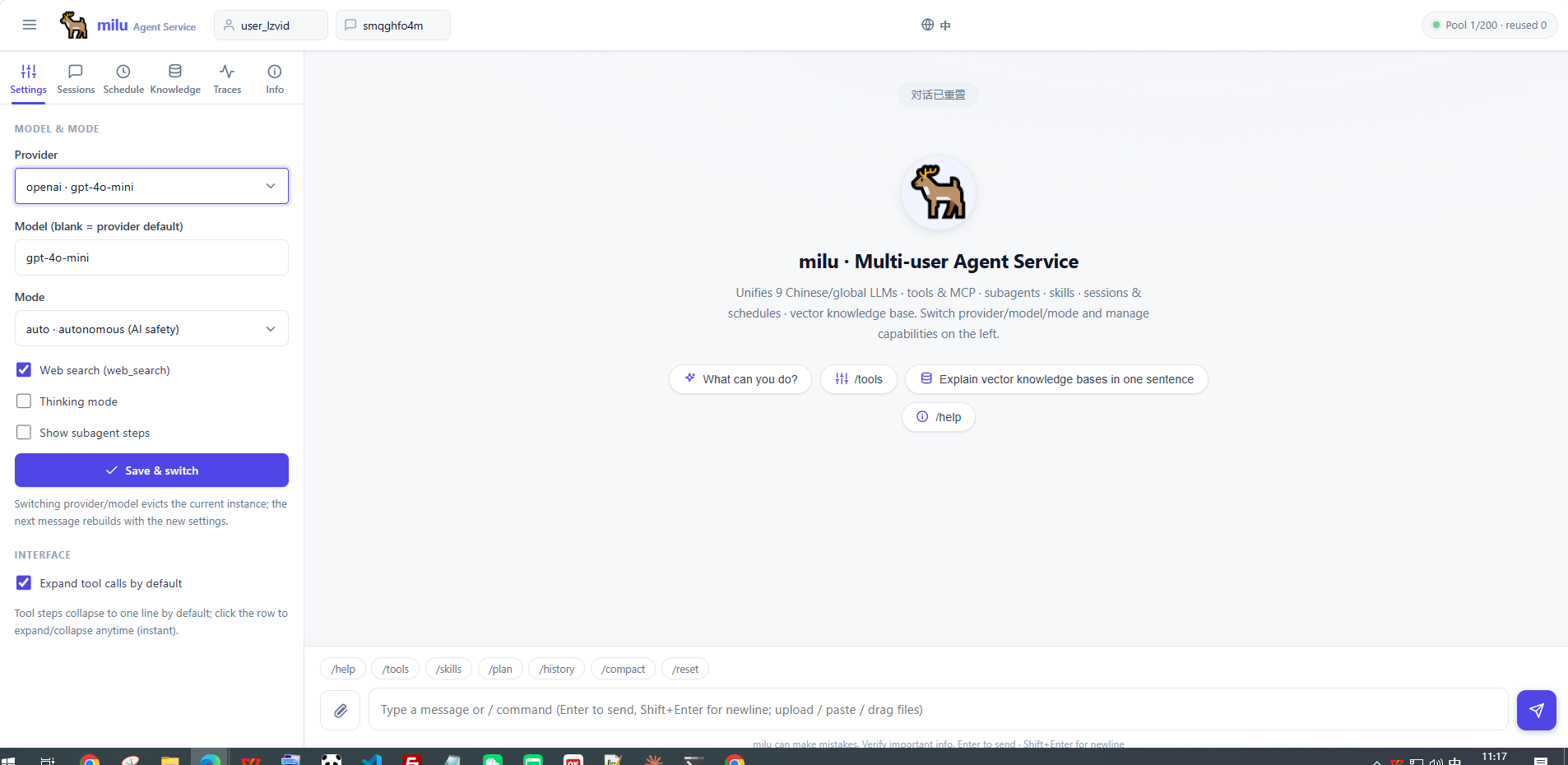
milu serve ships a full multi-user web UI in one command: streaming chat (text / reasoning / tool calls / sub-agents), provider & mode switching, session management, scheduled tasks, and a knowledge-base panel — plus chat attachments (images / docs) and a risky-tool confirmation dialog. Pure vanilla front-end, no build step. Fully bilingual — toggle EN / 中文 in the top bar.
10 · Multi-channel gateway (WeChat / Feishu / Telegram)
# configure any channel's credentials in .env, then one command:
milu gateway                      # auto-enables channels whose credentials are set
milu gateway --channel telegram   # or pick specific channels
milu config set multiuser strict  # docker + workspace jail for public deployments
Or wire it in code (Ports & Adapters — adding a platform is one Channel):
from milu.channels import AgentRunner, Gateway, FileStateStore
from milu.channels.telegram import TelegramChannel, TelegramConfig
from milu import ModelRegistry

runner = AgentRunner.from_llm(ModelRegistry.create("qwen", model="qwen3.6-plus"))
channels = [TelegramChannel(TelegramConfig.from_env(), state=FileStateStore())]
Gateway.from_runner(runner, channels).run(port=8800)
Each platform is one adapter; the milu-facing core is platform-agnostic. Per-user
isolation, persistent dedup/cursor (no double replies or replays across restarts),
inbound images (vision) and file attachments (doc_read/file_read), and optional /
commands with admin tiers. See docs/Gateway 多渠道接入.md.
CLI
milu                 interactive chat (first run launches setup wizard)
milu setup           provider / API key / search backend wizard
milu chat -p glm     chat with a specific provider
milu run "..." -q    one-shot execution, pipe-friendly
milu serve           multi-user web service + demo UI
milu gateway         IM gateway (WeChat / Feishu / Telegram), auto-detects channels
milu providers       list 9 providers and key status
milu trace ...       inspect agent runs (list / show / compare / stats)
milu config ...      layered config (CLI > user > project > defaults)
milu sessions list   browse saved sessions
milu schedule ...    manage scheduled tasks
milu scheduler start  run the scheduler as a standalone daemon
milu version          print the installed version
milu --lang en ...   switch UI language for one run (zh / en)
Language (中文 / English). Both the CLI and the web UI are fully bilingual. Pick the interface language in any of these ways:
milu --lang en providers        # one-off override (also accepts --lang zh)
$env:MILU_LANG="en"; milu chat   # per-session via env var (PowerShell; bash: MILU_LANG=en)
milu config set lang en          # persist to ~/.milu/config.json
milu setup                       # the wizard asks for language as its first step
Priority: --lang > MILU_LANG > config.json lang > default zh. In the web UI, use the EN / 中文 toggle in the top bar.
Architecture
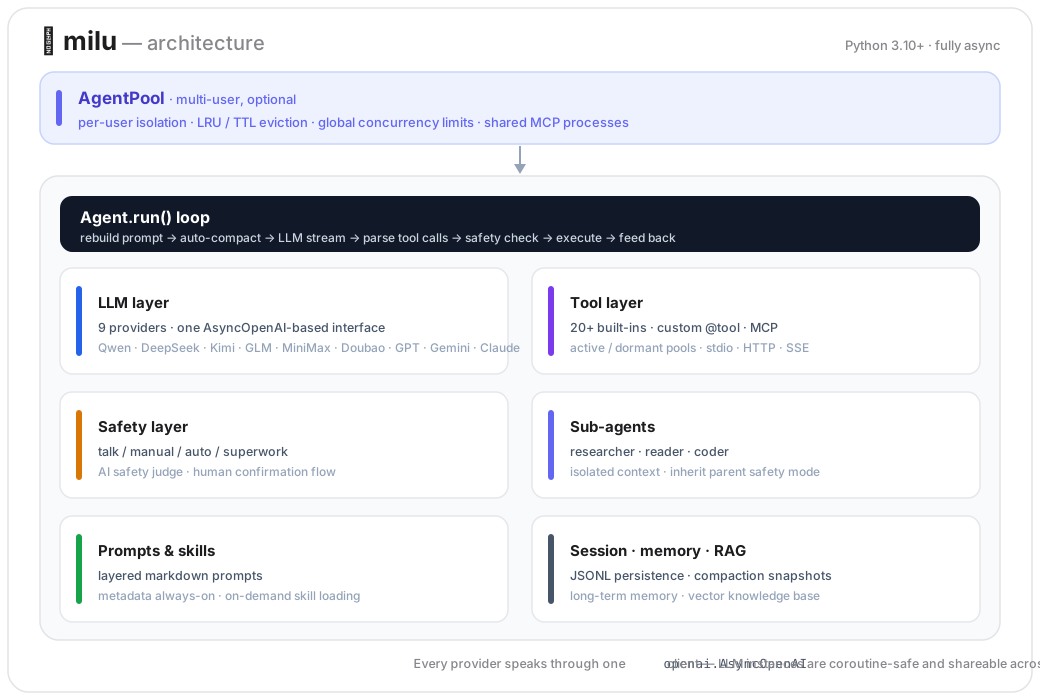
Text version
AgentPool (multi-user, optional)
  └─ Agent.run() loop ── system prompt rebuild → auto-compaction
       ├─ LLM layer        9 providers, one AsyncOpenAI-based interface
       ├─ Tool layer       built-ins · custom @tool · MCP (active/dormant pools)
       ├─ Safety layer     modes · AI judge · confirmation flow
       ├─ Sub-agents       researcher / reader / coder (isolated context)
       ├─ Prompts & skills layered markdown prompts · on-demand skill loading
       ├─ Session          JSONL persistence · compaction snapshots
       └─ Observability    span-tree tracing · per-run cost / latency · milu trace
Python 3.10+ · fully async · every provider speaks through one openai.AsyncOpenAI client, so LLM instances are coroutine-safe and shareable across users.
Production notes
- Scaling out: route by
user_id(e.g. nginxip_hash); per-session serialization is handled by in-process entry locks — no distributed locks needed. Sessions persist to disk and recover after eviction or restart. - Memory budget: MCP subprocesses are the dominant cost (15–50 MB per agent). Enable shared MCP (
AgentPoolConfig(shared_mcp=True)) to keep one set of MCP processes for the whole pool. - Multi-tenant keys:
KeyedLLMProvidercaches one LLM client per distinct API key with LRU eviction — seeexamples/multi_tenant_keys.py. - Docker: see docs/Docker部署.md — health checks, data volumes, SSE reverse-proxy settings, scheduler single-instance behavior.
Roadmap
- Observability: span-tree tracing (OTel GenAI semconv-aligned) + CLI
milu trace - Multi-user observability dashboard (cross-user data-center view at
/dashboard) - OTLP exporter for the tracing layer
- Pluggable sandbox backends for
python_repl/shell_command(subprocess isolation by default — scrubs*_API_KEY, real timeout-kill, crash isolation, guarded-open;localfor zero overhead;dockerfor true isolation — containerized, no host FS/network/secrets, mounts only the per-user workspace; opt-in, zero pip deps) - Strict multi-user deployment profile (
multiuser=strictbundles docker isolation + file-tool workspace jail + no-network in one switch; per-key overridable with startup warnings) - Multi-channel IM gateway (WeChat Work / Feishu / Telegram over Ports & Adapters;
milu gateway, inbound images & files,/commands with admin tiers) - Voice / audio message ingestion for the gateway (ASR transcription)
- Pluggable ANN backends for the knowledge store (sqlite-vec) beyond brute-force cosine
- English documentation set (architecture & guides — currently Chinese)
- Prebuilt images on a container registry
- One-click installers / standalone binaries (no Python required)
Contributing
Issues and PRs welcome. Run the test suite with:
pip install -e ".[dev]"
python -m pytest tests/ --ignore=tests/test_real_api.py --ignore=tests/test_real_new_providers.py -q
License
MIT. Five built-in skills are ported from anthropics/skills (Apache-2.0) and obra/superpowers (MIT) — see THIRD_PARTY_NOTICES.
milu (麋鹿) — named after Père David's deer, the legendary Chinese animal that "resembles four creatures yet is none of them" — one body, the strengths of many.


Download files
Download the file for your platform. If you're not sure which to choose, learn more about installing packages.
Source Distribution
Built Distribution
Filter files by name, interpreter, ABI, and platform.
If you're not sure about the file name format, learn more about wheel file names.
Copy a direct link to the current filters
File details
Details for the file milu-0.5.0.tar.gz.
File metadata
- Download URL: milu-0.5.0.tar.gz
- Upload date:
- Size: 724.6 kB
- Tags: Source
- Uploaded using Trusted Publishing? No
- Uploaded via: twine/6.2.0 CPython/3.13.7
File hashes
| Algorithm | Hash digest | |
|---|---|---|
| SHA256 |
18ed214de9c1c6e146c2fc3246e85ef661071ca84a749709181c063e5e6c56a0
|
|
| MD5 |
6bc678036e272a027c616a047b33096d
|
|
| BLAKE2b-256 |
9efb067a6005948c3882feca8ec2d93d8a39145077f099e5576517a77bd45cf4
|
File details
Details for the file milu-0.5.0-py3-none-any.whl.
File metadata
- Download URL: milu-0.5.0-py3-none-any.whl
- Upload date:
- Size: 555.9 kB
- Tags: Python 3
- Uploaded using Trusted Publishing? No
- Uploaded via: twine/6.2.0 CPython/3.13.7
File hashes
| Algorithm | Hash digest | |
|---|---|---|
| SHA256 |
d4a86a3a5b61fa4e92aba7915756629ed7d47fe44e55057b6f6e5abdfcc78d39
|
|
| MD5 |
a0735b151c9c9b5236cb39d86187dc17
|
|
| BLAKE2b-256 |
942440c57dcae5ae2fdf4123add35ff4fc2c2796fb8926c0a431f9981fc49772
|






