
A lightweight version of Milvus wrapped with Python.

Project description

A lightweight version of Milvus



Introduction
Milvus Lite is the lightweight version of Milvus, a high-performance vector database that powers AI applications with vector similarity search. This repo contains the core components of Milvus Lite.
With Milvus Lite, you can start building an AI application with vector similarity search within minutes! Milvus Lite is good for running in the following environment:
- Jupyter Notebook / Google Colab
- Laptops
- Edge Devices
Milvus Lite can be imported into your Python application, providing the core vector search functionality of Milvus. Milvus Lite is already included in the Python SDK of Milvus. To use it, you just need pip install pymilvus.
Milvus Lite uses the same API as Milvus Standalone and Distributed, providing a consistent experience across environments. Develop your GenAI applications once and run them anywhere: on a laptop or Jupyter Notebook with Milvus Lite, in a Docker container with Milvus Standalone, or on a K8s cluster with Milvus Distributed for large-scale production.
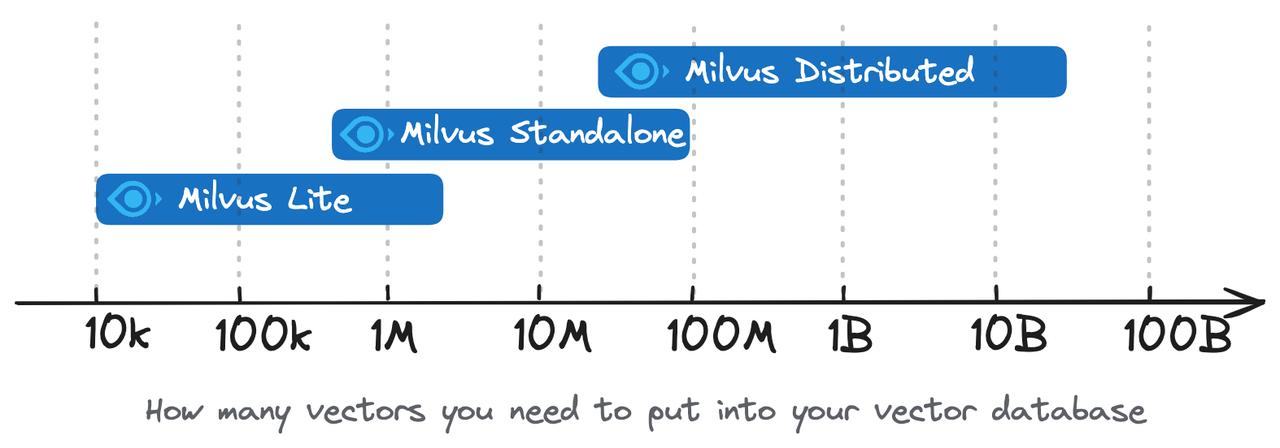
Milvus Lite is only suitable for small scale prototyping (usually less than a million vectors) or edge devices. For large scale production, we recommend using Milvus Standalone or Milvus Distributed. You can also consider the fully-managed Milvus on Zilliz Cloud.
Requirements
Milvus Lite currently supports the following environments:
- Ubuntu >= 20.04 (x86_64 and arm64)
- MacOS >= 11.0 (Apple Silicon M1/M2 and x86_64)
Note: Windows is not yet supported.
Installation
pip install -U pymilvus[milvus-lite]
We recommend using pymilvus. You can pip install with -U to force update to the latest version and milvus-lite will be automatically installed.
If you want to explicitly install milvus-lite package, or you have installed an older version of milvus-lite and would like to update it, you can do pip install -U milvus-lite.
Usage
In pymilvus, specify a local file name as uri parameter of MilvusClient will use Milvus Lite.
from pymilvus import MilvusClient
client = MilvusClient("./milvus_demo.db")
NOTE: Note that the same API also applies to Milvus Standalone, Milvus Distributed and Zilliz Cloud, the only difference is to replace local file name to remote server endpoint and credentials, e.g.
client = MilvusClient(uri="http://localhost:19530", token="username:password")for self-hosted Milvus server.
Examples
Following is a simple demo showing how to use Milvus Lite for text search. There are more comprehensive examples for using Milvus Lite to build applications such as RAG, image search, and using Milvus Lite in popular RAG framework such as LangChain and LlamaIndex!
from pymilvus import MilvusClient
import numpy as np

client = MilvusClient("./milvus_demo.db")
client.create_collection(
    collection_name="demo_collection",
    dimension=384  # The vectors we will use in this demo has 384 dimensions
)

# Text strings to search from.
docs = [
    "Artificial intelligence was founded as an academic discipline in 1956.",
    "Alan Turing was the first person to conduct substantial research in AI.",
    "Born in Maida Vale, London, Turing was raised in southern England.",
]
# For illustration, here we use fake vectors with random numbers (384 dimension).

vectors = [[ np.random.uniform(-1, 1) for _ in range(384) ] for _ in range(len(docs)) ]
data = [ {"id": i, "vector": vectors[i], "text": docs[i], "subject": "history"} for i in range(len(vectors)) ]
res = client.insert(
    collection_name="demo_collection",
    data=data
)

# This will exclude any text in "history" subject despite close to the query vector.
res = client.search(
    collection_name="demo_collection",
    data=[vectors[0]],
    filter="subject == 'history'",
    limit=2,
    output_fields=["text", "subject"],
)
print(res)

# a query that retrieves all entities matching filter expressions.
res = client.query(
    collection_name="demo_collection",
    filter="subject == 'history'",
    output_fields=["text", "subject"],
)
print(res)

# delete
res = client.delete(
    collection_name="demo_collection",
    filter="subject == 'history'",
)
print(res)
Supported Features
Functionality
Milvus Lite shares the same API as Milvus Standalone, Milvus Distributed and Zilliz Cloud, offering core features including:
- Insert/upsert operations
- Vector data persistence and collection management
- Dense, sparse, and hybrid vector search
- Metadata filtering
- Multi-vector support
Index Type
Milvus Lite has limited index type support compared to other Milvus deployments:
-
Prior to version 2.4.11:
- Only supports the FLAT index type
- Uses FLAT index regardless of the specified index type in collection creation
-
Version 2.4.11 and later:
Known Limitations
Milvus Lite does not support partitions, users/roles/RBAC, alias. To use those features, please choose other Milvus deployment types such as Standalone, Distributed or Zilliz Cloud (fully-managed Milvus).
Migrating data from Milvus Lite
All data stored in Milvus Lite can be easily exported and loaded into other types of Milvus deployment, such as Milvus Standalone on Docker, Milvus Distributed on K8s, or fully-managed Milvus on Zilliz Cloud.
Milvus Lite provides a command line tool that can dump data into a json file, which can be imported into self-hosted Milvus or fully-managed Milvus on Zilliz Cloud.
pip install -U "pymilvus[bulk_writer]"
# The `milvus-lite` command line tool is already included in `milvus-lite` package which is part of "pymilvus", but it also needs some dependencies from `pymilvus[bulk_writer]` for dumping data.

milvus-lite dump -h

usage: milvus-lite dump [-h] [-d DB_FILE] [-c COLLECTION] [-p PATH]

optional arguments:
  -h, --help            show this help message and exit
  -d DB_FILE, --db-file DB_FILE
                        milvus lite db file
  -c COLLECTION, --collection COLLECTION
                        collection that need to be dumped
  -p PATH, --path PATH  dump file storage dir
The following example dumps all data from demo_collection collection that's stored in ./milvus_demo.db (a user specified local file that persists data for Milvus Lite)
To export data:
milvus-lite dump -d ./milvus_demo.db -c demo_collection -p ./data_dir
# ./milvus_demo.db: milvus lite db file
# demo_collection: collection that need to be dumped
#./data_dir : dump file storage dir
You can use the dump file as input to upload data to Zilliz Cloud via Data Import, or a self-hosted Milvus server via Bulk Insert.
Contributing
If you want to contribute to Milvus Lite, please read the Contributing Guide first.
Report a bug
For any bug or feature request, please report it by submitting an issue in milvus-lite repo.
License
Milvus Lite is under the Apache 2.0 license. See the LICENSE file for details.
Release history Release notifications | RSS feed


Download files
Download the file for your platform. If you're not sure which to choose, learn more about installing packages.
Source Distributions
Built Distributions
Filter files by name, interpreter, ABI, and platform.
If you're not sure about the file name format, learn more about wheel file names.
Copy a direct link to the current filters
File details
Details for the file milvus_lite-2.5.2rc1-py3-none-manylinux2014_x86_64.whl.
File metadata
- Download URL: milvus_lite-2.5.2rc1-py3-none-manylinux2014_x86_64.whl
- Upload date:
- Size: 56.1 MB
- Tags: Python 3
- Uploaded using Trusted Publishing? No
- Uploaded via: twine/6.2.0 CPython/3.14.3
File hashes
| Algorithm | Hash digest | |
|---|---|---|
| SHA256 |
39be8d47207314a6b1deb9c78301f2c5b0f29978f05724b15d12ce25c95df93e
|
|
| MD5 |
ccda9d654c950895ccbbfe3e7e65c4fb
|
|
| BLAKE2b-256 |
d95324cc996139be85c86a883a48747db4054783b425e73865af6fe091724022
|
File details
Details for the file milvus_lite-2.5.2rc1-py3-none-macosx_11_0_arm64.whl.
File metadata
- Download URL: milvus_lite-2.5.2rc1-py3-none-macosx_11_0_arm64.whl
- Upload date:
- Size: 25.4 MB
- Tags: Python 3, macOS 11.0+ ARM64
- Uploaded using Trusted Publishing? No
- Uploaded via: twine/6.2.0 CPython/3.14.3
File hashes
| Algorithm | Hash digest | |
|---|---|---|
| SHA256 |
94c673bb0657932d5daa9da3d8e5a0bbd3fbca2bcf642099fbdf0725dbcab6d4
|
|
| MD5 |
9e916faefc82190f9b44ac79b2c74386
|
|
| BLAKE2b-256 |
46cec30e5a36954e150c7a44f46c7f31bff7037c2dd0ecf67270afad8407de7b
|






