
mimeogram




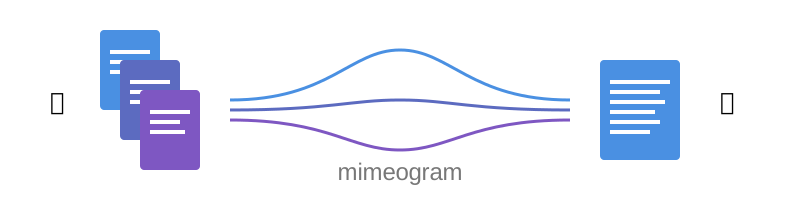
📨 A command-line tool for exchanging collections of files with Large Language Models - bundle multiple files into a single clipboard-ready document while preserving directory structure and metadata… good for code reviews, project sharing, and LLM interactions.
Key Features ⭐
🔄 Interactive Reviews: Review and apply LLM-proposed changes one by one.
📋 Clipboard Integration: Seamless copying and pasting by default.
🗂️ Directory Structure: Preserves hierarchical file organization.
🛡️ Path Protection: Safeguards against dangerous modifications.
Installation 📦
Method: Download Standalone Executable
Download the latest standalone executable for your platform from GitHub Releases. These executables have no dependencies and work out of the box.
Method: Install Executable Script
Install via the uv tool command:
uv tool install mimeogram
or, run directly with uvx:
uvx mimeogram
Or, install via pipx:
pipx install mimeogram
Method: Install Python Package
Install via uv pip command:
uv pip install mimeogram
Or, install via pip:
pip install mimeogram
Examples 💡
Below are some simple examples. Please see the examples documentation for more detailed usage patterns.
usage: mimeogram [-h] [OPTIONS] {create,apply,provide-prompt,version}

Mimeogram: hierarchical data exchange between humans and LLMs.

╭─ options ────────────────────────────────────────────────────────────────────╮
│ -h, --help              show this help message and exit                      │
│ --configfile {None}|STR                                                      │
│                         (default: None)                                      │
╰──────────────────────────────────────────────────────────────────────────────╯
╭─ subcommands ────────────────────────────────────────────────────────────────╮
│ {create,apply,provide-prompt,version}                                        │
│     create              Creates mimeogram from filesystem locations or URLs. │
│     apply               Applies mimeogram to filesystem locations.           │
│     provide-prompt      Provides LLM prompt text for mimeogram format.       │
│     version             Prints version information.                          │
╰──────────────────────────────────────────────────────────────────────────────╯
Working with Simple LLM Interfaces
Use with browser chat interfaces and API workbenches when you want explicit, portable control over exactly which files are shared with a model. This is useful for interfaces with limited repository tooling and for workflows where uploaded files may have favorable pricing (for example, some project-oriented plans in provider-hosted web interfaces).
Bundle files with mimeogram format instructions into clipboard.
mimeogram create src/*.py tests/*.py --prepend-promptPaste instructions and mimeogram into prompt text area in browser.
Interact with LLM until you are ready to apply results.
Request mimeogram from LLM and copy it from browser to clipboard.
Apply mimeogram parts from clipboard. (On a terminal, this will be interactive by default.)
mimeogram apply
Note that, if you do not want the LLM to return mimeograms to you, most of the current generation of LLMs are smart enough to understand the format without instructions. Thus, you can save tokens by not explicitly providing mimeogram instructions.
Working with LLM Project Interfaces
Many LLM service providers now offer project-style workspaces that persist instructions and uploaded context across chats. When available, this pairs well with mimeogram by reducing prompt overhead while preserving structured file exchange.
In these cases, you can take advantage of the project instructions so that you do not need to include mimeogram instructions with each new chat:
Copy mimeogram format instructions into clipboard.
mimeogram provide-promptPaste mimeogram prompt into project instructions and save the update. Any new chats will be able to reuse the project instructions hereafter.
Simply create mimeograms for new chats without prepending instructions.
mimeogram create src/*.py tests/*.pySame workflow as chats without project support at this point: interact with LLM, request mimeogram (as necessary), apply mimeogram (as necessary).
Remote URLs
You can also create mimeograms from remote URLs:
mimeogram create https://raw.githubusercontent.com/BurntSushi/aho-corasick/refs/heads/master/src/dfa.rsBoth local and remote files may be bundled together in the same mimeogram.
However, there is no ability to apply a mimeogram to remote URLs.
Interactive Review
During application of a mimeogram, you will be, by default, presented with the chance to review each part to apply. For each part, you will see a menu like this:
src/example.py [2.5K]
Action? (a)pply, (d)iff, (e)dit, (i)gnore, (s)elect hunks, (v)iew >
Choosing a to select the apply action will cause the part to be queued for application once the reivew of all parts is complete. All queued parts are applied simultaneously to prevent thrash in IDEs and language servers as interdependent files are reevaluated.
Filesystem Protection
If an LLM proposes the alteration of a sensitive file, such as one which may contain credentials or affect the operating system, then the program makes an attempt to flag this:
~/.config/sensitive.conf [1.2K] [PROTECTED]
Action? (d)iff, (i)gnore, (p)ermit changes, (v)iew >
If, upon review of the proposed changes, you believe that they are safe, then you can choose p to permit them, followed by a to apply them.
We take AI safety seriously. Please review all LLM-generated content, whether it is flagged for a sensitive destination or not.
Configuration 🔧
Default Location
Mimeogram creates a configuration file on first run. You can find it at:
Linux: ~/.config/mimeogram/general.toml
macOS: ~/Library/Application Support/mimeogram/general.toml
Windows: %LOCALAPPDATA%\\mimeogram\\general.toml
Default Settings
[apply]
from-clipboard = true    # Read from clipboard by default

[create]
to-clipboard = true      # Copy to clipboard by default

[prompt]
to-clipboard = true      # Copy prompts to clipboard

[acquire-parts]
fail-on-invalid = false  # Skip invalid files
recurse-directories = false

[update-parts]
disable-protections = false
Motivation 🎯
Why Mimeogram in an Agentic World 💡
Portable, provider-agnostic format for sharing and applying multi-file changes.
Works in web interfaces and chat surfaces that do not expose local filesystem tools.
Useful when you want explicit, auditable context selection instead of full-repository agent access.
Supports batch exchange workflows, including scenarios where uploaded files can be cheaper than repeated API context transmission.
Technical Benefits ✅
Preserves hierarchical directory structure.
Version control friendly. (I.e., honors Git ignore files.)
Supports async/batch workflows.
Platform Neutrality ☁️
IDE and platform agnostic.
Works with and without provider-specific agent tooling.
Useful with both project-enabled and non-project chat interfaces.
Limitations and Alternatives 🔀
Manual refresh of files needed (no automatic sync).
Cannot retract stale content from conversation history in provider GUIs.
For tight edit/test loops inside a local repository, agentic tools and coding IDEs may be faster.
Comparison of General Approaches ⚖️
Feature |
Mimeograms |
Projects (Web) [1] |
Agentic CLIs [2] |
Specialized IDEs [3] |
|---|---|---|---|---|
Primary Interaction Model |
Bundle/ apply |
Chat + uploads |
Local tools + chat |
IDE-native assistant |
Directory Structure |
Yes |
No |
Yes |
Yes |
Version Control |
Yes |
No [4] |
Yes |
Yes |
Platform Support |
Cross- platform |
Web |
Varies |
Varies |
Local Repo Live Sync |
Manual |
No |
Yes |
Yes |
Provider Portability |
High |
Low |
Medium |
Low/Medium |
Setup Required |
Low |
None |
Medium |
Medium |
Cost Model |
Varies |
Usually subscr. |
Varies |
Usually subscr. |
Notes:
No single column is universally best.
Mimeogram is designed to complement agentic tools, especially when you need explicit scope control or provider portability.
Comparison with Similar Tools ⚖️
Mimeogram is unique among file collection tools for LLMs in offering round-trip support - the ability to not just collect files but also apply changes proposed by LLMs.
Features Matrix
Feature |
Mimeogram |
Gitingest |
Repomix |
dump_dir |
|---|---|---|---|---|
Round Trips |
✓ |
|||
Clipboard Support |
✓ |
✓ |
✓ |
|
Remote URL Support |
✓ |
✓ |
✓ |
|
Security Checks |
✓ |
✓ |
Content Selection Approaches
Tools in this space generally follow one of two approaches: filesystem-oriented or repository-oriented.
Tools, like mimeogram, dump_dir, and ai-digest, are oriented around files and directories. You start with nothing and select what is needed. This approach offers more precise control over context window usage and is better suited for targeted analysis or specific features.
Tools, like gitingest and repomix, are oriented around code repositories. You start with an entire repository and then filter out unneeded files and directories. This approach is better for full project comprehension but requires careful configuration to avoid exceeding LLM context window limits.
Contribution 🤝
Contribution to this project is welcome! However, it must follow the code of conduct for the project.
Please file bug reports and feature requests in the issue tracker or submit pull requests to improve the source code or documentation.
For development guidance and standards, please see the development guide.
About the Name 📝
The name “mimeogram” draws from multiple sources:
- 📜 From Ancient Greek roots:
μῖμος (mîmos, “mimic”) + -γραμμα (-gramma, “written character, that which is drawn”)
Like mimeograph but emphasizing textual rather than pictorial content.
- 📨 From MIME (Multipurpose Internet Mail Extensions):
Follows naming patterns from the Golden Age of Branding: Ford Cruise-o-matic, Ronco Veg-O-Matic, etc….
Reflects the MIME-inspired bundle format.
- 📬 Echoes telegram:
Emphasizes message transmission.
Suggests structured communication.
Note: Despite similar etymology, this project is distinct from the PyPI package mimeograph, which serves different purposes.
Pronunciation? The one similar to mimeograph seems to roll off the tongue more smoothly, though it is one more syllable than “mime-o-gram”. Preferred IPA: /ˈmɪm.i.ˌoʊ.ɡræm/.
Additional Indicia









1 maintainer

Metadata
1 maintainer
Release files for mimeogram 1.6
For a detailed explanation of source distributions (sdists) and built distributions (wheels), please see the package formats documentation.
Source distribution (sdist)
| File | Size | Uploaded | |
|---|---|---|---|
| mimeogram-1.6.tar.gz | 48.0 kB | Details |
Built distribution (wheel)
| File | Interpreter | ABI | Platform | Reset |
|---|---|---|---|---|
| mimeogram-1.6-py3-none-any.whl | Python 3 | none | any | Details |
Total release size: 112.7 kB
Release files / mimeogram-1.6.tar.gz
| Download URL | mimeogram-1.6.tar.gz |
|---|---|
| Size | 48.0 kB |
| Tags | Source |
|
SHA-256 checksum How to use checksums |
9a71cad25a149e652c4e22f6fe7360cb572badf3bca9a88a4f5913e4c3d32957
|
|
BLAKE2b-256 checksum How to use checksums |
f9f3008c251e46b122e37b9523604de37f97489c0c06c6857b4fb004768ee30e
|
| Upload date | |
|
Uploaded using Trusted Publishing? What is trusted publishing? |
Yes |
| Uploaded via |
twine/6.1.0 CPython/3.13.7
|
Provenance
Provenance describes where a file came from. On PyPI, provenance is shared via attestations, which provide a verifiable record of the build or publishing details. View details, limitations and caveats.


PyPI Publish Attestation
PyPI verified that this artifact, at this checksum, originated from the publisher listed below.
Signed by GitHub Actions, verified by PyPI on Feb 18, 2026.
Transparency logRelease files / mimeogram-1.6-py3-none-any.whl
| Download URL | mimeogram-1.6-py3-none-any.whl |
|---|---|
| Size | 64.7 kB |
| Tags | Python 3 |
|
SHA-256 checksum How to use checksums |
63426e13cffb894eaa291862eccca25e28fe171c1e73ef414a9548193c912b54
|
|
BLAKE2b-256 checksum How to use checksums |
d9f6c1089a2de65725bb51cd9d38f912b90a6e82ffd5e06501e6eddae2d1221c
|
| Upload date | |
|
Uploaded using Trusted Publishing? What is trusted publishing? |
Yes |
| Uploaded via |
twine/6.1.0 CPython/3.13.7
|
Provenance
Provenance describes where a file came from. On PyPI, provenance is shared via attestations, which provide a verifiable record of the build or publishing details. View details, limitations and caveats.
PyPI Publish Attestation
PyPI verified that this artifact, at this checksum, originated from the publisher listed below.
Signed by GitHub Actions, verified by PyPI on Feb 18, 2026.
Transparency log













