
Mindoff Dataport
Build high-fidelity Excel and PDF reports from reusable .xlsx templates.
Mindoff Dataport turns styled Excel workbooks into reusable report templates, compiles runtime data into a portable ReportBundle, and exports .xlsx and .pdf outputs while preserving the layout, structure, and styling you designed.



Documentation: https://dataport.mindoff.work
Source: https://github.com/mindoffwork/mindoff-dataport
Roadmap: https://dataport.mindoff.work/latest-release/community/roadmap/
Case Study: https://mindoff.work/projects/mindoff-dataport/
Key Features
-
Template-First Report Generation
Turn real Excel workbooks into reusable report templates without rebuilding layouts in code. -
One Bundle, Two Formats
The same compiled bundle renders to both.xlsxand.pdf. No second pipeline, no separate styling pass. -
Dataframes Plug Directly Into Templates
Connect dataframe inputs directly to templates so report generation fits naturally into modern data workflows. -
Streaming for Large Exports
In streaming mode, Parquet sources are read in batches and rows are written incrementally. Peak memory stays roughly flat as row count grows, instead of climbing with the dataset. -
Flexible Repeating and Dynamic Sheets
Generate repeated sections and dynamic sheets for customer-wise, region-wise, or report-wise output from a single template. -
Adjustable Layout at Export Time
Column occupation, alignment, and collision shifting are configurable at runtime, without touching the original template.
Why Not Just openpyxl, ReportLab, or XlsxWriter?
Those tools still matter here. mindoff-dataport builds on them instead of pretending they do not exist. The difference is where the work lives.
| If you build with... | You usually own... | What mindoff-dataport changes |
|---|---|---|
openpyxl |
Cell-by-cell layout code, style copying, merge handling, row/column shifting, and workbook assembly | You keep the layout in Excel and compile data into a reusable bundle before export |
reportlab |
A second PDF-specific layout system, plus duplicated styling decisions that drift from Excel over time | The same compiled bundle exports to PDF, so the PDF path follows the template-driven plan instead of a separate document build |
xlsxwriter |
Fast XLSX writing, but still your responsibility to recreate template structure and styling rules in code | Streaming export keeps the write path efficient while the template and compile steps carry the layout contract |
mindoff-dataport |
An extra extract-and-compile step, plus some streaming constraints for very large exports | In return, you get one template-driven workflow for .xlsx and .pdf, with less layout logic living in application code |
If your report is simple enough that raw workbook or PDF code stays readable, the lower-level libraries may be enough. This project is for the point where template fidelity, repeated exports, and layout drift start costing more than an extra compile step.
Quick Start
Think of it like a mail merge for spreadsheets: you design the layout once in Excel, then the library fills in the data. Every report follows four steps: extract -> inspect -> compile -> export.
1. Install the Package
pip install mindoff-dataport
For dataframe support (Polars DataFrames or LazyFrames):
pip install "mindoff-dataport[polars]"
2. Extract the Template
Read your .xlsx file into a schema. This captures the layout, every style, and the {{key:type}} placeholders you marked in cells. You run this once per template, not once per report.
import polars as pl
from mindoff_dataport import mo_dataport

template = mo_dataport.extract("invoice_template.xlsx")
3. Inspect What the Template Needs
Before you build a payload, ask the template what it expects. Useful when working with a template someone else designed, or coming back to one after a while.
required_inputs = mo_dataport.inputs(template)
# {'Invoice': {'customer_name': 'string', 'invoice_number': 'number', 'line_items': 'dataframe'}}
The result is sheet-scoped: the outer key is the sheet name, and the inner keys are the placeholders on that sheet with their expected types.
4. Compile: Bind Your Data
Hand the template your real data, keyed by sheet name. The library validates it against the contract from step 3 and produces a ReportBundle: a portable artifact you can export immediately or save to disk and export later.
line_items = pl.DataFrame({"item": ["Widget A", "Widget B"], "amount": [125, 275]})

bundle = mo_dataport.compile(
    template,
    data={
        "Invoice": {
            "customer_name": "Acme Industries",
            "invoice_number": 1024,
            "line_items": line_items,
        }
    },
)
5. Export
Render the bundle to a file. The same bundle drives both formats. No second pipeline.
mo_dataport.export(bundle, "invoice_filled.xlsx")
mo_dataport.export(bundle, "invoice_filled.pdf", format="pdf")
When you're ready to go further (placeholders, the data contract, streaming, repeats, dynamic sheets, custom fonts, and the full API reference), head to the developer guide.
If you want to see what is already covered and what is planned next, check the roadmap.
Performance
Streaming mode holds near-constant peak memory regardless of dataset size. These benchmarks compare it against raw openpyxl, xlsxwriter, and ReportLab loops with equivalent layout and styling (the most direct alternative).
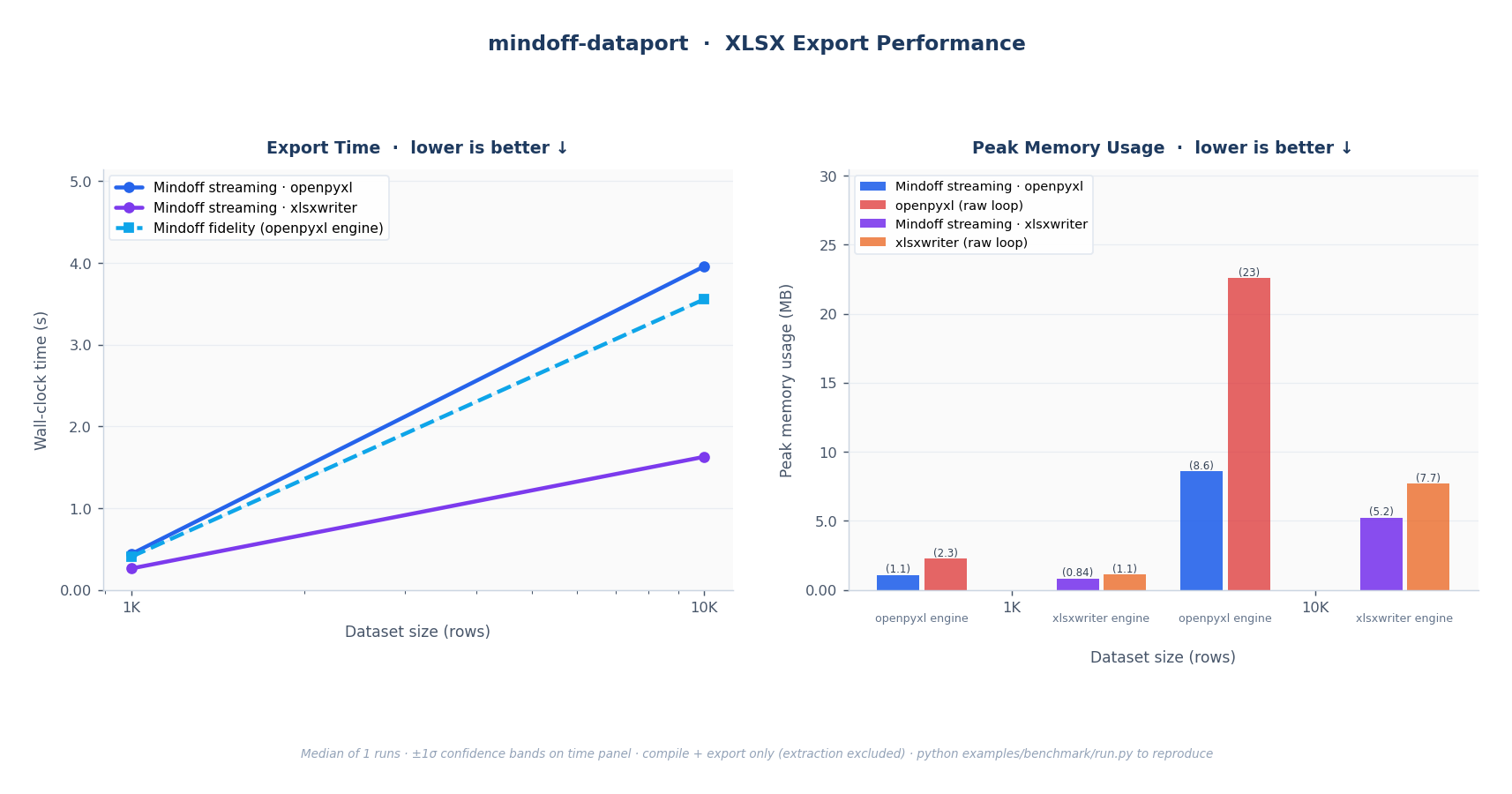
Fig. 1: XLSX export. Left: wall-clock time for all Mindoff modes; both streaming and fidelity scale O(n) linearly. Right: peak RSS; Mindoff streaming holds near-constant while openpyxl and xlsxwriter raw loops grow with dataset size.
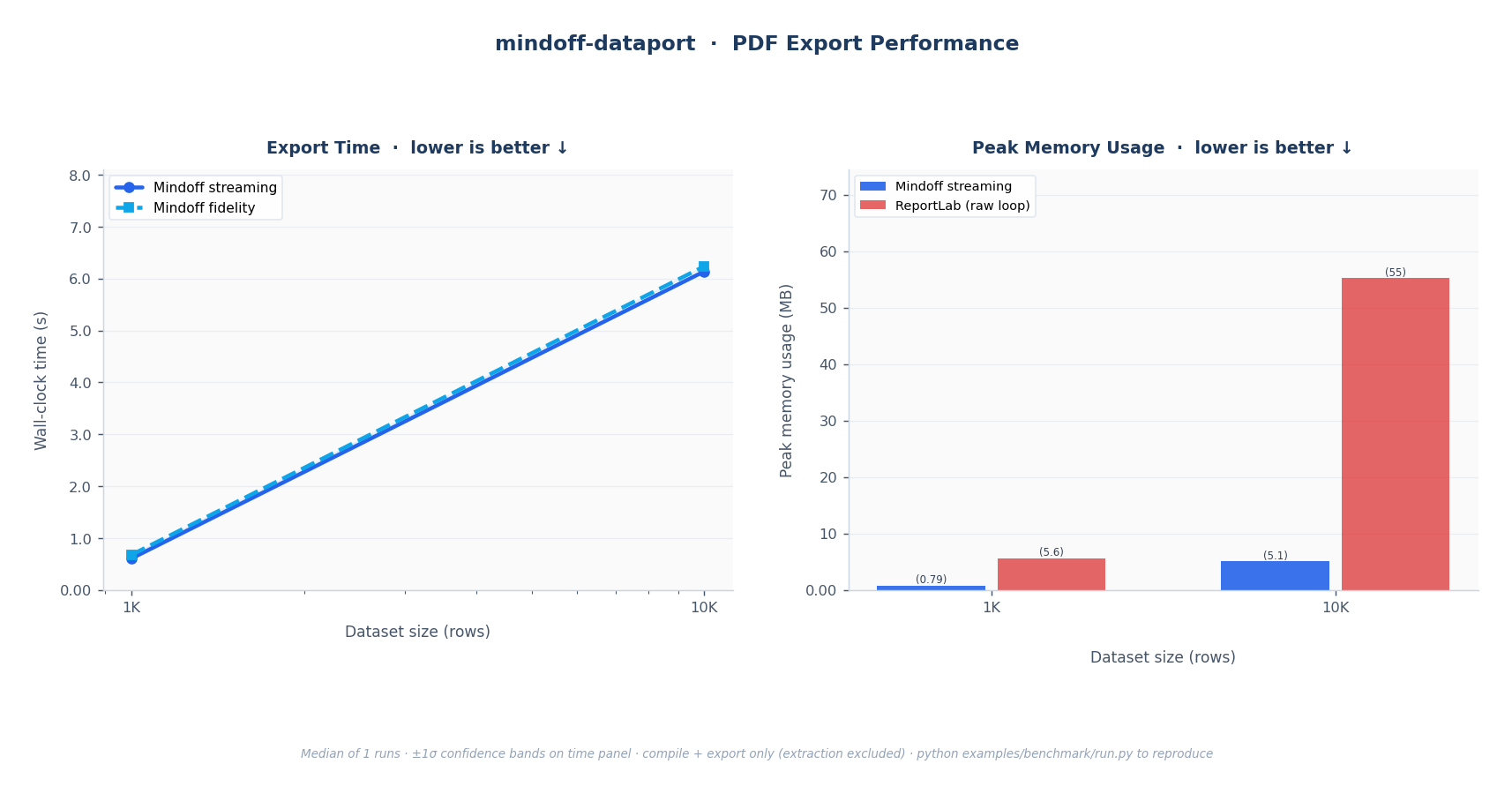
Fig. 2: PDF export. Left: wall-clock time; linear O(n) scaling. Right: peak RSS; Mindoff streaming vs. ReportLab raw loop.
| Scenario | Mode | Why |
|---|---|---|
| <= 50K rows, full style fidelity | export_mode="fidelity" |
Full merged-cell and style support; no streaming constraints |
| > 50K rows, XLSX | export_mode="streaming" |
Near-constant memory regardless of row count |
| Any size, PDF | automatic | PDF always paginates; no export_mode setting needed |
| > 1M rows, split output | streaming + max_rows_per_workbook |
Splits output across multiple workbook files |
Full methodology, fairness notes, and instructions to reproduce the numbers yourself are in the Benchmarking guide.
License
Released under the MIT License.
1 maintainer

Metadata
1 maintainer
Release files for mindoff-dataport 1.0.1
For a detailed explanation of source distributions (sdists) and built distributions (wheels), please see the package formats documentation.
Source distribution (sdist)
| File | Size | Uploaded | Provenance | |
|---|---|---|---|---|
| mindoff_dataport-1.0.1.tar.gz | 352.5 kB | With provenance | Details |
Built distribution (wheel)
| File | Interpreter | ABI | Platform | Reset |
|---|---|---|---|---|
| mindoff_dataport-1.0.1-py3-none-any.whl | Python 3 | none | any | Details |
Total release size: 713.3 kB
Release files / mindoff_dataport-1.0.1.tar.gz
| Download URL | mindoff_dataport-1.0.1.tar.gz |
|---|---|
| Size | 352.5 kB |
| Tags | Source |
|
SHA-256 checksum How to use checksums |
e4647a700eb6ad39a49143eab89ce385893f215a3890217a117504ed12a45153
|
|
BLAKE2b-256 checksum How to use checksums |
ae1384fcc76fe9d9d1f2c40498f87061c256b9c67ecbeebf4cac12fe5a78f13d
|
| Upload date | |
|
Uploaded using Trusted Publishing? What is trusted publishing? |
Yes |
| Uploaded via |
twine/6.1.0 CPython/3.13.12
|
Provenance
Provenance describes where a file came from. On PyPI, provenance is shared via attestations, which provide a verifiable record of the build or publishing details. View details, limitations and caveats.


PyPI Publish Attestation
PyPI verified that this artifact, at this checksum, originated from the publisher listed below.
Signed by GitHub Actions, verified by PyPI on Jun 15, 2026.
Transparency logRelease files / mindoff_dataport-1.0.1-py3-none-any.whl
| Download URL | mindoff_dataport-1.0.1-py3-none-any.whl |
|---|---|
| Size | 360.8 kB |
| Tags | Python 3 |
|
SHA-256 checksum How to use checksums |
a958d48c44482319dd769154df16b161696b6b42a298b713d31fc2a0cf186e13
|
|
BLAKE2b-256 checksum How to use checksums |
18e03b3129204ccdb87bd886156a7dddc9b799204ccf3beba89b49dfbbd83794
|
| Upload date | |
|
Uploaded using Trusted Publishing? What is trusted publishing? |
Yes |
| Uploaded via |
twine/6.1.0 CPython/3.13.12
|
Provenance
Provenance describes where a file came from. On PyPI, provenance is shared via attestations, which provide a verifiable record of the build or publishing details. View details, limitations and caveats.
PyPI Publish Attestation
PyPI verified that this artifact, at this checksum, originated from the publisher listed below.
Signed by GitHub Actions, verified by PyPI on Jun 15, 2026.
Transparency logSecurity for mindoff-dataport 1.0.1
Provenance
Provenance describes where a file came from. On PyPI, provenance is shared via attestations, which provide a verifiable record of the build or publishing details. View details, limitations and caveats.
Full provenance
All 2 files in this release have been uploaded with provenance metadata.
Attestation for mindoff_dataport-1.0.1.tar.gz
PyPI Publish Attestation
PyPI verified that this artifact, at this checksum, originated from the publisher listed below.
Signed by GitHub Actions, verified by PyPI on Jun 15, 2026.
Transparency logA note on package security
PyPI is a repository for distributing packages, not a service for auditing them. While third-party security researchers and our staff do their best to detect and remove malicious packages, PyPI cannot guarantee the quality, security or suitability of any given package.
To learn more about protecting yourself from malicious actors, visit our package security documentation.














