







MineCode is a local Model Context Protocol (MCP) server that gives AI assistants like GitHub Copilot and Claude real-time access to version-accurate Minecraft data, documentation, vanilla presets, and your Minecraft logs.
Written for a hackathon about MCP sponsored by dust, alpic, and others. Please star if you'd like to help out, and open issues for anything broken.
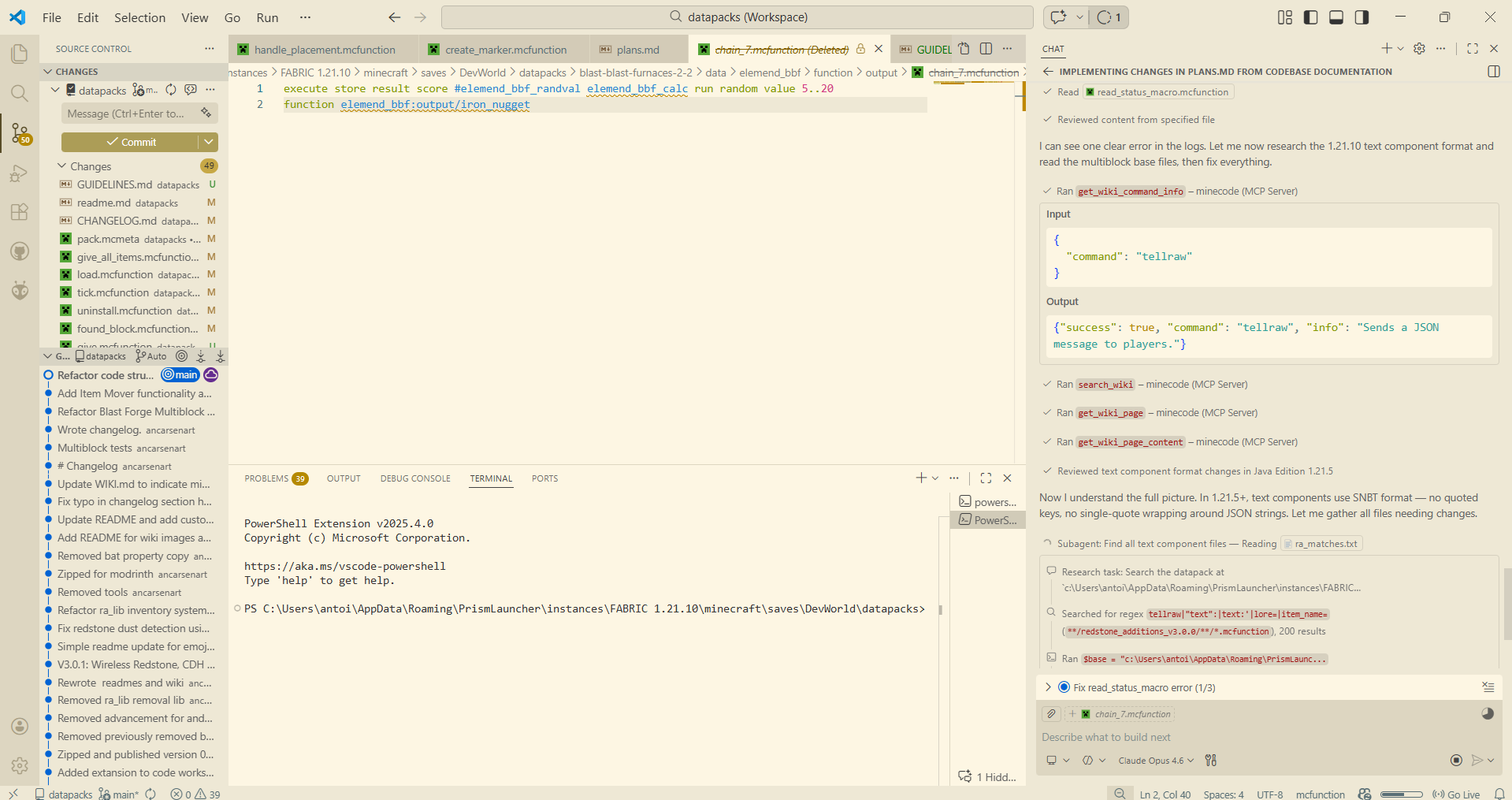
🎯 The problem this solves
AI assistants get Minecraft syntax wrong constantly, and they do it confidently. The reason is simple: Minecraft's datapack format changed substantially and repeatedly, and every model's training data is older than the current game.
- 1.20.5 replaced item NBT with typed components. Old NBT is now a hard parse error.
- 1.21 renamed every datapack folder to singular (
advancements/→advancement/). A pack with the old names loads with no error and no content — it silently does nothing. - 1.21.2 dropped the
generic.prefix from every attribute ID. - 1.21.4 turned
custom_model_datafrom an integer into an object. - 1.21.5 made text components strictly typed.
minecraft.wiki documents only the latest version, so consulting it for an older pack actively makes this worse.
MineCode attacks this from four directions:
minecraft_start_session— detects the target version frompack.mcmetabefore any code is written, so nothing downstream is guessing.get_technical_changes— returns what actually changed between two versions, from misode/technical-changes plus a curated table of the traps agents fall into most.get_command_usage/validate_command— command syntax compiled from the game's own Brigadier grammar, and a parser to check the agent's output against it.- Honest tool descriptions — every wiki tool states up front that it covers the latest version only, and names the version-exact alternative.
🚀 Installation
Requires Python 3.10 or newer. Check with python --version (Windows: py --version).
Windows
py -m pip install --upgrade pip
py -m pip install minecode-mcp
Verify:
py -m minecode.server --help 2>$null; py -c "import minecode; print('ok')"
If
pyis not recognised: Python isn't installed or wasn't added to PATH. Reinstall from python.org with "Add python.exe to PATH" ticked. Avoid the Microsoft Store build — it sandboxes file access, which breaks readingpack.mcmetaand Minecraft logs from arbitrary paths.
macOS
python3 -m pip install --upgrade pip
python3 -m pip install minecode-mcp
If your Python is Homebrew-managed you'll hit error: externally-managed-environment. Use a venv (see below) or pipx:
brew install pipx && pipx install minecode-mcp
Linux
python3 -m pip install --upgrade pip
python3 -m pip install minecode-mcp
Most modern distributions (Arch, Debian 12+, Ubuntu 23.04+, Fedora) mark the system Python as externally managed and will refuse the command above. That protection is correct — don't override it with --break-system-packages. Use one of:
# Option A: pipx — recommended, isolated but still on PATH
sudo pacman -S python-pipx        # Arch
sudo apt install pipx             # Debian/Ubuntu
sudo dnf install pipx             # Fedora
pipx install minecode-mcp

# Option B: user install
python3 -m pip install --user minecode-mcp

# Option C: a venv you point the client at (see Configuration)
Isolated install (any platform)
Works everywhere and never touches system Python. Note the absolute path it prints — you'll need it for the client config.
# Linux / macOS
python3 -m venv ~/.minecode-venv
~/.minecode-venv/bin/pip install minecode-mcp
echo ~/.minecode-venv/bin/minecode
# Windows
py -m venv $HOME\.minecode-venv
& $HOME\.minecode-venv\Scripts\pip.exe install minecode-mcp
Write-Output "$HOME\.minecode-venv\Scripts\minecode.exe"
Upgrading and uninstalling
pip install --upgrade minecode-mcp   # or: pipx upgrade minecode-mcp
pip uninstall minecode-mcp           # or: pipx uninstall minecode-mcp
Upgrading doesn't clear the response cache. That's intentional — version-pinned data can't go stale. To clear it anyway, call the cache_status tool with clear=true, or delete the directory shown by cache_status.
Which Python am I actually using?
The single most common setup failure is installing into one interpreter and pointing the client at another. When in doubt, get the absolute path and use it verbatim in your client config:
python3 -c "import sys; print(sys.executable)"   # Linux/macOS
py -c "import sys; print(sys.executable)"        # Windows
▶️ Running the server
MineCode is an MCP server, not an app you sit in front of. It speaks JSON-RPC over stdin/stdout and is normally launched by your AI client, not by you. You rarely need to start it manually — but you do need to know how, because that's how you check the install before wiring up a client.
The two ways to launch it
minecode                  # console script, installed by pip
python -m minecode.server # module form — identical, works even if the script isn't on PATH
On Windows use py -m minecode.server.
What "working" looks like
Running it directly looks like a hang. That is correct:
$ minecode
[INFO] Loaded assistant preprompt from .../assistant_preprompt.txt
[INFO] Starting MineCode MCP server
[INFO] MineCode MCP server starting (stdio)
[INFO] Registered 30 tools, 1 prompts, 2 resources
…and then nothing. The server is waiting for JSON-RPC on stdin. This is a healthy server, not a freeze. Press Ctrl+C to stop it.
The line that matters is Registered 30 tools. If you see it, the install is good. Logs go to stderr, so they never corrupt the protocol stream on stdout.
Verifying the install without a client
python -c "
from minecode import tools
print(f'{len(tools.TOOLS)} tools, {len(tools.HANDLERS)} handlers')
assert {t.name for t in tools.TOOLS} == set(tools.HANDLERS)
print('registry consistent')
"
To exercise a tool without any MCP client at all:
python -c "
from minecode import handlers
r = handlers.handle_get_command_usage('1.21.4', 'give')
print(r['usage'])
"
Expected: ['/give <targets> <item>', '/give <targets> <item> <count>']
A full protocol handshake, if you want to be thorough:
printf '%s\n' \
  '{"jsonrpc":"2.0","id":1,"method":"initialize","params":{"protocolVersion":"2024-11-05","capabilities":{},"clientInfo":{"name":"t","version":"1"}}}' \
  '{"jsonrpc":"2.0","method":"notifications/initialized"}' \
  '{"jsonrpc":"2.0","id":2,"method":"tools/list"}' \
  | python -m minecode.server 2>/dev/null | tail -1 | head -c 300
Normal usage
Configure your client (next section), then restart it. The client spawns the server itself and keeps it alive for the session. From then on you just talk to your assistant — start with something like "set up my datapack and tell me what version it targets", which triggers minecraft_start_session.
Troubleshooting
| Symptom | Cause and fix |
|---|---|
command not found: minecode |
The script isn't on PATH. Use python -m minecode.server, or check pip show -f minecode-mcp |
No module named minecode |
Wrong interpreter. The client's python isn't the one you installed into — classic with pipx and venv installs. Use "command": "minecode" in the client config, or the interpreter's absolute path |
Error while finding module specification for 'minecode' |
-m minecode is not a valid entry point. The module form is -m minecode.server |
AttributeError: 'Server' object has no attribute 'list_tools' |
You have mcp 2.x. Run pip install "mcp>=1.25.0,<2" |
| Server starts, client shows no tools | Client config points at a different Python or a stale install. Restart the client fully — most only read MCP config at startup |
| Everything hangs with no output | Expected when run directly, see above. If it happens inside a client, check the client's MCP logs |
| Tools are slow the first time | Normal — first call fetches and caches upstream data. Later calls are near-instant |
| Suspect stale data | MINECODE_NO_CACHE=1 minecode, or call the cache_status tool with clear=true |
⚙️ Configuration
Claude Desktop / Claude Code
{
  "mcpServers": {
    "minecode": {
      "command": "minecode"
    }
  }
}
| OS | Config path |
|---|---|
| Windows | %APPDATA%\Claude\claude_desktop_config.json |
| macOS | ~/Library/Application Support/Claude/claude_desktop_config.json |
| Linux | ~/.config/Claude/claude_desktop_config.json |
VS Code (GitHub Copilot)
Add to User Settings (Ctrl+Shift+P → "MCP: Open User Configuration"), or create .vscode/mcp.json in your workspace:
{
  "servers": {
    "minecode": {
      "type": "stdio",
      "command": "minecode",
      "args": []
    }
  },
  "inputs": []
}
The minecode script is installed alongside the package and already points at the right interpreter, so this form works for pipx, venv, and --user installs alike.
The module form is equivalent only if the package is importable from whichever python the client resolves:
{
  "servers": {
    "minecode": {
      "type": "stdio",
      "command": "python",
      "args": ["-m", "minecode.server"]
    }
  },
  "inputs": []
}
⚠️ VS Code spawns the server with a bare
pythonfromPATH— not your selected Python interpreter, and not a pipx or venv environment. With a pipx install this fails withNo module named minecode, since the package lives in pipx's own venv. Use"command": "minecode"above, or the absolute interpreter path from the next section.
On Windows use
"command": "py"for the module form.pyis the Windows launcher and does not exist on macOS or Linux.
If minecode isn't on PATH
Common with venv, pipx, and --user installs. Give the absolute path to the interpreter that has the package, and let it run the module:
{
  "mcpServers": {
    "minecode": {
      "command": "/home/you/.minecode-venv/bin/python",
      "args": ["-m", "minecode.server"]
    }
  }
}
| Platform | Typical interpreter path |
|---|---|
| Linux / macOS venv | /home/you/.minecode-venv/bin/python |
| Windows venv | C:\\Users\\You\\.minecode-venv\\Scripts\\python.exe |
| pipx (any) | run pipx list --short and use the venv's bin/Scripts python |
Linux --user |
python3 usually works; else ~/.local/bin/minecode |
Get the exact path with python3 -c "import sys; print(sys.executable)" from the environment where you installed it.
Windows JSON: backslashes must be escaped —
C:\\Users\\...— or use forward slashes, which also work.
Restart the client fully after editing the config. Most MCP clients read it only at startup, so a reload isn't enough.
🛠️ Tools
Start here
| Tool | Description |
|---|---|
minecraft_start_session |
Call first. Detects the target version from pack.mcmeta and returns the applicable breaking changes and workflow. |
Version correctness
| Tool | Description |
|---|---|
get_technical_changes |
What changed between two versions — the fix for outdated syntax knowledge |
check_version_syntax |
Scan a command or JSON for syntax that's wrong for a version |
check_pack_structure |
Check folder layout — catches the silent 1.21 folder rename failure |
detect_pack_version |
Read pack.mcmeta → target version and format range |
pack_format_to_version / version_to_pack_format |
Map between the two |
list_technical_change_versions |
Which versions have changelog coverage |
Commands
| Tool | Description |
|---|---|
get_command_usage |
Readable, version-exact syntax compiled from the Brigadier tree |
validate_command |
Parse a command against the real grammar; reports the failing token |
Spyglass (authoritative, version-exact)
| Tool | Description |
|---|---|
spyglass_get_versions |
Versions with data/resource pack formats |
spyglass_get_registries |
Valid IDs per registry per version |
spyglass_get_block_states |
Block state properties and defaults |
spyglass_get_commands |
Command names, or one command's tree plus rendered usage |
spyglass_search_mcdoc_symbols |
Find mcdoc symbol paths by keyword |
spyglass_get_mcdoc_symbol |
One data structure's field-level schema |
Misode (real vanilla data)
| Tool | Description |
|---|---|
misode_get_preset_data |
Real vanilla JSON for a version — the best shape reference available |
misode_get_presets |
Preset IDs for a generator type |
misode_get_loot_tables |
Loot tables by category |
misode_get_recipes |
Recipes by type |
misode_get_generators |
Web generator links to show the user |
misode_list_versions |
Versions with data available |
Minecraft Wiki — ⚠️ latest version only
| Tool | Description |
|---|---|
search_wiki |
Search pages |
get_wiki_page |
Page summary, or full content with full=true |
get_wiki_command_explanation |
Prose about a command — not a syntax reference |
get_wiki_commands |
Command list |
get_wiki_category |
Pages in a category |
Other
| Tool | Description |
|---|---|
search_mojira |
Bug tracker search (filters by project, not version) |
get_logs |
Local Minecraft logs, with filter='errors' |
cache_status |
Inspect or clear the response cache |
Prompts and resources
| Kind | Name | Description |
|---|---|---|
| Prompt | minecraft_datapack_session |
Loads the development methodology |
| Resource | minecode://preprompt |
Same methodology, attachable as context |
| Resource | minecode://migrations |
The curated migration table as JSON |
💡 Example prompts
"Set up my datapack for 1.21.4 and tell me what changed since 1.20.4"
"Why does my datapack do nothing on 1.21?"
"What's the correct
/givesyntax with enchantments for this pack's version?"
"Convert this 1.20.4 loot table to 1.21.4"
"Check my Minecraft logs for errors"
🧠 How version knowledge works
Two layers, deliberately:
The curated table (minecode/knowledge/migrations.json) holds ~16 breaking changes as concrete before/after code pairs — the ones where a model's training data actively fights the correct answer. It's small, offline, instant, and every entry carries a verify_with field naming the tool that confirms it. It is a fast first-pass signal, never an authority.
The changelog (misode/technical-changes) is exhaustive and community-maintained across every snapshot. get_technical_changes queries it live.
This split is on purpose. A hand-written document covering every version's changes would be stale the day it was written, impossible to keep current against Minecraft's snapshot cadence, and far too large to fit in context. Keeping the curated layer small and querying the maintained source for everything else is what makes it sustainable.
Adding a migration
Add an entry to migrations.json:
{
  "id": "kebab-case-id",
  "title": "Short description",
  "changed_in": "1.21.5",
  "affects": ["give", "item"],
  "severity": "breaking",
  "confidence": "high",
  "before": "the old syntax",
  "after": "the new syntax",
  "explanation": "What changed and what happens if you get it wrong.",
  "detect": [
    {"pattern": "regex", "kind": "command|json|path|any", "message": "What to do instead"}
  ],
  "verify_with": "get_technical_changes(from_version='1.21.4', to_version='1.21.5')"
}
Then add tests to tests/test_knowledge.py — one for detection and one for the false-positive case. A checker that flags correct modern syntax trains the agent to ignore it, which is worse than having no checker at all.
🧑💻 Development
Setup
Linux / macOS
git clone https://github.com/AnCarsenat/minecode-mcp.git
cd minecode-mcp
python3 -m venv venv
source venv/bin/activate
python -m pip install --upgrade pip
python -m pip install -e ".[dev]"
Windows (PowerShell)
git clone https://github.com/AnCarsenat/minecode-mcp.git
cd minecode-mcp
py -m venv venv
.\venv\Scripts\Activate.ps1
py -m pip install --upgrade pip
py -m pip install -e ".[dev]"
If activation is blocked:
Set-ExecutionPolicy -Scope Process -ExecutionPolicy Bypass
The -e (editable) install means source edits take effect immediately — no reinstall between changes. But your MCP client must point at this venv's interpreter, not a system one, or you'll be testing the published package instead of your working copy.
Everyday workflow
pytest -m "not network"    # ~0.4s — run before every commit
python -m minecode.server  # smoke test; "Registered N tools" then a hang is correct
pytest -m network          # live API tests, hits volunteer-run services
pytest tests/test_knowledge.py -v          # one file
pytest -k "migration" -v                   # by name
pytest -m "not network" --lf               # only last-failed
Please don't run the network suite in a loop — Spyglass, misode and minecraft.wiki are volunteer-funded. The offline suite covers the logic; the network suite only checks that upstream response shapes haven't changed.
Testing against a real datapack
The most valuable check, and how the redirect and backtracking bugs were found:
python - <<'EOF'
import pathlib
from minecode import handlers

PACK = pathlib.Path("path/to/your/datapack")
info = handlers.handle_minecraft_start_session(str(PACK))
version = info["target_version"]
print("target:", version, "| multi-version:", info["multi_version"])

print("structure:", handlers.handle_check_pack_structure(str(PACK))["issue_count"], "issues")

bad = 0
for f in PACK.rglob("*.mcfunction"):
    for n, line in enumerate(f.read_text(errors="ignore").splitlines(), 1):
        line = line.strip()
        if not line or line.startswith(("#", "$")):
            continue
        result = handlers.handle_validate_command(line, version)
        if not result.get("valid"):
            bad += 1
            print(f"{f.name}:{n} {line[:80]}\n   -> {result.get('error')}")
print("invalid commands:", bad)
EOF
A false positive here is a bug worth reporting — a validator that cries wolf gets ignored, which is worse than having none.
Environment variables
| Variable | Effect |
|---|---|
MINECODE_NO_CACHE=1 |
Disable the disk cache. Use when testing scraper changes, and always in CI |
MINECODE_CACHE_DIR |
Override the cache location |
Project layout
server.py is wiring only (transport, dispatch, prompts, resources). tools.py holds schemas plus the name→handler registry. handlers.py holds behaviour. scrappers/ talks to the outside world. Nothing else should make HTTP calls.
Adding a tool
- Write
handle_<name>inhandlers.py. Return a dict withsuccess, never a bare string. - Add a
TooltoTOOLSintools.py. - Add the entry to
HANDLERSin the same file. pytest -m "not network"
Step 3 is not optional and not forgettable — tools.py asserts at import time that TOOLS and HANDLERS match exactly, so a missing entry fails immediately rather than months later. That assertion exists because four working changelog functions sat unreachable in misode.py for exactly that reason.
Description guidance, learned from what actually goes wrong:
- Say when to call it, not just what it does. Agents match situation to description.
- Put limitations first. A caveat at the end isn't read in time to change the decision.
- Name the better tool when one exists — "use X instead for Y" prevents the wrong choice a neutral description invites.
Adding a version migration
See How version knowledge works. Every entry needs two tests: one proving detection fires, one proving it does not fire on correct modern syntax.
Code conventions
- Handlers return dicts; the dispatcher does the JSON encoding
- Every
versionparameter goes throughpackmeta.resolve_versionfirst - Scrapers go through
cache.cached_fetch - Never return
[]for a failure — an empty list reads as a real "none found" answer. Raise instead - Report truncation explicitly. A silently capped list reads as complete
On the
mcpdependency: pinned to>=1.25.0,<2. mcp 2.0 removed the low-level decorator API this server is built on; installing 2.x raisesAttributeErrorat import. Migrating to the 2.xMCPServerAPI is open work — PRs welcome.
Contributing
Branch off main, keep commits scoped to one concern, run pytest -m "not network" before pushing. CI runs the offline suite on Python 3.10/3.11/3.12 for every PR; live tests run nightly.
📦 PyPI publishing
Publishing uses Trusted Publishing (OIDC). There is no API token anywhere — no PYPI_API_TOKEN secret to create, paste, rotate, or leak. GitHub proves its identity to PyPI directly.
One-time setup
1. Create the GitHub environment
Repo → Settings → Environments → New environment → name it exactly pypi.
Optionally add yourself under "Required reviewers". That makes every publish need a manual click — a good safety net, since a tag push would otherwise publish immediately and a version number burned on PyPI can never be reused.
2. Register the publisher on PyPI
Log in at pypi.org.
- If
minecode-mcpalready exists: go to the project → Manage → Publishing. - For a brand-new project: Account settings → Publishing → Add a pending publisher.
Fill in exactly these values:
| Field | Value |
|---|---|
| PyPI Project Name | minecode-mcp |
| Owner | AnCarsenat |
| Repository name | minecode-mcp |
| Workflow name | publish.yml |
| Environment name | pypi |
The workflow filename and environment name must match character for character. This is the most common place setup goes wrong, and the resulting error is an opaque 403.
That's it. No token is generated and nothing is pasted into GitHub.
Releasing
⚠️ Step 1 is bumping the version in
pyproject.toml. Do not skip it.A version number on PyPI is permanent. Once
0.2.0is published, that number can never be reused or overwritten — even if you delete the release. A bad publish can only be followed by a new version, never a replacement. Re-tagging an already-published version fails at the upload step.
1. Bump the version. Edit version in pyproject.toml:
version = "0.2.1" # was 0.2.0
Which digit to move:
| Change | Bump | Example |
|---|---|---|
| Bug fix, docs, internals — nothing user-visible breaks | patch | 0.2.0 → 0.2.1 |
| New tools, new parameters — existing setups keep working | minor | 0.2.0 → 0.3.0 |
| Tools removed or renamed, parameters removed — existing configs break | major-ish | 0.2.0 → 0.3.0 before 1.0, 1.x → 2.0 after |
(0.2.0 was a minor bump because it removed two tools and renamed one.)
2. Commit, tag, and push. The tag must be v + the exact version:
git add pyproject.toml
git commit -m "Release 0.2.1"
git tag v0.2.1
git push origin main --tags
3. Approve the deployment. The workflow builds, then pauses. Go to the
Actions tab → the running Publish to PyPI run → Review deployments
→ tick pypi → Approve and deploy. GitHub also emails you an approve link.
Publishing takes about 30 seconds after approval.
What the workflow checks before it will publish
- The tag matches
pyproject.toml— this is the safety net for a forgotten bump. Taggingv0.2.1whilepyproject.tomlstill says0.2.0fails the build withTag v0.2.1 does not match pyproject.toml version 0.2.0, and nothing is published - Offline test suite passes
- Wheel and sdist build
twine checkon the metadata- The preprompt, config, and migration table are actually inside the wheel
If any of these fail, the approval button never appears — there is nothing to approve.
If you forgot to bump
The build fails at step 1 and nothing ships. Recover by deleting the tag, bumping properly, and re-tagging:
git tag -d v0.2.1
git push origin :refs/tags/v0.2.1
# bump pyproject.toml, commit, then tag again
This is safe precisely because nothing was published.
Optional: TestPyPI first
Register a second pending publisher at test.pypi.org with the same values but environment testpypi, create a matching GitHub environment, then add this job to publish.yml:
  publish-test:
    needs: build
    if: github.ref == 'refs/heads/main'
    runs-on: ubuntu-latest
    environment:
      name: testpypi
    permissions:
      id-token: write
    steps:
      - uses: actions/download-artifact@v4
        with: { name: dist, path: dist/ }
      - uses: pypa/gh-action-pypi-publish@release/v1
        with:
          repository-url: https://test.pypi.org/legacy/
          skip-existing: true
This catches packaging errors before they reach real PyPI, where a version number is burned permanently — you can't re-upload 0.2.0 after a bad publish, only bump to 0.2.1.
Troubleshooting
| Symptom | Cause |
|---|---|
403 Forbidden on publish |
Publisher fields don't match, or id-token: write is missing from the publish job |
| Workflow doesn't run | Tag doesn't match v*.*.* — v0.2.0 works, 0.2.0 doesn't |
| "Tag does not match pyproject" | You tagged without bumping the version |
| Publish hangs | Required reviewer is set; approve it in the Actions tab |
📁 Project structure
minecode-mcp/
├── minecode/
│   ├── server.py              # Transport, dispatch, prompts, resources
│   ├── tools.py               # Tool schemas + name->handler registry
│   ├── handlers.py            # Tool behaviour
│   ├── brigadier.py           # Command tree rendering and validation
│   ├── packmeta.py            # pack.mcmeta reading, version resolution
│   ├── cache.py               # Disk cache
│   ├── knowledge/
│   │   ├── __init__.py        # Version comparison, syntax checking
│   │   └── migrations.json    # Curated breaking changes
│   ├── preprompts/
│   │   └── assistant_preprompt.txt
│   ├── config/
│   └── scrappers/
│       ├── spyglass.py        # Version-exact registries, commands, mcdoc
│       ├── misode.py          # Vanilla presets + technical changelogs
│       ├── minecraftwiki.py   # Wiki (latest version only)
│       ├── mojira.py          # Bug tracker
│       └── minecraft_logs.py  # Multi-launcher log reader
├── tests/
├── example/crystal_dimension/
└── pyproject.toml
🌐 Data sources
| Source | Role |
|---|---|
| Spyglass MC | Registries, command trees, mcdoc — version-exact |
| misode/mcmeta | Vanilla presets per version |
| misode/technical-changes | Per-version technical changelogs |
| Minecraft Wiki | Concepts and mechanics (latest version only) |
| Mojira | Bug tracker |
Spyglass, misode, and the wiki are volunteer-run. MineCode caches aggressively — version-pinned data permanently, since it cannot change — to keep request volume low. Please don't disable the cache in automated setups.
📄 License
MIT — see LICENSE
Made with 💜 for the Minecraft community
1 maintainer

Metadata
1 maintainer
Release files for minecode-mcp 0.2.2
For a detailed explanation of source distributions (sdists) and built distributions (wheels), please see the package formats documentation.
Source distribution (sdist)
| File | Size | Uploaded | |
|---|---|---|---|
| minecode_mcp-0.2.2.tar.gz | 97.4 kB | Details |
Built distribution (wheel)
| File | Interpreter | ABI | Platform | Reset |
|---|---|---|---|---|
| minecode_mcp-0.2.2-py3-none-any.whl | Python 3 | none | any | Details |
Total release size: 180.7 kB
Release files / minecode_mcp-0.2.2.tar.gz
| Download URL | minecode_mcp-0.2.2.tar.gz |
|---|---|
| Size | 97.4 kB |
| Tags | Source |
|
SHA-256 checksum How to use checksums |
3a5fd8c88586ffce8c37c90a6b1f79094063dc07c4b3830bbba5a354536090cf
|
|
BLAKE2b-256 checksum How to use checksums |
03c8338a26cf7a4af931c095c3f19311d7c081e354c07a85dddf7d28347970e3
|
| Upload date | |
|
Uploaded using Trusted Publishing? What is trusted publishing? |
Yes |
| Uploaded via |
twine/7.0.0 CPython/3.13.14
|
Provenance
Provenance describes where a file came from. On PyPI, provenance is shared via attestations, which provide a verifiable record of the build or publishing details. View details, limitations and caveats.


PyPI Publish Attestation
PyPI verified that this artifact, at this checksum, originated from the publisher listed below.
Signed by GitHub Actions, verified by PyPI on Aug 16, 2026.
Transparency logRelease files / minecode_mcp-0.2.2-py3-none-any.whl
| Download URL | minecode_mcp-0.2.2-py3-none-any.whl |
|---|---|
| Size | 83.2 kB |
| Tags | Python 3 |
|
SHA-256 checksum How to use checksums |
19a3e700c865579a40daab017b3ec527e884ff48864ad73d5b0e0158eb77ed87
|
|
BLAKE2b-256 checksum How to use checksums |
1990a9885c0144a1ce2ba0aa0277da58d60a6b80de22c97707c77db93e9d0417
|
| Upload date | |
|
Uploaded using Trusted Publishing? What is trusted publishing? |
Yes |
| Uploaded via |
twine/7.0.0 CPython/3.13.14
|
Provenance
Provenance describes where a file came from. On PyPI, provenance is shared via attestations, which provide a verifiable record of the build or publishing details. View details, limitations and caveats.
PyPI Publish Attestation
PyPI verified that this artifact, at this checksum, originated from the publisher listed below.
Signed by GitHub Actions, verified by PyPI on Aug 16, 2026.
Transparency log













