
Minemize your stuff
Verified details
These details have been verified by PyPIProject links
GitHub Statistics
Maintainers

Project description
minemizer
minemizer is a format that is focused on representing data using the least amount of tokens (up to 4x gains!) and highest LLM accuracy possible. It is csv-like, but supports sparse and nested data. Minimal and also human readable.
More interactive benchmarks can be found here: https://ashirviskas.github.io/
At a Glance
Flat Data
csv-like
from minemizer import minemize

data = [
    {"name": "Marta", "role": "Engineer", "team": "Backend"},
    {"name": "James", "role": "Designer", "team": "Frontend"},
    {"name": "Sophie", "role": "Manager", "team": "Product"},
]
print(minemize(data))
outputs:
name; role; team
Marta; Engineer; Backend
James; Designer; Frontend
Sophie; Manager; Product
Nested Data
data = [
    {"id": 1, "name": "Yuki", "address": {"street": "12 Sakura Lane", "city": "Kyoto"}},
    {"id": 2, "name": "Lin", "address": {"street": "88 Garden Road", "city": "Taipei"}},
]
print(minemize(data))
outputs:
id; name; address{ street; city}
1; Yuki;{ 12 Sakura Lane; Kyoto}
2; Lin;{ 88 Garden Road; Taipei}
Sparse Data
Control how sparse fields are handled using sparsity_threshold (default=0.5).
data = [
    {"id": 1, "name": "Lukas", "location": {"city": "Vilnius", "floor": 3}},
    {"id": 2, "name": "Emma", "location": {"city": "Boston", "floor": 7, "desk": "A12"}},
    {"id": 3, "name": "Yuki", "location": {"city": "Tokyo", "floor": 5}},
    {"id": 4, "name": "Oliver", "location": {"city": "London", "floor": 2, "desk": "B04"}},
]

# Default (0.5): desk appears in 50% of records, included in schema
print(minemize(data))
# Very high sparsity threshold (sparse values schema appears in data rows)
print(minemize(data, sparsity_threshold=1.0))
Default sparsity threshold outputs:
default (0.5) sparsity_threshold:

id; name; location{ city; floor; desk}
1; Lukas;{ Vilnius; 3;}
2; Emma;{ Boston; 7; A12}
3; Yuki;{ Tokyo; 5;}
4; Oliver;{ London; 2; B04}

----------
strict (1.0) sparsity_threshold: only fields in ALL records go in schema, "desk" becomes sparse

id; name; location{ city; floor; ...}
1; Lukas;{ Vilnius; 3}
2; Emma;{ Boston; 7; desk: A12}
3; Yuki;{ Tokyo; 5}
4; Oliver;{ London; 2; desk: B04}
Why Another Format?
tl;dr:
flat data
- Original data size (JSON pretty): 763 chars | 312.8 tokens | 2.4 chars/token
- minemizer: 251 chars | 75.8 tokens | 10.1 og chars/token
- toon: 246 chars | 97.2 tokens | 7.8 og chars/token
nested data
- Original data size (JSON pretty): 1039 chars | 430.2 tokens | 2.4 chars/token
- minemizer: 325 chars | 124.5 tokens | 8.3 og chars/token
- toon: 675 chars | 249.8 tokens | 4.2 og chars/token
In human words
- up to 4x token savings (~1.5x on average)
- LLMs handle more data with the same token budget
- Most efficient for token usage among tested
- Human readable
- Simple format - basically CSV when data is flat
- Simple implementation with no dependencies (core is <500 LoCs)
- Can increase data comprehension and retrieval accuracy (YAML won in some cases, but at a much higher token usage and within the margin of error)
- Flexible
- No regex in the core, so the code is super readable too!
Visual Comparison
Image visualizing tokens
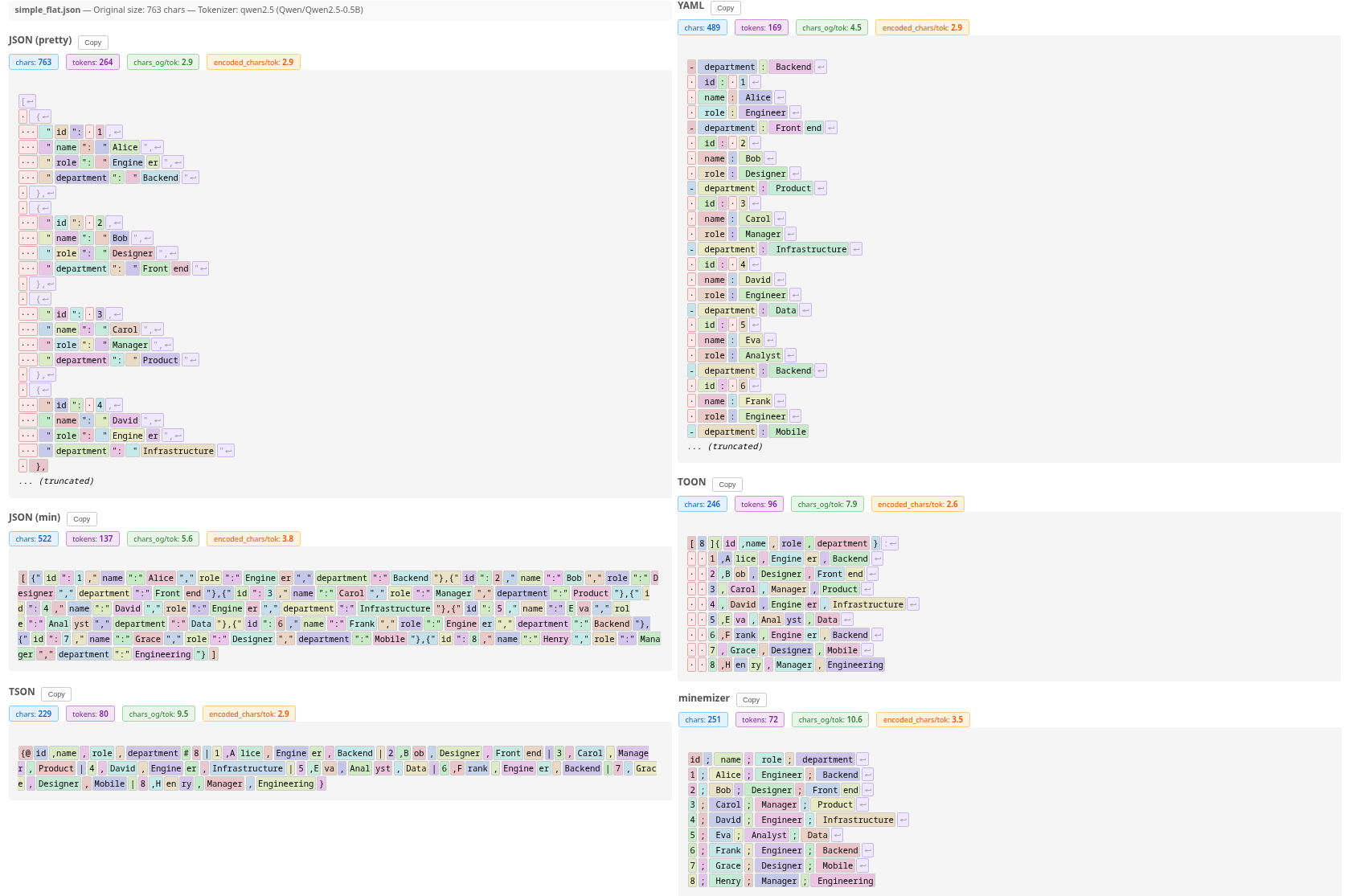
Table comparing different formats and tokenizers
| Format | Chars | gpt2 | llama | qwen2.5 | Deepseek-V3.2 | Avg Tokens | Orig/Token |
|---|---|---|---|---|---|---|---|
| JSON (pretty) | 763 | 384 | 334 | 264 | 269 | 312.8 | 2.4 |
| JSON (min) | 522 | 152 | 165 | 137 | 149 | 150.8 | 5.1 |
| CSV | 234 | 95 | 101 | 77 | 90 | 90.8 | 8.4 |
| TSV | 234 | 95 | 101 | 77 | 91 | 91.0 | 8.4 |
| YAML | 489 | 163 | 180 | 169 | 171 | 170.8 | 4.5 |
| TOON | 246 | 98 | 103 | 96 | 92 | 97.2 | 7.8 |
| TSON | 229 | 90 | 95 | 80 | 85 | 87.5 | 8.7 |
| minemizer | 251 | 74 | 83 | 72 | 74 | 75.8 | 10.1 |
| minemizer (compact) | 224 | 85 | 91 | 77 | 82 | 83.8 | 9.1 |
See interactive benchmarks for detailed tokenization and accuracy comparison across different tokenizers and LLMs.
Installation
pip
pip install git+https://github.com/ashirviskas/minemizer.git
uv
uv add git+https://github.com/ashirviskas/minemizer.git
poetry
poetry add git+https://github.com/ashirviskas/minemizer.git
Configuration
Set global defaults or use per-call overrides:
from minemizer import config, minemize

# Configure globally
config.delimiter = "|"
config.use_spaces = False

data = [{"a": 1, "b": 2}]
print(minemize(data))  # a|b \n 1|2

# Override per-call
print(minemize(data, delimiter=","))  # a,b \n 1,2
Options
| Option | Default | Description |
|---|---|---|
delimiter |
";" |
Field separator |
use_spaces |
True |
Add space after delimiter |
sparsity_threshold |
0.5 |
Key frequency threshold for header (0.0-1.0) |
sparse_indicator |
"..." |
Indicator for sparse fields in schema |
header_separator |
None |
Separator row after header (e.g., "---") |
wrap_lines |
None |
Wrap each line with this string (e.g., "|") |
Presets
I added some presets for fun if you want your data to look more like something else that might help your LLM understand it better while still keeping some minemizer optimizations. It does not guarantee the format will be compliant, but hey, at least it looks like it.
from minemizer import minemize, presets
CSV
If you cannot tell the difference, does it really matter?
print(minemize(data, preset=presets.csv))
name,role,team
Marta,Engineer,Backend
James,Designer,Frontend
Sophie,Manager,Product
Markdown table
Works all the time, 75% of the time (don't try nested pls)
print(minemize(data, preset=presets.markdown))
|name| role| team|
|---| ---| ---|
|Marta| Engineer| Backend|
|James| Designer| Frontend|
|Sophie| Manager| Product|
Rendered:
| name | role | team |
|---|---|---|
| Marta | Engineer | Backend |
| James | Designer | Frontend |
| Sophie | Manager | Product |
Available presets
| Preset | Description |
|---|---|
presets.default / presets.llm |
Optimized for LLM token efficiency (semicolon, spaces) |
presets.markdown |
Proper markdown table with header separator |
presets.csv |
Comma-separated values |
presets.tsv |
Tab-separated values |
presets.compact |
Minimal characters (like default, just no spaces) |
See examples/ for more detailed examples.
Benchmarks
Last updated: 2025-12-01
Token Efficiency
Normalized comparison (JSON pretty = 1.0x):
| Format | flat | nested | lists | sparse | complex | books | countries | large_mixed | large_numerical | large_text | mcp_tools | avg |
|---|---|---|---|---|---|---|---|---|---|---|---|---|
| JSON (pretty) | 1.0x | 1.0x | 1.0x | 1.0x | 1.0x | 1.0x | 1.0x | 1.0x | 1.0x | 1.0x | 1.0x | 1.0x |
| JSON (min) | 2.1x | 2.3x | 2.4x | 2.0x | 2.2x | 1.5x | 1.5x | 2.1x | 1.7x | 1.7x | 2.3x | 2.0x |
| CSV | 3.4x | ✗ | ✗ | ✗ | ✗ | 2.0x | ✗ | ✗ | ✗ | ✗ | ✗ | 2.7x** |
| TSV | 3.4x | ✗ | ✗ | ✗ | ✗ | 2.0x | ✗ | ✗ | ✗ | ✗ | ✗ | 2.7x** |
| YAML | 1.8x | 1.8x | 1.8x | 1.8x | 1.7x | 1.3x | 2.1x | 1.7x | 1.4x | 1.5x | 1.5x | 1.7x |
| TOON | 3.2x | 1.7x | 1.9x | 1.6x | 1.6x | 2.0x | 2.0x | 1.5x | 1.3x | 1.5x | 1.5x | 1.8x |
| TSON | 3.6x | 3.4x | 3.7x | 2.0x | 2.6x | 2.0x | 2.9x | 1.9x | 1.7x | 1.6x | 2.4x | 2.5x |
| minemizer | 4.1x | 3.5x | 3.7x | 3.6x | 3.1x | 2.0x | 3.7x | 2.4x | 1.8x | 2.2x | 2.9x | 3.0x |
| minemizer (compact) | 3.7x | 3.4x | 3.6x | 3.3x | 3.0x | 2.1x | 3.6x | 2.4x | 1.9x | 2.1x | 2.9x | 2.9x |
Higher is better. ✗ = format cannot represent this data type. ** = average from partial data.
See interactive benchmarks or markdown for detailed comparison across different tokenizers and LLMs.
Running Benchmarks
# Install benchmark dependencies
uv sync --group benchmark

# Run compression benchmarks (token efficiency)
uv run python -m benchmarks compression

# Generate synthetic data for LLM benchmarks
uv run python -m benchmarks generate --sizes 50,100,1000,5000

# Run LLM accuracy benchmarks (requires local llama.cpp server)
uv run python -m benchmarks llm --model "your-model" --data nested_1000 --queries 50

# Generate HTML report from LLM results
uv run python -m benchmarks report --include-all
Design Notes
- Delimiter:
;- Chosen mostly arbitrarily as it is not used too often in text data, but is used often enough to be recognized as a separator by LLMs. - Use spaces:
True- Renders strings as{ somevalue; othervalue}instead of{somevalue;othervalue}for better tokenization efficiency. It does introduce more tokens on average (~3-5% in my testing), but more the tokens more often preserve whole words. Example{Hana;pyramid}will tokenize to{|H|ana|;p|yramid}(5 tokens and words are split), while{ Hana; pyramid}tokenizes to{| Hana|;| pyramid|}(still 5 tokens, but the words are preserved). This will not matter much for bigger LLMs, but for smaller models it can make a difference. If you use a model that is 100B+ parameters, you can probably set this toFalseand save some tokens. Real benchmarks are more than welcome. - Sparsity threshold:
0.5- If some value appears in less than 50% of records, it becomes sparse.
Limitations
- Not battle tested
- Not a standard format
- Standard not finalized yet
- Cannot convert the data back to the original format (no parser implementation)
Future Work
- Deal with auto formatting numbers (floats, i.e. do python
{number:.5g}maybe as optional), dates (ISO8601 FTW, LLMs do like it very much) etc. - Create presets for different LLM tokenizers/models to maximize token efficiency (less tokens) and/or performance (better benchmarks)
- Support for type hints to optimize formatting (e.g., dates, numbers)
- Per field configuration (custom date format, number precision, unix to datetime etc.)
Contributing
PRs are very welcome!
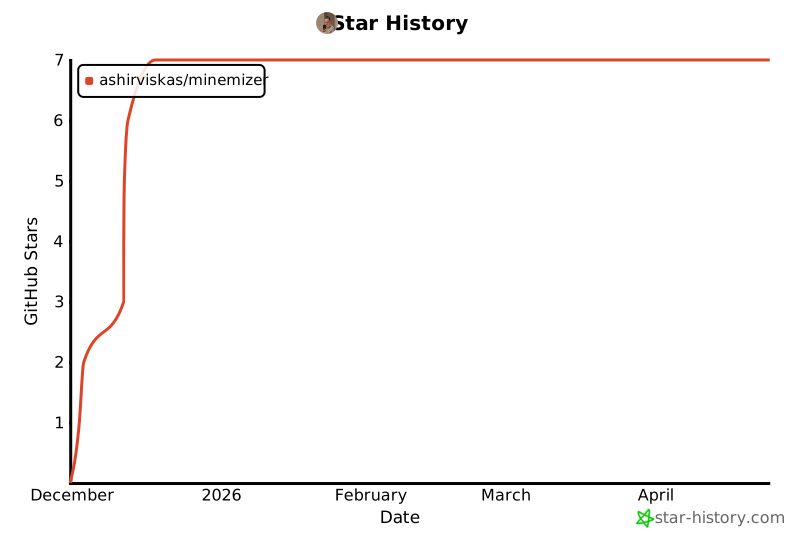
Star History
Project details
Verified details
These details have been verified by PyPIProject links
GitHub Statistics
Maintainers
Release history Release notifications | RSS feed

Download files
Download the file for your platform. If you're not sure which to choose, learn more about installing packages.
Source Distribution
Built Distribution
Filter files by name, interpreter, ABI, and platform.
If you're not sure about the file name format, learn more about wheel file names.
Copy a direct link to the current filters
File details
Details for the file minemizer-0.1.0.tar.gz.
File metadata
- Download URL: minemizer-0.1.0.tar.gz
- Upload date:
- Size: 6.2 MB
- Tags: Source
- Uploaded using Trusted Publishing? Yes
- Uploaded via: uv/0.9.17 {"installer":{"name":"uv","version":"0.9.17","subcommand":["publish"]},"python":null,"implementation":{"name":null,"version":null},"distro":{"name":"Ubuntu","version":"24.04","id":"noble","libc":null},"system":{"name":null,"release":null},"cpu":null,"openssl_version":null,"setuptools_version":null,"rustc_version":null,"ci":true}
File hashes
| Algorithm | Hash digest | |
|---|---|---|
| SHA256 |
98da3b22c38886acb7c53df3591bcd2ff350ec39ce4e0f4bc94fa388f3caf6b7
|
|
| MD5 |
e3252be2abbff0a6f6da54a31fce4292
|
|
| BLAKE2b-256 |
dc7a22608f1a5a783c0276c094006d3da94eccab34cd5d49bd6eedab13c6610a
|
File details
Details for the file minemizer-0.1.0-py3-none-any.whl.
File metadata
- Download URL: minemizer-0.1.0-py3-none-any.whl
- Upload date:
- Size: 16.9 kB
- Tags: Python 3
- Uploaded using Trusted Publishing? Yes
- Uploaded via: uv/0.9.17 {"installer":{"name":"uv","version":"0.9.17","subcommand":["publish"]},"python":null,"implementation":{"name":null,"version":null},"distro":{"name":"Ubuntu","version":"24.04","id":"noble","libc":null},"system":{"name":null,"release":null},"cpu":null,"openssl_version":null,"setuptools_version":null,"rustc_version":null,"ci":true}
File hashes
| Algorithm | Hash digest | |
|---|---|---|
| SHA256 |
beb631b44601180f12a642f61ccb2c992af24a14eeec56f6202590cb6bd7c0ec
|
|
| MD5 |
fedd298859076bfa701ec68170008fbd
|
|
| BLAKE2b-256 |
f35d77d56c549e62ba56c3f959c4d5615c2349fe031b8bcaf1c59e61e5cd11a7
|






