
Mini EQ




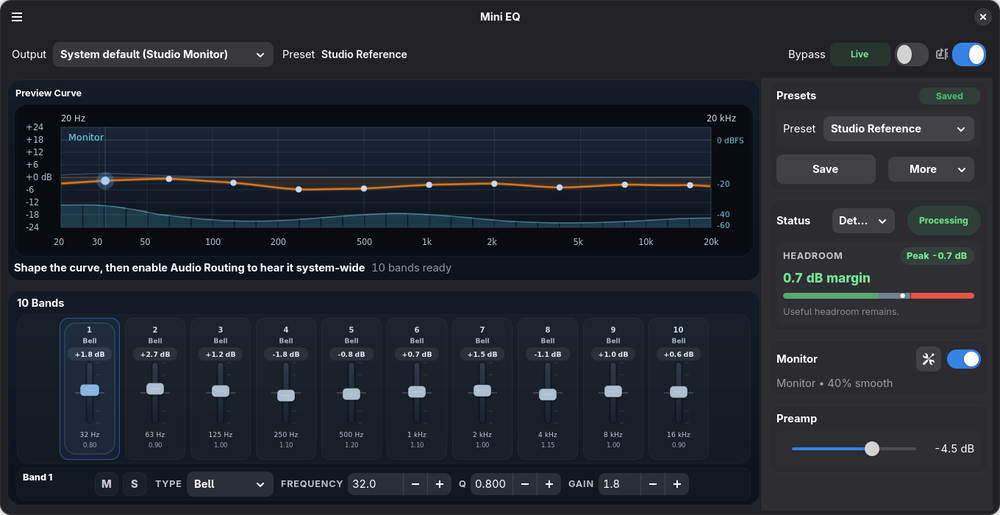
Mini EQ is a small system-wide parametric equalizer for PipeWire desktops. It uses GTK/Libadwaita for the UI, pipewire-gobject for app-facing PipeWire routing, metadata, and monitor streams, and PipeWire filter-chain with builtin biquad filters for the equalizer. When libebur128 is available, the monitor can also show live LUFS loudness.
The native PipeWire biquad filters calculate coefficients at their processing sample rate; EQ processing is not pinned to 48 kHz.
Features
- System-wide parametric EQ for PipeWire desktop playback.
- GTK/Libadwaita interface with a compact 10-band fader workflow.
- PipeWire routing and default-output tracking through pipewire-gobject.
- PipeWire filter-chain DSP using builtin biquad filters.
- Optional spectrum analyzer and LUFS loudness readout through a PipeWire monitor capture stream.
- Auto preset links can follow the detected PipeWire port when available and fall back to the selected EQ output when a port is not reported.
- Optional background mode keeps the EQ active after closing the window, with a separate Start at Login preference and optional active-at-login routing.
- Optional GNOME Shell extension for quick panel access to routing, EQ, analyzer status, presets, and auto preset links.
- Search and import headphone correction presets from
AutoEq directly in the app, or import Equalizer
APO-style text presets from a local file or
--import-apo.
AutoEq And APO Presets
Mini EQ can search AutoEq.app headphone profiles, preview the correction curve for a selected profile, and import a generated Equalizer APO-style parametric EQ preset. Use Import from AutoEq... from the main menu, search by headphone model, select a profile, then import it. Profile data and generated presets come from AutoEq.app on demand and are cached locally.
Local APO text presets are still supported: use Import Equalizer APO... in
Mini EQ or start the app with mini-eq --import-apo path/to/ParametricEQ.txt.
Install
The recommended desktop install path is Flathub:
flatpak install flathub io.github.bhack.mini-eq
flatpak run io.github.bhack.mini-eq
PyPI and source installs are available for development or for systems with a recent GTK/Libadwaita stack plus PyGObject, PipeWire, WirePlumber, and native pipewire-gobject build/runtime packages already installed:
python3 -m pip install mini-eq
mini-eq --check-deps
mini-eq
See Development for distro package names, PyPI virtualenv details, source checkout commands, tests, and local Flatpak builds.
GNOME Shell Extension
Mini EQ also has an optional GNOME Shell extension for quick panel access to routing, EQ, analyzer status, presets, and auto preset links.
Install it from GNOME Shell Extensions: https://extensions.gnome.org/extension/9803/mini-eq-controls/
Notes
User presets and output preset links are stored under ~/.config/mini-eq.
AutoEq profile data and downloaded presets are cached under
~/.cache/mini-eq/autoeq.
pip install mini-eq installs only the Python package. The recent desktop and
audio system packages listed in
Development
are still required for the app to connect to GTK, PipeWire, and the host
WirePlumber-managed session.
Acknowledgements
Mini EQ is inspired in part by EasyEffects and the broader PipeWire audio tooling ecosystem. Mini EQ is a separate project focused on a compact system-wide parametric EQ workflow.
1 maintainer

Metadata
1 maintainer
Release files for mini-eq 0.8.9
For a detailed explanation of source distributions (sdists) and built distributions (wheels), please see the package formats documentation.
Source distribution (sdist)
| File | Size | Uploaded | |
|---|---|---|---|
| mini_eq-0.8.9.tar.gz | 788.0 kB | Details |
Built distribution (wheel)
| File | Interpreter | ABI | Platform | Reset |
|---|---|---|---|---|
| mini_eq-0.8.9-py3-none-any.whl | Python 3 | none | any | Details |
Total release size: 948.1 kB
Release files / mini_eq-0.8.9.tar.gz
| Download URL | mini_eq-0.8.9.tar.gz |
|---|---|
| Size | 788.0 kB |
| Tags | Source |
|
SHA-256 checksum How to use checksums |
b6c6dfcaae450161824084637634994d7446821624560c05481e7b0d65e34685
|
|
BLAKE2b-256 checksum How to use checksums |
6ca080e5899c36969e51d8f99226239a12b0cf7dac4c111a3adeb359143ba154
|
| Upload date | |
|
Uploaded using Trusted Publishing? What is trusted publishing? |
Yes |
| Uploaded via |
twine/7.0.0 CPython/3.13.14
|
Provenance
Provenance describes where a file came from. On PyPI, provenance is shared via attestations, which provide a verifiable record of the build or publishing details. View details, limitations and caveats.


PyPI Publish Attestation
PyPI verified that this artifact, at this checksum, originated from the publisher listed below.
Signed by GitHub Actions, verified by PyPI on Oct 13, 2026.
Transparency logRelease files / mini_eq-0.8.9-py3-none-any.whl
| Download URL | mini_eq-0.8.9-py3-none-any.whl |
|---|---|
| Size | 160.0 kB |
| Tags | Python 3 |
|
SHA-256 checksum How to use checksums |
5b72ca2eda50644337d819a360ee5e8e485df947897f79d9baf3eae3ac60468b
|
|
BLAKE2b-256 checksum How to use checksums |
305017361a17cce659d17d7752a48c8c88fdb893945da368db8a3b91a15e8e76
|
| Upload date | |
|
Uploaded using Trusted Publishing? What is trusted publishing? |
Yes |
| Uploaded via |
twine/7.0.0 CPython/3.13.14
|
Provenance
Provenance describes where a file came from. On PyPI, provenance is shared via attestations, which provide a verifiable record of the build or publishing details. View details, limitations and caveats.
PyPI Publish Attestation
PyPI verified that this artifact, at this checksum, originated from the publisher listed below.
Signed by GitHub Actions, verified by PyPI on Oct 13, 2026.
Transparency log













