
minibotcatcher






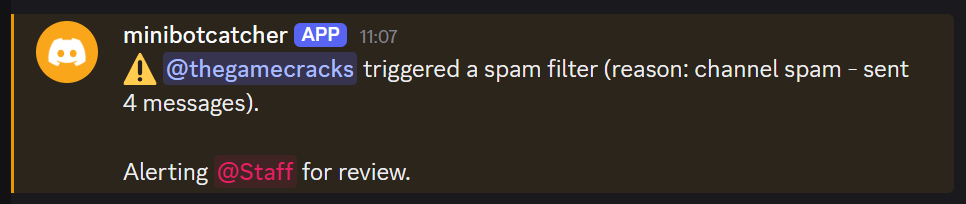
A small Discord bot to catch spam bots. Automatically timeout bots, delete spam, and alert moderators.
Made to be easy to self-host with minimal configuration. Optionally works without dangerous permissions if desired.
See the Usage section for all features.
Table of Contents
Installation
PyPI
The minimum required Python version is 3.14. It is highly recommended to install the project and its dependencies inside a virtual environment, or with pipx or uv:
# Using venv:
$ python -m venv .venv
$ source .venv/bin/activate  # Windows: .venv\Scripts\activate
(.venv) $ pip install minibotcatcher
# Using pipx:
$ pipx install minibotcatcher
# Using uv:
$ uv tool install minibotcatcher
Afterwards to run minibotcatcher, you need to set your bot token as an environment variable or inside a .env file where the installed script lives, or in any of the directories above it (see python-dotenv):
$ BOT_TOKEN=abc123 minibotcatcher
# or:
$ export BOT_TOKEN=abc123
$ minibotcatcher
# or, assuming minibotcatcher lives in a subdirectory of home like ~/.local/bin/:
$ echo 'BOT_TOKEN=abc123' >> ~/.env
$ minibotcatcher
Docker
To run the latest versioned image:
$ docker pull ghcr.io/thegamecracks/minibotcatcher
$ docker run --rm -it -e BOT_TOKEN=abc123 minibotcatcher
To run the latest development image from main branch:
$ docker run --rm -it -e BOT_TOKEN=abc123 ghcr.io/thegamecracks/minibotcatcher:main
To build and run from source directly:
$ git clone https://github.com/thegamecracks/minibotcatcher
$ cd minibotcatcher
$ docker build -t minibotcatcher .
$ docker run --rm -it -e BOT_TOKEN=abc123 minibotcatcher
From source
To install this project from source, clone the repository and create your virtual environment:
$ git clone https://github.com/thegamecracks/minibotcatcher
$ cd minibotcatcher
$ python -m venv .venv
$ source .venv/bin/activate  # Windows: .venv\Scripts\activate
(.venv) $ pip install --editable .
(.venv) $ echo 'BOT_TOKEN=abc123' > .env
(.venv) $ minibotcatcher
With uv, you can use uv run to let it manage the virtual environment for you:
$ git clone https://github.com/thegamecracks/minibotcatcher
$ cd minibotcatcher
$ echo 'BOT_TOKEN=abc123' > .env
$ uv run --no-dev minibotcatcher
In this case, uv will automatically pin your dependencies to the project's uv.lock file.
Configuration
The following environment variables are supported:
BOT_TOKEN: the bot token used to login, retrieved from the Discord Developer Portal.AUDIT_CHANNELS: a comma-separated list of channel IDs for reporting infractions (see Actions).AUDIT_MESSAGES: how to handle sending audit messages (see Actions).SPAM_FILTERS: a comma-separated list of filter names (see Filters).SPAM_TIMEOUT_MINUTES: the duration that offenders can be timed out in minutes (see Actions).FORCE_COLORorNO_COLOR: force ANSI colour logging on or off by setting either variable to1.
With manual setup, the bot can automatically load environment variables from a .env file.
On Docker, the equivalent would be docker run --env-file .env minibotcatcher.
Intents
Before you start the bot, consider enabling the Message Content intent for your bot in the Discord Developer Portal. This privileged intent allows for additional spam filters, such as mention spam.
Usage
When the bot is started, it will print an invite link requesting the relevant permissions. Use this invite link to add your bot, and then move the bot's new role above any member/vanity roles that you want checked for spam (see Exemptions).
Afterwards, the bot will begin watching messages and checking them against the spam filters.
Permissions
Four potentially dangerous permissions are suggested in the invite link:
- Moderate Members: allows timing out any bots that trigger a spam filter.
- Manage Messages: allows deleting any offending messages detected by a spam filter.
- Mention Everyone: better allows mentioning the first staff role that has kick or ban permissions.
- Bypass Slowmode: prevents audit messages from being interrupted in slowmode channels.
Each permission can be turned off to disable its corresponding functionality. For example, if the bot lacks the permissions to timeout or delete messages, the bot can still alert staff when a spam filter is triggered.
Exemptions
Spam filters do not apply to any message that meets any of the following conditions:
- The message was sent to the bot's DMs
- The author is marked as a bot, system, or webhook
- The author has at least one moderation permission (e.g. kick, ban, manage XYZ, mute/deafen/move members, bypass slowmode)
- The author's highest role exceeds the bot's highest role
The last point determines whether the bot is permitted by Discord to apply moderation actions, like timing out the member. As such, it is recommended to move the bot's role above member/vanity roles, but stay below staff roles.
Filters
The following spam filters are implemented:
- Burst spam (
burst): the author must not excessively send messages in a short period. - Channel spam (
channel): the author must not quickly send messages across multiple channels. - Mention spam (
mention): the author must not quickly mention other users/roles across multiple messages (requires Message Content).
By default, all spam filters are enabled. To select specific filters, the
SPAM_FILTERS envvar can be set to a comma-separated list of filter names,
for example, SPAM_FILTERS=channel,mention.
This setting applies globally to all servers.
While these filters are currently designed to catch user bots, it is possible that a real user can trigger the filters. In case this happens, admins with the Moderate Members permission can reverse a timeout by right-clicking or long-tapping their username.
Actions
The following actions can be performed when a bot triggers the spam filter:
-
The offender may be temporarily timed out from sending messages.
By default, the timeout is 5 minutes. The
SPAM_TIMEOUT_MINUTESenvvar can be used to change how long offenders are timed out for. If set to 0, offenders will never be timed out.This action is skipped if the bot does not have the Moderate Members permission.
-
The offender may have their offending messages deleted.
Only the specific messages that triggered the filter will be deleted. If the bot is not able to delete one or more messages (for example, a channel denies the Manage Messages permission), those messages will be left unaffected.
-
A message will be sent to the most recent channel indicating the offender, infraction reason, any timeout applied, and any mentionable staff role with kick or ban permissions.
The role mention is determined by the lowest staff role that is permitted to kick or ban members. The bot must either have the Mention Everyone permission, or the staff role must allow anyone to mention it. If no candidate role is found, the server owner will be mentioned instead.
The
AUDIT_CHANNELSenvvar can be used to change where the message is sent to. If it specifies a channel ID matching the server where the infraction occured, the message will be sent there instead, along with the most recent offending message forwarded. If multiple channels match, the first available channel will be used.The
AUDIT_MESSAGESenvvar controls how audit messages are sent:AUDIT_MESSAGES=0: audit messages are turned off entirely.AUDIT_MESSAGES=1(default): audit messages are sent only once to the audit channel if set, or the most recent channel otherwise. This is preferred if you have an audit channel and don't want a public notification that a member was timed out.AUDIT_MESSAGES=2: audit messages are sent both to the audit channel and the most recent channel. This is preferred if you always want a public notification of a member being timed out.
Server admins can check the audit channel and staff role by using their respective text commands,
@minibotcatcher antispam auditand@minibotcatcher antispam staff.
License
This project is written under the MIT License.
1 maintainer

Metadata
1 maintainer
Release files for minibotcatcher 1.0.0.post1
For a detailed explanation of source distributions (sdists) and built distributions (wheels), please see the package formats documentation.
Source distribution (sdist)
| File | Size | Uploaded | |
|---|---|---|---|
| minibotcatcher-1.0.0.post1.tar.gz | 16.1 kB | Details |
Built distribution (wheel)
| File | Interpreter | ABI | Platform | Reset |
|---|---|---|---|---|
| minibotcatcher-1.0.0.post1-py3-none-any.whl | Python 3 | none | any | Details |
Total release size: 37.4 kB
Release files / minibotcatcher-1.0.0.post1.tar.gz
| Download URL | minibotcatcher-1.0.0.post1.tar.gz |
|---|---|
| Size | 16.1 kB |
| Tags | Source |
|
SHA-256 checksum How to use checksums |
9ceaac35198a5867c54c978c46631383b7b5a7337a14c2b804fb8ca86992f198
|
|
BLAKE2b-256 checksum How to use checksums |
efe20eb4423c29120f9db8dcf906fe9adcea70c30f7a4392681f20aa83a6f1e1
|
| Upload date | |
|
Uploaded using Trusted Publishing? What is trusted publishing? |
Yes |
| Uploaded via |
twine/7.0.0 CPython/3.13.14
|
Provenance
Provenance describes where a file came from. On PyPI, provenance is shared via attestations, which provide a verifiable record of the build or publishing details. View details, limitations and caveats.


PyPI Publish Attestation
PyPI verified that this artifact, at this checksum, originated from the publisher listed below.
Signed by GitHub Actions, verified by PyPI on Oct 3, 2026.
Transparency logRelease files / minibotcatcher-1.0.0.post1-py3-none-any.whl
| Download URL | minibotcatcher-1.0.0.post1-py3-none-any.whl |
|---|---|
| Size | 21.3 kB |
| Tags | Python 3 |
|
SHA-256 checksum How to use checksums |
7afa5a98a18d2049be621c3590daaf3722ea4edc42ac754155a4a15c3759a849
|
|
BLAKE2b-256 checksum How to use checksums |
2e53e965442644d1aff6e6981f241e797d97153b89ad90a6cb90d20b17f64560
|
| Upload date | |
|
Uploaded using Trusted Publishing? What is trusted publishing? |
Yes |
| Uploaded via |
twine/7.0.0 CPython/3.13.14
|
Provenance
Provenance describes where a file came from. On PyPI, provenance is shared via attestations, which provide a verifiable record of the build or publishing details. View details, limitations and caveats.
PyPI Publish Attestation
PyPI verified that this artifact, at this checksum, originated from the publisher listed below.
Signed by GitHub Actions, verified by PyPI on Oct 3, 2026.
Transparency log













