
一站式量化交易策略开发库,简化从策略搭建到实盘交易的全流程

Project description
MiniBT - 让量化交易更简单、更高效的一站式策略开发库



无论是量化新手还是资深开发者,minibt 都能帮你轻松搞定从策略搭建到实盘交易的全流程 —— 以极简的代码实现复杂逻辑,用强大的工具链提升策略效果。
✨ 核心优势
-
🚀 极简编码体验:告别繁琐的底层实现,用简洁语法快速定义交易逻辑,让你的精力聚焦于策略思想而非代码细节。
-
📊 丰富指标即插即用:内置 pandas_ta、talib 等主流指标库,均线、MACD、RSI 等常用指标一键调用,无需重复造轮子。
-
📈 直观可视化分析:集成 Bokeh 可视化工具,策略回测结果、资金曲线、信号分布等数据一键生成交互式图表,趋势洞察更清晰。
-
🔗 无缝对接实盘:支持 TQSDK 实盘接口,策略在回测通过后可快速切换至实盘交易,从研究到落地零门槛。
-
🤖 智能优化升级:内置参数优化工具与强化学习模块,自动迭代策略参数、动态适应市场变化,助力提升策略稳定性与收益潜力。
minibt,让量化交易的门槛更低、效率更高,无论是快速验证想法还是部署实盘策略,都是你的得力助手。
📚 相关资源
- 知乎专栏:minibt量化教程专栏
- 在线教程:minibt量化教程
- GitHub仓库:https://github.com/MiniBtMaster/minibt
- PyPI仓库:https://pypi.org/project/minibt/
🛠️ 技术栈
- 核心框架: minibt 回测引擎
- 数据处理: NumPy, Pandas
- 指标计算: TA-Lib, Pandas-TA, Tulip
- 可视化: Bokeh, PySide6 (交互式图表)
- 参数优化: Optuna
- 实盘交易: TQSDK
- 强化学习: ElegantRL
📦 安装
环境要求
minibt 依赖以下基础环境,建议使用 Python 3.12 及以上版本(推荐 3.12 - 3.13 系列),可通过 python --version 检查当前环境版本:
通过 pip 安装(推荐)
pip install minibt
该命令会自动拉取 minibt 及其基础依赖(如 numpy、pandas 等),但部分特殊依赖(如 TA-Lib 需额外系统级依赖)需手动处理。
从源码安装(适合开发/定制)
# 克隆仓库
git clone https://github.com/MiniBtMaster/minibt.git
cd minibt

# 安装依赖
pip install -e .
或从 PyPI 下载 whl 文件安装:
python -m pip install 文件名.whl
验证安装
安装完成后,打开 Python 交互环境(终端执行 python 或 ipython),输入:
import minibt
print(minibt.__version__)
若输出 1.2.4(或对应版本号),且无导入错误,说明安装成功。
🚀 快速开始
示例1:双均线交叉策略
from minibt import *  # 导入minibt核心功能(策略、指标、回测引擎等)

class MA(Strategy):  # 定义策略类,必须继承Strategy基类
    params = dict(
       length1=10,  # 短期均线周期(可通过参数优化调整)
       length2=20   # 长期均线周期(可通过参数优化调整)
   )
   def __init__(self):
       # 1. 加载数据:使用minibt内置测试数据(无需手动准备)
       self.data = self.get_kline(LocalDatas.test)

       # 2. 计算均线指标:基于收盘价计算SMA
       self.ma1 = self.data.close.sma(self.params.length1)  # 短期均线
       self.ma2 = self.data.close.sma(self.params.length2)  # 长期均线


       # 3. 生成交易信号:金叉(多头)、死叉(空头)
       self.long_signal = self.ma1.cross_up(self.ma2)  # 短期均线上穿长期均线
       self.short_signal = self.ma2.cross_down(self.ma1)  # 长期均线下穿短期均线

   def next(self):
       # next 方法:逐根K线处理核心逻辑,策略的"大脑"
       # 情况1:无持仓时,根据信号开仓
       if not self.data.position:  # position=0 表示空仓
           if self.long_signal.new:  # 金叉信号最新值
               self.data.buy()       # 开多仓
           elif self.short_signal.new:  # 死叉信号最新值
               self.data.sell()      # 开空仓

       # 情况2:持有多头时,死叉信号平仓
       elif self.data.position > 0 and self.short_signal.new:
           self.data.sell()  # 平多仓

       # 情况3:持有空头时,金叉信号平仓
       elif self.data.position < 0 and self.long_signal.new:
           self.data.buy()   # 平空仓

if __name__ == "__main__":
   # 初始化回测引擎:auto=True 自动处理数据加载、回测、可视化
   bt = Bt(auto=True)
   bt.run()  # 启动回测,完成后自动弹出可视化界面
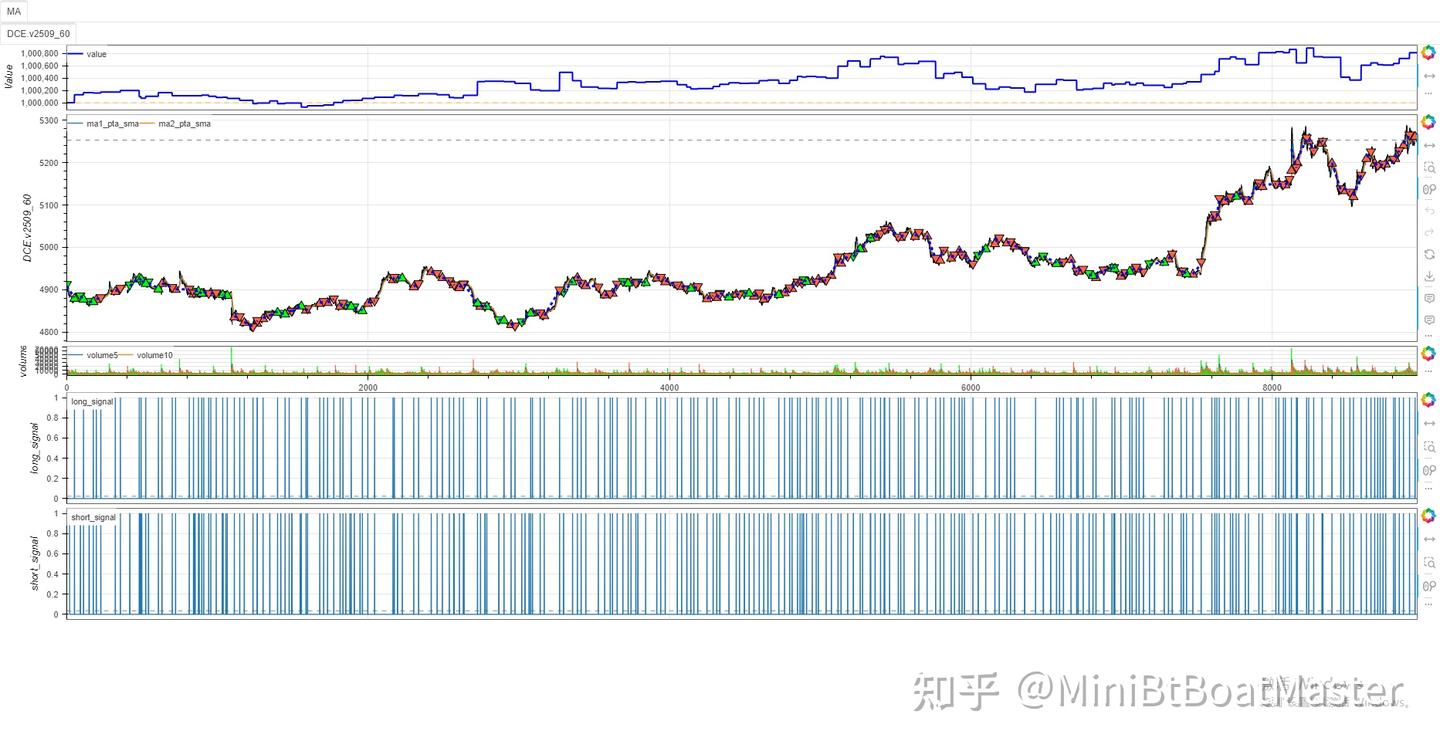
示例2:极简指标展示
from minibt import *

if __name__ == "__main__":
    LocalDatas.test.kline.run(
        ["ma1", Multiply(PandasTa.sma, dict(length=20))],
        ["ma2", Multiply(PandasTa.sma, dict(length=30))],
        ["ma3", Multiply(PandasTa.sma, dict(length=60))],
        ["ma4", Multiply(PandasTa.sma, dict(length=120))],
        ["ebsw", Multiply(PandasTa.ebsw)])
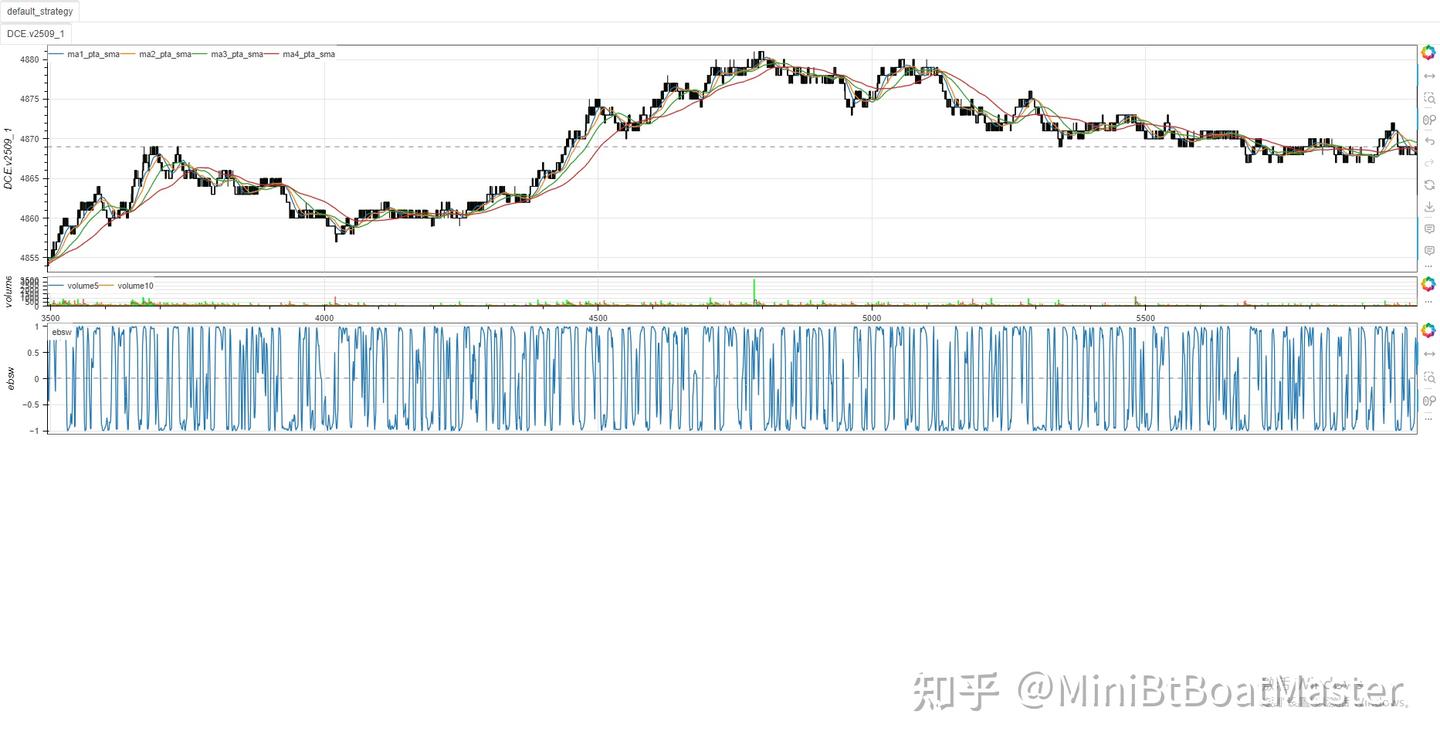
示例3:参数优化配置
if __name__ == "__main__":
    bt = Bt(auto=True)
    # 设置优化目标和参数范围
    bt.optstrategy(
        ["profit", "win_rate"],  # 优化目标:收益和胜率
        (1, 1),                  # 权重配置
        length1=(5, 15, 1),      # length1参数范围:5到15,步长为1
        length2=(20, 30, 1),     # length2参数范围:20到30,步长为1
        opconfig=OptunaConfig(n_trials=100)  # Optuna配置:100次试验
    )
    bt.run()
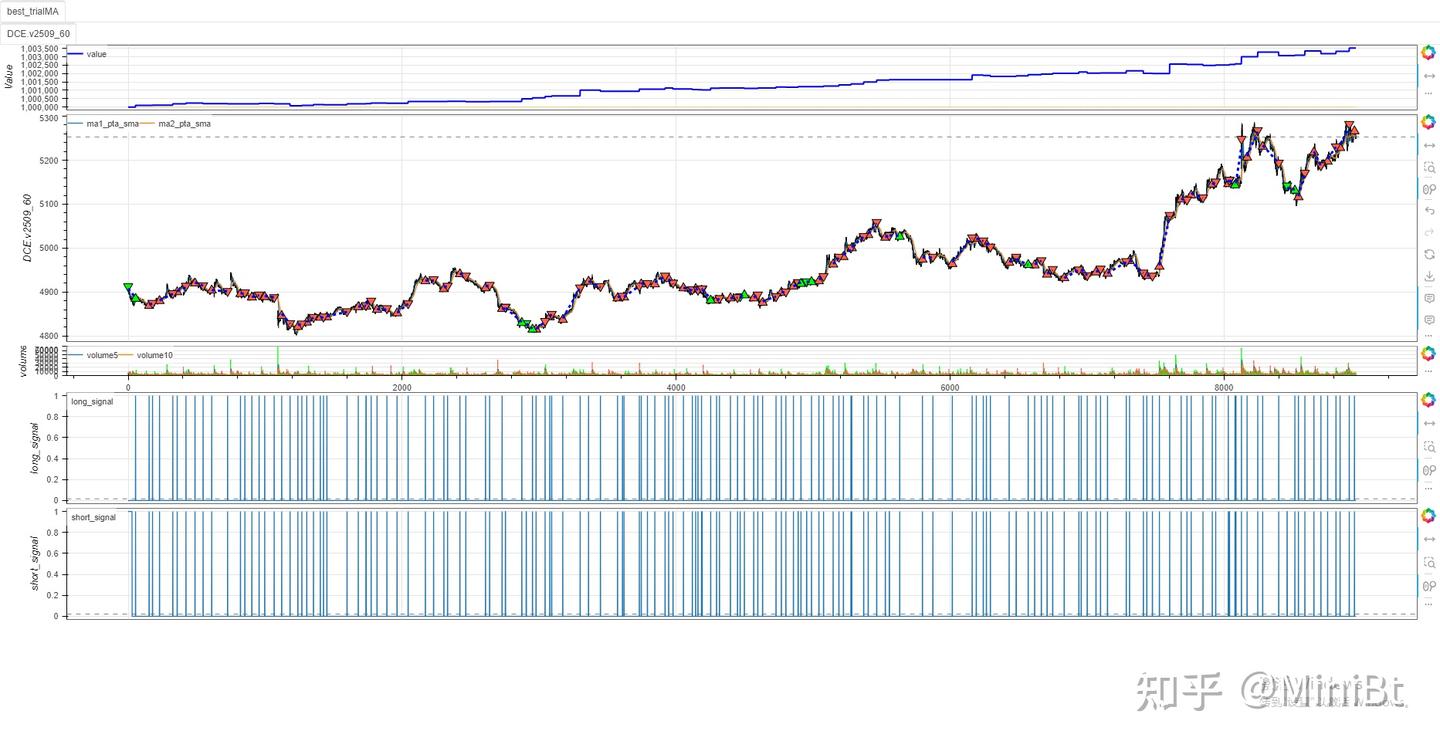
📖 核心功能详解
标准化接口与统一数据模型
minibt量化框架中所有指标和数据对象统一封装了指标与K线数据的共性能力,为子类(如 Line、IndSeries、IndFrame、KLine)提供标准化接口:
1. 多类型数据统一接口
- Line: 单值数据序列
- IndSeries: 一维数据序列(类似pandas.Series)
- IndFrame: 多维数据表格(类似pandas.DataFrame)
- KLine: K线数据对象
2. 运算符重载体系
- 支持算术运算(
+,-,*,/等) - 支持比较运算(
>,<,==等) - 支持逻辑运算(
&,|等) - 支持一元运算(
abs(),-x等)
3. 无缝Pandas兼容
- 自动将Pandas方法返回结果转换为框架内置类型
- 支持原生Pandas API调用
- 保持指标对象特性不被破坏
4. 多周期数据处理
- 支持上采样(upsample)
- 自动处理跨周期数据对齐
- 保持多周期数据的一致性
数据访问与操作
基础属性访问
# 获取数据值数组
values = indicator.values
# 获取数据形状(行数, 列数)
shape = indicator.shape
# 获取行数(时间步数量)
length = indicator.V  # 或 indicator.length
# 获取列数(特征维度)
columns = indicator.H
索引访问
# 支持多种索引方式
indicator[0]          # 第一行
indicator['close']    # close列
indicator[10:20]      # 切片
indicator[[1, 3, 5]]  # 索引列表
专用索引器
# 基于位置的索引
indicator.iloc[0]        # 第一行
indicator.iloc[0:5]      # 前5行
indicator.iloc[0, 1]     # 第一行第二列

# 基于标签的索引
indicator.loc['close']   # close列
indicator.loc[0:5]       # 前5行

# 快速标量访问
indicator.at[0, 'close'] # 第一行的close值
indicator.iat[0, 1]      # 第一行第二列的值
运算符重载
算术运算
# 基本算术运算
result = ma5 + ma10
result = close - open
result = volume * 2
result = close / open
# 原地运算
ma5 += 10
volume *= 1.5
比较运算
# 比较运算
signal = close > ma20
signal = volume >= volume.mean()
signal = rsi == 50
逻辑运算
# 逻辑运算
combined_signal = (close > ma20) & (volume > volume.mean())
either_signal = (rsi > 70) | (rsi < 30)
数据处理与转换
历史数据访问
# 访问历史数据
current_value = indicator.new        # 当前值
previous_value = indicator.prev      # 前一个值
value_10_periods_ago = indicator.history(10)  # 10周期前的值
last_10_values = indicator.history(0, 10)     # 最近10个值
数据填充
# 生成填充数据
ones = indicator.ones        # 全1序列
zeros = indicator.zeros      # 全0序列
filled = indicator.full(100) # 填充指定值的序列
多条件数据处理
ifs 方法
# 多条件数据处理
signal = indicator.ifs(
    condition1, value1,    # 条件1满足时设为value1
    condition2, value2,    # 条件2满足时设为value2
    other=default_value    # 默认值
)

# 示例:生成交易信号
long_signal = price.ifs(
    price > ma20, 1,       # 价格上穿MA20时设为1
    price < ma10, 0,       # 价格下穿MA10时设为0
    other=0                # 默认值0(无信号)
)
滚动窗口计算
基本滚动计算
# 滚动窗口计算
rolling_mean = indicator.rolling(window=20).mean()
rolling_std = indicator.rolling(window=20).std()
rolling_max = indicator.rolling(window=20).max()
自定义滚动函数
# 自定义滚动函数
def custom_roll_func(window_data):
    return window_data.max() - window_data.min()

rolling_range = indicator.rolling_apply(custom_roll_func, window=20)
多周期处理
上采样
# 指标上采样
minute_data = indicator.upsample()  # 默认参数
minute_data = indicator()
多指标并行计算
# 多指标并行计算
result1, result2, result3 = indicator.multi_apply(
    [func1, params1],  # 第一个指标
    [func2, params2],  # 第二个指标
    [func3, params3]   # 第三个指标
)
第三方指标库集成
# 使用PandasTA指标
pandas_ta_result = indicator.pta.sma(length=20)

# 使用TA-Lib指标
talib_result = indicator.talib.RSI(timeperiod=14)

# 使用Tulip指标
tulip_result = indicator.tulip.wma(period=10)

# 使用内置指标
btind_result = indicator.btind.pmax(period=14, multiplier=3)

# 使用FinTa指标
finta_result = indicator.finta.SMA(period=20)

# 使用天勤指标
tqfunc_result = indicator.tqfunc.barlast()

# 使用天勤指标
tqta_result = indicator.tqta.RSI()

# 使用信号特征
signal_features = indicator.sf.Binarizer()

# 使用配对交易指标
pair_result = indicator.pairtrading.bollinger_bands()

# 使用因子分析
factors: pd.DataFrame
factor_result = indicator.factors.single_asset_multi_factor_strategy(*factors)

# 使用TradingView指标
gc = btdata.tradingview.G_Channels()
绘图配置
基本绘图设置
# 设置指标名称
indicator.sname = "my_indicator"           #策略里面命名的变量名称
indicator.ind_name = "Custom Indicator"    #指标名称

# 设置绘图开关
indicator.isplot = True  # 全部显示
indicator.isplot = {"line1": True, "line2": False}  # 按线条名设置

# 设置主图叠加
indicator.overlap = True  # 全部叠加
indicator.overlap = {"line1": True, "line2": False}  # 按线条名设置

# 设置绘图高度
indicator.height = 300  # 指标图表显示高度
水平线设置
# 添加水平线
indicator.span_style = 50.0  # 单个水平线
indicator.span_style = SpanStyle(  # 完整配置
    location=50.0,
    color="red",
    dash="dashed",
    width=2.0
)
数据类型标识
# 检查数据类型
is_indicator = indicator.isindicator  # 是否为指标
is_custom = indicator.iscustom        # 是否为自定义数据
is_mdim = indicator.isMDim            # 是否为多维数据
is_main = indicator.ismain            # 是否在主周期显示
is_resample = indicator.isresample    # 是否为转换数据
is_replay = indicator.isreplay        # 是否为回放数据
is_candles = indicator.iscandles      # 是否为蜡烛图
is_signal = indicator.issignal        # 是否包含交易信号
策略关联
# 获取关联的策略和数据
strategy = indicator.strategy_instance  # 关联的策略实例
bt_data = indicator.kline               # 关联的K线数据

# 获取策略ID和索引
strategy_id = indicator.strategy_id    # 策略ID
plot_id = indicator.plot_id            # 绘图ID
data_id = indicator.data_id            # 数据ID
resample_id = indicator.resample_id    # 转换ID
replay_id = indicator.replay_id        # 回放ID

# 获取回测状态
current_index = indicator.btindex      # 当前回测索引
is_live = indicator.islivetrading      # 是否为实盘交易
🎯 高级功能
多周期策略示例
from minibt import *


class MultiTimeframeStrategy(Strategy):
    def __init__(self):
        # 主数据(1分钟)
        self.data_1m = self.get_kline(LocalDatas.v2509_60)
        # 转换到5分钟数据
        self.data_5m = self.data_1m.resample(300)
        # 在不同周期上计算指标
        self.ma_1m = self.data_1m.close.sma(20)
        # 数据上采样
        self.ma_5m = self.data_5m.close.sma(20)()
        self.ma_5m.overlap = True
        # 交易信号
        self.long_signal = self.ma_1m.cross_up(self.ma_5m)
        self.short_signal = self.ma_1m.cross_down(self.ma_5m)

    def next(self):
        if not self.data_1m.position:
            # 多周期信号组合
            if self.long_signal.new:
                self.buy()
            elif self.short_signal.new:
                self.sell()
        elif self.data_1m.position > 0 and self.short_signal.new:
            self.sell()
        elif self.data_1m.position < 0 and self.long_signal.new:
            self.buy()


if __name__ == "__main__":
    Bt().run()
自定义指标构造器
复杂指标示例(G-Channels)
from minibt import *


class G_Channels(BtIndicator):
    """G-Channels指标 - 高效计算上下极值通道"""
    params = dict(length=144., cycle=1)
    overlap = True  # 主图叠加显示

    def next(self):
        length = self.params.length
        cycle = min(max(int(self.params.cycle), 1), 3)
        size = self.close.size
        a = self.full()  # 上通道
        b = self.full()  # 下通道
        close = self.close.values
        pre_a = 0.
        pre_b = 0.
        # 计算通道
        for i in range(size):
            if i and i % cycle == 0:
                a[i] = max(close[i], pre_a) - (pre_a - pre_b) / length
                b[i] = min(close[i], pre_b) + (pre_a - pre_b) / length
                pre_a = a[i]
                pre_b = b[i]
        # 周期大于1时进行插值
        if cycle > 1:
            a = a.interpolate()
            b = b.interpolate()
        # 计算中轨
        avg = (a + b) / 2.
        return a, b, avg  # 返回上轨、下轨、中轨


class MyStrategy(Strategy):
    def __init__(self):
        self.data = self.get_kline(LocalDatas.v2509_60)
        self.data.height = 600
        self.G_Channels = G_Channels(self.data)
        self.G_Channels.a.line_style = LineStyle(
            LineDash.solid, 2, Colors.blue),     # 上轨样式
        self.G_Channels.b.line_style = LineStyle(
            LineDash.solid, 2, Colors.red),      # 下轨样式
        self.G_Channels.avg.line_style = LineStyle(
            LineDash.dotted, 3, Colors.gray)     # 中轨样式


if __name__ == "__main__":
    Bt().run()
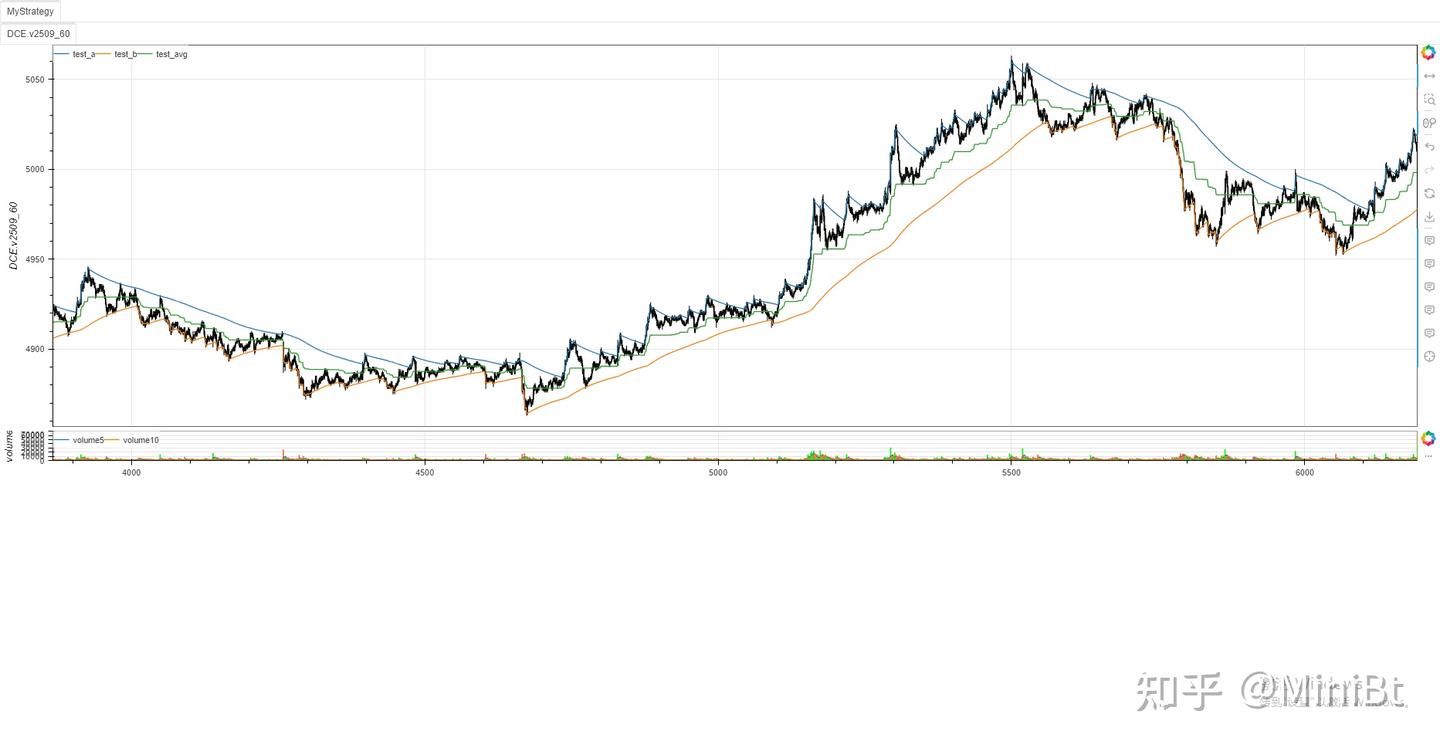
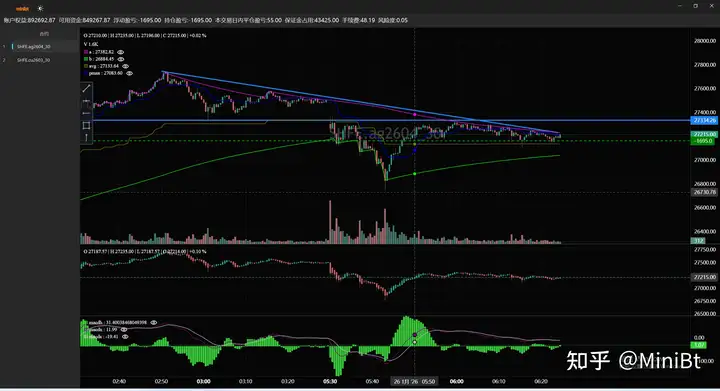
实时图表系统使用示例
from __future__ import annotations
from minibt import *
from tqsdk import TqApi, TqAuth, TqKq


def get_contract(exchange_id: str, contracts: list[str], has_night=None):
    global api
    target_prefixes: list[str] = [
        f"{exchange_id}.{cont}" for cont in contracts]
    all_contracts: list[str] = api.query_cont_quotes(
        exchange_id, has_night=has_night)

    return [
        contract for contract in all_contracts
        for prefix in target_prefixes
        if contract.startswith(prefix) and contract[len(prefix):].isdigit()
    ]


class MyStrategy(Strategy):
    params = dict(symbol="DCE.v2601")

    def __init__(self) -> None:
        self.data = self.get_kline(self.params.symbol, 60, 1000)
        self.data.watermark = True
        self.toolbox = False
        self.gc = self.data.tradingview.G_Channels()
        self.ha = self.data.ha()
        self.pmax = self.data.close.btind.pmax3().pmax
        self.macd = self.data.close.macd()
        self.macd.macdh.line_color = Colors.limegreen
        self.macd.macdh.price_label = True
        self.macd.macdh.price_line = True


if __name__ == "__main__":
    api = TqApi(TqKq(), auth=TqAuth(
        "天勤账户", "天勤密码"))
    bt = Bt(auto=False, live=True)
    bt.addTqapi(api=api)

    contracts_dict = {
        "SHFE": ["cu", "ag"],
        # "DCE": ["v", "pp",  "m", "l", "eg", "eb", "b"],
        # "CZCE": ["TA", "SR", "SM", "RM", "PX", "PF", "MA"]
    }
    name = "策略"
    i = 0
    for k, v in contracts_dict.items():
        contracts = get_contract(k, v)
        for contract in contracts:
            i += 1
            bt.addstrategy(
                MyStrategy.copy(name=f"{name}{i}", params=dict(symbol=contract)))

    bt.run(period_milliseconds=1000)
🤝 贡献指南
我们欢迎社区贡献!请参阅 CONTRIBUTING.md 了解如何参与项目开发。
- Fork 本项目
- 创建特性分支 (
git checkout -b feature/AmazingFeature) - 提交更改 (
git commit -m 'Add some AmazingFeature') - 推送到分支 (
git push origin feature/AmazingFeature) - 开启 Pull Request
📄 许可证
本项目采用 MIT 许可证 - 查看 LICENSE 文件了解详情。
📞 联系我们
- GitHub仓库: https://github.com/MiniBtMaster/minibt
- PyPI项目: https://pypi.org/project/minibt/
- 教程网站: https://www.minibt.cn
- 联系邮箱: 407841129@qq.com
- 作者: owen
🙏 致谢
感谢以下开源项目的支持:
- NumPy - 科学计算基础库
- Pandas - 数据分析工具
- TA-Lib - 技术分析指标库
- Pandas-TA - Pandas技术分析扩展
- Bokeh - 交互式可视化库
- Optuna - 超参数优化框架
- TQSDK - 天勤量化交易接口
- ElegantRL - 强化学习框架
注意: MiniBT 目前处于活跃开发阶段,建议关注项目更新以获取最新功能和优化。欢迎试用并提供反馈!
Release history Release notifications | RSS feed


Download files
Download the file for your platform. If you're not sure which to choose, learn more about installing packages.
Source Distributions
Built Distribution
Filter files by name, interpreter, ABI, and platform.
If you're not sure about the file name format, learn more about wheel file names.
Copy a direct link to the current filters
File details
Details for the file minibt-1.2.4-py3-none-any.whl.
File metadata
- Download URL: minibt-1.2.4-py3-none-any.whl
- Upload date:
- Size: 4.1 MB
- Tags: Python 3
- Uploaded using Trusted Publishing? No
- Uploaded via: twine/6.2.0 CPython/3.9.13
File hashes
| Algorithm | Hash digest | |
|---|---|---|
| SHA256 |
4c563cc8dff5bfacf13b06357c21091453879c1c9749c7c1f4fff96d8a0f7201
|
|
| MD5 |
516cb8a6448e568c35da9c46c5006ae7
|
|
| BLAKE2b-256 |
d85ba84d258bffaf25cf868d2abcad0848e8e17290a16f686d4cc7484c310794
|






