
minify-html






A Rust HTML minifier meticulously optimised for speed and effectiveness, with bindings for other languages.
- Advanced minification strategy beats other minifiers while being much faster.
- Uses SIMD searching, direct tries, and lookup tables.
- Handles invalid HTML, with extensive testing and fuzzing.
- Natively binds to esbuild for super fast JS and CSS minification.
Performance
Comparison with html-minfier and minimize, run on the top web pages. See the breakdown here.
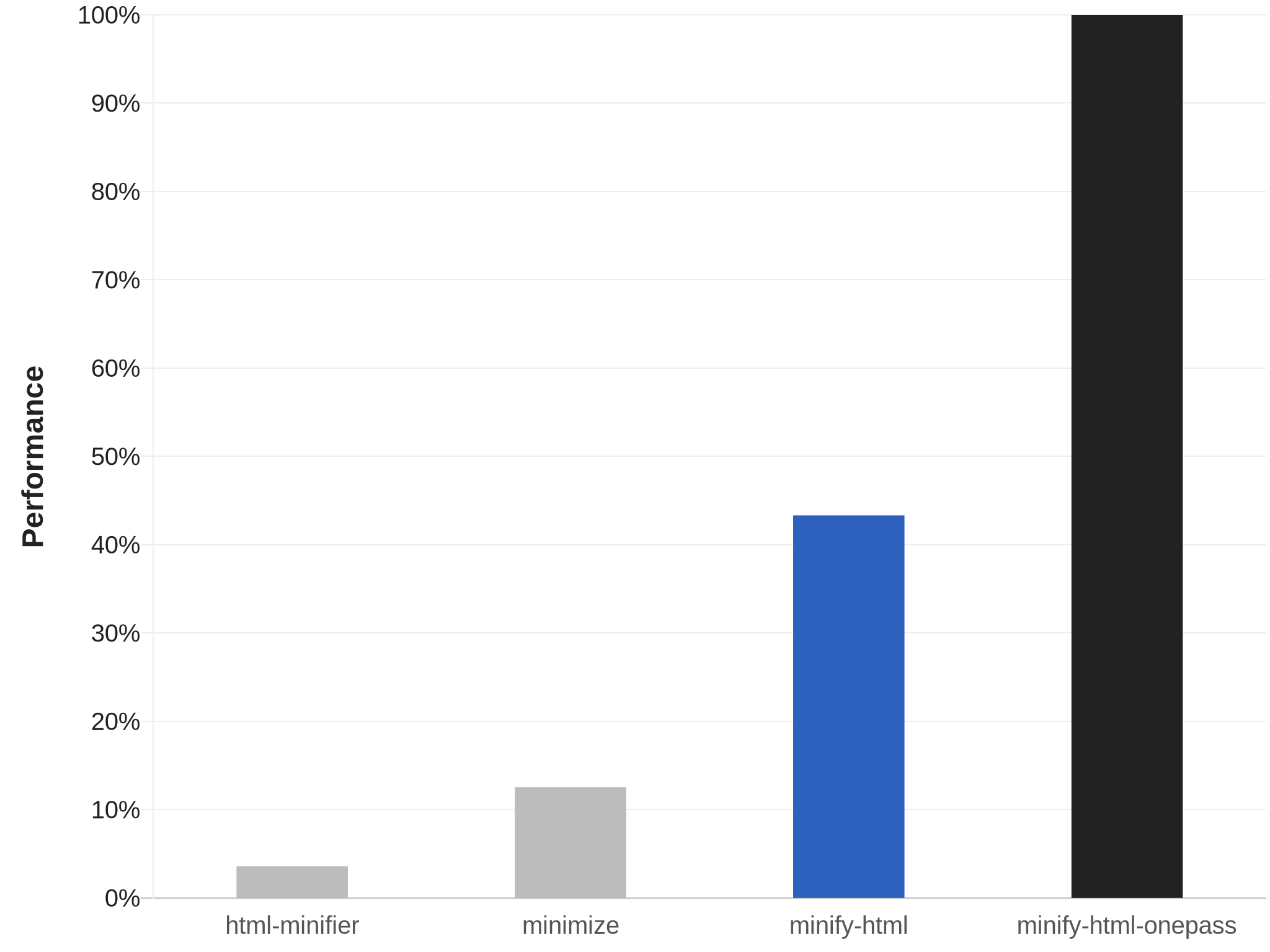
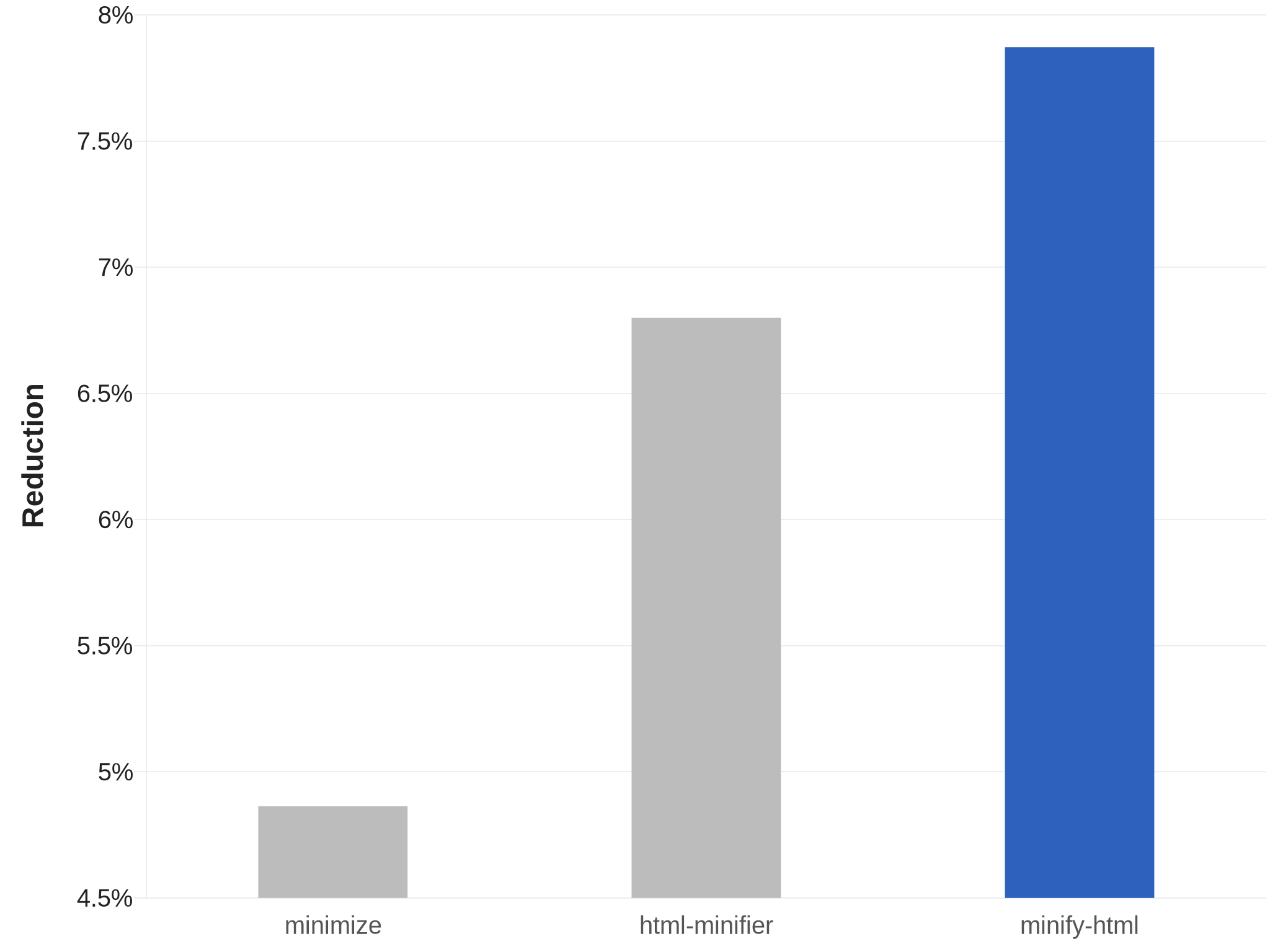
The onepass variant is even more optimised for speed. See its README for more details.
Compatibility and usage
CLI
Precompiled binaries are available for Linux, macOS, and Windows.
Get
Linux x64 | Linux ARM64 | macOS x64 | macOS ARM64 | Windows x64
Use
Use the --help argument for more details.
minify-html --output /path/to/output.min.html --keep-closing-tags --minify-css /path/to/src.html
Rust
Get
[dependencies]
minify-html = { version = "0.8.1", features = ["js-esbuild"] }
Building with the js-esbuild feature requires the Go compiler to be installed as well, to build the JS and CSS minifier.
If the js-esbuild feature is not enabled, cfg.minify_js and cfg.minify_css will have no effect.
Use
Check out the docs for API and usage examples.
Node.js
- Package: @minify-html/js
- Binding: N-API
- Platforms: Linux (ARM64 and x64), macOS (ARM64 and x64), Windows (x64); Node.js 8.6.0 and higher
Get
Using npm:
npm i @minify-html/js
Using Yarn:
yarn add @minify-html/js
Use
TypeScript definitions are available.
import * as minifyHtml from "@minify-html/js";
// Or `const minifyHtml = require("@minify-html/js")` if not using TS/ESM.

const cfg = minifyHtml.createConfiguration({ keep_spaces_between_attributes: true, keep_comments: true });
const minified = minifyHtml.minify("<p>  Hello, world!  </p>", cfg);
All Cfg fields are available as snake_case properties on the object provided to createConfiguration; if any are not set, they default to false.
Java
- Package: in.wilsonl.minifyhtml
- Binding: JNI
- Platforms: Linux, macOS, Windows; Java 7 and higher
Get
Add as a Maven dependency:
<dependency>
  <groupId>in.wilsonl.minifyhtml</groupId>
  <artifactId>minify-html</artifactId>
  <version>0.8.1</version>
</dependency>
Use
import in.wilsonl.minifyhtml.Configuration;
import in.wilsonl.minifyhtml.MinifyHtml;

Configuration cfg = new Configuration.Builder()
    .setKeepHtmlAndHeadOpeningTags(true)
    .setMinifyCss(true)
    .build();

String minified = MinifyHtml.minify("<p>  Hello, world!  </p>", cfg);
All Cfg fields are available as camelCase setter methods on the Builder; if any are not set, they default to false.
Python
- Package: minify-html
- Binding: PyO3
- Platforms: Linux (ARM64 and x64), macOS (ARM64 and x64), Windows (x64); Python 3.8 to 3.10
Get
Add the PyPI project as a dependency and install it using pip or pipenv.
Use
import minify_html

minified = minify_html.minify("<p>  Hello, world!  </p>", minify_js=True, remove_processing_instructions=True)
All Cfg fields are available as Python keyword arguments; if any are omitted, they default to False.
Ruby
- Package: minify_html
- Binding: Rutie
- Platforms: Linux, macOS; Ruby 2.5 and higher
Get
Add the library as a dependency to Gemfile or *.gemspec.
Use
require 'minify_html'

print MinifyHtml.minify("<p>  Hello, world!  </p>", { :keep_spaces_between_attributes => true, :minify_js => true })
All Cfg fields are available; if any are omitted, they default to false.
Minification
Note that some of the minification done can result in HTML that will not pass validation, but remain interpreted and rendered correctly by the browser; essentially, the laxness of the browser is taken advantage of for better minification. These can be turned off via the Cfg object.
Whitespace
minify-html has advanced context-aware whitespace minification that does things such as:
- Leave whitespace untouched in
preandcode, which are whitespace sensitive. - Trim and collapse whitespace in content tags, as whitespace is collapsed anyway when rendered.
- Remove whitespace in layout tags, which allows the use of inline layouts while keeping formatted code.
Methods
There are three whitespace minification methods. When processing text content, minify-html chooses which ones to use depending on the containing element.
Collapse whitespace
Applies to: any element except whitespace sensitive elements.
Reduce a sequence of whitespace characters in text nodes to a single space (U+0020).
| Before | After |
|---|---|
<p>↵
··The·quick·brown·fox↵
··jumps·over·the·lazy↵
··dog.↵
</p>
|
<p>·The·quick·brown·fox·jumps·over·the·lazy·dog.·</p>
|
Destroy whole whitespace
Applies to: any element except whitespace sensitive, content, content-first, and formatting elements.
Remove any text nodes between tags that only consist of whitespace characters.
| Before | After |
|---|---|
<ul>↵
··<li>A</li>↵
··<li>B</li>↵
··<li>C</li>↵
</ul>
|
<ul>↵
··<li>A</li><li>B</li><li>C</li>↵
</ul>
|
Trim whitespace
Applies to: any element except whitespace sensitive and formatting elements.
Remove any leading/trailing whitespace from any leading/trailing text nodes of a tag.
| Before | After |
|---|---|
<p>↵
··Hey,·I·<em>just</em>·found↵
··out·about·this·<strong>cool</strong>·website!↵
··<sup>[1]</sup>↵
</p>
|
<p>Hey,·I·<em>just</em>·found↵
··out·about·this·<strong>cool</strong>·website!↵
··<sup>[1]</sup></p>
|
Element types
minify-html assumes HTML and SVG elements are used in specific ways, based on standards and best practices. By making these assumptions, it can apply optimal whitespace minification strategies. If these assumptions do not hold, consider adjusting the HTML source or turning off whitespace minification.
| Group | Elements | Expected children |
|---|---|---|
| Formatting | a, strong, and others |
Formatting elements, text. |
| Content | h1, p, and others |
Formatting elements, text. |
| Layout | div, ul, and others |
Layout elements, content elements. |
| Content-first | label, li, and others |
Like content but could be layout with only one child. |
Formatting elements
Whitespace is collapsed.
Formatting elements are usually inline elements that wrap around part of some text in a content element, so its whitespace isn't trimmed as they're probably part of the content.
Content elements
Whitespace is trimmed and collapsed.
Content elements usually represent a contiguous and complete unit of content such as a paragraph. As such, whitespace is significant but sequences of them are most likely due to formatting.
Before
<p>↵
··Hey,·I·<em>just</em>·found↵
··out·about·this·<strong>cool</strong>·website!↵
··<sup>[1]</sup>↵
</p>
After
<p>Hey,·I·<em>just</em>·found·out·about·this·<strong>cool</strong>·website!·<sup>[1]</sup></p>
Layout elements
Whitespace is trimmed and collapsed. Whole whitespace is removed.
These elements should only contain other elements and no text. This makes it possible to remove whole whitespace, which is useful when using display: inline-block so that whitespace between elements (e.g. indentation) does not alter layout and styling.
Before
<ul>↵
··<li>A</li>↵
··<li>B</li>↵
··<li>C</li>↵
</ul>
After
<ul><li>A</li><li>B</li><li>C</li></ul>
Content-first elements
Whitespace is trimmed and collapsed.
These elements are usually like content elements but are occasionally used like a layout element with one child. Whole whitespace is not removed as it might contain content, but this is OK for using as layout as there is only one child and whitespace is trimmed.
Before
<li>↵
··<article>↵
····<section></section>↵
····<section></section>↵
··</article>↵
</li>
After
<li><article><section></section><section></section></article></li>
Tags
Optional opening and closing tags are removed.
Attributes
Any entities in attribute values are decoded, and then the shortest representation of the value is calculated and used:
- Double quoted, with any
"encoded. - Single quoted, with any
'encoded. - Unquoted, with
"/'first character (if applicable), any>, and any whitespace encoded.
Attributes have their whitespace (after any decoding) trimmed and collapsed when possible.
Boolean attribute values are removed. Some other attributes are completely removed if their value is empty or the default value after any processing.
type attributes on script tags with a value equaling a JavaScript MIME type are removed.
If an attribute value is empty after any processing, everything but the name is completely removed (i.e. no =), as an empty attribute is implicitly the same as an attribute with an empty string value.
Spaces are removed between attributes when possible.
Entities
Entities are decoded if they're valid and shorter or equal in length when decoded. UTF-8 sequences that have a shorter entity representation are encoded.
Numeric entities that do not refer to a valid Unicode Scalar Value are replaced with the replacement character.
Encoding is avoided when possible; for example, < are only encoded in content if they are followed by a valid tag name character.
If necessary, the shortest entity representation is chosen.
Comments
Comments are removed.
Ignored
Bangs, processing instructions, and empty elements are not removed as it is assumed there is a special reason for their declaration.
Parsing
minify-html can process any HTML, handling all possible syntax (including invalid ones) gracefully like browsers. See Parsing.md for more details.
Issues and contributions
Pull requests and any contributions welcome!
If minify-html did something unexpected, misunderstood some syntax, or incorrectly kept/removed some code, raise an issue with some relevant code that can be used to reproduce and investigate the issue.
1 maintainer

Metadata
1 maintainer
Release files for minify-html-core 0.8.1
For a detailed explanation of source distributions (sdists) and built distributions (wheels), please see the package formats documentation.
Built distributions (wheels)
| File | Reset | |||
|---|---|---|---|---|
| minify_html_core-0.8.1-cp310-cp310-manylinux_2_27_x86_64.whl | CPython 3.10 | CPython 3.10 | Linux glibc 2.27+ x86-64 | Details |
| minify_html_core-0.8.1-cp310-cp310-macosx_10_7_x86_64.whl | CPython 3.10 | CPython 3.10 | macOS 10.7+ x86-64 | Details |
| minify_html_core-0.8.1-cp39-cp39-manylinux_2_27_x86_64.whl | CPython 3.9 | CPython 3.9 | Linux glibc 2.27+ x86-64 | Details |
| minify_html_core-0.8.1-cp39-cp39-macosx_10_7_x86_64.whl | CPython 3.9 | CPython 3.9 | macOS 10.7+ x86-64 | Details |
| minify_html_core-0.8.1-cp38-cp38-manylinux_2_27_x86_64.whl | CPython 3.8 | CPython 3.8 | Linux glibc 2.27+ x86-64 | Details |
| minify_html_core-0.8.1-cp38-cp38-macosx_10_7_x86_64.whl | CPython 3.8 | CPython 3.8 | macOS 10.7+ x86-64 | Details |
Total release size: 2.6 MB
Release files / minify_html_core-0.8.1-cp310-cp310-manylinux_2_27_x86_64.whl
| Download URL | minify_html_core-0.8.1-cp310-cp310-manylinux_2_27_x86_64.whl |
|---|---|
| Size | 479.1 kB |
| Tags | CPython 3.10 Linux glibc 2.27+ x86-64 |
|
SHA-256 checksum How to use checksums |
7aebcfdc25b646bf71c8cff00b1d7b7956e62d14c490a965abce6fdcc2744372
|
|
BLAKE2b-256 checksum How to use checksums |
f42bf713571998a775d0e542fc389715601c047795e92b47756aa9676875dfc8
|
| Upload date | |
|
Uploaded using Trusted Publishing? What is trusted publishing? |
No |
| Uploaded via |
twine/4.0.1 CPython/3.10.5
|
Release files / minify_html_core-0.8.1-cp310-cp310-macosx_10_7_x86_64.whl
| Download URL | minify_html_core-0.8.1-cp310-cp310-macosx_10_7_x86_64.whl |
|---|---|
| Size | 381.6 kB |
| Tags | CPython 3.10 macOS 10.7+ x86-64 |
|
SHA-256 checksum How to use checksums |
9ef21f141023d189aa12a3e9c9cd1fd71584c267bf658eb86dea0a4b3c8caa6a
|
|
BLAKE2b-256 checksum How to use checksums |
4fb7bf0a9ab65c1f009f8f5912a18a5cdf03ac492f93f8b2d440dd7cc44204ae
|
| Upload date | |
|
Uploaded using Trusted Publishing? What is trusted publishing? |
No |
| Uploaded via |
twine/4.0.1 CPython/3.10.5
|
Release files / minify_html_core-0.8.1-cp39-cp39-manylinux_2_27_x86_64.whl
| Download URL | minify_html_core-0.8.1-cp39-cp39-manylinux_2_27_x86_64.whl |
|---|---|
| Size | 479.1 kB |
| Tags | CPython 3.9 Linux glibc 2.27+ x86-64 |
|
SHA-256 checksum How to use checksums |
16204a43b5af893c92e8d46caba78d657bed862ea6ed2b92ba48a4000db20f70
|
|
BLAKE2b-256 checksum How to use checksums |
1560aad0f4e6a004c7fc6c6b4ea7168350eda7f8ca152f7d83be8ebd35bb6197
|
| Upload date | |
|
Uploaded using Trusted Publishing? What is trusted publishing? |
No |
| Uploaded via |
twine/4.0.1 CPython/3.9.13
|
Release files / minify_html_core-0.8.1-cp39-cp39-macosx_10_7_x86_64.whl
| Download URL | minify_html_core-0.8.1-cp39-cp39-macosx_10_7_x86_64.whl |
|---|---|
| Size | 381.6 kB |
| Tags | CPython 3.9 macOS 10.7+ x86-64 |
|
SHA-256 checksum How to use checksums |
cdcc1c5f4500376dcfdb8ba13c3f08fb942f76edf1b0b32180ec330e6f9e21c3
|
|
BLAKE2b-256 checksum How to use checksums |
73367ed12eefbacd29ca0682aabede1d37a0eb23d2f16f4bd943cc8ee8ea95a3
|
| Upload date | |
|
Uploaded using Trusted Publishing? What is trusted publishing? |
No |
| Uploaded via |
twine/4.0.1 CPython/3.9.13
|
Release files / minify_html_core-0.8.1-cp38-cp38-manylinux_2_27_x86_64.whl
| Download URL | minify_html_core-0.8.1-cp38-cp38-manylinux_2_27_x86_64.whl |
|---|---|
| Size | 478.9 kB |
| Tags | CPython 3.8 Linux glibc 2.27+ x86-64 |
|
SHA-256 checksum How to use checksums |
b0fbe602833e1fd0324d332ca292c99c4a0ec484827735814127bd6a94c08cf3
|
|
BLAKE2b-256 checksum How to use checksums |
f9464dbb50d15bf2b67002642878dfba29049cd25623514fa5aa988333028c5e
|
| Upload date | |
|
Uploaded using Trusted Publishing? What is trusted publishing? |
No |
| Uploaded via |
twine/4.0.1 CPython/3.8.12
|
Release files / minify_html_core-0.8.1-cp38-cp38-macosx_10_7_x86_64.whl
| Download URL | minify_html_core-0.8.1-cp38-cp38-macosx_10_7_x86_64.whl |
|---|---|
| Size | 381.4 kB |
| Tags | CPython 3.8 macOS 10.7+ x86-64 |
|
SHA-256 checksum How to use checksums |
fcdd318f5d8a19d2797f53001acb8bf693a05cf38f3d7f461b18104af8373441
|
|
BLAKE2b-256 checksum How to use checksums |
412ee55ee340a15b0741d75c56f93faf286d71b881c4e99113ceb2666bda2cfa
|
| Upload date | |
|
Uploaded using Trusted Publishing? What is trusted publishing? |
No |
| Uploaded via |
twine/4.0.1 CPython/3.8.12
|














